

retroshelf
Retroshelf effortlessly tracks your retro handheld gaming sessions, helping you log games, discover trends, and connect with fellow players.
About retroshelf
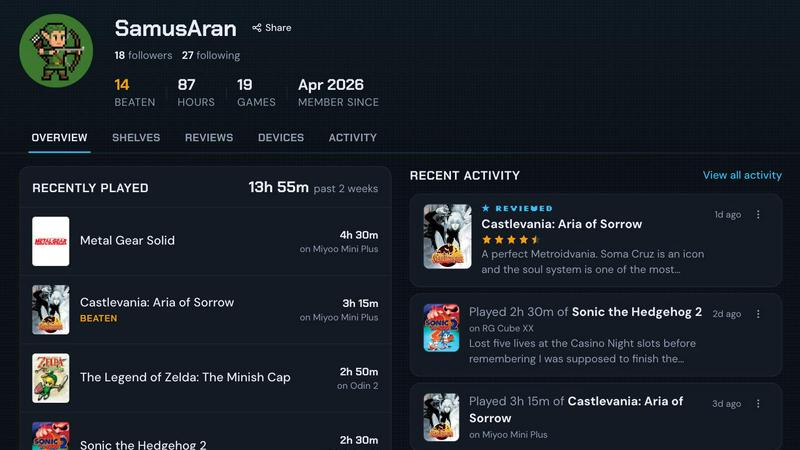
retroshelf is a groundbreaking play-tracking and discovery application tailored specifically for retro handheld gaming enthusiasts. In an era where gaming spans a multitude of devices and platforms, retroshelf provides a seamless solution for users to manage their gaming experiences. With its intuitive public shelf feature, gamers can effortlessly showcase the titles they are currently playing, those they have completed, as well as games they are reviewing or replaying. The app’s unique device context allows users to maintain a comprehensive log of their sessions without the hassle of juggling spreadsheets or notes. By employing a compact plugin that runs on handheld devices, retroshelf automatically captures crucial details such as game title, playtime, and the device used, ensuring that every gaming moment is remembered. This capability not only enhances personal reflection on gaming journeys but also fosters community connection as players can see what others are enjoying and discussing in real-time.
Features of retroshelf
Automatic Session Logging
retroshelf simplifies the tracking process with a lightweight plugin that runs on your handheld device. This plugin automatically logs every gaming session, capturing essential data such as the game title, playtime, and the specific device used. This means you can focus on enjoying your games without worrying about manual entries or lost notes.
Comprehensive Game Timeline
The app transforms scattered gaming sessions into an easily browsable timeline. Users can view their entire gaming history, including what they played, where they played it, and any notes they left. This feature allows for easy reflection on past experiences and helps players to appreciate their gaming journey more fully.
Community Discovery
retroshelf encourages community engagement by showcasing popular games among handheld players. Users can discover which titles are trending, who is playing them, and which devices are being used. This feature fosters a sense of connection within the retro gaming community and provides insights into emerging trends.
Device-Specific Reviews
The app enhances the review process by associating star ratings with the specific handheld used for gameplay. This means that when users read reviews, they gain valuable context regarding the experience on different devices, allowing for informed decisions about which games to try next.
Use Cases of retroshelf
Personal Gaming Journal
Players can use retroshelf as a comprehensive personal gaming journal to log their play sessions. By automatically capturing details for each game, users can keep a detailed record of their gaming experiences, making it easy to reflect on what they have played over time.
Community Engagement
retroshelf serves as a platform for community engagement, allowing gamers to connect with others who share similar interests. Users can browse public shelves to see what games are popular among peers, fostering discussions and recommendations within the retro gaming community.
Game Discovery and Exploration
For users looking to discover new titles, retroshelf provides insights into trending games. By exploring what others are picking up, finishing, and replaying, players can find hidden gems and expand their gaming library with confidence.
Device Management
With retroshelf, users can manage their gaming experiences across multiple handheld devices. The ability to filter games by device type enables players to keep track of their gaming sessions specific to each handheld, making it easier to transition between different devices while retaining their gaming history.
Frequently Asked Questions
How does retroshelf capture my gaming sessions?
retroshelf utilizes a small plugin that runs on your handheld device. This plugin automatically logs your gaming sessions, capturing the game title, playtime, and the device used without requiring manual input from the user.
Can I use retroshelf on any handheld device?
Currently, retroshelf supports specific operating systems including muOS and OnionOS. Make sure your handheld device is compatible with these systems to take full advantage of retroshelf's features.
Is retroshelf free to use?
As of now, retroshelf is in a closed beta phase, and specific pricing details have not been announced. Users interested in trying the app can join the beta program to help shape its development.
How can I connect with other users on retroshelf?
retroshelf enables community interaction by allowing users to browse public shelves and see what others are playing. You can engage with the community through shared gaming experiences, discussions, and recommendations based on popular titles among peers.
Explore more in this category:
Similar to retroshelf

Name Wheel Pro
Can't decide? NameWheelPro spins up random names, numbers, colors, or yes/no answers in seconds. Free, fast, and ad-free.

AIdorable
Adopt a virtual baby who grows, learns, and remembers you.

sorry text repeater
Say sorry 100, 1,000, or 10,000 times — free apology text generator with emojis and custom layouts.

Peekviewer
Anonymous Instagram viewer. Browse profiles, stories, and posts without an account or leaving a trace.

GeoRank
GeoRank turns relocation research into an interactive map where you compare places on sunshine, cost, tax, and visa, then ask AI about your shortlist.

PrettyScale
PrettyScale analyzes your face with 9 private AI tools for beauty scoring, look-alikes, and body shape, all instantly in-browser with no signup.

Sorry Hundred Times
Sorry Hundred Times instantly multiplies your personalized apology message into 100 to 10,000 copies for a dramatic, impactful text to paste anywhere.

Insta Repeater
Insta Repeater is a free text utility that instantly repeats any message up to 10,000 times with emojis and fancy fonts for easy sharing on social.