

Sorry Hundred Times
Sorry Hundred Times instantly multiplies your personalized apology message into 100 to 10,000 copies for a dramatic, impactful text to paste anywhere.
About Sorry Hundred Times
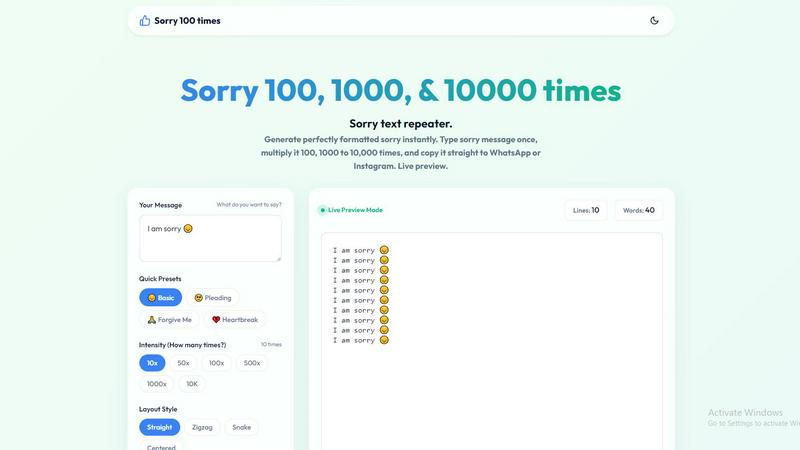
Sorry Hundred Times is a free, browser-based utility designed to generate repeated apology messages instantly, transforming a simple "sorry" into a powerful, visually impactful statement. The tool allows users to type any apology phrase once, then multiply it from 10 to 10,000 times with a single click. It is built for anyone who feels that a single apology is insufficient in a text message, particularly on platforms like WhatsApp, Instagram, and iMessage. The core value proposition is bridging the gap between genuine remorse and digital expression: when words feel too small, the sheer volume and formatting of a repeated apology demonstrates effort, sincerity, and dedication. The tool operates entirely in the user's browser, ensuring zero lag and instant generation even for 10,000 repetitions. It supports full personalization, allowing users to add names, emojis, and choose from multiple layout styles like straight, zigzag, centered, or snake. Quick presets for different emotional tones (Basic, Pleading, Forgive Me, Heartbreak) make it easy to start, while advanced formatting options like line numbers and separators add structure. The target audience includes individuals in personal relationships seeking to mend fences, friends apologizing for minor slip-ups, and anyone who wants to make their apology stand out in a crowded chat. By providing a free, instant, no-sign-up-required solution, Sorry Hundred Times empowers users to communicate remorse with impact, turning a simple text into a memorable gesture of contrition.
Features of Sorry Hundred Times
Instant Multiplier with Live Preview
This feature allows users to type any apology message once and instantly multiply it from 10 to 10,000 times. A live preview mode updates in real-time, showing the total number of lines and words. This eliminates guesswork and ensures the user sees exactly what the recipient will see before copying. The preview updates instantly without page reloads, and the tool runs locally in the browser, meaning there is zero lag even when generating massive blocks of text like 10,000 lines.
Customizable Layout Styles
Users can choose from four distinct layout styles to change the visual presentation of the repeated message: Straight, Zigzag, Snake, and Centered. Each layout alters how the text flows on the screen, adding a layer of personality and effort beyond simple repetition. This feature allows the user to match the visual tone of the apology to the situation, whether it is a playful zigzag for a minor slip-up or a serious centered format for a major apology.
Quick Presets and Emoji Integration
The tool provides ready-made apology phrases with integrated emojis, categorized by emotional intensity: Basic, Pleading, Forgive Me, and Heartbreak. Users can select a preset like "I am sorry 🙏" or "Sorry Jaan 😔" and edit it before generating. This feature saves time and helps users who are unsure of the right words. Full emoji support is built-in, allowing users to add any emoji directly into their custom message for a more personal touch.
Formatting Controls and One-Click Copy
Advanced formatting options give users control over the final output. They can choose to have a new line for each repetition, show line numbers to visually emphasize the count, or add a separator between each line. The tool features a dedicated "Copy Apology" button that copies the entire generated text to the clipboard with one click. A "Save .txt" option is also available for downloading the message as a text file, and a "Clear" button resets the form instantly.
Use Cases of Sorry Hundred Times
The Casual Slip-Up (10x to 50x)
This use case covers minor mistakes like forgetting to text back, eating the last slice of pizza, or showing up a few minutes late. The low repetition count keeps the apology light and playful, preventing overreaction. Users can select the "Basic" preset or a simple "sorry" with a zigzag layout to add a touch of humor. The goal is to acknowledge the mistake without making it a serious issue, using repetition to show you remembered without being overly dramatic.
The Sweet Spot Apology (100x)
The 100-time repetition is the most popular setting for sincere, impactful apologies that show genuine care without being overwhelming. This is ideal for arguments with a partner, misunderstandings with a close friend, or any situation where a standard apology feels insufficient. Users can personalize the message with the recipient's name and a pleading emoji, then choose a centered layout with line numbers to visually emphasize the count. This use case balances effort and sincerity effectively.
The Major Apology (1,000x to 10,000x)
For significant arguments, betrayals of trust, or major relationship mistakes, a thousand or ten thousand repetitions creates an undeniable statement of remorse. The sheer volume of text is impossible to ignore and demonstrates a profound level of dedication and effort. Users typically combine this with the "Forgive Me" or "Heartbreak" presets, a straight or snake layout, and line numbers to show the recipient exactly how many times they have written the apology. This is a last-resort gesture for serious situations.
Creative and Humorous Messaging
Beyond serious apologies, the tool can be used for creative or humorous purposes. Users can send a massive wall of "sorry" as a joke for an overly dramatic apology for something trivial, or combine it with the "I love you 100 times" feature for a romantic gesture. The ability to customize the message and layout makes it a versatile tool for any situation where repetition adds emotional weight or comedic effect, such as in group chats or social media posts.
Frequently Asked Questions
Is Sorry Hundred Times really free to use?
Yes, Sorry Hundred Times is completely free to use. There is no sign-up, no account creation, and no payment required. The tool runs entirely in your browser, meaning you can generate as many apology messages as you want, from 10 to 10,000 repetitions, without any cost or limitations. All features, including presets, layout styles, and formatting options, are available at no charge.
How do I copy and paste the generated message to WhatsApp or Instagram?
After generating your message, simply click the "Copy Apology" button. This copies the entire generated text to your clipboard. Then, open WhatsApp, Instagram, or any other messaging app, go to the chat or message field, long-press (on mobile) or right-click (on desktop), and select "Paste." You can also use the keyboard shortcut Ctrl+C (Windows) or Cmd+C (Mac) after clicking the preview area.
Can I use my own custom message with names and emojis?
Absolutely. The tool is fully customizable. You can type any message you want into the "Your Message" field, including names, emojis, and any other text. For example, you can type "I am so sorry, Sarah 😔🙏" and the tool will repeat that exact phrase the number of times you specify. The quick presets are just starting points; you can edit them before generating.
What happens if I generate 10,000 lines? Will my browser crash?
No, the tool is designed to run locally in your browser with zero lag. It is optimized to handle high repetition counts like 10,000 lines instantly without crashing or freezing. The live preview updates in real-time without performance issues. However, copying and pasting very large blocks of text into some chat apps may cause them to lag or truncate the message, so it is best to test with a smaller count first.
Explore more in this category:
Similar to Sorry Hundred Times

AI Rap
AI rap generator that turns two portraits, or one photo of two people, into a short English duet rap video with original lyrics, vocals, and music.

Two-Minute Drill
A free daily football strategy game: call the plays in real NFL late-game situations, manage the clock, and see how your decisions grade.

airapvideo
AI rap video generator that turns two portraits into a short, lip-synced vertical music video with movement, sound, and a shared stage.

LiveGameShow
A game show board for the TV, with real buzzers on every player's phone

LivePartyGames
Most likely to, would you rather and more: the TV shows it, every phone votes

Tip Toe AI
Upload a Dancer photo and a Partner photo and get your own AI Tip Toe barn-dance video. Free 5s preview, 12s HD from $4.90. No subscription.

Ozil Goal AI
Turn one photo into the viral Özil goal meme video: you, your dog, a toy or a drawing scores. Free 5s preview, 10s 720p from $4.90. No subscription.

Wheel of Names Picker AI
Wheel of Names Spin Wheel Picker tool for classrooms or events