
AI Formatter vs LuxSign
Side-by-side comparison to help you choose the right AI tool.
AI Formatter
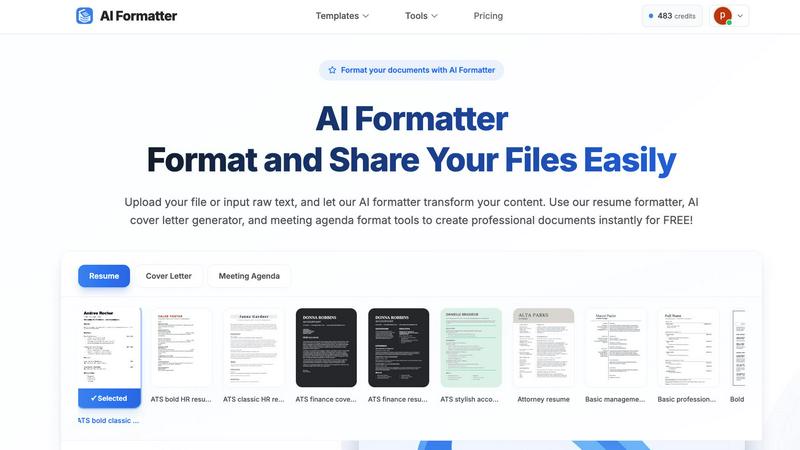
Effortlessly transform raw text into polished documents with AI Formatter's professional templates and intuitive tools.
Last updated: March 1, 2026

LuxSign offers secure, legally valid electronic signatures for documents, ensuring compliance and efficiency across.
Last updated: February 28, 2026
Visual Comparison
AI Formatter
LuxSign

Feature Comparison
AI Formatter
Extensive Template Library
AI Formatter boasts an impressive selection of over 162 professional templates, including ATS-optimized resumes and cover letters. This diverse array ensures that users can find the perfect format for their specific needs, enhancing their chances of making a strong impression on recruiters and colleagues alike.
Real-Time Document Editing
The platform features an intuitive real-time online editor that allows users to make adjustments to their documents after formatting. This feature enables users to customize their content easily, ensuring that the final product meets their expectations and maintains their unique voice.
Multi-Format Export Options
AI Formatter provides seamless multi-format export capabilities, allowing users to download their formatted documents in various formats, including PDF and Word. This flexibility ensures that users can share their documents in the most suitable format for their audience or application.
Secure Document Sharing
AI Formatter prioritizes user security by offering secure sharing options. Users can share their formatted documents directly through the platform, ensuring that their information is protected while still being accessible to potential employers or collaborators.
LuxSign
Multiple Signature Methods
LuxSign offers various signature methods to accommodate user preferences. Users can draw their signature using a mouse, type their name, or upload an image. The platform also supports custom initials, allowing for quick document signing without compromising authenticity.
Advanced Security
With industry-standard encryption protocols, LuxSign ensures that all documents are securely stored and transmitted. The platform's data centers are located in Luxembourg, complying with EU regulations to provide peace of mind regarding document safety and integrity.
Collaboration Workspaces
LuxSign facilitates teamwork through its collaboration workspaces. Users can create shared environments for their teams, organize documents by folders, manage access levels, and collaborate seamlessly on signing workflows, making it ideal for businesses that require multiple inputs on documents.
Complete Audit Trail
LuxSign maintains a detailed audit trail for every document signed through its platform. This includes timestamps, IP addresses, and signer information, providing comprehensive records for compliance and verification purposes while enhancing transparency in the signing process.
Use Cases
AI Formatter
Job Seekers
For job seekers, AI Formatter is an invaluable resource. By using the ATS-optimized resume and cover letter templates, candidates can enhance their chances of passing automated screening systems, making a significant difference in their job search journey.
Business Professionals
Business professionals can utilize AI Formatter to create polished meeting agendas, reports, and presentations. The platform's ability to standardize document formatting helps maintain a professional image and improves communication within teams.
Academics and Researchers
Academics can leverage AI Formatter to format research papers, theses, and presentations quickly and efficiently. The platform's templates ensure adherence to various academic standards, saving time and reducing formatting headaches.
Freelancers and Small Business Owners
Freelancers and small business owners can create professional invoices and receipts using AI Formatter's tools. This capability helps them maintain a professional appearance in their transactions while streamlining their administrative tasks.
LuxSign
Streamlining Contract Signing
Businesses can utilize LuxSign to expedite the contract signing process. By uploading contracts and inviting signers through email, teams can achieve quick turnaround times, ensuring that agreements are finalized without unnecessary delays.
Managing Employee Documents
HR departments can leverage LuxSign for managing employee-related documents, such as contracts, NDAs, and policy acknowledgments. The platform allows for multiple signers and workflow customization, ensuring efficient and compliant documentation.
Facilitating Client Approvals
Consultants and service providers can use LuxSign to obtain client approvals on proposals and agreements. The ability to send documents for signature and track their progress in real-time ensures that clients remain engaged and informed throughout the process.
Enhancing Legal Agreements
Law firms can integrate LuxSign into their operations to modernize how legal documents are signed. With robust security features and eIDAS compliance, the platform offers a reliable solution for handling sensitive legal agreements while ensuring compliance with regulatory standards.
Overview
About AI Formatter
AI Formatter, developed by Sun Sky LLC, is an advanced AI-driven document formatting platform that revolutionizes the way users create and present their documents. This cloud-based Software as a Service (SaaS) tool is designed for both individuals and businesses, enabling them to effortlessly convert raw text or uploaded files, including Word, PDF, and TXT formats, into professionally formatted documents in mere seconds. With its remarkable ATS pass rate exceeding 95%, AI Formatter is especially beneficial for job seekers aiming to enhance their resumes and cover letters. Users can choose from an extensive library of over 100 professional templates tailored to various industries, ensuring that they can craft visually appealing and customized documents. The platform's real-time online editor provides extensive customization options, allowing users to adjust fonts, colors, and layouts as needed. Additionally, its multi-format export capabilities and secure sharing options significantly enhance usability. Ideal for professionals, businesses, and academics, AI Formatter not only saves time but also boosts productivity by standardizing business documents and simplifying career transitions.
About LuxSign
LuxSign is a cutting-edge electronic signature platform designed for businesses that prioritize security and compliance. Built in Luxembourg, it offers a secure, cloud-based solution for signing and managing documents, ensuring that all data is encrypted end-to-end and stored within the country to maintain full GDPR compliance. The platform is specifically tailored for organizations that operate within the European Union, as it adheres to the eIDAS SES standards, providing legal validity for contracts across all member states. LuxSign's user-friendly interface makes it easy for any business to streamline its signing processes, from individual freelancers to large enterprises. Key features include customizable signing workflows, automated notifications, and advanced audit trails, each designed to enhance efficiency while ensuring document integrity. With LuxSign, businesses can confidently transition to a digital signing process that is both fast and secure.
Frequently Asked Questions
AI Formatter FAQ
How does AI Formatter work?
AI Formatter works by allowing users to upload their documents or input raw text, which the AI then formats according to the selected template. This process is quick, ensuring users receive a professionally formatted document in seconds.
What file formats does AI Formatter support?
AI Formatter supports various file formats, including PDF, DOC, DOCX, and TXT. This wide compatibility enables users to work with their existing documents seamlessly.
Can I customize my formatted document?
Yes, AI Formatter features a real-time online editor that allows users to customize their formatted documents. Users can adjust fonts, colors, layouts, and content to suit their preferences and branding.
Is AI Formatter suitable for team collaboration?
Absolutely. AI Formatter's secure sharing options make it easy for teams to collaborate on documents. Users can share their formatted documents directly with colleagues or clients, ensuring smooth communication and collaboration.
LuxSign FAQ
What types of documents can I sign with LuxSign?
LuxSign supports a variety of document formats, including PDF, DOC, and DOCX. Users can easily upload files up to 10MB, making it versatile for various business needs.
How does LuxSign ensure document security?
LuxSign employs industry-standard encryption for documents during upload, storage, and transmission. Additionally, all data is hosted in secure servers located in Luxembourg, ensuring compliance with EU data protection laws.
Is LuxSign compliant with GDPR?
Yes, LuxSign is fully compliant with GDPR and Luxembourg data protection regulations. This commitment to privacy ensures that all user data and signed documents are handled with the utmost care and security.
Can I integrate LuxSign with other applications?
Absolutely. LuxSign offers cloud integrations, allowing users to import documents directly from popular cloud storage services. The platform also provides a full REST API and an embeddable SDK for seamless system integrations.
Alternatives
AI Formatter Alternatives
AI Formatter is a cloud-based document formatting platform developed by Sun Sky LLC that leverages AI technology to transform raw text into professionally formatted documents. Designed for productivity and management, it serves individuals and businesses alike by streamlining the document creation process with its extensive library of templates and intuitive editing tools. Users often seek alternatives to AI Formatter due to factors such as pricing, specific feature requirements, or integration capabilities with other platforms or workflows that better suit their needs. When searching for an alternative, it's essential to consider several key factors. Evaluate the range of templates offered and their relevance to your industry. Assess the customization options available, as well as the ease of use of the platform. Additionally, check for export capabilities and any security features that protect your data. Understanding your specific needs will lead to a more effective choice that enhances your document creation experience.
LuxSign Alternatives
LuxSign is an electronic signature platform developed in Luxembourg, designed to provide secure and compliant signing solutions for businesses. As an eIDAS SES compliant service, it ensures that electronic signatures are legally valid across all EU member states, making it a reliable choice for organizations that prioritize legal compliance and data security. However, users often seek alternatives to LuxSign for various reasons, including pricing considerations, specific feature sets, or the need for integrations with other platforms to better suit their operational requirements. When searching for an alternative to LuxSign, it is crucial to evaluate several factors. Users should consider the level of compliance with regulations like GDPR, the robustness of security measures in place, and the flexibility of signing workflows. Additionally, understanding the pricing models, available features like templates and audit trails, as well as customer support options can help in making an informed decision that aligns with the unique needs of a business.