
AI Formatter
Effortlessly transform raw text into polished documents with AI Formatter's professional templates and intuitive tools.
About AI Formatter
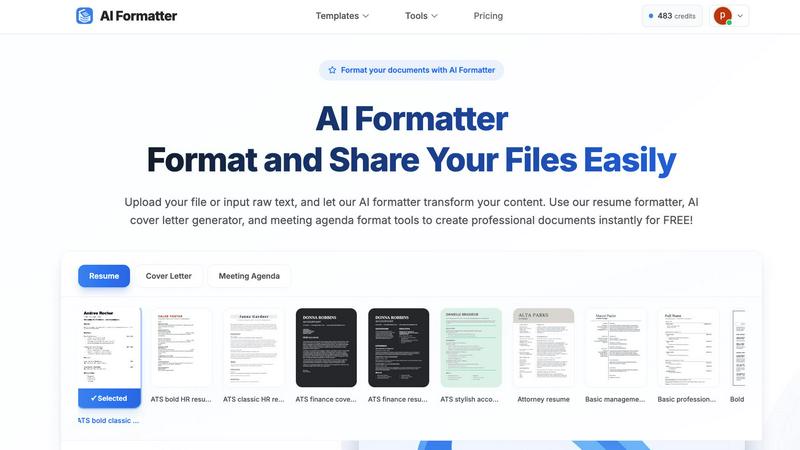
AI Formatter, developed by Sun Sky LLC, is an advanced AI-driven document formatting platform that revolutionizes the way users create and present their documents. This cloud-based Software as a Service (SaaS) tool is designed for both individuals and businesses, enabling them to effortlessly convert raw text or uploaded files, including Word, PDF, and TXT formats, into professionally formatted documents in mere seconds. With its remarkable ATS pass rate exceeding 95%, AI Formatter is especially beneficial for job seekers aiming to enhance their resumes and cover letters. Users can choose from an extensive library of over 100 professional templates tailored to various industries, ensuring that they can craft visually appealing and customized documents. The platform's real-time online editor provides extensive customization options, allowing users to adjust fonts, colors, and layouts as needed. Additionally, its multi-format export capabilities and secure sharing options significantly enhance usability. Ideal for professionals, businesses, and academics, AI Formatter not only saves time but also boosts productivity by standardizing business documents and simplifying career transitions.
Features of AI Formatter
Extensive Template Library
AI Formatter boasts an impressive selection of over 162 professional templates, including ATS-optimized resumes and cover letters. This diverse array ensures that users can find the perfect format for their specific needs, enhancing their chances of making a strong impression on recruiters and colleagues alike.
Real-Time Document Editing
The platform features an intuitive real-time online editor that allows users to make adjustments to their documents after formatting. This feature enables users to customize their content easily, ensuring that the final product meets their expectations and maintains their unique voice.
Multi-Format Export Options
AI Formatter provides seamless multi-format export capabilities, allowing users to download their formatted documents in various formats, including PDF and Word. This flexibility ensures that users can share their documents in the most suitable format for their audience or application.
Secure Document Sharing
AI Formatter prioritizes user security by offering secure sharing options. Users can share their formatted documents directly through the platform, ensuring that their information is protected while still being accessible to potential employers or collaborators.
Use Cases of AI Formatter
Job Seekers
For job seekers, AI Formatter is an invaluable resource. By using the ATS-optimized resume and cover letter templates, candidates can enhance their chances of passing automated screening systems, making a significant difference in their job search journey.
Business Professionals
Business professionals can utilize AI Formatter to create polished meeting agendas, reports, and presentations. The platform's ability to standardize document formatting helps maintain a professional image and improves communication within teams.
Academics and Researchers
Academics can leverage AI Formatter to format research papers, theses, and presentations quickly and efficiently. The platform's templates ensure adherence to various academic standards, saving time and reducing formatting headaches.
Freelancers and Small Business Owners
Freelancers and small business owners can create professional invoices and receipts using AI Formatter's tools. This capability helps them maintain a professional appearance in their transactions while streamlining their administrative tasks.
Frequently Asked Questions
How does AI Formatter work?
AI Formatter works by allowing users to upload their documents or input raw text, which the AI then formats according to the selected template. This process is quick, ensuring users receive a professionally formatted document in seconds.
What file formats does AI Formatter support?
AI Formatter supports various file formats, including PDF, DOC, DOCX, and TXT. This wide compatibility enables users to work with their existing documents seamlessly.
Can I customize my formatted document?
Yes, AI Formatter features a real-time online editor that allows users to customize their formatted documents. Users can adjust fonts, colors, layouts, and content to suit their preferences and branding.
Is AI Formatter suitable for team collaboration?
Absolutely. AI Formatter's secure sharing options make it easy for teams to collaborate on documents. Users can share their formatted documents directly with colleagues or clients, ensuring smooth communication and collaboration.
Explore more in this category:
Best Productivity & Management AI tools
Similar to AI Formatter

JevModel
Bilingual Jev decision workbench with original guides for structured, AI-assisted decisions.

Novastart
Apps and files on an infinite canvas where people and AI agents work together.

Memorable Contact
Memorable Contact helps you remember people, save conversation details, find contacts using AI-powered search, and share digital business cards easily

Clever AI Humanizer
Clever AI Humanizer is a free tool that makes AI-generated text sound more human.

Sayble
AI copilot that tells you what to say next on live sales calls, then writes the recap and follow-up.

Product Launch Checklist
A free launch checklist for SaaS, apps, AI tools and more. Every step says why it matters and when you can skip it.

Kody Tools
Free collection of online developer utilities, code formatters, and digital converters designed to streamline your daily workflow.

tally counter
Browser-based gamepad diagnostic tool for testing controller buttons, analog sticks, triggers, D-pad controls, and input detection.