

HypeShare
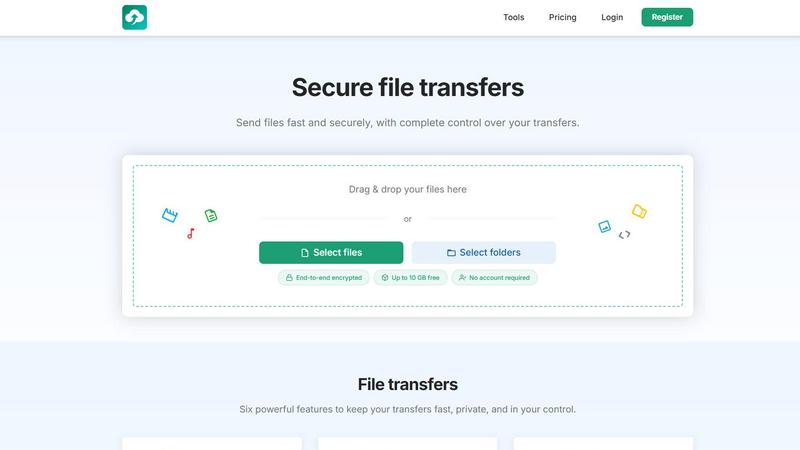
HypeShare is a secure file transfer platform that lets you send large files up to 10GB instantly without an account using end-to-end encryption and.
About HypeShare
HypeShare is a secure file transfer platform engineered for speed, privacy, and user autonomy, serving as a direct response to the bloat and friction found in traditional file-sharing tools. At its core, HypeShare allows anyone to send large files up to 10GB without the need to create an account, prioritizing immediate action over administrative hurdles. For users who require more robust capabilities, a free registration unlocks 20GB of persistent storage, encrypted transfers, custom expiry links, and the ability to create file request pages. This feature set is particularly powerful for freelancers, agencies, and teams who need a no-friction alternative to bloated solutions like WeTransfer or Google Drive. HypeShare differentiates itself through a layered approach to security, offering end-to-end encryption, password protection, and automatic expiration dates on all transfers. The platform also introduces a sophisticated file request system, which allows users to receive files from anyone without requiring the sender to log in. From a strategic perspective, HypeShare occupies a unique market position by combining the simplicity of guest transfers with the control and analytics of a professional-grade service. Whether you are a creative professional sending large video projects, a business collecting client documents, or a developer looking for an API-driven solution, HypeShare provides a streamlined, secure, and scalable environment for all your file transfer needs.
Features of HypeShare
End-to-End Encryption and Password Protection
HypeShare ensures that every file transfer is protected by end-to-end encryption, meaning your data is scrambled from the moment it leaves your device until it reaches the intended recipient. This security layer prevents unauthorized access during transit, a critical requirement for businesses handling sensitive legal, financial, or medical documents. Additionally, users can set a custom password on any transfer, adding an extra authentication barrier. This dual-layered security approach gives senders complete confidence that only the person with the correct password and the unique transfer link can access the files, making HypeShare a viable alternative to enterprise-grade solutions for small and medium-sized teams.
Custom Expiry and Download Limits
Control over the lifecycle of your transfers is a cornerstone of HypeShare's functionality. Users can set automatic expiration dates for their links, ensuring that files are no longer accessible after a specified time period, which is ideal for time-sensitive projects or compliance with data retention policies. Complementing this, HypeShare allows you to define exactly how many times a transfer can be downloaded. Once the download limit is reached, the link becomes inactive. This feature is invaluable for distributing exclusive content, software releases, or confidential briefings where you need to track and limit distribution, preventing unauthorized sharing and ensuring your data remains under your control.
File Request Pages for Seamless Inbound Transfers
One of the most innovative features of HypeShare is the File Request system, which effectively turns the platform into a personal inbound mailbox for large files. Users can create a custom request page with a unique link (e.g., hypeshare.io/request/yourname) and share it with clients, collaborators, or anyone else. The sender does not need an account, they simply click the link, select their files, and upload them directly to your HypeShare dashboard. This eliminates the back-and-forth of finding compatible sharing methods and removes the friction of requiring recipients to sign up. Combined with email notifications for each new upload, this feature streamlines workflows for photographers collecting proofs, agencies gathering assets from clients, or HR departments receiving applicant portfolios.
Transfer Analytics and Download Notifications
For professionals who need to track the success and engagement of their file deliveries, HypeShare provides built-in transfer analytics. This feature gives you visibility into when a file was downloaded, how many times it was accessed, and from which general location. This data is crucial for freelancers and agencies who send invoices, proposals, or final deliverables and need confirmation of receipt. Furthermore, the Pro plan includes download notifications, which send you an instant alert the moment a recipient accesses your file. This real-time feedback loop enables faster follow-ups, ensures project timelines are met, and provides a layer of accountability that is often missing in standard file transfer services.
Use Cases of HypeShare
Freelancers Sending Large Creative Assets
A freelance videographer or graphic designer often needs to send large project files, such as raw footage, high-resolution PSDs, or final exports, to clients who may not have technical expertise. With HypeShare, the freelancer can upload a 10GB video file without an account, set a password for security, and configure an expiration date that matches the project deadline. The client receives a simple link and can download the file without signing up for anything. This workflow eliminates the need for costly cloud storage subscriptions and provides the freelancer with peace of mind that their work is protected and will not remain accessible indefinitely.
Agencies Collecting Client Assets via File Requests
Marketing agencies and design firms frequently need to receive large volumes of assets from clients, such as brand logos, product photos, or copy documents. Using HypeShare's File Request feature, the agency creates a dedicated upload page with a custom link. They share this link with the client, who can then drag and drop their files directly into the agency's dashboard. The agency receives automatic email notifications for each upload, and the files are organized and ready for the creative team. This eliminates the chaos of email attachments and the need for clients to navigate complex file-sharing interfaces, creating a professional and efficient intake process.
Businesses Sharing Confidential Documents with Expiry
Corporate teams, legal departments, and financial advisors often need to share confidential documents like contracts, NDAs, or quarterly reports with external partners. HypeShare's combination of end-to-end encryption, password protection, and automatic expiry dates is perfectly suited for this use case. A business can send a sensitive document, set it to expire after 7 days, and limit downloads to just one. This ensures that even if the link is intercepted, the document cannot be accessed without the password, and it will self-destruct after the intended use, meeting strict compliance and data governance requirements.
Teams Collaborating on Large Project Files
Remote teams working on software development, video production, or architectural design often need to share large files that exceed email attachment limits. HypeShare allows team members to quickly share builds, renders, or CAD files up to 200GB per transfer on the Pro plan. The ability to set download limits and track analytics helps project managers understand who has accessed the latest version of a file. Combined with unlimited transfers and storage, HypeShare becomes a lightweight, fast, and cost-effective alternative to complex cloud storage ecosystems, enabling teams to maintain velocity without sacrificing security.
Frequently Asked Questions
Do I need to create an account to send files with HypeShare?
No, you do not need an account to send files. HypeShare allows guest users to send up to 5 transfers per month, with each transfer supporting up to 10 files and a maximum size of 10GB. This is perfect for one-off or infrequent file sharing. If you need more transfers, storage, or advanced features like file requests and analytics, you can register for a free account which offers 10 transfers per month and 20GB of persistent storage.
How is my data protected during and after a transfer?
All transfers on HypeShare are protected with end-to-end encryption, meaning your files are encrypted on your device before being uploaded and can only be decrypted by the recipient. You can also add an extra layer of security by setting a password that the recipient must enter to access the download. Additionally, you have full control over the file lifecycle with custom expiry dates and download limits. Files are automatically deleted from HypeShare's servers based on your data retention settings, which range from 7 days for guest users to unlimited retention for Pro subscribers.
What is a File Request and how does it work?
A File Request is a feature that allows you to receive files from other people without them needing to have a HypeShare account. You create a custom request link (e.g., hypeshare.io/request/yourname) and share it via email, text, or any other channel. When someone clicks the link, they are taken to a simple upload page where they can select files from their device and send them directly to your HypeShare dashboard. You will receive an email notification each time a new file is uploaded, making it an ideal tool for collecting client assets, job applications, or project submissions.
What is the difference between the Free and Pro plans?
The Free plan offers 10 transfers per month, 20GB of storage, and a maximum transfer size of 10GB per file. It includes all core features like encryption, passwords, expiry dates, and file requests. The Pro plan, priced at 8.99 USD per month, unlocks unlimited transfers and files, 1000GB of storage, a 200GB per-transfer limit, unlimited download counts, and 50 emails per transfer. Pro users also get priority support, branded downloads, and detailed transfer analytics with download notifications. The Pro plan is designed for professionals and teams who need higher volume, larger files, and more granular control over their transfers.
Similar to HypeShare

JavaScript Tools
JavaScript Tools provides over 40 client-side formatters and utilities for JSON, HTML, CSS, XML, Markdown, and more, all running instantly in your.

Whop Trends
Whop Trends empowers you to discover and capitalize on emerging products with real-time market insights and data.

Blueberry
Blueberry unifies your editor, terminal, and browser into a single AI-powered workspace for seamless web app.

Shrinkpad
Shrinkpad compresses images and videos on your Mac in seconds, saving space and streamlining your creative workflow.

Skene
Skene turns your own codebase into a prompt-driven growth engine you fully control.

Yellow Systems
Yellow Systems builds custom AI and software to fuel growth for startups and enterprises.

Rocknroll.build
Rocknroll.build is your AI product team that turns ideas into validated solutions for just $10 a month.

MVPable
MVPable delivers instant, tailored plans to build your MVP efficiently with the right tools and expert connections.