

JavaScript Tools
JavaScript Tools provides over 40 client-side formatters and utilities for JSON, HTML, CSS, XML, Markdown, and more, all running instantly in your.
About JavaScript Tools
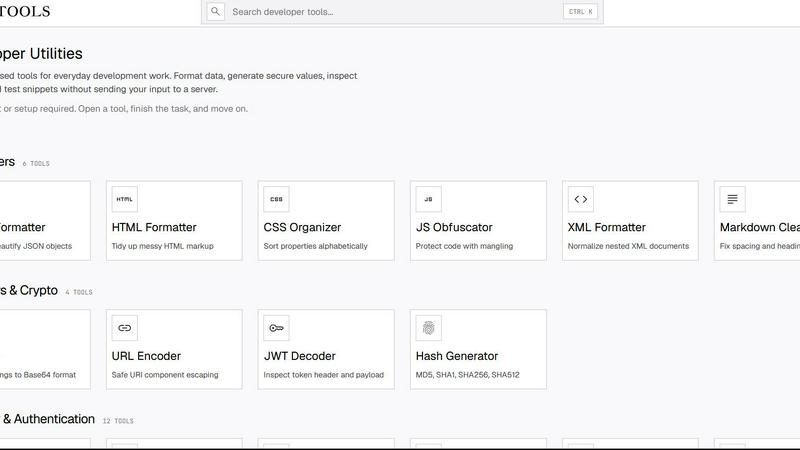
JavaScript Tools, accessible at JSTools.Space, is a comprehensive, free, and privacy-first platform that delivers a vast suite of focused utilities for common development tasks. It is designed for developers, security engineers, data analysts, and technical writers who need to quickly format, validate, encode, or generate data without the overhead of setting up a project or creating an account. The platform’s core value proposition lies in its privacy-centric architecture: most processing occurs directly within the user’s browser, meaning sensitive data such as code, credentials, tokens, or test data never leave the local machine. This eliminates the need to upload information to an application server, significantly reducing security risks. From formatting JSON, HTML, CSS, XML, and Markdown to encoding Base64 and URLs, inspecting JWTs, and generating passwords, API keys, UUIDs, hashes, salts, nonces, and TOTP secrets, the toolset covers a wide spectrum of needs. It also includes a configurable Dummy Data Library, practical documentation, a developer security blog, and companion tools like the JSTools JSON Inspector Chrome extension and the cross-platform JSON Studio desktop application. The platform’s multi-faceted approach—offering everything from simple formatters to advanced cryptographic generators—makes it an indispensable, all-in-one utility belt for modern development workflows, all while maintaining a strict no-account, no-setup policy that allows users to open a tool, finish the task, and move on.
Features of JavaScript Tools
Formatters and Validators
This feature provides a comprehensive set of tools for beautifying, minifying, and validating structured data formats. It includes dedicated formatters for JSON, HTML, CSS, XML, and SQL, each designed to normalize messy markup into readable, well-indented structures. For example, the JSON Formatter can beautify or minify objects, while the CSS Checker validates syntax and identifies issues. The XML Formatter normalizes nested documents, and the SQL Formatter creates readable queries. This feature is essential for code review, debugging, and ensuring consistency across projects, all without sending any data to external servers.
Security and Authentication Generators
This feature offers an extensive library of 19 tools focused on generating secure values for authentication and cryptographic purposes. Users can create strong random passwords, memorable passphrases, prefix-safe API keys, HMAC-ready JWT secrets, custom alphabet strings, hex salts, Base32 TOTP secrets, opaque session IDs, CSRF tokens, OAuth state parameters, nonces, and UUID v4 identifiers. Additionally, it includes hash generators for Argon2, Bcrypt, SHA-1 through SHA-512, and MurmurHash, as well as AES-256-GCM encryption and decryption. This feature is critical for developers building secure authentication systems, managing secrets, and implementing zero-trust architectures.
Encoders and Crypto Utilities
This feature provides a robust set of tools for encoding, decoding, and transforming data across multiple formats. It includes a URL Encoder for safe URI component escaping, a JWT Decoder for inspecting token headers and payloads, and a Hash Generator supporting MD5, SHA1, SHA256, and SHA512. The Base64 section alone offers 19 tools, enabling conversion between Base64 and ASCII, audio, files, hex, images, PDFs, text, and video, as well as encoding from audio, CSS, files, hex, HTML, images, PDFs, text, URLs, and video. This feature is indispensable for data transmission, storage optimization, and security analysis, allowing users to handle complex encoding tasks locally and privately.
Text and Markdown Processing
This feature delivers a diverse set of tools for manipulating text and Markdown content. The Text Tools include a word and character counter, a text diff checker for comparing added and removed lines, a case converter for naming conventions, a duplicate line remover, a whitespace cleaner, a slug generator, and a Unicode text converter. The Markdown section offers 15 tools, including a live preview editor, a table generator, a cleaner, converters to ASCII, Word, PDF, Google Docs, HTML, Slack, Notion, Jira, and Confluence, a TOC generator, a linter, and a Google Docs to Markdown converter. This feature is essential for content creators, documentation writers, and developers needing to manage, transform, and export text and Markdown efficiently.
Use Cases of JavaScript Tools
Rapid API Development and Testing
A backend developer building a RESTful API can use the JSON Formatter to beautify raw API responses for debugging, the JWT Decoder to inspect authentication tokens, and the API Key Generator to create secure credentials for service-to-service communication. The Base64 tools enable quick encoding of payloads for transmission, while the URL Encoder ensures query parameters are properly escaped. This use case highlights how the platform streamlines the entire API development lifecycle, from prototyping to testing, without exposing sensitive data to external servers.
Secure Credential and Secret Management
A security engineer responsible for implementing authentication flows can leverage the Password Generator, Passphrase Generator, and TOTP Secret tools to create strong, multi-factor authentication secrets. The Salt Generator and Argon2 Hash Generator provide the necessary components for secure password hashing, while the Session ID and CSRF Token tools protect against session hijacking and cross-site request forgery. This use case demonstrates the platform’s value in building zero-trust security postures, where all sensitive generation and validation happens locally, minimizing attack surfaces.
Content Formatting and Documentation
A technical writer or documentation specialist can use the Markdown Editor with live preview to draft articles, the Markdown Table Generator to create structured data tables, and the Markdown to HTML converter to publish content on static sites. The Text Diff Checker helps track changes between document versions, while the Case Converter ensures consistent naming conventions across API documentation. This use case shows how the platform empowers content creators to produce high-quality, well-formatted documentation without needing specialized software or cloud-based services.
Data Encoding and Transformation for Integration
A data analyst integrating systems with different data formats can use the Base64 to ASCII tool to decode encoded logs, the Hex to Base64 converter to transform cryptographic output, and the File to Base64 tool to embed images or PDFs in JSON payloads. The URL Encoder ensures safe transmission of data in web requests, while the Hash Generator creates checksums for data integrity verification. This use case illustrates the platform’s role in bridging disparate systems, enabling seamless data transformation and integration without compromising privacy or requiring server-side infrastructure.
Frequently Asked Questions
Do I need to create an account or set up a project to use JavaScript Tools?
No, absolutely not. JavaScript Tools is designed with a strict no-account, no-setup policy. You can open any tool directly from the website, complete your task, and move on without any registration, login, or project configuration. This approach prioritizes your privacy and efficiency, allowing you to focus solely on the task at hand.
Is my data safe when using JavaScript Tools?
Yes, your data is extremely safe. The vast majority of processing happens directly inside your browser, meaning your code, credentials, tokens, or test data never leave your local machine. There is no need to upload any information to an application server, which significantly reduces the risk of data breaches or unauthorized access. The platform’s privacy-first architecture ensures that sensitive operations like password generation, JWT inspection, and encryption are performed locally.
What types of tools are available on the platform?
The platform offers a comprehensive suite of tools organized into several categories. These include Formatters (JSON, HTML, XML, SQL), CSS Tools (checker, formatter, minifier, organizer), Text Tools (counter, diff checker, case converter, slug generator), Markdown Tools (editor, table generator, linter, converters), Encoders and Crypto (URL encoder, JWT decoder, hash generator), Base64 Tools (19 conversion tools), and Security and Authentication Tools (19 generators for passwords, API keys, hashes, TOTP secrets, and more). This wide range ensures you can handle almost any development utility task.
Can I use JavaScript Tools on different operating systems and browsers?
Yes, JavaScript Tools is a web-based platform that works on any modern browser, including Chrome, Firefox, Safari, and Edge, across Windows, macOS, and Linux operating systems. Additionally, the platform offers companion tools like the JSTools JSON Inspector Chrome extension and the cross-platform JSON Studio desktop application, which extend functionality for specific use cases like inspecting JSON structures or working offline.
Explore more in this category:
Similar to JavaScript Tools

Kody Tools
Free collection of online developer utilities, code formatters, and digital converters designed to streamline your daily workflow.


laya.tools
A free directory of 950+ projects built on Laya, the open-source decision model. Updated daily.

tally counter
Browser-based gamepad diagnostic tool for testing controller buttons, analog sticks, triggers, D-pad controls, and input detection.

Forms Plugin
The #1 Native Form Builder Plugin for Framer - No Code, No Embeds, No External Platforms.


