
TrafficClaw vs URL to Any
Side-by-side comparison to help you choose the right AI tool.

TrafficClaw
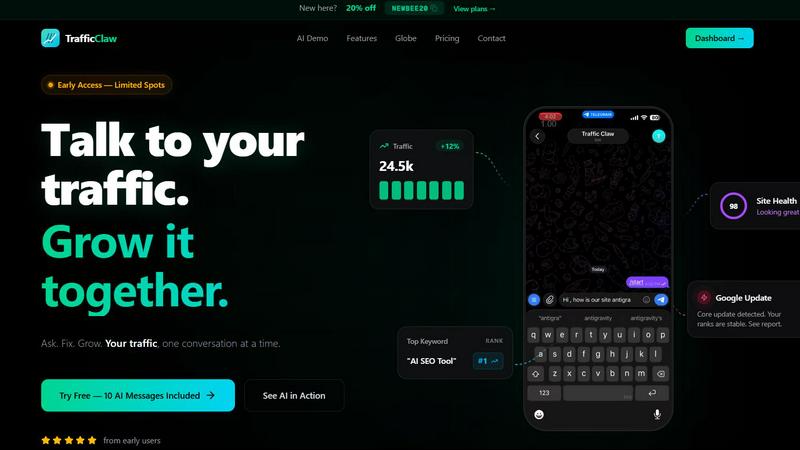
TrafficClaw transforms your SEO and analytics data into actionable insights, empowering you to grow your website traffic through intelligent.
Last updated: April 13, 2026

URL to Any
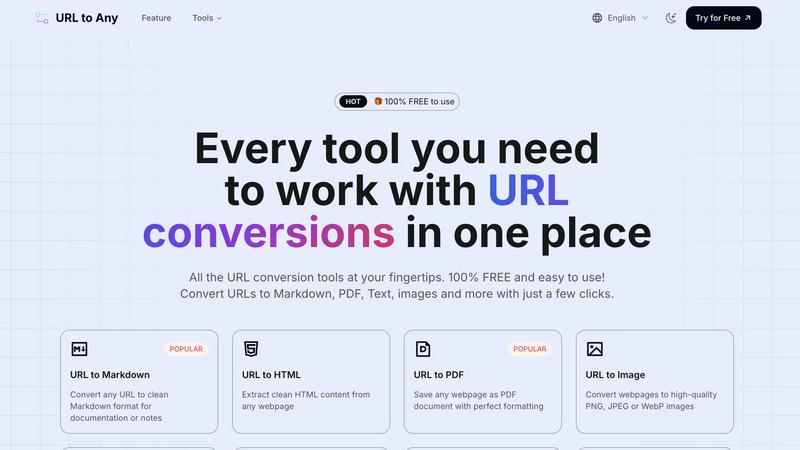
Effortlessly convert any URL into multiple formats like PDF, Markdown, and images with URL to Any’s all-in-one toolset.
Last updated: February 28, 2026
Visual Comparison
TrafficClaw
URL to Any
Feature Comparison
TrafficClaw
AI Chat
TrafficClaw features an AI-powered chat interface that enables users to ask questions about their analytics in natural language. This allows for instant responses, complete with visual charts and actionable insights, making data interpretation easier and more efficient.
SEO Intelligence
The platform provides advanced SEO intelligence capabilities, including keyword gap analysis, content decay alerts, and cannibalization detection. This ensures users can optimize their content strategies and improve search engine visibility effectively.
Analytics Dashboard
TrafficClaw offers a real-time analytics dashboard that consolidates visitors, traffic trends, bounce rates, and conversion funnels into one comprehensive overview. This holistic view of data helps users make informed decisions quickly.
Site Audit
The site audit feature delivers deep page-level assessments, providing performance scores and Core Web Vitals data. Additionally, it offers auto-fix suggestions to enhance site performance, ensuring users maintain optimal website health effortlessly.
URL to Any
URL to Markdown
The URL to Markdown feature allows users to convert any webpage into clean Markdown format. This is particularly useful for documentation and note-taking, as Markdown is widely used in various content management systems and platforms, enabling seamless integration and formatting.
URL to PDF
With the URL to PDF feature, users can save any webpage as a PDF document while maintaining perfect formatting. This is ideal for preserving the layout and structure of web content for offline access or sharing, ensuring that important information is always at hand.
URL to Image
The URL to Image feature enables users to convert webpages into high-quality images, available in formats such as PNG, JPEG, or WebP. This is especially beneficial for creating visual references or sharing content on social media and other platforms in a more engaging format.
URL to QR Code
The URL to QR Code feature allows users to generate QR codes from any URL quickly and easily. This is perfect for marketing campaigns, presentations, or any situation where sharing a link in a scannable format is required, making it easier for others to access content.
Use Cases
TrafficClaw
Diagnosing Traffic Drops
Website owners can utilize TrafficClaw to quickly diagnose unexpected traffic drops. By asking the AI analyst about specific issues, users can identify problems like SEO cannibalization or content decay, which can be addressed promptly.
Content Optimization
Content creators can leverage the SEO intelligence feature to discover keyword gaps and optimize their existing content. This ensures that their articles and pages are aligned with current search trends, enhancing visibility and engagement.
Real-Time Performance Monitoring
Digital marketers can use the analytics dashboard for ongoing performance monitoring. By keeping track of real-time visitor data and conversion rates, they can swiftly make adjustments to campaigns for better results.
Comprehensive Site Audits
Webmasters can perform thorough site audits using TrafficClaw to identify technical issues affecting site performance. With detailed insights and recommendations, they can implement fixes that improve both user experience and search engine ranking.
URL to Any
Saving Research Material
Researchers and students can utilize URL to Any to save important web content in their preferred format, whether it's as a PDF for printing or Markdown for note-taking. This simplifies the process of gathering and organizing information for projects.
Content Creation
Content creators can leverage the tool to convert articles and web pages into Markdown or HTML for their blogs and websites. This enables them to streamline their workflow and focus on crafting engaging narratives without getting bogged down by formatting issues.
Visual Presentations
Professionals preparing presentations can convert relevant web pages into images or PDFs to include in their slides. This ensures that information is visually appealing and accessible, enhancing the overall quality of the presentation.
Quick Sharing
Marketers and social media managers can use the URL to QR Code feature to generate QR codes for campaigns or events. This allows for quick distribution and easy access to digital content, driving engagement and interaction with their audience.
Overview
About TrafficClaw
TrafficClaw is an innovative AI-driven analytics tool designed to help website owners and digital marketers understand their traffic dynamics in-depth. When traffic drops, traditional tools like Google Analytics and Search Console can often provide confusing data without clear insights. TrafficClaw changes that by allowing users to simply ask questions like "Why did my traffic drop?" and receive precise, actionable answers based on real-time data. By seamlessly integrating with Google Analytics 4 and Search Console, TrafficClaw provides a comprehensive view of traffic trends, keyword performance, and SEO health. This tool is especially valuable for website owners, marketers, and SEO specialists looking to optimize their online presence, recover lost traffic, and enhance their digital strategies. With its user-friendly interface, TrafficClaw empowers users to engage in meaningful conversations about their data, making growth a collaborative and informed process.
About URL to Any
URL to Any is a versatile and user-friendly web content conversion tool designed to simplify the way users interact with online content. This powerful tool allows users to effortlessly transform any webpage into a wide array of formats including Markdown, PDF, images, HTML, and even QR codes. It caters to a diverse audience ranging from content creators and document managers to developers and educators who frequently need to repurpose web content for various projects. The primary value proposition of URL to Any lies in its ability to eliminate the complexities often associated with content conversion, enabling users to focus on what matters most: their work. With no registration requirements, users can paste a URL and receive their desired format in seconds, making it an ideal choice for those who prioritize efficiency. Additionally, as a completely free service, URL to Any stands out in the crowded market of content conversion tools, streamlining workflows and enhancing productivity across multiple domains.
Frequently Asked Questions
TrafficClaw FAQ
How does TrafficClaw analyze my data?
TrafficClaw connects to your Google Analytics 4 and Search Console accounts to pull real-time data. It uses AI algorithms to analyze this data, providing actionable insights and answers to your queries without generic advice.
Is my data secure with TrafficClaw?
Yes, TrafficClaw prioritizes your data security. It uses Google OAuth for authentication, ensuring that your data remains yours and is not shared with unauthorized parties.
Can I cancel my TrafficClaw subscription anytime?
Absolutely. TrafficClaw offers a flexible subscription model that allows you to cancel your plan at any time without facing any penalties, making it easy to manage your account.
What kind of support does TrafficClaw provide?
TrafficClaw offers comprehensive support through various channels, including a knowledge base, email support, and community forums. Users can find answers to common questions or reach out for personalized assistance.
URL to Any FAQ
Is URL to Any free to use?
Yes, URL to Any is completely free to use. Users can access all conversion features without any registration or subscription fees, making it highly accessible.
What formats can I convert URLs into?
URL to Any supports multiple output formats, including Markdown, PDF, HTML, images (PNG, JPEG, WebP), text, JSON, XML, and even QR codes, providing users with a comprehensive toolkit for their conversion needs.
Do I need to install software to use URL to Any?
No, URL to Any operates entirely in the cloud, meaning that users do not need to install any software on their devices. This allows for easy access from any device with internet connectivity.
How quickly can I get my converted content?
The processing speed of URL to Any is optimized for efficiency, allowing users to receive their converted content in just seconds. This quick turnaround is perfect for those who need to work swiftly without compromising on quality.
Alternatives
TrafficClaw Alternatives
TrafficClaw is an innovative tool designed to enhance your SEO and analytics experience by providing straightforward answers to your data-related questions. As part of the AI Assistants, Analytics & Data, and SEO categories, it empowers users to engage with their Google Analytics and Search Console data in a conversational manner. Instead of sifting through endless reports and metrics, users can simply ask questions and receive tailored insights directly related to their traffic performance. Many users seek alternatives to TrafficClaw due to various reasons, including pricing constraints, specific feature requirements, or compatibility with their existing platforms. When searching for an alternative, it's crucial to consider factors such as user-friendliness, the depth of data analysis offered, integration capabilities, and overall support. Finding a product that meets your unique needs can significantly enhance your SEO strategies and analytics understanding.
URL to Any Alternatives
URL to Any is an innovative web content conversion tool designed to effortlessly transform any URL into a variety of formats. Positioned within the AI Assistants category, it caters to content creators, document managers, and developers who require a seamless solution for their web content needs. Users often seek alternatives to such tools due to concerns about pricing, feature sets, or compatibility with specific workflows and platforms. Factors to consider when choosing an alternative include ease of use, the range of supported formats, and the overall cost of the service, ensuring that users find the best fit for their unique requirements. --- [{"question": "What is URL to Any?", "answer": "URL to Any is a web content conversion tool that allows users to transform any webpage into multiple formats, such as Markdown, PDF, and images."},{"question": "Who is URL to Any for?", "answer": "URL to Any is designed for content creators, document managers, developers, and anyone who frequently interacts with web content."},{"question": "Is URL to Any free?", "answer": "Yes, URL to Any offers its conversion services completely free of charge, with no hidden fees or premium tiers."},{"question": "What are the main features of URL to Any?", "answer": "Main features of URL to Any include an easy-to-use interface, the ability to convert URLs into various formats, and a commitment to providing a completely free service."}]