

URL to Any
Effortlessly convert any URL into multiple formats like PDF, Markdown, and images with URL to Any’s all-in-one toolset.
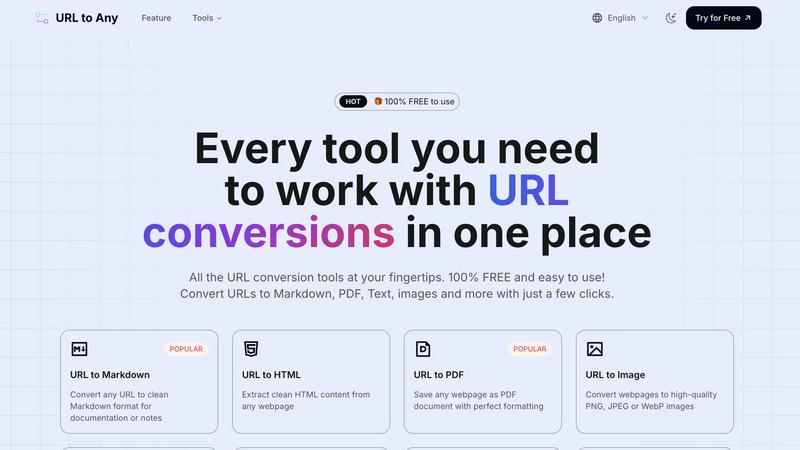
About URL to Any
URL to Any is a versatile and user-friendly web content conversion tool designed to simplify the way users interact with online content. This powerful tool allows users to effortlessly transform any webpage into a wide array of formats including Markdown, PDF, images, HTML, and even QR codes. It caters to a diverse audience ranging from content creators and document managers to developers and educators who frequently need to repurpose web content for various projects. The primary value proposition of URL to Any lies in its ability to eliminate the complexities often associated with content conversion, enabling users to focus on what matters most: their work. With no registration requirements, users can paste a URL and receive their desired format in seconds, making it an ideal choice for those who prioritize efficiency. Additionally, as a completely free service, URL to Any stands out in the crowded market of content conversion tools, streamlining workflows and enhancing productivity across multiple domains.
Features of URL to Any
URL to Markdown
The URL to Markdown feature allows users to convert any webpage into clean Markdown format. This is particularly useful for documentation and note-taking, as Markdown is widely used in various content management systems and platforms, enabling seamless integration and formatting.
URL to PDF
With the URL to PDF feature, users can save any webpage as a PDF document while maintaining perfect formatting. This is ideal for preserving the layout and structure of web content for offline access or sharing, ensuring that important information is always at hand.
URL to Image
The URL to Image feature enables users to convert webpages into high-quality images, available in formats such as PNG, JPEG, or WebP. This is especially beneficial for creating visual references or sharing content on social media and other platforms in a more engaging format.
URL to QR Code
The URL to QR Code feature allows users to generate QR codes from any URL quickly and easily. This is perfect for marketing campaigns, presentations, or any situation where sharing a link in a scannable format is required, making it easier for others to access content.
Use Cases of URL to Any
Saving Research Material
Researchers and students can utilize URL to Any to save important web content in their preferred format, whether it's as a PDF for printing or Markdown for note-taking. This simplifies the process of gathering and organizing information for projects.
Content Creation
Content creators can leverage the tool to convert articles and web pages into Markdown or HTML for their blogs and websites. This enables them to streamline their workflow and focus on crafting engaging narratives without getting bogged down by formatting issues.
Visual Presentations
Professionals preparing presentations can convert relevant web pages into images or PDFs to include in their slides. This ensures that information is visually appealing and accessible, enhancing the overall quality of the presentation.
Quick Sharing
Marketers and social media managers can use the URL to QR Code feature to generate QR codes for campaigns or events. This allows for quick distribution and easy access to digital content, driving engagement and interaction with their audience.
Frequently Asked Questions
Is URL to Any free to use?
Yes, URL to Any is completely free to use. Users can access all conversion features without any registration or subscription fees, making it highly accessible.
What formats can I convert URLs into?
URL to Any supports multiple output formats, including Markdown, PDF, HTML, images (PNG, JPEG, WebP), text, JSON, XML, and even QR codes, providing users with a comprehensive toolkit for their conversion needs.
Do I need to install software to use URL to Any?
No, URL to Any operates entirely in the cloud, meaning that users do not need to install any software on their devices. This allows for easy access from any device with internet connectivity.
How quickly can I get my converted content?
The processing speed of URL to Any is optimized for efficiency, allowing users to receive their converted content in just seconds. This quick turnaround is perfect for those who need to work swiftly without compromising on quality.
Similar to URL to Any


benchmark.directory
AI tools written up by the people who paid for them. Pricing, integrations, data policy and the limit we hit in a week of use.

saasgrow.ai
The shortcut to the right SaaS. Screened growth tools, organised by category, with nothing sponsored and nothing bought.

Tools Network
Tools Network is a curated directory that brings the internet's best AI tools together in one organized place.


Built2WinWeb AI SEO
AI‑ready websites, WebAgentScan SaaS, and Indexing Pack. MCP, A2A, llms.txt — hand‑coded PHP, complete ownership, flat‑fee, free quote.

SnapPChart
SnapPChart grades a trading chart screenshot A+ to F, with an entry, stop, targets, and risk/reward. Works on stocks, forex, crypto, futures.