
Fusedash vs Threat Watch
Side-by-side comparison to help you choose the right AI tool.

Fusedash transforms raw data into intuitive dashboards and charts, enabling quick insights and informed team actions.
Last updated: March 4, 2026

Threat Watch
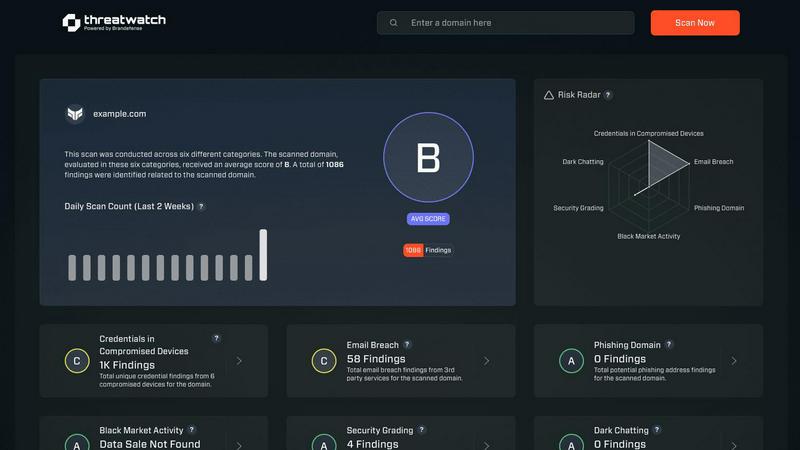
Instantly assess your cybersecurity health with actionable insights across critical risk categories.
Last updated: March 1, 2026
Visual Comparison
Fusedash

Threat Watch
Feature Comparison
Fusedash
Flexible Views
Fusedash offers the ability to build the right dashboard view tailored to different audiences. By allowing users to transform the same dataset into dashboards, charts, maps, or report-style views, stakeholders can easily access the information that matters most to them without unnecessary back-and-forth discussions.
AI Chart Generator
The AI Chart Generator enables users to create clear and informative visuals from CSVs or APIs in a matter of minutes. This feature simplifies the chart creation process by allowing users to select the appropriate chart type, apply comparisons, and refine labels, ensuring that each chart effectively communicates its intended story.
Dashboard Software
Fusedash combines dashboards with narrative reporting within one seamless workspace. This feature allows users to not only monitor KPIs but also provide context about performance changes through storytelling, keeping teams aligned and minimizing the chances of conflicting reports.
AI Chat
The AI Chat feature enhances the user experience by allowing team members to ask questions about their data in plain language. This innovative tool provides suggestions for metrics, charts, and breakdowns, facilitating a quicker understanding of the data and helping users turn insights into shareable dashboard views.
Threat Watch
Unified Threat Intelligence Dashboard
This central command center synthesizes data from across the clear, deep, and dark web into a single pane of glass. It transforms overwhelming, disparate data streams into a coherent visual narrative of your organization's security posture, enabling rapid comprehension and decision-making without the need to juggle multiple tools or reports.
Automated Cyber Health Assessment
Threat Watch automates the continuous evaluation of critical security categories, providing a fast and comprehensive scan of your digital footprint. This feature delivers an immediate diagnostic of key risk areas, including compromised credentials, breached accounts, and vulnerable devices, establishing a clear baseline for your cybersecurity health.
Proactive Dark Web Monitoring
The platform actively patrols dark web marketplaces, forums, and private channels where stolen data is traded. This proactive surveillance is crucial for early detection of compromised employee credentials, leaked intellectual property, or planned attacks against your organization, offering a vital early warning system.
Prioritized Risk Insights and Alerts
Beyond simple detection, Threat Watch employs intelligent analytics to triage and prioritize threats based on context and potential impact. This means security teams are guided directly to the most critical issues first, such as active credential misuse or high-severity vulnerabilities, optimizing response efforts and resource allocation.
Use Cases
Fusedash
Marketing Performance Tracking
Marketing teams can leverage Fusedash to create interactive dashboards that monitor campaign performance in real-time. By visualizing key metrics such as conversion rates and ROI, marketers can quickly adapt strategies based on data-driven insights.
Sales Analysis
Sales teams can utilize Fusedash to analyze sales data across different regions or time periods. By drilling down into specific segments and visualizing trends, sales professionals can identify opportunities for growth and adjust their tactics accordingly.
Operational Efficiency Monitoring
Operations teams can harness Fusedash to track key operational metrics, such as production efficiency and supply chain performance. By consolidating data from various sources into clear dashboards, they can quickly identify inefficiencies and implement improvements.
Financial Reporting
Finance departments can use Fusedash to create comprehensive financial reports that combine historical data with real-time insights. By standardizing KPIs and metrics across the organization, finance teams can ensure consistency in reporting and facilitate better decision-making at all levels.
Threat Watch
Proactive Breach Response and Mitigation
Security teams use Threat Watch to shift from reacting to breach notifications to proactively discovering them. By identifying compromised employee credentials or corporate data on the dark web before they are actively exploited, organizations can force password resets and secure accounts, effectively neutralizing a threat before an attack begins.
Third-Party and Supply Chain Risk Management
Risk professionals leverage the platform to extend visibility beyond their own perimeter. By monitoring for breaches and exposures associated with vendors, partners, and suppliers, organizations can assess third-party risk and initiate crucial conversations to strengthen the security of their entire ecosystem.
Executive and Board-Level Risk Reporting
Business leaders utilize the clear, consolidated dashboard to gain an accurate, real-time understanding of organizational cyber risk. The visual reports and prioritized metrics translate technical data into strategic business intelligence, supporting informed decision-making and resource justification for security investments.
IT Asset and Vulnerability Management
IT and security operations teams integrate Threat Watch findings with their asset inventories. The platform helps identify unknown or unmanaged devices exposed on the internet, and correlates them with known vulnerabilities, ensuring that patching and remediation efforts are focused on the assets most likely to be targeted.
Overview
About Fusedash
Fusedash is an innovative AI-powered data visualization platform designed to streamline the way teams interact with their data. By transforming connected data into clear and actionable insights, Fusedash serves as a unified workspace that allows users to create decision-ready dashboards, interactive charts, detailed maps, and narrative reports without the hassle of using multiple disconnected tools. This platform is ideal for organizations looking to enhance consistency and efficiency in their reporting processes. With Fusedash, users can define their key metrics and KPIs once and reuse these definitions across various views and reports, ensuring that everyone, from leadership to operational teams, is aligned and referencing the same trusted numbers. It caters to teams that are weary of manual reporting cycles and discrepancies in data storytelling, empowering them to monitor real-time events and delve into the reasons behind the data trends by segmenting information by region or time. Integrated AI features, such as natural language data chat and smart visualization assistance, make data exploration faster and more accessible, turning raw data into a shared source of truth that drives alignment and action across the organization.
About Threat Watch
Threat Watch is not merely a monitoring tool; it is a strategic cybersecurity intelligence platform that fundamentally shifts how organizations perceive and manage digital risk. It acts as a centralized diagnostic hub, providing a real-time, holistic view of an organization's cyber health by continuously scanning and correlating data across the clear, deep, and dark web. Designed for IT security teams, risk management professionals, and forward-thinking business leaders, its core mission is to dismantle reactive security postures. By consolidating fragmented threat data—from exposed credentials and breached accounts to vulnerable devices and phishing campaigns—into a single, intuitive dashboard, Threat Watch delivers prioritized, actionable insights. This empowers organizations to move with speed and precision, closing the window of opportunity for attackers by mitigating critical risks before they escalate, thereby building a more resilient and intelligence-driven security foundation.
Frequently Asked Questions
Fusedash FAQ
What types of data sources can I connect to Fusedash?
Fusedash allows users to connect various data sources, including CSV files, APIs, and databases. This flexibility ensures that you can integrate all relevant data into one platform for comprehensive analysis.
How does Fusedash ensure data consistency across reports?
Fusedash enables users to define key metrics and KPIs once, which can then be reused across all dashboards and reports. This standardization helps maintain consistent data representation, reducing the risk of conflicting information.
Can I customize the visualizations in Fusedash?
Absolutely! Fusedash offers a range of customization options, allowing users to tailor dashboards, charts, and reports based on their specific needs. You can adjust layouts, filters, and time ranges to create the most relevant views for your audience.
Is there support for real-time data monitoring in Fusedash?
Yes, Fusedash provides real-time monitoring capabilities, allowing teams to stay updated with the latest data. This feature ensures that users can react swiftly to changes and make informed decisions based on live insights.
Threat Watch FAQ
What does Threat Watch actually scan and monitor?
Threat Watch conducts a comprehensive scan across multiple layers of the internet. This includes the clear web (publicly accessible information), the deep web (unindexed databases), and the dark web (obfuscated networks). It specifically hunts for compromised employee credentials, breached account details, phishing sites targeting your domain, vulnerable devices, and mentions of your organization's assets in criminal forums.
How is Threat Watch different from a traditional vulnerability scanner?
While vulnerability scanners focus on identifying technical weaknesses within your known IT infrastructure, Threat Watch operates from an external, intelligence-led perspective. It discovers risks you may not know exist—like stolen credentials on the dark web or a shadow IT server exposed online—providing context about how attackers might actually target you, not just what flaws are present.
Who inside an organization typically uses this platform?
Threat Watch serves multiple roles. Security analysts and SOC teams use it for daily threat hunting and incident response. IT managers use it to discover unmanaged assets. Risk and compliance officers use it for reporting and third-party assessment. Finally, CISOs and business executives use the high-level dashboard to oversee the organization's cyber risk posture.
How quickly can I see results after starting a scan?
The platform is designed for rapid insight. Upon initiating a free scan, Threat Watch immediately begins assessing your provided domains and key terms against its intelligence databases. You can receive initial findings on critical categories like compromised credentials and breached accounts within minutes, providing immediate value and a starting point for deeper investigation.
Alternatives
Fusedash Alternatives
Fusedash is an innovative AI-powered data visualization platform that helps teams turn raw data into actionable insights through clear dashboards and charts. Positioned within the Analytics & Data and Business Intelligence categories, it serves as a unified workspace, allowing users to create decision-ready visualizations without the hassle of managing multiple disconnected tools. Users often seek alternatives to Fusedash for various reasons, including pricing considerations, feature requirements, or specific platform needs. When evaluating an alternative, it's important to consider factors such as ease of use, integration capabilities, scalability, and the level of data customization offered. An ideal alternative should align with your team's workflow and enhance your ability to make data-driven decisions.
Threat Watch Alternatives
Threat Watch is a cybersecurity intelligence platform that falls under the broader category of business intelligence tools, specifically focused on providing a real-time, actionable view of an organization's digital security posture. It consolidates threat data to offer proactive insights into risks like compromised credentials and vulnerable assets. Users often explore alternatives for various practical reasons. These can include budget constraints, the need for a different feature set, integration requirements with existing security stacks, or a preference for a platform with a different operational focus, such as deeper compliance reporting or more specialized threat hunting capabilities. When evaluating other options, key considerations should align with your primary needs. Look for the scope of monitoring (clear, deep, and dark web coverage), the quality and speed of actionable alerts, ease of integration, and the platform's ability to prioritize risks effectively to reduce your overall attack surface and improve cyber resilience.