
Admanage AI vs The SaaS Ads Studio
Side-by-side comparison to help you choose the right AI tool.

Admanage AI launches ads ten times faster across all major ad platforms for media buyers.
Last updated: February 28, 2026

Effortlessly launch and optimize profitable Google and Facebook Ads for your B2B SaaS with our guided self-serve.
Last updated: February 28, 2026
Visual Comparison
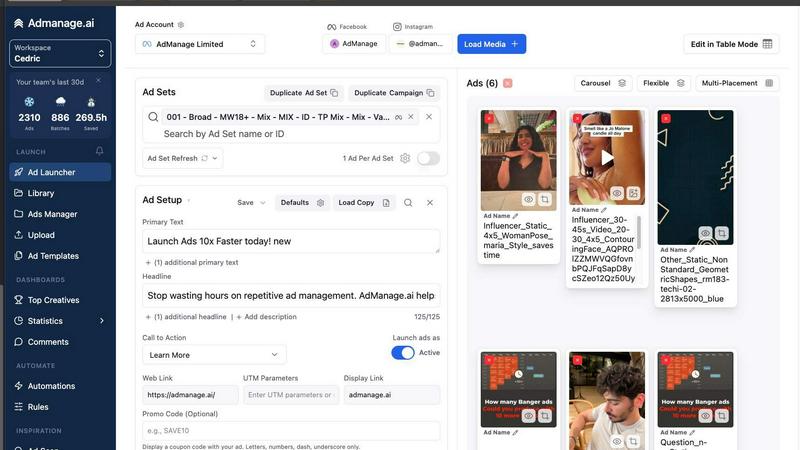
Admanage AI
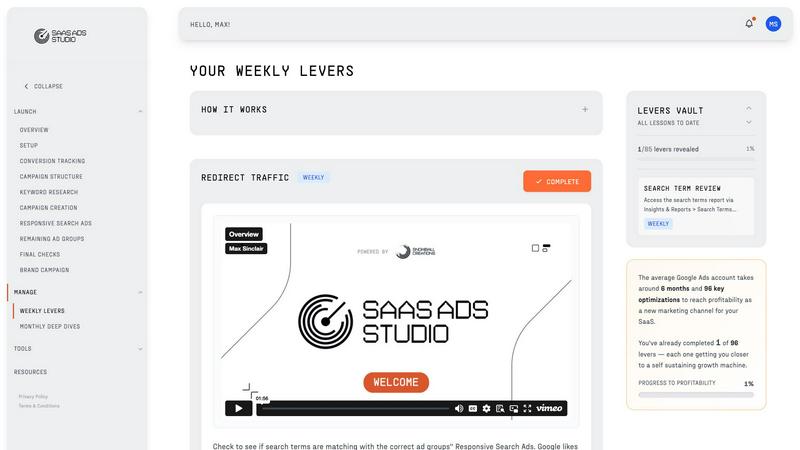
The SaaS Ads Studio
Feature Comparison
Admanage AI
Bulk Ad Launching in Seconds
This is the platform's cornerstone capability. Instead of uploading and configuring ads one by one in a native manager, users can launch hundreds of ad variations simultaneously. The interface is optimized for speed, allowing for rapid selection of assets, application of copy, and deployment across campaigns and ad sets. This feature turns a multi-hour ordeal into a task completed in under a minute, directly enabling the high-volume testing strategies that drive performance marketing success.
Automated Multi-Format Creative Grouping
Admanage AI intelligently handles the complexity of modern ad specs. When you upload a primary video or image, the platform can automatically generate and group the correctly formatted versions (such as 9:16 for Reels, 4:5 for Feed, and 1:1 for placement flexibility). This eliminates the manual, error-prone work of resizing, cropping, and ensuring each creative is assigned to the right ad within a set, guaranteeing consistency and saving immense production time.
One-Click Templates & Post ID Relaunching
For consistency and leveraging proven success, users can save high-performing ad configurations as one-click templates. More powerfully, the Post ID relaunching feature allows marketers to instantly create new ads using the social proof (likes, comments) of existing high-performing posts from their pages. This combines strategic reuse with operational speed, allowing teams to scale what works without starting from scratch every time.
Google Sheets & Cloud Storage Integration
Admanage AI seamlessly connects with existing workflows through its free Google Sheets plugin for bulk launches and direct integrations with cloud storage platforms like Google Drive, Dropbox, Frame.io, and Box. This means creative teams can simply update a shared folder or Sheet, and media buyers can instantly pull those assets into the launch platform without manual downloads or uploads, creating a smooth, error-free bridge between production and execution.
The SaaS Ads Studio
Guided Google + Facebook Ads Builder
The SaaS Ads Studio features a guided ads builder that simplifies the creation of effective Google and Facebook campaigns. This tool walks users through selecting audiences, crafting compelling copy, and developing creative concepts, ensuring that every aspect of the campaign aligns with best practices for B2B SaaS marketing.
AI-Powered Brand DNA Analysis
Using AI technology, the platform generates a unique Brand DNA profile for each user. This profile distills the essence of the company’s identity, analyzing website content, messaging, audience, and positioning to create tailored campaigns that resonate with target customers.
Weekly Optimization Tasks
Once campaigns are live, users receive a set of bite-sized optimization tasks each week. These tasks are carefully curated to enhance both Google and Facebook ad performance, providing a systematic approach to continuous improvement without overwhelming users with complex strategies.
Data-Driven Insights and Reporting
The SaaS Ads Studio allows users to upload real search term reports to gain structured insights into their campaign performance. This feature enables users to identify wasteful spending, discover expansion opportunities, and make informed decisions about budget allocation for optimal results.
Use Cases
Admanage AI
High-Velocity Creative Testing & Scaling
For teams running dozens of creative tests per week to find winning hooks, angles, and formats, Admanage AI is indispensable. It allows them to rapidly launch hundreds of ad variants with different thumbnails, copy, and headlines to statistically identify top performers. Once a winner is found, the platform enables instant scaling by using templates or Post ID relaunching to deploy the successful creative across new audiences, campaigns, or geographies in seconds.
Streamlining Multi-Brand & Agency Workflows
Agencies and in-house teams managing multiple brands or accounts face constant context switching and naming inconsistencies. Admanage AI provides a centralized workspace to manage all accounts, enforce standardized naming conventions through templates, and launch coordinated campaigns across different brands simultaneously. This brings order to chaos, ensuring professional execution and saving hours previously lost to navigating between different tabs and accounts.
Seasonal Campaign & Product Launch Blitzes
During critical periods like Black Friday, product launches, or Medicare open enrollment, the need to deploy a massive volume of targeted ads quickly is paramount. Admanage AI allows teams to pre-build and then launch entire campaign suites—hundreds of ads tailored to various segments and formats—in a single, coordinated action. This ensures maximum market impact from day one without being bottlenecked by platform upload speeds.
Eliminating Manual Errors & Ensuring Compliance
Manual processes lead to mistakes like broken links, incorrect budgets, or accidentally leaving on unwanted AI optimizations (like Advantage+ placements). Admanage AI’s templated and automated workflow standardizes execution. Rules and one-click settings ensure every ad is launched with the correct, intended configuration, dramatically reducing costly errors and ensuring campaign settings comply with best practices and team guidelines.
The SaaS Ads Studio
Launching a New B2B SaaS Product
With The SaaS Ads Studio, teams can quickly set up and launch their first advertising campaigns for a new product in just a weekend. The platform's step-by-step guidance ensures that even those with limited experience can create effective campaigns that drive awareness and generate leads.
Optimizing Existing Campaigns
For businesses already running Google and Facebook ads, the platform provides a structured system for periodic optimization. Users can implement weekly tasks that refine their campaigns, helping to improve conversion rates and reduce wasted ad spend over time.
Expanding into New Markets
SaaS companies looking to enter new markets can leverage the Brand DNA analysis feature to tailor campaigns for local audiences. By understanding regional preferences and behaviors, teams can create more effective ads that resonate with diverse customer segments.
Training Marketing Teams
The SaaS Ads Studio serves as an educational resource for in-house marketing teams. With its combination of video content and practical tools, it equips team members with the knowledge and skills needed to manage and optimize paid advertising campaigns independently.
Overview
About Admanage AI
Admanage AI is a specialized ad operations platform engineered to solve the critical bottleneck of creative testing at scale. It directly addresses the frustrations of performance marketers trapped in slow, clunky native ad managers like Meta Ads Manager, where manual processes, launch errors, and time-consuming workflows stifle velocity. The platform serves a clear master: growth teams, media buyers, and agencies that need to launch hundreds of ads daily to effectively test and scale winning creative. Its core value proposition is radical efficiency. By providing a purpose-built interface, deep cloud storage integrations, and powerful automation, Admanage AI transforms a process that traditionally takes hours into one that takes minutes. This shift doesn't just save time; it fundamentally changes a team's capacity, allowing them to reallocate resources from tedious execution to high-value creative strategy and analysis. Trusted by brands like Bolt, Naked Wines, and Wonderbly, which collectively launch over a million ads monthly through the platform, Admanage AI positions itself not as another generic tool, but as the essential operating system for modern, high-velocity paid social advertising.
About The SaaS Ads Studio
The SaaS Ads Studio is an innovative platform crafted for B2B SaaS companies seeking to optimize their Google Ads campaigns effectively. This comprehensive tool combines educational video tutorials with advanced AI-driven functionalities, allowing users to launch profitable Google and Facebook Ads within a weekend without incurring the high costs of hiring a paid ads agency. The platform is divided into two primary sections: Launch and Manage. In the Launch phase, users benefit from step-by-step instructions to create a clean, conversion-focused advertising account that minimizes wasteful expenditure while prioritizing buying intent. Following the initial setup, the Manage section offers weekly optimization tasks designed to refine campaign performance and boost profitability. This structured approach empowers SaaS founders and growth teams to master Google Ads and achieve measurable results, establishing The SaaS Ads Studio as an essential resource for maximizing digital marketing efficiency.
Frequently Asked Questions
Admanage AI FAQ
What advertising platforms does Admanage AI support?
Admanage AI is an official Marketing Partner for major platforms including Meta (Facebook & Instagram), TikTok, Google, Pinterest, and Snapchat. This means it offers deep, reliable integration for launching and managing ads directly to these networks from within its unified interface, providing a centralized hub for cross-platform paid social efforts.
How does the platform handle different ad formats and aspect ratios?
The platform features an intelligent auto-grouping system. When you upload a primary asset, such as a vertical 9:16 video, Admanage AI can automatically create and correctly assign the necessary 4:5 and 1:1 versions for optimal placement across feeds, stories, and Reels. This happens behind the scenes, saving you from manually creating and managing multiple files for a single ad concept.
Can I integrate Admanage AI with my existing creative workflow?
Absolutely. This is a core strength. Admanage AI offers a free Google Sheets add-on for spreadsheet-based bulk operations and direct native integrations with cloud storage providers like Google Drive, Dropbox, Frame.io, and Box. Creative teams can finalize assets in their preferred tool, save them to a connected folder, and media buyers can instantly access and launch them without any manual downloading or uploading.
Is Admanage AI suitable for small businesses or just large teams?
While the platform's power is evident in large-scale operations launching thousands of ads, its efficiency benefits teams of all sizes. The time saved from manual work—whether launching 20 ads or 200—translates directly into more strategic capacity. The intuitive interface and quick onboarding (often cited as 15 minutes) make it accessible for any performance-focused marketer tired of clunky native ad managers.
The SaaS Ads Studio FAQ
What types of ads can I launch with The SaaS Ads Studio?
The SaaS Ads Studio enables users to create and manage both Google Ads and Facebook Ads campaigns, providing a comprehensive solution for digital marketing across major platforms.
Do I need prior experience to use The SaaS Ads Studio?
No prior experience is necessary. The platform is designed for users of all skill levels, offering step-by-step guidance and educational content to help you understand and navigate the advertising process.
How often do I receive optimization tasks?
Users receive weekly optimization tasks every Monday. These tasks are designed to be quick and manageable, helping you to continuously improve your campaigns without significant time investment.
What if I have questions or need support while using the platform?
The SaaS Ads Studio provides several resources for support, including educational videos, FAQs, and user guides. Additionally, you can reach out to their customer support team for further assistance as needed.
Alternatives
Admanage AI Alternatives
Admanage AI is a specialized tool in the marketing technology category, designed to accelerate and streamline the process of launching and managing digital ad campaigns across multiple platforms like Meta and Google. It targets performance marketers who need to execute high-volume creative testing and bulk ad operations efficiently. Users often explore alternatives for various reasons, such as budget constraints, specific feature requirements not covered, or the need for integration with a different set of existing tools in their tech stack. The search for a different solution can also stem from a desire for a different user experience or support for niche advertising channels. When evaluating an alternative, key considerations should include the platform's ability to handle your required ad volume and velocity, its integration capabilities with your current workflow and asset storage, and the robustness of features for bulk operations and error reduction. The ideal tool should not only match your technical needs but also free up strategic time by automating repetitive tasks.
The SaaS Ads Studio Alternatives
The SaaS Ads Studio is a specialized platform designed for B2B SaaS companies to effectively manage their Google Ads campaigns. It combines educational resources with AI-driven tools, enabling users to create and optimize ads without relying on expensive agencies. Users often seek alternatives due to factors such as pricing, specific feature sets, or the need for integration with other platforms. When evaluating alternatives, it is essential to consider the ease of use, the depth of guidance provided, and the overall effectiveness of the tools in driving conversions. Finding the right solution can significantly impact your advertising success, so prioritize platforms that offer a comprehensive understanding of your target audience and facilitate ongoing campaign management. Look for features that support customization, scalability, and measurable results, ensuring that the alternative you choose aligns with your unique business goals and needs.