
Nano AI vs Sketch To
Side-by-side comparison to help you choose the right AI tool.

Nano AI
Nano AI is your all-in-one platform for fast AI image generation, editing, and seamless creative collaboration.
Last updated: February 28, 2026
Sketch To
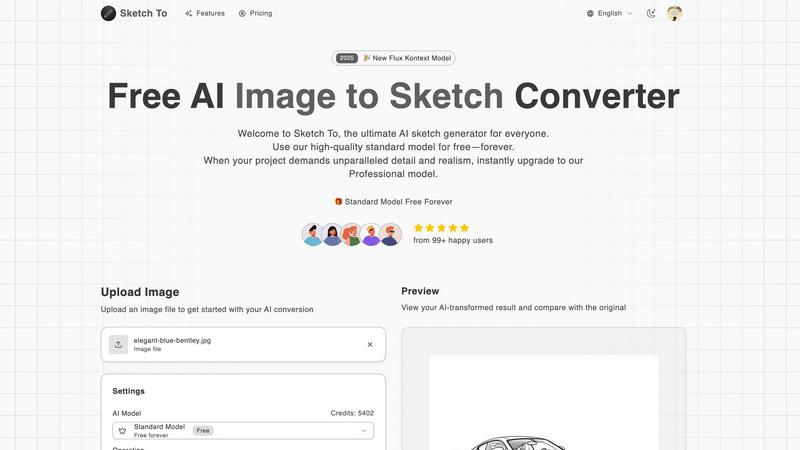
Sketch To effortlessly transforms images into stunning sketches, offering tools for both casual creators and.
Last updated: February 28, 2026
Visual Comparison
Nano AI

Sketch To
Feature Comparison
Nano AI
Unified Creative Workspace
Nano AI offers a comprehensive workspace that integrates text-to-image and image-to-image functionalities along with essential utility tools. This all-in-one approach allows users to transition fluidly from ideation to execution without switching between different applications.
Nano Banana Model
The core of Nano AI's performance lies in its proprietary Nano Banana model, which enables flash-speed inference. This model allows users to generate high-quality images in under ten seconds, significantly reducing waiting times and keeping users focused on the creative process.
Advanced Editing Tools
With advanced editing capabilities such as inpainting and outpainting, users can manipulate specific areas of their images using natural language descriptions. This feature streamlines the editing process, allowing for quick adjustments to color, texture, and other elements without needing extensive technical skills.
Collaborative Features
Nano AI includes shared galleries and collaborative tools that facilitate teamwork and feedback. This allows teams to review, iterate, and share their creative work seamlessly, ensuring that inspiration is captured and maintained throughout the project lifecycle.
Sketch To
Image to Sketch Conversion
Transform your photos into beautiful pencil sketches in just a few clicks. The advanced AI technology ensures that the artistic conversions maintain the essence of the original image while adding a unique artistic flair. This feature is perfect for artists and designers looking to create sketches from photographs effortlessly.
Sketch to Image AI
With the ability to convert hand-drawn sketches into photorealistic images, Sketch To offers an incredible tool for illustrators and designers. The Pro model brings sketches to life with remarkable detail and accuracy, enabling users to produce professional-grade images suitable for various applications.
Instant Processing
Sketch To boasts a powerful cloud-based AI processing engine that delivers results in seconds. Users can upload their images or sketches and receive high-quality conversions almost immediately, making it an efficient tool for time-sensitive creative projects.
High Resolution Output
Every creation can be downloaded in high resolution, ensuring that images are suitable for print and professional use. This feature is particularly beneficial for artists and designers who require quality that meets industry standards for print materials, portfolios, and presentations.
Use Cases
Nano AI
Marketing Campaigns
Marketing teams can leverage Nano AI to quickly generate visual assets for campaigns, social media posts, and advertisements. The platform's rapid generation speed ensures that marketing materials can be produced in response to real-time trends and consumer feedback.
Product Design
Designers can utilize Nano AI to create prototypes and mockups that embody their vision. The advanced editing features allow for detailed refinement, enabling designers to explore various styles and compositions without the hassle of traditional design tools.
Content Creation
Content creators, including bloggers and social media influencers, can generate eye-catching visuals to accompany their written work. With Nano AI, they can create unique images that resonate with their audience, enhancing engagement and visibility.
Educational Materials
Educators can use Nano AI to create visually appealing educational content, such as infographics and presentation slides. The platform allows for quick iterations and modifications, making it easier to adapt materials for different learning environments.
Sketch To
Social Media Posts
Artists and content creators can use Sketch To to generate eye-catching sketches from photos for their social media feeds. This unique presentation style can help enhance engagement and attract followers, making it a valuable tool for personal branding.
School Projects
Students can leverage Sketch To to create artistic representations of their assignments, enhancing the visual appeal of presentations and reports. This can lead to better grades and feedback from teachers who appreciate creative approaches.
Professional Artwork
Graphic designers can utilize the Pro model to produce high-quality images from sketches for commercial projects. This feature allows for a level of detail and realism that meets the demands of clients and industry standards.
Creative Hobbies
Hobbyists can explore their artistic talents by converting their favorite photographs into sketches and vice versa. This playful experimentation can lead to new artistic styles and techniques, enriching their creative journey.
Overview
About Nano AI
Nano AI is a transformative creative platform specifically designed to streamline the workflow of professionals in marketing, design, and content creation. Unlike traditional AI image generators, Nano AI offers a fully integrated solution that encompasses the entire creative process—from initial brainstorming to rapid image generation, detailed editing, and final asset sharing. It eliminates the friction caused by using multiple tools, providing a unified workspace that enhances collaboration and creativity. Powered by the proprietary Nano Banana model, it facilitates sub-10-second generation times for both text-to-image and image-to-image tasks. This rapid output allows users to produce high-quality, production-ready visual assets quickly, making it ideal for teams aiming for efficiency without compromising quality. The platform also features advanced editing tools, collaborative galleries, and granular control over styles, ensuring that creative ideas can flourish without the hindrance of technical challenges. With upcoming enhancements like 4K neural upscaling and innovative Prompt Labs, Nano AI is poised to be the go-to hub for maintaining creative momentum from inception to final export.
About Sketch To
Sketch To is an innovative AI-powered platform that seamlessly connects the realms of digital photography and traditional artistry. Designed for both hobbyists and professional artists, Sketch To offers unique capabilities to transform ordinary photographs into intricate sketches and vice versa. This dual-direction conversion functionality allows users to explore their creativity in novel ways, whether they want to enhance their social media posts or produce high-quality artwork. The core value proposition of Sketch To lies in its accessibility and flexibility. By providing a robust free Standard Model and a premium Professional Model, it democratizes advanced AI image processing. Users can enjoy an always-free trial, making it easy for anyone with an internet connection to create stunning artistic conversions without the need for software installations. The credit-based system for the Pro tier allows for enhanced detail and realism, perfect for commercial projects and professional use.
Frequently Asked Questions
Nano AI FAQ
What types of images can I create with Nano AI?
You can create a wide variety of images using Nano AI, including illustrations, marketing graphics, and concept art. The platform supports both text-to-image and image-to-image generation, allowing for diverse creative applications.
How does Nano AI ensure fast generation times?
Nano AI achieves fast generation times through its proprietary Nano Banana model and a specially designed orchestration layer. This combination allows for sub-10-second rendering of images, streamlining the creative process.
Are there collaborative features in Nano AI?
Yes, Nano AI includes collaborative features such as shared galleries and tools that allow teams to work together on projects. This enhances feedback and iteration processes, making it easier to maintain creative momentum.
Will there be any future updates to Nano AI?
Yes, Nano AI is committed to continuous improvement and innovation. Upcoming features include 4K neural upscaling and the introduction of Prompt Labs, which will further enhance user experience and capabilities within the platform.
Sketch To FAQ
What types of files can I upload to Sketch To?
You can upload various image file formats, including JPEG, PNG, and more. The platform supports multiple images, making it convenient for users to experiment with different files.
How does the credit system work for the Professional Model?
The credit system allows users to purchase credits that can be used for each conversion in the Professional Model. This provides flexibility, as users only pay for what they use, and can easily manage costs based on their needs.
Is there a limit on the number of images I can convert?
While the Standard Model offers a generous number of trial credits, the Pro model operates on a credit basis. Users can convert multiple images, but they will need sufficient credits to do so, ensuring that they can manage their usage according to their plans.
Can I use Sketch To for commercial purposes?
Yes, the Professional Model is specifically designed for commercial use, providing users with the quality and detail necessary for professional projects. This makes it an ideal choice for designers, illustrators, and anyone needing high-quality artistic output for business purposes.
Alternatives
Nano AI Alternatives
Nano AI is an innovative creative platform that specializes in ultra-fast AI image generation, editing, and transformation. It is designed to streamline the entire creative workflow by integrating ideation, generation, editing, and asset sharing into a cohesive workspace. Users often seek alternatives to Nano AI for various reasons, including pricing concerns, specific feature requirements, or compatibility with other tools and platforms they may be using. When choosing an alternative, consider aspects such as speed, ease of use, customization options, and collaborative features to ensure that the new tool meets your creative needs without hindering your workflow. In a rapidly evolving digital landscape, users are increasingly looking for solutions that can adapt to their specific workflows and project demands. Evaluating alternatives involves considering not just the immediate features but also the long-term benefits such as scalability, community support, and integration capabilities with existing systems. Ultimately, finding the right alternative should enhance your creative process while minimizing disruptions and maximizing output quality.
Sketch To Alternatives
Sketch To is an innovative AI-powered platform that falls within the realm of digital art and image processing, specifically designed to convert photographs into detailed sketches and vice versa. With its dual-direction conversion feature, it appeals to a diverse range of users, from casual hobbyists to professional artists. However, users often seek alternatives for various reasons, including pricing structures, specific features, or compatibility with their preferred platforms. When exploring alternatives, it’s essential to consider aspects such as ease of use, the quality of output, and any additional functionalities that may cater to individual creative needs. When searching for an alternative to Sketch To, keep in mind the importance of flexibility, accessibility, and the type of artistic tools available. Look for platforms that offer both free and premium options, ensuring you can experiment without upfront costs. Additionally, evaluate the user interface and community support, as these factors can significantly enhance your overall experience and creative journey.