
Img Editor vs Sketch To
Side-by-side comparison to help you choose the right AI tool.

Img Editor
Img Editor transforms your ideas into stunning AI-generated images with professional quality in seconds.
Last updated: February 28, 2026
Sketch To
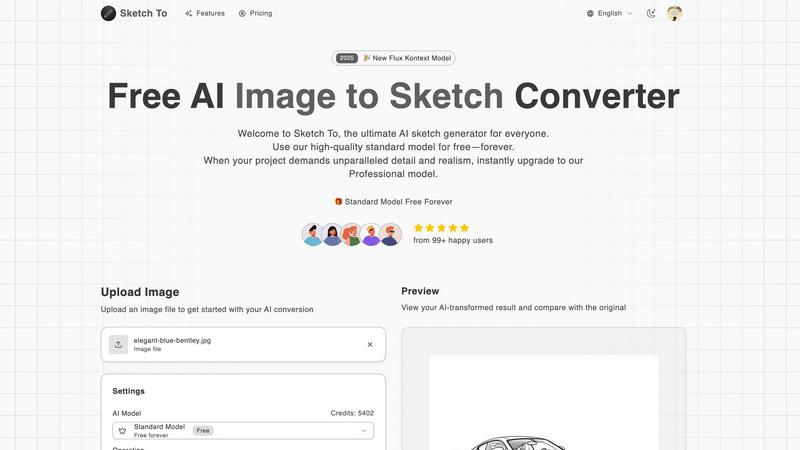
Sketch To effortlessly transforms images into stunning sketches, offering tools for both casual creators and.
Last updated: February 28, 2026
Visual Comparison
Img Editor

Sketch To
Feature Comparison
Img Editor
Free Daily Generations
Img Editor's most distinctive feature is its generous offering of ten free AI image generations every single day. This model removes the financial barrier that often accompanies advanced AI tools, allowing users to experiment, learn, and create consistently without cost. It empowers continuous exploration of the platform's capabilities, from testing simple prompts to refining complex artistic visions, all within a sustainable daily allowance.
Advanced Prompt Generator & Gallery
The platform includes an intelligent Prompt Generator and a thriving public Gallery. The Generator assists users in crafting effective, detailed prompts to achieve their desired results. The Gallery serves as both an inspiration hub and a collaborative space, where users can browse popular creations and directly reuse successful prompts with a single click, fostering a cycle of shared learning and creative discovery within the community.
High-Quality Output Options
Img Editor provides users with control over the technical quality of their generated images. It supports multiple aspect ratios (like 1:1, 16:9) and offers tiered quality settings, including Standard, High Quality (2K), and Ultra Quality (4K) outputs. The highest fidelity 2K and 4K generations are available through the integrated Nano Photo feature, enabling the creation of images suitable for professional prints, detailed digital artwork, and high-resolution marketing materials.
Integrated Image Editing Tools
Beyond pure generation, Img Editor incorporates practical editing functionalities. This includes an "Image to Prompt" or "Describe Your Image" feature that can analyze an uploaded photo and generate a descriptive text prompt from it. This capability is invaluable for reverse-engineering styles, recreating concepts, or simply understanding how the AI interprets visual elements, adding a layer of analytical power to the creative toolkit.
Sketch To
Image to Sketch Conversion
Transform your photos into beautiful pencil sketches in just a few clicks. The advanced AI technology ensures that the artistic conversions maintain the essence of the original image while adding a unique artistic flair. This feature is perfect for artists and designers looking to create sketches from photographs effortlessly.
Sketch to Image AI
With the ability to convert hand-drawn sketches into photorealistic images, Sketch To offers an incredible tool for illustrators and designers. The Pro model brings sketches to life with remarkable detail and accuracy, enabling users to produce professional-grade images suitable for various applications.
Instant Processing
Sketch To boasts a powerful cloud-based AI processing engine that delivers results in seconds. Users can upload their images or sketches and receive high-quality conversions almost immediately, making it an efficient tool for time-sensitive creative projects.
High Resolution Output
Every creation can be downloaded in high resolution, ensuring that images are suitable for print and professional use. This feature is particularly beneficial for artists and designers who require quality that meets industry standards for print materials, portfolios, and presentations.
Use Cases
Img Editor
Digital Marketing & Content Creation
Marketers and social media managers can use Img Editor to rapidly produce unique, eye-catching visuals for campaigns, blog posts, advertisements, and social media content. The ability to generate custom images on-demand for specific themes or promotions eliminates reliance on stock photography and ensures brand-aligned, original artwork that captures audience attention.
Concept Art & Storyboarding
Artists, writers, and game developers can leverage the tool to visualize characters, environments, and key scenes during the conceptual phase. By generating multiple iterations from descriptive prompts, creators can explore different artistic directions, solidify visual narratives, and create compelling storyboards or mood boards without initial manual sketching.
Educational & Presentation Materials
Educators and professionals can create custom illustrations, diagrams, and historical recreations to enhance learning materials, reports, and presentations. A history teacher could generate an image of "a bustling medieval marketplace," while a business professional might visualize a complex data concept, making abstract ideas tangible and engaging for their audience.
Personal Art Exploration & Hobby Projects
For hobbyists and art enthusiasts, Img Editor serves as a limitless digital canvas. Users can explore personal projects, create custom artwork for gifts, visualize ideas for home decor, or simply experiment with artistic styles—from photorealism to abstract digital art. The free daily generations make it an ideal tool for casual, imaginative play and skill development.
Sketch To
Social Media Posts
Artists and content creators can use Sketch To to generate eye-catching sketches from photos for their social media feeds. This unique presentation style can help enhance engagement and attract followers, making it a valuable tool for personal branding.
School Projects
Students can leverage Sketch To to create artistic representations of their assignments, enhancing the visual appeal of presentations and reports. This can lead to better grades and feedback from teachers who appreciate creative approaches.
Professional Artwork
Graphic designers can utilize the Pro model to produce high-quality images from sketches for commercial projects. This feature allows for a level of detail and realism that meets the demands of clients and industry standards.
Creative Hobbies
Hobbyists can explore their artistic talents by converting their favorite photographs into sketches and vice versa. This playful experimentation can lead to new artistic styles and techniques, enriching their creative journey.
Overview
About Img Editor
Img Editor represents a paradigm shift in the accessibility of AI-powered visual creation. At its core, it is a sophisticated text-to-image generation platform designed to transform imaginative ideas into high-quality digital art with remarkable ease. The tool is engineered for a broad spectrum of users, from professional artists, graphic designers, and digital marketers seeking to accelerate their workflow, to content creators, educators, and hobbyists exploring the boundaries of their creativity. Its primary value proposition is a powerful democratization of technology: offering ten free image generations daily without any subscription fee. This foundational access is supplemented by a unique community-driven model where users can earn bonus generations by contributing to the public gallery. Powered by advanced AI, Img Editor interprets detailed text descriptions—or prompts—to produce visuals ranging from photorealistic scenes and concept art to abstract compositions. By lowering the barrier to entry, it empowers anyone with an idea to participate in the digital art revolution, making professional-grade image generation an inclusive and community-focused experience.
About Sketch To
Sketch To is an innovative AI-powered platform that seamlessly connects the realms of digital photography and traditional artistry. Designed for both hobbyists and professional artists, Sketch To offers unique capabilities to transform ordinary photographs into intricate sketches and vice versa. This dual-direction conversion functionality allows users to explore their creativity in novel ways, whether they want to enhance their social media posts or produce high-quality artwork. The core value proposition of Sketch To lies in its accessibility and flexibility. By providing a robust free Standard Model and a premium Professional Model, it democratizes advanced AI image processing. Users can enjoy an always-free trial, making it easy for anyone with an internet connection to create stunning artistic conversions without the need for software installations. The credit-based system for the Pro tier allows for enhanced detail and realism, perfect for commercial projects and professional use.
Frequently Asked Questions
Img Editor FAQ
How many free images can I create per day?
Img Editor provides ten free image generations every 24 hours. This daily refresh allows for consistent, cost-free usage. Additionally, you can earn extra generations by submitting your approved creations to the public Gallery, fostering both your resource pool and community contribution.
What is Nano Photo?
Nano Photo is a sponsored feature within Img Editor that provides access to higher-resolution image generation. It enables outputs at 2K (High Quality) and 4K (Ultra Quality) resolutions, which are essential for projects requiring fine detail, large-format printing, or professional-grade digital assets beyond the standard quality setting.
Can I use the images I generate for commercial purposes?
While the provided context does not specify detailed licensing terms, AI-generated images are typically created for user utilization. It is always recommended to review Img Editor's official Terms of Service for explicit guidelines regarding copyright, ownership, and commercial usage rights for the images you generate on the platform.
How does the Prompt Generator and Gallery help me?
The Prompt Generator assists you in crafting more effective and detailed text descriptions, which leads to better AI-generated results. The Gallery allows you to see what others have created and use their successful prompts as a starting point for your own work. This dramatically shortens the learning curve and provides endless inspiration.
Sketch To FAQ
What types of files can I upload to Sketch To?
You can upload various image file formats, including JPEG, PNG, and more. The platform supports multiple images, making it convenient for users to experiment with different files.
How does the credit system work for the Professional Model?
The credit system allows users to purchase credits that can be used for each conversion in the Professional Model. This provides flexibility, as users only pay for what they use, and can easily manage costs based on their needs.
Is there a limit on the number of images I can convert?
While the Standard Model offers a generous number of trial credits, the Pro model operates on a credit basis. Users can convert multiple images, but they will need sufficient credits to do so, ensuring that they can manage their usage according to their plans.
Can I use Sketch To for commercial purposes?
Yes, the Professional Model is specifically designed for commercial use, providing users with the quality and detail necessary for professional projects. This makes it an ideal choice for designers, illustrators, and anyone needing high-quality artistic output for business purposes.
Alternatives
Img Editor Alternatives
Img Editor is a prominent player in the AI image generation and editing category, empowering users to create visuals from text prompts. It has carved a niche by offering a generous free tier, making advanced digital art accessible to a wide audience. However, the search for alternatives is a natural part of the user journey, driven by diverse needs and project requirements. Users often explore other options for various reasons. Some may require a different pricing model, such as unlimited generations without a daily cap, while others seek specialized features like higher-resolution outputs, more control over artistic styles, or integration with specific design platforms. The need for a different user experience or platform compatibility, like a dedicated mobile app or desktop software, also fuels this exploration. When evaluating alternatives, it's crucial to align the tool's capabilities with your primary goals. Consider the core AI model's strengths, the flexibility of its editing tools, and the overall cost-effectiveness for your volume of work. The ideal platform balances raw creative power with an interface that matches your skill level, ensuring your vision can be realized efficiently and effectively.
Sketch To Alternatives
Sketch To is an innovative AI-powered platform that falls within the realm of digital art and image processing, specifically designed to convert photographs into detailed sketches and vice versa. With its dual-direction conversion feature, it appeals to a diverse range of users, from casual hobbyists to professional artists. However, users often seek alternatives for various reasons, including pricing structures, specific features, or compatibility with their preferred platforms. When exploring alternatives, it’s essential to consider aspects such as ease of use, the quality of output, and any additional functionalities that may cater to individual creative needs. When searching for an alternative to Sketch To, keep in mind the importance of flexibility, accessibility, and the type of artistic tools available. Look for platforms that offer both free and premium options, ensuring you can experiment without upfront costs. Additionally, evaluate the user interface and community support, as these factors can significantly enhance your overall experience and creative journey.