
Shrinkpad vs Skene
Side-by-side comparison to help you choose the right AI tool.

Shrinkpad
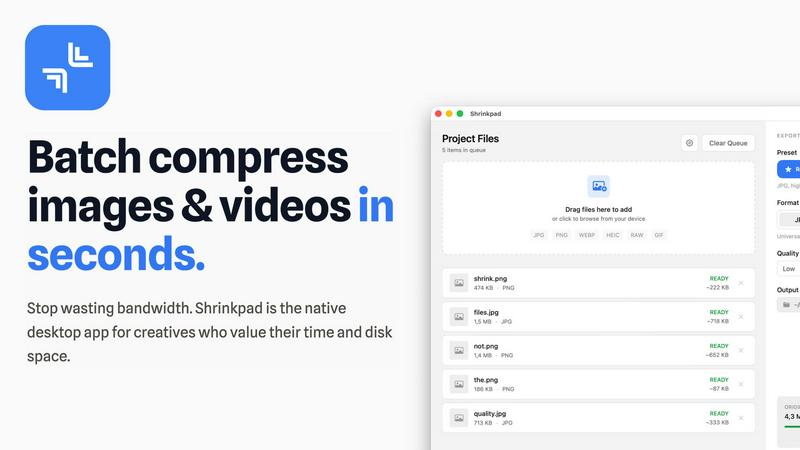
Shrinkpad compresses images and videos on your Mac in seconds, saving space and streamlining your creative workflow.
Last updated: February 28, 2026

Skene turns your own codebase into a prompt-driven growth engine you fully control.
Last updated: February 28, 2026
Visual Comparison
Shrinkpad
Skene

Feature Comparison
Shrinkpad
One-Drop Import
With Shrinkpad's intuitive one-drop import feature, users can simply drag and drop entire folders onto the application. This functionality automatically detects and adds all supported images and videos to the batch processing list, eliminating the need to manually select individual files.
Smart Detection
Shrinkpad's smart detection technology identifies over 30 different image formats, including popular RAW formats, alongside major video formats. This ensures that all media files are processed optimally while non-media files are ignored for a streamlined experience, allowing users to focus on their creative outputs.
Unlimited Batching
Designed for efficiency, Shrinkpad allows users to process thousands of assets simultaneously without crashing. Unlike web-based tools that may falter under heavy loads, Shrinkpad handles massive queues effortlessly, ensuring that users can maximize their productivity without interruptions.
Privacy First
Shrinkpad is built with privacy at its core. All processing occurs locally on the user's machine, meaning that no files are ever uploaded to the cloud. This not only protects sensitive data but also ensures that users are not dependent on internet speeds, providing a secure and fast compression experience.
Skene
Codebase-Native Signal Detection
Skene integrates directly with your repository and IDE, performing deep structural analysis to automatically detect growth signals and user friction points from your code itself. It scans framework patterns, component trees, and user flow logic to identify onboarding bottlenecks, activation opportunities, and retention risks without requiring manual instrumentation or external tagging. This creates a living, code-accurate map of your user journey.
Autonomous Growth Loop Implementation
Moving beyond analysis, Skene autonomously generates and deploys optimized growth loops. Based on its analysis, it can prompt engineers or AI agents to implement changes, or manage deployments itself to improve funnels. This transforms growth from a manual, campaign-based effort into a continuous, automated process that ships improvements as seamlessly as new features.
Prompt-Driven Growth Infrastructure
Growth logic becomes as malleable and promptable as any other part of your codebase. Developers and AI agents can interact with Skene's context layer using natural language prompts to query analytics, request optimizations for specific flows, or generate implementation code. This shifts the paradigm from configuring rigid dashboards to commanding an intelligent growth engine.
Self-Healing & Version-Controlled Logic
Because Skene's intelligence is built upon your actual code, its recommendations and implemented flows automatically update and adapt with every git commit and deployment. There's no risk of UI tour scripts breaking after a redesign; the growth logic is versioned and tested alongside the product, ensuring resilience and maintainability.
Use Cases
Shrinkpad
Photographers Optimizing Portfolio
Professional photographers can use Shrinkpad to quickly compress high-resolution images for their portfolios, ensuring that they retain visual quality while reducing file sizes for faster loading times on websites and easier sharing with clients.
Designers Streamlining Assets
Graphic designers often work with multiple image formats in projects. Shrinkpad allows them to batch compress assets directly from design tools like Figma or Photoshop, saving hours of manual work and enabling smooth collaboration with clients and team members.
Developers Enhancing Website Performance
Web developers can leverage Shrinkpad to optimize images and videos before deployment. By significantly reducing file sizes, they improve website load times and user experience, which can lead to better performance metrics and higher search engine rankings.
Content Creators Managing Media Libraries
Content creators with extensive media libraries can benefit from Shrinkpad's ability to handle mixed media batches. Whether they are compressing photos for social media or videos for YouTube, the tool ensures that all assets are optimized in a single workflow, enhancing productivity.
Skene
Accelerating Time-to-Value for New Users
For products struggling with user activation, Skene autonomously audits the onboarding funnel directly from the code, identifying unnecessary steps or confusing UI patterns. It then generates and implements streamlined flows, tooltips, or progress trackers to guide users to their "aha moment" faster, dramatically improving activation rates without constant manual experimentation.
Reducing Engineering Overhead on Growth Tasks
Engineering teams burdened with building and maintaining one-off analytics events, A/B test frameworks, and lifecycle emails can offload this work to Skene. It handles the instrumentation, analysis, and iterative optimization, allowing developers to focus on core product features while still shipping data-driven growth improvements.
Enabling AI Agents to Own Growth Outcomes
Companies leveraging AI agents for development can provide them with a rich, code-aware growth context layer via Skene. An agent can be tasked with "improving retention for feature X" and, using Skene's analysis and tooling, understand the current flow, propose changes, and even implement the necessary code modifications autonomously.
Consolidating a Fragmented Growth Stack
Startups tired of managing multiple point solutions for analytics, user onboarding, and email automation can replace them with Skene's unified infrastructure. It eliminates the performance tax of external scripts, breaks down data silos, and provides a single source of truth for growth logic that is owned, versioned, and evolved within the main codebase.
Overview
About Shrinkpad
Shrinkpad is a cutting-edge, privacy-first desktop application specifically designed for macOS, aiming to revolutionize batch media compression. It addresses a significant challenge faced by modern creatives: the struggle with oversized image and video files that not only occupy precious disk space but also hinder workflow efficiency. Unlike traditional cloud-based solutions, Shrinkpad operates solely on your local machine, utilizing native macOS frameworks. This guarantees the utmost privacy, ensures that your sensitive data remains secure, and eliminates reliance on internet bandwidth. The application is engineered to process hundreds or even thousands of files in mere seconds, optimizing performance especially for Apple Silicon. Shrinkpad allows photographers, designers, developers, and content creators to compress files by up to 90% while intelligently maintaining visual quality. Supporting over 50 formats, from JPGs and RAW files to 4K MP4 videos, Shrinkpad transforms a typically cumbersome task into a simple one-click batch operation. This makes it an essential productivity tool for anyone looking to optimize their digital assets and reclaim valuable storage space.
About Skene
Skene is not just another growth tool; it's a foundational reimagining of how software achieves product-led growth (PLG). It functions as an AI-powered, fully automated PLG iteration engine that integrates as intrinsic infrastructure directly into your development environment. Unlike external services that bolt on with performance-draining snippets, Skene connects to your codebase and IDE, analyzing your application's structure and user interaction data to autonomously identify friction points, optimize critical user flows, and deploy improvements. Its core value proposition is the consolidation and automation of growth work: it replaces manual A/B testing, fragmented analytics dashboards, and brittle third-party scripts with a self-learning system that treats growth logic as version-controlled code you own. Designed for indie developers, early-stage startups, and established PLG companies, Skene acts as a "growth team in a box." It continuously optimizes key funnels like onboarding, activation, and retention, freeing engineering and product teams from constant manual optimization overhead. By deriving signals directly from the source code, it creates a powerful, actionable context layer for your AI agents and ensures your growth strategies evolve in lockstep with every product deployment, making data silos and performance-breaking external dependencies obsolete.
Frequently Asked Questions
Shrinkpad FAQ
Can I use Shrinkpad for free?
Yes, Shrinkpad offers a Free Starter plan that includes essential tools for casual users, allowing compression of up to 10 files per batch.
What file formats does Shrinkpad support?
Shrinkpad supports a wide range of formats, including popular ones like JPG, PNG, WEBP, AVIF, MP4, MOV, and many RAW formats, making it versatile for various media types.
Does Shrinkpad support video compression?
Absolutely! Shrinkpad is capable of compressing various video formats, including 4K MP4 and MOV, ensuring that both images and videos can be optimized efficiently.
How many files can I process at once?
With Shrinkpad, users can process thousands of files simultaneously, thanks to its unlimited batching feature, which is designed to handle massive queues without any crashes.
Skene FAQ
How is Skene different from traditional customer experience software?
Traditional tools like tour builders or analytics platforms are external services that require manual configuration, rely on fragile DOM selectors that break with UI updates, and create data silos. Skene is infrastructure that reads your codebase to automatically generate and maintain context-aware flows. It updates itself with each deploy and keeps all logic and data within your owned code environment.
How long does it take to set up Skene?
Setup is designed to be exceptionally fast, typically under 60 seconds. You grant Skene read-only access to your GitHub or GitLab repository. It then automatically analyzes your codebase structure to generate initial PLG flows and insights without requiring any initial code changes or API integrations.
Is my source code secure with Skene?
Absolutely. Security is a primary design principle. Skene only ever requires read-only access to your repository. All code analysis is performed in a secure, isolated environment. Your proprietary code never becomes training data for external models, and you maintain full ownership and control.
What kind of analytics does Skene provide?
Skene offers a real-time analytics dashboard focused on actionable growth metrics. This includes user progress tracking, funnel completion rates, engagement heatmaps, and bottleneck identification. It provides insights like time-to-value and measures the direct impact of automated improvements, all derived from your codebase signals rather than external pageview trackers.
Alternatives
Shrinkpad Alternatives
Shrinkpad is a powerful desktop application designed for macOS that specializes in compressing images and videos to optimize storage and improve workflow efficiency. As a privacy-first tool, it allows users to process files locally without uploading data to the cloud. This makes it particularly appealing to creative professionals who often handle large media files and prioritize data security. Users frequently seek alternatives to Shrinkpad for various reasons, including budget constraints, feature sets that may better align with specific needs, or compatibility with different operating systems. When selecting an alternative, it’s crucial to consider factors such as processing speed, the range of supported file formats, ease of use, and the degree of privacy offered by the software.
Skene Alternatives
Skene is an AI-powered Product-Led Growth (PLG) engine that integrates directly with your codebase. It belongs to the category of growth automation and product analytics infrastructure, designed to autonomously optimize user funnels by treating growth as version-controlled code. This represents a shift from traditional, manual growth hacking and external analytics services. Users may explore alternatives for several common reasons. These include budget constraints, as advanced automation tools often carry a premium. Others might seek solutions with a different technical approach, such as those focusing purely on analytics dashboards without deep code integration, or platforms that cater to non-technical teams. The need for specific integrations, company size, or a preference for more manual control over experiments can also drive the search. When evaluating alternatives, key considerations should align with your core needs. Assess the depth of integration with your development stack and whether the solution treats growth logic as owned, versionable code. Consider the level of automation versus manual control offered, the robustness of signal detection beyond basic click-tracking, and how the tool scales with your product's complexity. Ultimately, the choice hinges on finding the right balance between powerful automation and the transparency and ownership you require over your growth processes.