
LuxSign vs Refbox
Side-by-side comparison to help you choose the right AI tool.

LuxSign offers secure, legally valid electronic signatures for documents, ensuring compliance and efficiency across.
Last updated: February 28, 2026

Refbox provides instant access to your images, videos, and notes for a streamlined and efficient workflow.
Last updated: February 28, 2026
Visual Comparison
LuxSign

Refbox
Feature Comparison
LuxSign
Multiple Signature Methods
LuxSign offers various signature methods to accommodate user preferences. Users can draw their signature using a mouse, type their name, or upload an image. The platform also supports custom initials, allowing for quick document signing without compromising authenticity.
Advanced Security
With industry-standard encryption protocols, LuxSign ensures that all documents are securely stored and transmitted. The platform's data centers are located in Luxembourg, complying with EU regulations to provide peace of mind regarding document safety and integrity.
Collaboration Workspaces
LuxSign facilitates teamwork through its collaboration workspaces. Users can create shared environments for their teams, organize documents by folders, manage access levels, and collaborate seamlessly on signing workflows, making it ideal for businesses that require multiple inputs on documents.
Complete Audit Trail
LuxSign maintains a detailed audit trail for every document signed through its platform. This includes timestamps, IP addresses, and signer information, providing comprehensive records for compliance and verification purposes while enhancing transparency in the signing process.
Refbox
Floating Reference Frames
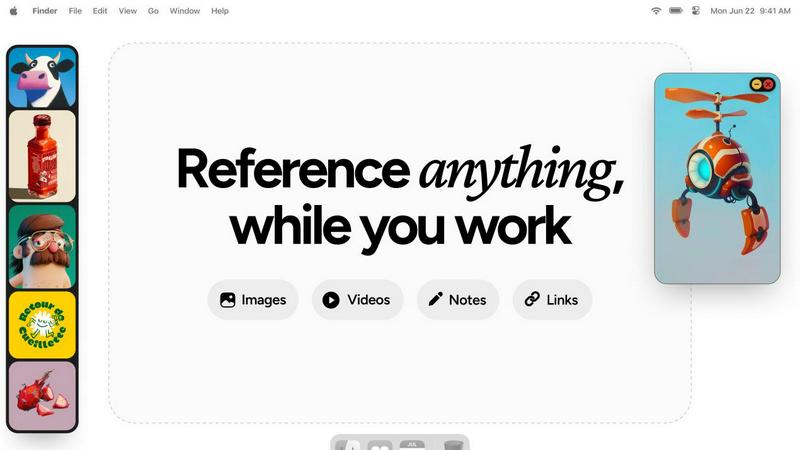
Refbox allows users to create floating reference frames that can be resized and positioned anywhere on their screen. This feature ensures that your references are always visible, regardless of the application you are using, enhancing your productivity.
Masonry Mode
The Masonry Mode organizes your pinned content into visually appealing layouts, making it easier to view multiple references at once. This feature is perfect for moodboarding and ensures that your creative inspirations are presented in an aesthetically pleasing manner.
Markdown-Enabled Notes
With markdown-enabled notes, users can jot down ideas, create checklists, and include styled text without needing to switch between apps. This integration keeps your thoughts organized and accessible right alongside your visual references.
GIF Playback and Pixel Rendering
Refbox supports GIF playback, allowing users to step through each frame for detailed analysis. Additionally, the pixel rendering feature ensures that pixel art is displayed correctly, providing artists with the precision they need for their projects.
Use Cases
LuxSign
Streamlining Contract Signing
Businesses can utilize LuxSign to expedite the contract signing process. By uploading contracts and inviting signers through email, teams can achieve quick turnaround times, ensuring that agreements are finalized without unnecessary delays.
Managing Employee Documents
HR departments can leverage LuxSign for managing employee-related documents, such as contracts, NDAs, and policy acknowledgments. The platform allows for multiple signers and workflow customization, ensuring efficient and compliant documentation.
Facilitating Client Approvals
Consultants and service providers can use LuxSign to obtain client approvals on proposals and agreements. The ability to send documents for signature and track their progress in real-time ensures that clients remain engaged and informed throughout the process.
Enhancing Legal Agreements
Law firms can integrate LuxSign into their operations to modernize how legal documents are signed. With robust security features and eIDAS compliance, the platform offers a reliable solution for handling sensitive legal agreements while ensuring compliance with regulatory standards.
Refbox
Graphic Design
Graphic designers can use Refbox to keep essential reference images and color palettes readily accessible while working on projects. This continuous access helps streamline the design process and boosts creativity.
Animation
Animators can pin videos, GIFs, and notes related to their projects, allowing them to reference movements and styles without disrupting their workflow. Refbox facilitates quicker iterations and enhances the overall animation quality.
UI/UX Development
UI/UX developers can benefit from having design inspirations, color schemes, and user feedback at their fingertips. With Refbox, they can easily compare design elements and make informed decisions during the development process.
Concept Art Creation
Concept artists can utilize Refbox to gather diverse references, such as images and notes, into one accessible space. This support fosters an environment where creativity can flourish, allowing artists to explore new ideas without losing focus.
Overview
About LuxSign
LuxSign is a cutting-edge electronic signature platform designed for businesses that prioritize security and compliance. Built in Luxembourg, it offers a secure, cloud-based solution for signing and managing documents, ensuring that all data is encrypted end-to-end and stored within the country to maintain full GDPR compliance. The platform is specifically tailored for organizations that operate within the European Union, as it adheres to the eIDAS SES standards, providing legal validity for contracts across all member states. LuxSign's user-friendly interface makes it easy for any business to streamline its signing processes, from individual freelancers to large enterprises. Key features include customizable signing workflows, automated notifications, and advanced audit trails, each designed to enhance efficiency while ensuring document integrity. With LuxSign, businesses can confidently transition to a digital signing process that is both fast and secure.
About Refbox
Refbox is a groundbreaking floating reference application tailored for creatives who require continuous access to their sources of inspiration while working. This versatile app allows users to pin a variety of media, including images, GIFs, videos, and notes, in always-on-top frames that remain visible above all other applications. This eliminates the hassle of window switching, allowing artists, designers, animators, and 3D modelers to maintain an uninterrupted workflow. Refbox supports the integration of media from multiple sources such as the web, local storage, and clipboard, all organized into a customizable sidebar. Users can enjoy features like Masonry Mode for aesthetically pleasing layouts, frame resizing, and full-screen galleries for dual monitor setups. Furthermore, Refbox enables markdown-enabled notes for quick idea capture and instructions, streamlining the creative process. This app is essential for any creative professional seeking to enhance productivity and focus without distractions.
Frequently Asked Questions
LuxSign FAQ
What types of documents can I sign with LuxSign?
LuxSign supports a variety of document formats, including PDF, DOC, and DOCX. Users can easily upload files up to 10MB, making it versatile for various business needs.
How does LuxSign ensure document security?
LuxSign employs industry-standard encryption for documents during upload, storage, and transmission. Additionally, all data is hosted in secure servers located in Luxembourg, ensuring compliance with EU data protection laws.
Is LuxSign compliant with GDPR?
Yes, LuxSign is fully compliant with GDPR and Luxembourg data protection regulations. This commitment to privacy ensures that all user data and signed documents are handled with the utmost care and security.
Can I integrate LuxSign with other applications?
Absolutely. LuxSign offers cloud integrations, allowing users to import documents directly from popular cloud storage services. The platform also provides a full REST API and an embeddable SDK for seamless system integrations.
Refbox FAQ
How does Refbox improve my creative workflow?
Refbox enhances your creative workflow by providing constant access to your references without the need to switch between multiple applications. This saves time and helps maintain focus.
Can I customize the layout of my references?
Yes, Refbox offers customizable frames that can be resized and organized in various layouts, including Masonry Mode, allowing you to create a visual workspace that best suits your needs.
Is there support for different media types in Refbox?
Absolutely! Refbox supports various media types, including images, videos, GIFs, and markdown-enabled notes, making it a versatile tool for all types of creative professionals.
Can I use Refbox on multiple monitors?
Yes, Refbox is designed to work seamlessly with multiple monitors. You can utilize full-screen galleries and arrange your frames across different screens for an optimized creative experience.
Alternatives
LuxSign Alternatives
LuxSign is an electronic signature platform developed in Luxembourg, designed to provide secure and compliant signing solutions for businesses. As an eIDAS SES compliant service, it ensures that electronic signatures are legally valid across all EU member states, making it a reliable choice for organizations that prioritize legal compliance and data security. However, users often seek alternatives to LuxSign for various reasons, including pricing considerations, specific feature sets, or the need for integrations with other platforms to better suit their operational requirements. When searching for an alternative to LuxSign, it is crucial to evaluate several factors. Users should consider the level of compliance with regulations like GDPR, the robustness of security measures in place, and the flexibility of signing workflows. Additionally, understanding the pricing models, available features like templates and audit trails, as well as customer support options can help in making an informed decision that aligns with the unique needs of a business.
Refbox Alternatives
Refbox is a cutting-edge floating reference app tailored for creatives, designed to keep essential media like images, videos, and notes readily accessible above other applications. It enables users to maintain a seamless workflow by allowing them to pin references in always-on-top frames, significantly reducing the need for constant window switching. As users explore their creative options, they often seek alternatives to Refbox due to factors such as pricing, specific feature sets, or different platform compatibility that may better suit their unique needs. When searching for alternatives, it is crucial to consider aspects such as user interface design, customization options, and the ability to integrate with existing tools. Additionally, factors like performance, customer support, and community feedback can greatly influence the decision-making process. Ultimately, the right alternative should enhance productivity and streamline the creative workflow, catering to the individual preferences of each user.