
poseup vs RemoveTexts
Side-by-side comparison to help you choose the right AI tool.

poseup
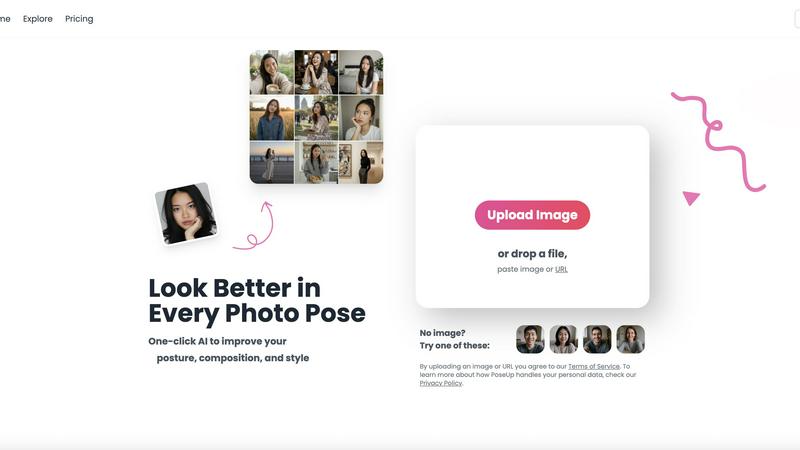
PoseUp uses AI to effortlessly enhance your photos by improving posture, composition, and style with a single click.
Last updated: March 1, 2026

RemoveTexts
RemoveTexts is an AI tool that effortlessly removes text and watermarks from images in seconds, making editing simple for everyone.
Last updated: March 11, 2026
Visual Comparison
poseup
RemoveTexts

Feature Comparison
poseup
One-Click Enhancement
PoseUp's standout feature is its one-click enhancement capability. This allows users to instantly improve their photos by correcting posture, optimizing composition, and enhancing visual appeal. No prior experience is required, making it accessible for everyone.
Advanced AI Analysis
The platform employs cutting-edge AI technology to analyze key elements of photographs. This includes assessing lighting, framing, and pose, enabling the tool to suggest intelligent adjustments that enhance the overall quality of the image.
Versatile Use Cases
PoseUp is designed for a variety of photography scenarios, from casual lifestyle shots to professional headshots and fitness imagery. Its versatility ensures that users can apply enhancements across different contexts, making it a valuable tool for diverse audiences.
User-Friendly Interface
With an easy-to-navigate interface, PoseUp ensures a seamless user experience. Users can upload images in various formats, including JPG, PNG, WEBP, and HEIC, making it easy to get started on enhancing their photos without any hassle.
RemoveTexts
Paint to Remove
This feature allows users to brush over specific areas of text that they want to eliminate. With precise control, you can target only the unwanted elements, ensuring that the rest of your image remains intact and visually appealing.
Auto Remove All
Utilizing advanced AI technology, this one-click feature automatically detects and removes every text element in an image. It saves users time and effort, making it ideal for those who want a quick and hassle-free solution.
Edit & Replace Text
With this functionality, users can replace existing text in images while matching the original font style. This feature is particularly useful for marketers and designers who wish to modify promotional materials without starting from scratch.
Remove Objects
Beyond just text, RemoveTexts can also erase unwanted objects, logos, and visual elements from images. This versatility makes it a comprehensive tool for anyone looking to enhance their visuals by cleaning up distracting elements.
Use Cases
poseup
Social Media Content Creation
For social media creators, PoseUp serves as an excellent tool to enhance the quality of their images. By improving poses and compositions, users can create visually striking content that stands out in crowded feeds and attracts more engagement.
Professional Portraits
Photographers can utilize PoseUp to refine portraits for clients, ensuring that every shot meets the highest standards. With automatic posture correction and composition enhancements, photographers can focus more on creativity and less on editing.
Fitness and Wellness Imagery
Fitness enthusiasts can benefit from PoseUp by generating compelling images that showcase their workouts or transformations. The tool helps create dynamic poses and visually appealing compositions that resonate with audiences interested in health and wellness.
Family and Group Photos
PoseUp is perfect for families looking to capture memorable moments without the stress of traditional photography. The tool enhances group poses and ensures everyone looks their best, making family gatherings more enjoyable and memorable.
RemoveTexts
E-Commerce Product Photos
Online sellers frequently use RemoveTexts to clean up product images by removing watermarks or text overlays. This enhances the visual appeal of their listings, helping to attract more potential buyers.
Legal Document Redaction
Legal professionals rely on RemoveTexts to redact sensitive information from documents and images. The tool's ability to erase text while preserving the background ensures that redacted documents look professional and trustworthy.
Social Media Content Creation
Content creators and marketers use RemoveTexts to produce high-quality visuals by removing unwanted text from their images. This allows them to maintain a clean and cohesive aesthetic across their social media platforms.
Academic and Research Publications
Researchers can use RemoveTexts to remove unnecessary text from figures and images in their papers. This ensures that their visuals are clear and directly convey the intended information without distractions.
Overview
About poseup
PoseUp is an innovative AI-powered photo enhancement platform that aims to bridge the gap between ordinary snapshots and professional-quality portraits. Designed for users ranging from casual photographers to social media influencers, PoseUp leverages advanced artificial intelligence to automatically analyze and enhance core photo elements, including pose, posture, and composition, all with a single click. This tool tackles common frustrations related to photography, such as awkward stances, poor framing, and unflattering angles. By eliminating the need for expensive cameras, professional training, or complex editing software, PoseUp empowers users to effortlessly transform their images into stunning visual representations. Whether you are capturing family moments, taking professional headshots, or curating content for social media, PoseUp provides instant enhancements that elevate your imagery. Its intuitive design and seamless functionality make it an indispensable resource for anyone looking to present their best selves, regardless of their photography experience.
About RemoveTexts
RemoveTexts is an innovative AI-driven image editing tool specifically designed to eliminate unwanted text from images swiftly and effortlessly. With its user-friendly interface, anyone can remove watermarks, captions, subtitles, and other text elements without needing extensive design skills or experience with complex software like Photoshop. The main value proposition of RemoveTexts lies in its cutting-edge deep learning inpainting technology that not only erases text but also reconstructs the background seamlessly. This ensures that the final image appears professional and polished, making it perfect for creators, marketers, and everyday users who need clean visuals in mere seconds. Trusted by over 100,000 users globally, RemoveTexts is the go-to solution for quick and effective text removal in various applications, from personal projects to professional marketing materials.
Frequently Asked Questions
poseup FAQ
How does PoseUp enhance my photos?
PoseUp uses advanced AI algorithms to analyze and optimize key elements of your photos, including pose, posture, and composition. This results in improved visual appeal with just one click.
Is PoseUp easy to use for beginners?
Absolutely! PoseUp is designed with a user-friendly interface that makes it accessible for beginners. You can simply upload your image and let the AI do the work, requiring no prior photography or editing experience.
What types of images can I upload to PoseUp?
You can upload images in various formats, including JPG, PNG, WEBP, and HEIC, with a maximum file size of 5MB per image. This flexibility makes it easy to enhance a wide range of photos.
Can PoseUp be used for professional photography?
Yes, PoseUp is an excellent tool for both amateur and professional photographers. It enhances images quickly and effectively, allowing professionals to focus on their creative vision while ensuring high-quality results.
RemoveTexts FAQ
How does RemoveTexts work?
RemoveTexts utilizes advanced AI technology to analyze the surrounding pixels of the text you want to remove. It then intelligently reconstructs the background, ensuring that the area appears seamless and undetectable.
What file formats does RemoveTexts support?
RemoveTexts supports several image formats, including JPG, PNG, and WebP, allowing for a wide range of files to be processed easily within the tool.
Is there a limit to the size of images I can upload?
Yes, RemoveTexts allows uploads of images up to 10 MB. This size limit is in place to ensure optimal processing speed and quality results.
Can I remove text from images with complex backgrounds?
Absolutely! RemoveTexts is designed to work effectively even on images with intricate backgrounds. The AI technology ensures that the removed text blends perfectly with the surrounding elements, maintaining the overall quality of the image.
Alternatives
poseup Alternatives
PoseUp is an innovative AI-powered photo enhancement platform that specializes in improving posture, composition, and style with a single click. By addressing the common frustrations that arise from subpar photography, it aims to bridge the gap between everyday snapshots and professional-quality images. Users often seek alternatives to PoseUp due to various reasons, including pricing, specific features that may better suit their needs, or compatibility with different platforms. When searching for a suitable alternative, it is essential to consider factors such as ease of use, the sophistication of AI technology, pricing plans, and the range of features offered. Users should also assess the quality of enhancements, customer support, and compatibility with different devices to ensure they find the best fit for their photography needs.
RemoveTexts Alternatives
RemoveTexts is an AI-powered image editing tool designed to remove unwanted text from images quickly and efficiently. As part of the image and photo category, it simplifies the process of cleaning up visuals, allowing users to effortlessly erase watermarks, memes, and other text elements without requiring advanced design skills or complex software like Photoshop. Users often seek alternatives to RemoveTexts for various reasons, including differing pricing models, specific feature sets, or compatibility with different platforms. When choosing an alternative, it's essential to consider factors such as ease of use, the range of supported languages, customization options, and the quality of output, as these will significantly impact the overall user experience.