
Looktara vs poseup
Side-by-side comparison to help you choose the right AI tool.

Looktara
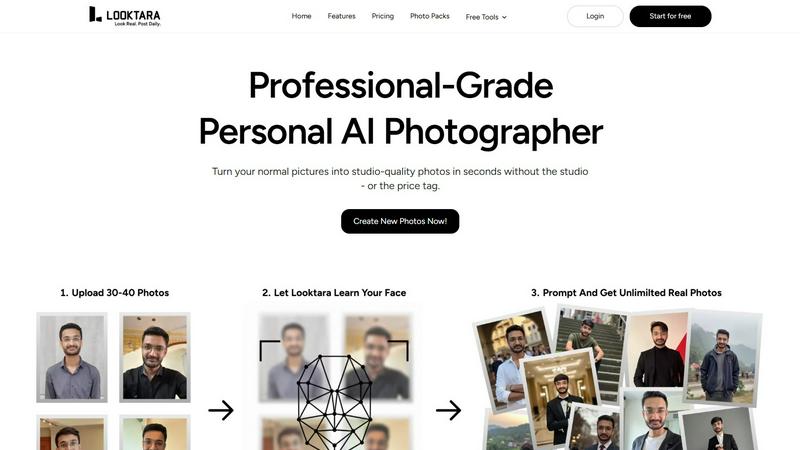
Looktara empowers you to create authentic, professional photos in your unique style with your own private AI.
Last updated: February 28, 2026

poseup
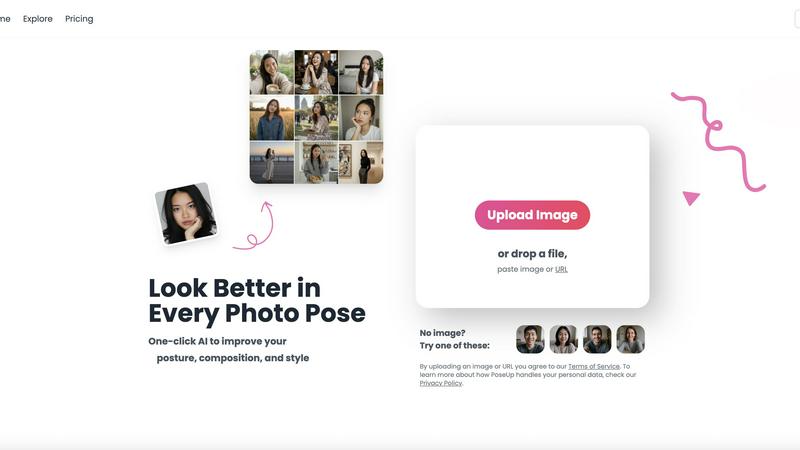
PoseUp uses AI to effortlessly enhance your photos by improving posture, composition, and style with a single click.
Last updated: March 1, 2026
Visual Comparison
Looktara
poseup
Feature Comparison
Looktara
Personalized AI Model
Looktara creates a dedicated AI model that learns specifically from your uploaded images. This personalization ensures that the generated photos represent you authentically, capturing your unique features and style.
Instant Photo Generation
With Looktara, you can generate a professional-grade photo in just about 5 seconds. This rapid turnaround allows you to meet tight deadlines and spontaneous needs without compromising on quality.
Context-Aware Styling
The AI understands the context of your request, ensuring that the generated images match the specific tone and setting you describe. This feature helps maintain your personal brand's consistency across various platforms.
High-Quality Output
Looktara produces images that avoid the common issues found in typical AI-generated photos, such as awkward posing or unrealistic skin tones. The results are natural, professional, and visually appealing, making them suitable for any professional use.
poseup
One-Click Enhancement
PoseUp's standout feature is its one-click enhancement capability. This allows users to instantly improve their photos by correcting posture, optimizing composition, and enhancing visual appeal. No prior experience is required, making it accessible for everyone.
Advanced AI Analysis
The platform employs cutting-edge AI technology to analyze key elements of photographs. This includes assessing lighting, framing, and pose, enabling the tool to suggest intelligent adjustments that enhance the overall quality of the image.
Versatile Use Cases
PoseUp is designed for a variety of photography scenarios, from casual lifestyle shots to professional headshots and fitness imagery. Its versatility ensures that users can apply enhancements across different contexts, making it a valuable tool for diverse audiences.
User-Friendly Interface
With an easy-to-navigate interface, PoseUp ensures a seamless user experience. Users can upload images in various formats, including JPG, PNG, WEBP, and HEIC, making it easy to get started on enhancing their photos without any hassle.
Use Cases
Looktara
Social Media Branding
Looktara is perfect for individuals who need high-quality images for their social media profiles. Whether for LinkedIn, Instagram, or Twitter, the generated photos enhance your online presence and personal brand.
Professional Presentations
If you need a polished image for a keynote presentation, Looktara delivers professional-grade photos that reflect your authority and expertise without the hassle of hiring a photographer.
Client Newsletters
For businesses looking to maintain a strong visual appeal in client communications, Looktara can provide personalized images that resonate with your audience, ensuring that your newsletters stand out.
Dating Profiles
In the world of online dating, having an authentic and appealing profile photo is crucial. Looktara allows you to generate images that reflect your personality and style, helping you make a memorable first impression.
poseup
Social Media Content Creation
For social media creators, PoseUp serves as an excellent tool to enhance the quality of their images. By improving poses and compositions, users can create visually striking content that stands out in crowded feeds and attracts more engagement.
Professional Portraits
Photographers can utilize PoseUp to refine portraits for clients, ensuring that every shot meets the highest standards. With automatic posture correction and composition enhancements, photographers can focus more on creativity and less on editing.
Fitness and Wellness Imagery
Fitness enthusiasts can benefit from PoseUp by generating compelling images that showcase their workouts or transformations. The tool helps create dynamic poses and visually appealing compositions that resonate with audiences interested in health and wellness.
Family and Group Photos
PoseUp is perfect for families looking to capture memorable moments without the stress of traditional photography. The tool enhances group poses and ensures everyone looks their best, making family gatherings more enjoyable and memorable.
Overview
About Looktara
Looktara is a groundbreaking personal AI photographer that caters specifically to individuals seeking authentic and professional imagery. Unlike generic AI image generators that often produce unrealistic results, Looktara creates a unique, encrypted model tailored to replicate only you. The user-friendly process requires uploading approximately 30 personal photos, after which Looktara trains your AI model in about 10 minutes. This personal photographer is available on demand for a variety of professional needs, from social media posts to presentations. By simply providing a text prompt detailing the desired tone and setting, Looktara generates a high-quality, studio-grade photo in roughly 5 seconds. It excels at avoiding common pitfalls associated with AI imagery, such as unnatural skin textures or eerie facial expressions, ensuring that the results are genuine and contextually appropriate. Looktara is ideal for professionals, content creators, and anyone looking to maintain a strong personal brand online, offering a scalable solution for consistent visual content that conveys the right emotional weight—whether it’s authority, warmth, or casual authenticity.
About poseup
PoseUp is an innovative AI-powered photo enhancement platform that aims to bridge the gap between ordinary snapshots and professional-quality portraits. Designed for users ranging from casual photographers to social media influencers, PoseUp leverages advanced artificial intelligence to automatically analyze and enhance core photo elements, including pose, posture, and composition, all with a single click. This tool tackles common frustrations related to photography, such as awkward stances, poor framing, and unflattering angles. By eliminating the need for expensive cameras, professional training, or complex editing software, PoseUp empowers users to effortlessly transform their images into stunning visual representations. Whether you are capturing family moments, taking professional headshots, or curating content for social media, PoseUp provides instant enhancements that elevate your imagery. Its intuitive design and seamless functionality make it an indispensable resource for anyone looking to present their best selves, regardless of their photography experience.
Frequently Asked Questions
Looktara FAQ
How does Looktara ensure the authenticity of generated photos?
Looktara’s unique approach involves creating a personalized AI model based on your own photos, allowing it to replicate your features and style accurately, resulting in genuinely authentic images.
What types of photos can I request from Looktara?
You can request a wide variety of photos, including professional headshots, casual portraits, themed images for social media, and contextually relevant visuals for presentations or newsletters.
Is my data safe with Looktara?
Yes, Looktara employs advanced encryption methods to ensure that your uploaded images and personal data remain secure and private. Only your dedicated AI model is trained on your data.
Can I update my personal model with new photos?
Absolutely! Looktara allows you to update your AI model whenever you wish by uploading new images, ensuring that your generated photos can evolve with your changing style and preferences.
poseup FAQ
How does PoseUp enhance my photos?
PoseUp uses advanced AI algorithms to analyze and optimize key elements of your photos, including pose, posture, and composition. This results in improved visual appeal with just one click.
Is PoseUp easy to use for beginners?
Absolutely! PoseUp is designed with a user-friendly interface that makes it accessible for beginners. You can simply upload your image and let the AI do the work, requiring no prior photography or editing experience.
What types of images can I upload to PoseUp?
You can upload images in various formats, including JPG, PNG, WEBP, and HEIC, with a maximum file size of 5MB per image. This flexibility makes it easy to enhance a wide range of photos.
Can PoseUp be used for professional photography?
Yes, PoseUp is an excellent tool for both amateur and professional photographers. It enhances images quickly and effectively, allowing professionals to focus on their creative vision while ensuring high-quality results.
Alternatives
Looktara Alternatives
Looktara is an innovative personal AI photographer that creates professional and authentic images tailored specifically to individual users. This tool operates within the generative art category, utilizing a unique private AI model trained exclusively on the photos provided by the user. As more people seek visually engaging content for their personal brands or professional needs, they often explore alternatives due to factors such as pricing, the range of features, or specific platform compatibility. When searching for alternatives to Looktara, users should consider several key aspects. These include the level of personalization offered, the security of the AI model, the speed of image generation, and the overall quality of the output. Additionally, evaluating how well the alternative meets unique creative requirements and the user experience can guide users toward an option that aligns with their goals for professional imagery.
poseup Alternatives
PoseUp is an innovative AI-powered photo enhancement platform that specializes in improving posture, composition, and style with a single click. By addressing the common frustrations that arise from subpar photography, it aims to bridge the gap between everyday snapshots and professional-quality images. Users often seek alternatives to PoseUp due to various reasons, including pricing, specific features that may better suit their needs, or compatibility with different platforms. When searching for a suitable alternative, it is essential to consider factors such as ease of use, the sophistication of AI technology, pricing plans, and the range of features offered. Users should also assess the quality of enhancements, customer support, and compatibility with different devices to ensure they find the best fit for their photography needs.