
LLMWise vs URL to Any
Side-by-side comparison to help you choose the right AI tool.

LLMWise
LLMWise offers a single API to seamlessly access and compare multiple AI models, charging only for what you use.
Last updated: February 28, 2026

URL to Any
Effortlessly convert any URL into multiple formats like PDF, Markdown, and images with URL to Any’s all-in-one toolset.
Last updated: February 28, 2026
Visual Comparison
LLMWise

URL to Any
Feature Comparison
LLMWise
Smart Routing
LLMWise employs advanced smart routing to ensure that every prompt is directed to the most appropriate model. For instance, coding queries can be sent to GPT, while creative tasks are routed to Claude, and translations are handled by Gemini. This feature maximizes efficiency and output quality by leveraging the strengths of each model.
Compare & Blend
The compare and blend feature allows users to run prompts across different models side-by-side, enabling direct comparison of responses. Users can blend outputs from multiple models into a single, cohesive answer, enhancing the overall quality of the results. Additionally, the Judge mode evaluates outputs to determine which model provides the best response.
Resilient Failover
LLMWise is built with resilience in mind, featuring a circuit-breaker failover system that automatically reroutes requests to backup models if a primary provider experiences downtime. This ensures that applications remain operational and reliable, protecting users against interruptions.
Test & Optimize
Developers can utilize LLMWise's comprehensive benchmarking suites and batch tests to optimize performance based on speed, cost, or reliability. Automated regression checks are also included to ensure that updates do not introduce new issues, enabling continuous improvement of AI integrations.
URL to Any
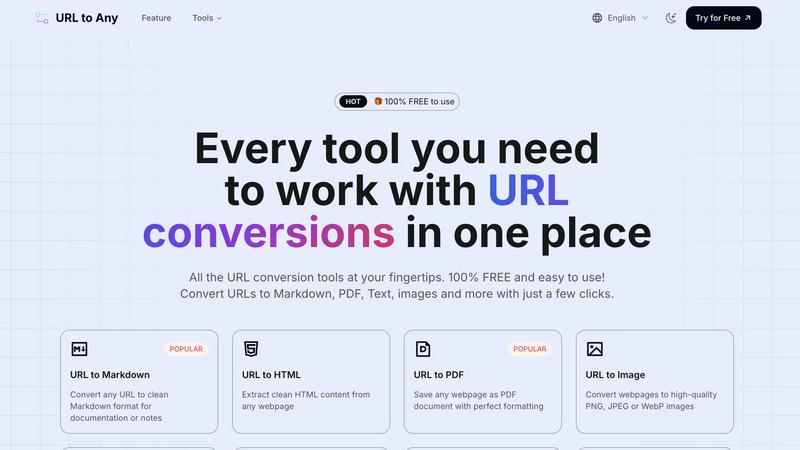
URL to Markdown
The URL to Markdown feature allows users to convert any webpage into clean Markdown format. This is particularly useful for documentation and note-taking, as Markdown is widely used in various content management systems and platforms, enabling seamless integration and formatting.
URL to PDF
With the URL to PDF feature, users can save any webpage as a PDF document while maintaining perfect formatting. This is ideal for preserving the layout and structure of web content for offline access or sharing, ensuring that important information is always at hand.
URL to Image
The URL to Image feature enables users to convert webpages into high-quality images, available in formats such as PNG, JPEG, or WebP. This is especially beneficial for creating visual references or sharing content on social media and other platforms in a more engaging format.
URL to QR Code
The URL to QR Code feature allows users to generate QR codes from any URL quickly and easily. This is perfect for marketing campaigns, presentations, or any situation where sharing a link in a scannable format is required, making it easier for others to access content.
Use Cases
LLMWise
Application Development
LLMWise is ideal for application developers who require various AI functionalities without managing multiple subscriptions. By leveraging a single API, developers can integrate diverse LLM capabilities into their applications, enhancing user experiences with tailored responses.
Content Creation
For content creators, LLMWise offers a powerful tool to generate high-quality written material. Whether writing blogs, social media posts, or marketing copy, users can utilize different models to refine their content, ensuring creativity and accuracy.
Translation Services
Businesses that require translation services can benefit from LLMWise's intelligent routing to the best translation models. This feature ensures that translations are not only accurate but also contextually appropriate, enhancing communication across languages.
Research and Analysis
Researchers can utilize LLMWise to gather insights and synthesize information from multiple models. The ability to compare and blend responses allows for a more comprehensive analysis, leading to better-informed conclusions and recommendations.
URL to Any
Saving Research Material
Researchers and students can utilize URL to Any to save important web content in their preferred format, whether it's as a PDF for printing or Markdown for note-taking. This simplifies the process of gathering and organizing information for projects.
Content Creation
Content creators can leverage the tool to convert articles and web pages into Markdown or HTML for their blogs and websites. This enables them to streamline their workflow and focus on crafting engaging narratives without getting bogged down by formatting issues.
Visual Presentations
Professionals preparing presentations can convert relevant web pages into images or PDFs to include in their slides. This ensures that information is visually appealing and accessible, enhancing the overall quality of the presentation.
Quick Sharing
Marketers and social media managers can use the URL to QR Code feature to generate QR codes for campaigns or events. This allows for quick distribution and easy access to digital content, driving engagement and interaction with their audience.
Overview
About LLMWise
LLMWise is an innovative API solution designed to simplify the complexities of working with multiple AI language models. In a landscape where businesses often juggle various AI providers, LLMWise streamlines this process by offering access to every major large language model (LLM) through a single API. Key players like OpenAI, Anthropic, Google, Meta, xAI, and DeepSeek are all accessible via intelligent routing that optimally matches each prompt to the most suitable model. Whether you need coding assistance, creative writing, or translations, LLMWise ensures that you leverage the best AI for each task. This solution is particularly beneficial for developers and businesses looking to enhance their applications without incurring the overhead of managing multiple subscriptions or API keys. The platform provides robust features like model comparison, blending outputs for superior results, and automatic failover to backup models, ensuring your applications remain resilient and reliable. With LLMWise, you can focus on innovation while reducing costs and complexity.
About URL to Any
URL to Any is a versatile and user-friendly web content conversion tool designed to simplify the way users interact with online content. This powerful tool allows users to effortlessly transform any webpage into a wide array of formats including Markdown, PDF, images, HTML, and even QR codes. It caters to a diverse audience ranging from content creators and document managers to developers and educators who frequently need to repurpose web content for various projects. The primary value proposition of URL to Any lies in its ability to eliminate the complexities often associated with content conversion, enabling users to focus on what matters most: their work. With no registration requirements, users can paste a URL and receive their desired format in seconds, making it an ideal choice for those who prioritize efficiency. Additionally, as a completely free service, URL to Any stands out in the crowded market of content conversion tools, streamlining workflows and enhancing productivity across multiple domains.
Frequently Asked Questions
LLMWise FAQ
How does LLMWise handle model failures?
LLMWise features a circuit-breaker failover system that automatically reroutes requests to backup models when a primary provider is down. This ensures that your applications remain operational without interruption.
Can I use my existing API keys with LLMWise?
Yes, LLMWise supports the "Bring Your Own Keys" (BYOK) feature, allowing users to integrate their existing API keys at provider prices. This flexibility helps reduce costs and streamlines the transition to LLMWise.
Is there a subscription fee for using LLMWise?
LLMWise operates on a pay-per-use model without any subscription fees. Users start with 20 free credits and can utilize additional functionalities based on their usage, making it cost-effective.
How can I compare outputs from different models?
The compare and blend feature in LLMWise allows users to run the same prompt across different models and view their responses side-by-side. This helps identify the best model for specific tasks and improves overall output quality.
URL to Any FAQ
Is URL to Any free to use?
Yes, URL to Any is completely free to use. Users can access all conversion features without any registration or subscription fees, making it highly accessible.
What formats can I convert URLs into?
URL to Any supports multiple output formats, including Markdown, PDF, HTML, images (PNG, JPEG, WebP), text, JSON, XML, and even QR codes, providing users with a comprehensive toolkit for their conversion needs.
Do I need to install software to use URL to Any?
No, URL to Any operates entirely in the cloud, meaning that users do not need to install any software on their devices. This allows for easy access from any device with internet connectivity.
How quickly can I get my converted content?
The processing speed of URL to Any is optimized for efficiency, allowing users to receive their converted content in just seconds. This quick turnaround is perfect for those who need to work swiftly without compromising on quality.
Alternatives
LLMWise Alternatives
LLMWise is a versatile API designed to streamline access to various large language models (LLMs) from leading providers. By offering a single interface to access multiple AI models like GPT, Claude, and Gemini, LLMWise simplifies the process for developers, enabling them to utilize the best model for each specific task without the hassle of managing multiple accounts or subscriptions. Users often seek alternatives to LLMWise due to factors such as pricing structures, specific feature sets, or unique platform needs that may not be fully addressed by this API. When choosing an alternative, it’s important to consider aspects like ease of integration, support for various models, flexibility in pricing, and the ability to optimize performance based on specific use cases, ensuring that the alternative meets both technical requirements and business objectives.
URL to Any Alternatives
URL to Any is an innovative web content conversion tool designed to effortlessly transform any URL into a variety of formats. Positioned within the AI Assistants category, it caters to content creators, document managers, and developers who require a seamless solution for their web content needs. Users often seek alternatives to such tools due to concerns about pricing, feature sets, or compatibility with specific workflows and platforms. Factors to consider when choosing an alternative include ease of use, the range of supported formats, and the overall cost of the service, ensuring that users find the best fit for their unique requirements. --- [{"question": "What is URL to Any?", "answer": "URL to Any is a web content conversion tool that allows users to transform any webpage into multiple formats, such as Markdown, PDF, and images."},{"question": "Who is URL to Any for?", "answer": "URL to Any is designed for content creators, document managers, developers, and anyone who frequently interacts with web content."},{"question": "Is URL to Any free?", "answer": "Yes, URL to Any offers its conversion services completely free of charge, with no hidden fees or premium tiers."},{"question": "What are the main features of URL to Any?", "answer": "Main features of URL to Any include an easy-to-use interface, the ability to convert URLs into various formats, and a commitment to providing a completely free service."}]