
Genstory vs Image3D AI
Side-by-side comparison to help you choose the right AI tool.

Genstory
Unlock your creativity with Genstory, the AI tool that transforms your ideas into stunning novels, comics, and videos.
Last updated: February 27, 2026

Image3D AI
Image3D AI instantly transforms any 2D image into a high-precision 3D model for printing or games.
Last updated: March 1, 2026
Visual Comparison
Genstory
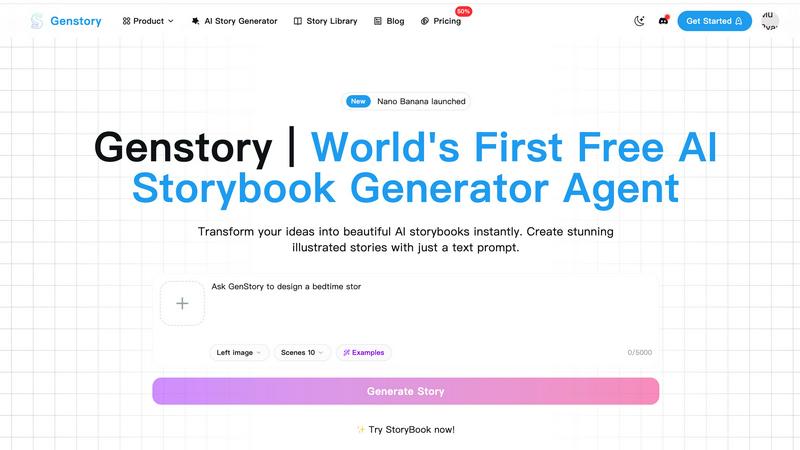
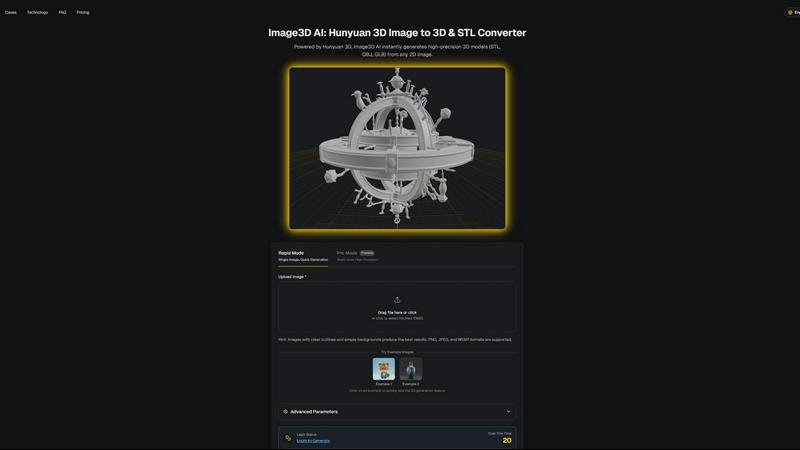
Image3D AI
Feature Comparison
Genstory
Lightning-Fast Generation
Genstory’s AI story generator can create a complete storybook in mere seconds. From initial text prompts to finalized illustrations, the entire process is streamlined, allowing users to experience rapid story creation without sacrificing quality.
Simple and Intuitive Interface
With Genstory, there is no need to learn complicated commands or technical jargon. The user-friendly interface allows for natural conversations with the AI, making it easy for anyone, regardless of tech-savviness, to generate captivating stories effortlessly.
Multi-Dimensional Output
Genstory provides flexibility in how stories can be enjoyed. Users can choose to generate their stories as PDFs for easy printing or create interactive web stories, making sharing with friends and family a breeze.
Beautiful Illustrations
Every story generated by Genstory is paired with stunning AI-created illustrations that enhance the narrative. These visuals are crafted to complement the text, ensuring that readers are not only engaged by the story but also captivated by the artwork.
Image3D AI
Dual Generation Modes (Rapid & Pro)
Image3D AI caters to different project needs with two distinct operational modes. The Rapid Mode is designed for speed and simplicity, generating a 3D model from a single uploaded image in under a minute, perfect for quick concepts or simple objects. For projects demanding higher precision and physical accuracy, the Pro Mode utilizes multi-view images. By uploading several photos of an object from different angles (e.g., front, side, back), the AI performs a more comprehensive analysis, resulting in a superior, dimensionally accurate reconstruction ideal for professional 3D printing or detailed digital assets.
Multi-Format Export (STL, OBJ, GLB)
Understanding that a 3D model's utility lies in its compatibility, Image3D AI exports directly to the industry's most essential file formats. Users can download their creations as STL files, the universal standard for 3D printing; as OBJ files, widely compatible with traditional 3D editing suites like Maya and Blender for further refinement; or as GLB files, the modern, compact format perfect for web applications, AR experiences, and game engines, as it contains both model and texture data in a single file.
Advanced Parameter Controls
Beyond a simple one-click conversion, the platform offers users a degree of creative and technical control through advanced parameters. While the specifics are hinted at with modes like "Normal," "Low Poly," and "Geometry," this feature allows for tailoring the output. Users can prioritize mesh detail for printing, optimize for lower polygon counts for game performance, or balance texture quality with generation speed, ensuring the final model is optimized for its intended use case.
No-Skill-Required Interface & Free Testing
A cornerstone of its accessibility is an exceptionally user-friendly interface that requires zero prior 3D modeling knowledge. The process is as simple as dragging and dropping an image. Furthermore, the platform encourages experimentation by offering a library of free example images that users can test with, requiring no login or credit expenditure. This risk-free trial allows anyone to immediately experience the power of AI-driven 3D conversion and understand the quality of results possible.
Use Cases
Genstory
For Parents
Parents can utilize Genstory to create personalized bedtime stories that feature their children as main characters. This not only fosters a love for reading but also strengthens the parent-child bond through shared storytelling experiences.
For Educators
Educators can employ Genstory to generate visual narratives that help explain complex concepts or stimulate creative writing prompts in classrooms. This is particularly beneficial in ESL and special education settings, where engaging content can enhance learning outcomes.
For Creative Writers
Aspiring writers can use Genstory to overcome writer's block or explore new narrative ideas. By simply entering a prompt, they can receive a full story that they can build upon, edit, or modify to suit their unique voice.
For Story Enthusiasts
Story enthusiasts looking to explore diverse genres can utilize Genstory to delve into different storytelling styles. Whether it's fantasy, adventure, or educational content, users can experiment with unlimited story possibilities guided by their creativity.
Image3D AI
Game Development & Asset Creation
For indie developers and large studios alike, Image3D AI accelerates the prototyping and production pipeline. Concept art, character designs, and environmental props can be converted into base 3D meshes in seconds. These assets, especially when generated with PBR material support, provide a fantastic starting point that can be directly imported into engines like Unity or Unreal Engine for further detailing, texturing, and integration, drastically reducing initial modeling time.
E-commerce & Interactive Product Visualization
Online retailers can leverage this technology to create immersive shopping experiences. By converting standard 2D product photos into interactive 3D models, customers can rotate, zoom, and inspect items from every angle on a website. This "image to 3D" capability is also the first step toward creating Augmented Reality (AR) previews, allowing customers to visualize products in their own space, which can significantly boost engagement and reduce return rates.
3D Printing & Rapid Prototyping
The platform serves as a powerful "image to STL converter" for makers, hobbyists, and engineers. A simple sketch, a logo, or a photo of an object can be transformed into a watertight, manifold STL file ready for slicing and 3D printing. This opens up rapid prototyping to a much wider audience, enabling the physical creation of custom parts, artistic sculptures, educational models, and personalized gifts directly from a 2D idea.
Architectural Visualization & Design
Architects and interior designers can use Image3D AI to quickly generate basic 3D forms from sketches, floor plans, or inspiration images. While not a replacement for detailed CAD software, it provides a rapid method to create massing models or simple contextual assets for presentations and client reviews. This speeds up the early conceptual phases, allowing for faster iteration and more efficient communication of spatial ideas before committing to detailed modeling.
Overview
About Genstory
Genstory is an innovative AI story generator that leverages advanced technology to transform your creative ideas into beautifully illustrated digital storybooks. Designed for parents, educators, and storytellers alike, Genstory allows users to generate complete storybooks with just a simple natural language prompt. Whether you want to craft a unique bedtime story for your child, create engaging educational material for a classroom, or simply explore your creativity, Genstory makes it accessible and uncomplicated. The platform not only provides compelling narratives but also enriches them with vivid illustrations, making the storytelling experience immersive and visually appealing. With Genstory, the possibilities for storytelling are endless, empowering users to bring their wildest imaginations to life in a matter of seconds.
About Image3D AI
Image3D AI represents a paradigm shift in the digital creation landscape, fundamentally altering how three-dimensional content is generated. At its core, it is a sophisticated AI-powered platform that transforms static, two-dimensional images into fully-realized, production-ready 3D models in a matter of seconds. This is not a simple extrusion tool; it leverages Tencent's groundbreaking Hunyuan 3D engine to infer depth, geometry, and texture from flat visuals, producing high-fidelity assets with remarkable accuracy. The tool democratizes 3D modeling, dismantling the steep technical and time barriers traditionally associated with software like Blender or Maya. Its primary value proposition is immense time savings and enhanced creative productivity, allowing professionals and hobbyists alike to bypass weeks of manual labor. Whether you are a game developer needing rapid asset iteration, a designer creating AR experiences, a 3D printing enthusiast bringing sketches to life, or an e-commerce manager seeking interactive product showcases, Image3D AI provides a seamless, intuitive bridge from concept to three-dimensional reality. It empowers users to focus on the creative vision and application of the model, rather than the arduous technical process of building it from scratch.
Frequently Asked Questions
Genstory FAQ
How does Genstory work?
Genstory operates by allowing users to input a simple text prompt describing their story idea. The advanced AI then generates a complete storybook, complete with engaging text and illustrations, in a matter of seconds.
Can I customize the stories generated by Genstory?
Yes, after the initial story is generated, users can review and customize the content. You can adjust the text, illustrations, and overall style to better fit your vision or preferences.
What formats can I save my stories in?
Genstory supports multiple output formats. You can save your stories as PDFs for printing or as interactive web stories for sharing online with friends and family.
Is there a limit to the number of stories I can generate?
There is no specified limit to the number of stories you can create with Genstory. Users are encouraged to experiment and explore various story ideas, allowing for endless creative possibilities.
Image3D AI FAQ
What image formats and quality work best for conversion?
For optimal results, upload high-contrast images (PNG, JPEG, or WEBP) with clear, well-defined outlines and a simple, uncluttered background. The subject should be in focus with good lighting. Avoid blurry, dark, or overly complex images where the main object is obscured. Following these best practices dramatically increases the AI's ability to accurately interpret shape and depth.
What is the difference between Single Image and Multi-view modes?
Single Image mode (Rapid) uses AI inference to generate a 3D model from one picture, ideal for logos, sketches, or objects with an obvious shape. Multi-view mode (Pro) requires several photos of a real-world object from different angles. This provides the AI with more geometric data, leading to a physically accurate and higher-fidelity reconstruction, which is essential for precise 3D printing or detailed digital twins.
Which output file format should I choose?
The choice depends on your intended use. Select .STL if you plan to 3D print the model. Choose .OBJ if you intend to edit the model further in traditional 3D software like Blender, 3ds Max, or ZBrush. Opt for .GLB if you need the model for web display, AR/VR applications, or game engines, as it is a compact, modern format that includes textures and materials in a single file.
Is there a free tier or way to test the tool?
Yes, you can test Image3D AI's core functionality without creating an account or paying. The platform provides a selection of free example images that you can click to instantly generate a 3D model. This allows you to evaluate the speed, quality, and workflow of the tool before committing to any paid plans or uploading your own images.
Alternatives
Genstory Alternatives
Genstory is an innovative AI-driven platform that allows users to instantly create novels, comics, and cinematic videos. It falls within the category of design tools, where creativity meets technology, enabling users to generate illustrated digital picture books through simple, natural language prompts. Users often seek alternatives to Genstory for various reasons, including pricing concerns, desired features, or particular platform compatibility that better aligns with their needs. When choosing an alternative, it’s crucial to consider factors such as ease of use, the quality of generated content, platform accessibility, and any additional capabilities that enhance the storytelling experience.
Image3D AI Alternatives
Image3D AI is a specialized design tool that leverages artificial intelligence to convert standard 2D images into detailed 3D models. It simplifies a traditionally complex process, making 3D asset creation accessible for 3D printing, game development, and digital content creation. Users often explore alternatives for various practical reasons. Cost is a primary consideration, as budget constraints or pricing models may not align with every user's needs. Others might seek different feature sets, such as specific export formats, animation capabilities, or integration with other software in their workflow. Platform compatibility, whether desktop versus web-based or operating system requirements, also drives the search for different solutions. When evaluating other options, it's crucial to assess your core requirements. Consider the primary output you need, such as print-ready precision or game-engine optimized assets. Examine the balance between automation and manual control, the learning curve involved, and the overall value proposition regarding output quality, speed, and cost.