
Filator vs qtrl.ai
Side-by-side comparison to help you choose the right AI tool.

Filator
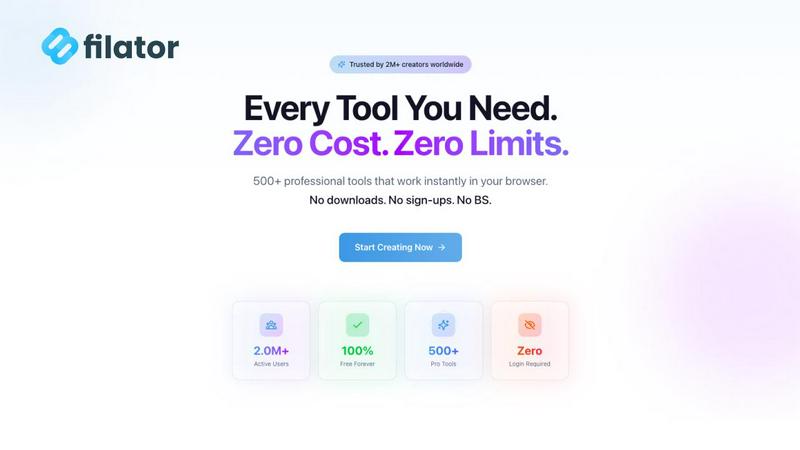
Filator is a free all-in-one platform for creating, converting, and automating tasks with AI, PDFs, and images.
Last updated: March 1, 2026

qtrl.ai
qtrl.ai scales QA with AI agents while ensuring full team control and governance.
Last updated: March 4, 2026
Visual Comparison
Filator
qtrl.ai

Feature Comparison
Filator
Instant Results
Filator provides users with immediate access to professional results without any waiting or queues. Whether you are converting files or generating content, you can expect prompt outcomes that meet your needs in real-time.
Zero Signup Requirement
Forget about tedious registration processes. Filator allows users to start using tools immediately without requiring accounts, email verification, or passwords, making it incredibly user-friendly and accessible.
50+ Free Tools
Filator boasts a growing collection of over 50 professional-grade tools that can be used completely free of charge. Users can access these tools without hidden fees or watermarks, guaranteeing high-quality outputs every time.
Powerful Automation Workflows
Filator enables users to chain tools together to automate repetitive tasks efficiently. With smart workflows, users can save significant time by connecting various utilities and streamlining their processes seamlessly.
qtrl.ai
Enterprise-Grade Test Management
qtrl provides a robust, centralized hub for all QA artifacts. It enables teams to create, organize, and manage test cases, plans, and runs with full traceability back to requirements. This ensures clear audit trails, supports compliance needs, and offers a single source of truth for both manual and automated testing workflows, giving managers complete oversight and control over the quality process.
Autonomous QA Agents
This core feature introduces intelligent automation through AI agents that execute high-level instructions in real browsers. Teams can describe a test in plain English, and the agent performs the actions across defined environments. These agents operate at scale, run continuously or on-demand, and function within strict governance rules, providing automation power without the fragility of traditional script maintenance.
Progressive Automation & Adaptive Memory
qtrl champions a step-by-step journey to automation. Teams begin with human-written instructions, then progress to AI-generated tests, with full review capabilities at each stage. The platform's Adaptive Memory builds a living knowledge base of your application, learning from every interaction and execution to power smarter, more context-aware test suggestions and maintenance over time.
Multi-Environment Execution & Governance
The platform supports secure testing across development, staging, and production environments. It manages per-environment variables and encrypted secrets, ensuring sensitive data is never exposed to AI agents. Built-in governance features like permissioned autonomy levels, full agent visibility, and transparent decision-making ensure enterprise-ready security and foster trust in the automated processes.
Use Cases
Filator
Content Creation for Marketers
Marketers can leverage Filator's AI-powered tools to generate engaging content quickly. Whether crafting social media posts or writing blog articles, Filator provides instant solutions to enhance marketing efforts.
PDF Management for Professionals
Professionals dealing with numerous documents can utilize Filator's PDF tools to merge, split, or convert PDFs effortlessly. This makes managing contracts, reports, and presentations simple and efficient.
Image Editing for Designers
Designers can take advantage of Filator's image tools to edit photos, remove backgrounds, or convert file formats without switching between multiple applications, allowing for a smoother workflow.
Social Media Engagement
Social media managers can utilize Filator's social media tools to create fake posts, generate QR codes, and download video thumbnails, enhancing their engagement strategies and content planning without hassle.
qtrl.ai
Scaling Beyond Manual Testing
For QA teams overwhelmed by repetitive manual test cycles, qtrl offers a graceful off-ramp. Teams can start by structuring their existing manual cases in the platform and then progressively introduce automation for the most tedious flows using autonomous agents, dramatically increasing test coverage and execution speed without a steep learning curve or loss of control.
Modernizing Legacy QA Workflows
Companies stuck with outdated, siloed, or script-heavy automation frameworks can use qtrl to consolidate and modernize. The platform integrates test management and execution, reduces maintenance burden via AI, and provides the dashboards and traceability missing from legacy setups, enabling a cohesive, data-driven quality strategy.
Ensuring Governance in Enterprise AI Adoption
Enterprises that require strict compliance, audit trails, and security for any AI tool find a safe partner in qtrl. Its "governance by design" philosophy, with features like permissioned autonomy, full visibility into agent actions, and encrypted secret management, allows large organizations to harness AI's power for QA without compromising on oversight or regulatory requirements.
Accelerating Product-Led Engineering Teams
Fast-moving product and engineering teams need to ensure quality without slowing down deployment. qtrl fits seamlessly into CI/CD pipelines, provides continuous quality feedback, and allows developers to create and run tests via simple instructions, enabling rapid iteration with confidence and shifting quality left in the development process.
Overview
About Filator
Filator is an innovative digital workspace that consolidates over 500 professional-grade online utilities into a single, seamless platform. Designed for developers, designers, marketers, and professionals across more than 150 countries, Filator enables users to create, convert, and automate various tasks directly within their browser, eliminating the need for multiple tools. The platform operates on the philosophy of radical respect for user privacy and time, ensuring that users can access tools without mandatory signups, premium paywalls, or intrusive data collection. With advanced AI-powered generators, PDF processors, image converters, and developer utilities, every tool is engineered for instant, client-side execution, meaning that sensitive data never leaves the user's device. This commitment to security and user sovereignty empowers over 2 million users to enhance their productivity through an intuitive interface that prioritizes speed, quality, and efficiency.
About qtrl.ai
qtrl.ai is a modern, progressive QA platform engineered to solve the fundamental tension in software quality assurance: the need for both speed and control. It is not merely another test automation tool, but a unified platform that seamlessly integrates enterprise-grade test management with powerful, trustworthy AI automation. At its heart, qtrl provides a centralized command center for all quality activities. Teams can meticulously organize test cases, plan and execute test runs, trace requirements to ensure comprehensive coverage, and monitor quality health through real-time dashboards. This structured foundation offers engineering leads and QA managers unparalleled visibility into testing status, risk areas, and release readiness.
Where qtrl truly distinguishes itself is through its philosophy of "progressive automation." Rejecting the risky, all-or-nothing approach of "black-box" AI, qtrl allows teams to start with familiar, manual test management. When ready, they can incrementally leverage intelligent autonomous agents. These agents can generate robust UI tests from simple English instructions, autonomously maintain them against application changes, and execute them at scale across multiple browsers and environments. This makes qtrl an ideal solution for product-led engineering teams seeking velocity, QA groups transitioning from manual processes, organizations modernizing legacy workflows, and enterprises that demand strict compliance, audit trails, and governance. Ultimately, qtrl bridges the gap between the slow pace of manual testing and the brittle, expensive complexity of traditional scripted automation, offering a trusted, scalable path to intelligent quality assurance.
Frequently Asked Questions
Filator FAQ
What types of tools does Filator offer?
Filator offers a diverse range of tools categorized into AI tools, PDF tools, image tools, social media tools, and QR/barcode generators, ensuring users can find solutions for various tasks.
Is there a cost associated with using Filator?
Filator provides over 50 tools for free, with premium plans available that offer additional features and higher usage limits, making it accessible for both casual and professional users.
How does Filator ensure user privacy and data security?
Filator prioritizes user privacy by ensuring that all processing occurs client-side, meaning that data never leaves the user's device, thus maintaining confidentiality and security at all times.
Can I automate tasks within Filator?
Yes, Filator allows users to create powerful workflows by chaining tools together, enabling automation of repetitive tasks and significantly improving efficiency and productivity.
qtrl.ai FAQ
How does qtrl.ai's AI differ from other "autonomous" testing tools?
qtrl.ai rejects the "black-box" AI-first approach that can be unpredictable and risky. Instead, it employs a progressive, trust-earning model. The AI operates as assistive agents that execute clear instructions or generate tests that are always reviewable and editable by humans. Governance controls, full transparency into agent actions, and a focus on augmenting (not replacing) human oversight make its AI practical and trustworthy for real enterprise workflows.
Can we use qtrl.ai if we currently only do manual testing?
Absolutely. qtrl is explicitly designed for this scenario. You can begin by using it as a powerful test management system to organize your existing manual cases and plans. When you're ready, you can start automating specific tests using plain English instructions with the AI agents, allowing you to scale your efforts incrementally without a disruptive, all-at-once transition.
How does qtrl handle testing across different environments and with sensitive data?
qtrl provides secure, multi-environment execution capabilities. You can define various environments (dev, staging, prod) with their own variables. Crucially, sensitive data like passwords and API keys can be stored as encrypted secrets that are injected at runtime. These secrets are never exposed to the AI agents, ensuring security and compliance are maintained throughout the testing process.
What kind of integration and traceability does qtrl support?
qtrl is built for real-world workflows. It supports requirements management integration, allowing you to trace tests back to specific features or user stories for coverage analysis. It also offers CI/CD pipeline support for automated test execution as part of your build process. Furthermore, its centralized nature provides inherent traceability from test cases to execution results and defects, all visible in comprehensive dashboards.
Alternatives
Filator Alternatives
Filator is an innovative, all-in-one digital workspace platform that integrates over 500 professional-grade online utilities, catering to developers, designers, marketers, and various professionals across the globe. This free tool excels in providing AI, PDF, and image functionalities, allowing users to efficiently create, convert, and automate tasks directly from their web browsers. Users often seek alternatives to Filator due to various factors such as pricing, specific feature sets, or compatibility with their unique platform needs. When searching for alternatives, it is essential to consider aspects like user privacy, the breadth of available tools, ease of use, and the overall security of the platform. Understanding these elements will help users find a solution that best fits their requirements.
qtrl.ai Alternatives
qtrl.ai is a modern QA platform in the automation and dev tools space. It uniquely blends enterprise-grade test management with a progressive, trustworthy AI layer, allowing teams to scale their testing efforts while maintaining full control and governance over the process. Users often explore alternatives for various reasons. These can include budget constraints, the need for a different feature mix, or specific platform requirements like deeper integrations with an existing toolchain. Some teams may also seek a solution that is either purely manual, fully open-source, or takes a more aggressive, AI-first approach to automation. When evaluating alternatives, consider your team's primary goals. Key factors include the balance between structured test management and automation capabilities, the level of AI integration and transparency desired, and the importance of enterprise features like audit trails and compliance. The ideal choice should align with your team's maturity, from manual testing to advanced autonomous agents.