
dmaya vs Prompt Builder
Side-by-side comparison to help you choose the right AI tool.

dmaya
dMaya is an AI design platform that enables teams to create, iterate, and export client-ready UI designs at unprecedented speed.
Last updated: April 13, 2026

Prompt Builder
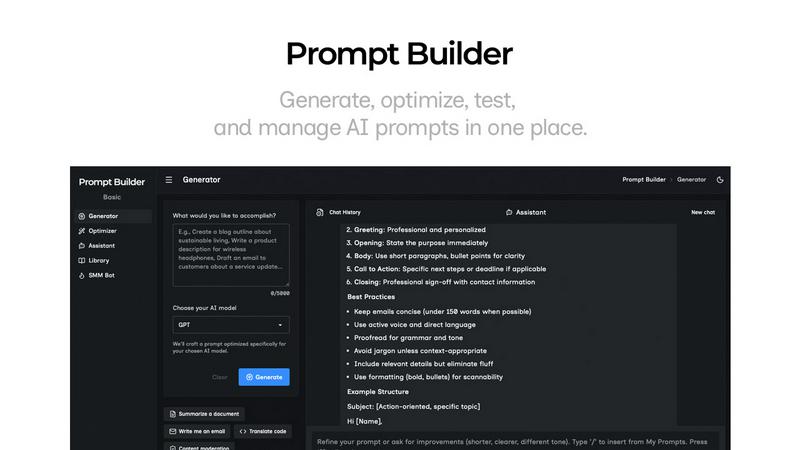
Generate, optimize, test, and manage AI prompts in one place. Turn an idea into a ready-to-use prompt in seconds.
Visual Comparison
dmaya
Prompt Builder
Overview
About dmaya
dMaya is an innovative design platform that revolutionizes the way agencies, teams, and freelancers approach UI design by prioritizing a design-first workflow. Unlike traditional AI tools that leap directly into coding, dMaya emphasizes the importance of thorough design planning before development begins. It empowers users to effortlessly generate professional UI designs through simple text descriptions, whether for a SaaS dashboard, e-commerce flow, or a mobile app. With dMaya, design iterations are instantaneous, enabling real-time adjustments to colors, layouts, typography, and more, all driven by a conversational AI agent. This seamless integration of design and iteration allows teams to obtain client feedback and approval in minutes instead of days, enhancing productivity and collaboration. Once designs are finalized, users can export them as clean HTML, CSS, and JavaScript code, ready for implementation in any preferred coding framework. dMaya is built for professionals who need to present, approve, and ship projects with confidence, ensuring that the design process is respected and optimized.
About Prompt Builder
Prompt Builder is a prompt engineering workspace for writing, testing, and saving prompts. Describe the task in plain English, and it helps you create a prompt that matches the model you choose. Start with a draft, refine it in chat, save or pin versions, then run them when you are ready. It works with GPT, Claude, Gemini, Llama, Mistral, DeepSeek, Grok, Perplexity, and more. You also get an Optimizer, an assistant for quick tests, and a library of reusable prompts and templates from the community. Turn an idea into a ready-to-use prompt in seconds. Refine it in chat, save it to your Library, and run it anytime.