

Prompt Builder
Prompt Builder lets you effortlessly create, refine, and manage AI prompts for top models like ChatGPT, saving time and boosting results.
About Prompt Builder
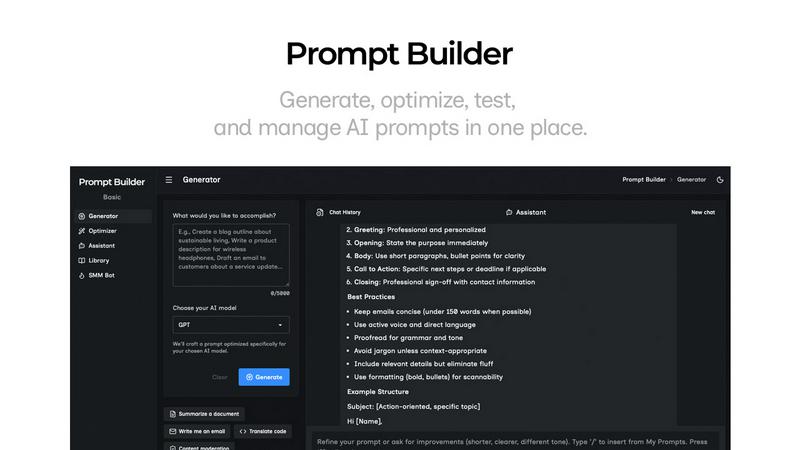
Prompt Builder is an innovative prompt engineering workspace designed to streamline the process of writing, testing, and saving prompts for various AI models. It is tailored for anyone who engages with AI, including content creators, developers, marketers, and researchers. The platform allows users to easily draft prompts, refine them in a built-in chat interface, and organize their best work within a personal library. One of the key advantages of Prompt Builder is its compatibility with a diverse range of AI models, such as GPT, Claude, Gemini, Llama, and more. The product's main value proposition lies in its ability to save users time by generating optimized prompts quickly, eliminating the tedious cycle of rewriting and testing. With features like an Optimizer for existing prompts, a library of reusable community templates, and a user-friendly chat workspace for rapid iterations, Prompt Builder empowers users to transform ideas into actionable prompts within seconds. This makes it an essential tool for maximizing productivity and achieving consistent, high-quality results from AI interactions.
Features of Prompt Builder
Prompt Generator
The Prompt Generator feature allows users to describe their ideas and select a target AI model, generating a professional-grade prompt tailored to that model. This ensures that the prompts are optimized for specific AI outputs, enhancing the effectiveness of the generated content.
Chat Refinement
Within the built-in chat workspace, users can refine their prompts through direct interaction with an assistant model. This feature enables quick iterations, allowing users to test and modify prompts based on immediate feedback, ensuring they achieve the desired outcomes.
Prompt Optimizer
The Prompt Optimizer takes existing prompts and enhances them, focusing on clarity, constraints, output format, and examples. Users can paste prompts from their library or input new ones, receiving improved versions in seconds, which can then be tested right away.
Prompt Library
The Prompt Library feature allows users to save, organize, and reuse their best prompts across various projects and teams. Users can search, filter, pin, edit, and delete prompts easily, ensuring that they have quick access to their most effective work.
Use Cases of Prompt Builder
Content Creation
Writers and marketers can utilize Prompt Builder to generate and refine content for blogs, social media, and marketing campaigns. By creating tailored prompts for different platforms, users can ensure that their messaging resonates with specific audiences.
Research Assistance
Researchers can leverage the tool to formulate precise prompts for extracting insights from AI models. The ability to quickly adjust and optimize prompts helps in obtaining accurate and relevant information for academic or professional inquiries.
Social Media Management
Social media managers can use the SMM Bot feature to create platform-ready posts for various channels like X, LinkedIn, and Instagram. The ability to refine posts in chat ensures that the content is engaging and aligns with audience expectations.
Team Collaboration
Teams can collaborate effectively by using the Prompt Library to share and build on each other's prompts. This communal approach encourages innovation and efficiency, as team members can quickly access and adapt successful prompts for their specific needs.
Frequently Asked Questions
What models does Prompt Builder support?
Prompt Builder supports a wide range of AI models, including GPT, Claude, Gemini, Llama, Mistral, DeepSeek, Grok, and Perplexity. This versatility allows users to generate prompts tailored to their preferred model.
How does the chat refinement work?
The chat refinement feature allows users to interact with an assistant model to refine their prompts. Users can receive instant feedback and make adjustments, facilitating a more efficient prompt development process.
Can I save my prompts for future use?
Yes, users can save their best prompts in the Prompt Library. This feature allows for easy organization, retrieval, and reuse of prompts across different projects and teams.
Is there a free trial available?
Prompt Builder offers a free plan that includes 25 assistant requests per month without requiring a credit card. This allows users to explore the tool and its features before committing to a paid plan.
Similar to Prompt Builder

Memorable Contact
Memorable Contact helps you remember people, save conversation details, find contacts using AI-powered search, and share digital business cards easily

GetYouTubeTranscript
Free YouTube transcripts on the web, a Chrome extension, and an API + MCP server so AI assistants can read YouTube.

Sayble
AI copilot that tells you what to say next on live sales calls, then writes the recap and follow-up.


