
Daily vs Never Drop
Side-by-side comparison to help you choose the right AI tool.

Daily is your simple planner to unload thoughts and find clarity without pressure.

Never Drop
NeverDrop instantly captures event leads and drafts personalized follow-ups to close deals faster.
Last updated: February 28, 2026
Visual Comparison
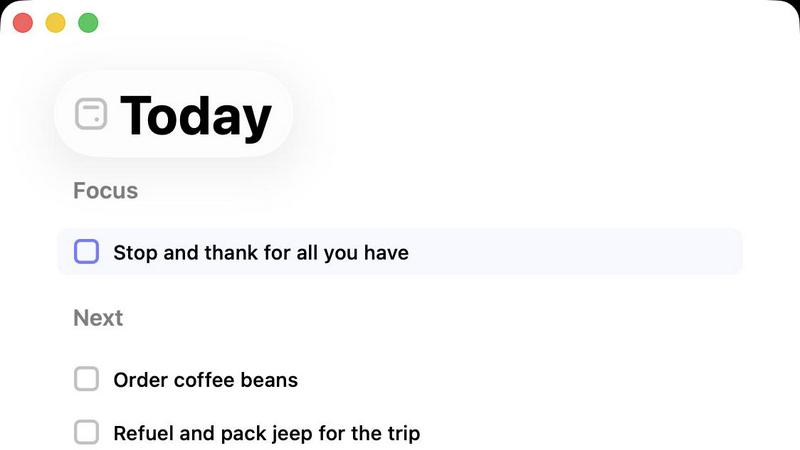
Daily
Never Drop

Feature Comparison
Daily
The Unstructured Brain Dump
Daily's foundational feature is a liberating, zero-friction capture system. It provides a dedicated space to instantly jot down any task, idea, or reminder the moment it enters your mind, completely free from the need to organize, prioritize, or file it. This act of mental offloading is therapeutic, reducing anxiety by ensuring nothing is forgotten. It creates a comprehensive, unsorted inventory of your commitments and thoughts, which you can later review with detachment, separating the urgent from the merely noisy.
The Intentional "Today" View
This is the heart of Daily's methodology. Unlike traditional planners that show all upcoming tasks, the Today view is a deliberately blank slate each morning. You actively choose items from your brain dump to bring into today's focus. This conscious act of selection forces prioritization based on present energy and context, not arbitrary lists. It creates a clean, manageable scope for the day, directly combating the overwhelm of an endless, rolling task list and promoting deep, sustained focus on what you've deemed truly important.
Gentle Task Carry-Forward
Tasks that are not completed or selected for the current day are not marked with glaring red overdue alerts. Instead, Daily employs a gentle, non-punitive system where unfinished items simply remain in your master list, ready to be considered again tomorrow. This removes the guilt and shame associated with "failed" productivity, reframing task management as a fluid, adaptive process. It acknowledges that priorities shift and energy levels fluctuate, allowing what matters to persist without pressure.
Purposefully Minimalist Design
The interface and functionality of Daily are stripped to the essentials by design. You will not find complex sub-tasks, color-coding, integrations, or elaborate calendars. This enforced minimalism is a feature, not a limitation. It eliminates decision fatigue and the temptation to over-organize, keeping the user's attention on the core practice: capturing thoughts and mindfully choosing daily actions. The calm, uncluttered environment itself supports the tool's goal of reducing mental noise.
Never Drop
AI-Powered Business Card Scanning
Gone are the days of manually typing details from a stack of cards. Never Drop's advanced Optical Character Recognition (OCR) technology allows users to simply snap a photo of any business card. The AI instantly and accurately extracts key details—name, company, title, phone number, and email—eliminating errors and saving invaluable time on the event floor. This foundational feature ensures contact data is digitized and ready for action within seconds of a meeting ending.
Intelligent Contact Enrichment & Email Finding
Business cards often lack direct contact information. Never Drop solves this by automatically searching for and appending verified work emails to a contact's profile using just the name and company. This eliminates tedious manual LinkedIn searches or guesswork, ensuring your sales team has a complete, actionable profile ready for immediate follow-up and seamless integration into your CRM, keeping your database clean and powerful.
Context-Aware AI Follow-Up Drafting
This is where Never Drop transitions from a capture tool to a sales acceleration engine. Based on the voice notes or text context you record about your conversation, its AI generates a uniquely personalized follow-up email draft. It moves beyond generic templates by incorporating the specific tone and topics discussed, crafting a message that feels genuinely personal and relevant, all within two minutes of the interaction.
Team Workspace & Event Organization
Never Drop is built for collaborative sales efforts. Leads can be organized by specific events, reassigned between team members, and all activity can be tracked from a centralized dashboard. This feature ensures alignment across the team, prevents leads from falling through the cracks due to miscommunication, and provides managers with clear visibility into event ROI and team performance.
Use Cases
Daily
For the Creative Professional with Scattered Ideas
Writers, designers, and developers often have bursts of inspiration alongside client deadlines and administrative tasks. Daily allows them to capture a creative idea for a future project alongside a reminder to email a client, all without breaking their creative flow. Later, in the Today view, they can strategically choose to focus on client work while preserving the seed of the idea for a more appropriate, inspired day, maintaining both productivity and creative integrity.
For the Anxious Mind Prone to Overwhelm
Individuals who feel paralyzed by long, overwhelming lists find refuge in Daily. The act of brain dumping provides immediate relief from cyclical worrying. The daily ritual of building a short, intentional list from a larger pool transforms an insurmountable mountain into a manageable hill. This process builds a sense of control and accomplishment, reducing anxiety by providing a clear, bounded container for daily effort and proving that progress is possible one day at a time.
For the Recovering Productivity Tool Addict
Many people have cycled through numerous complex apps, spending more time organizing tasks than executing them. Daily serves as a detox. Its constrained features prevent over-engineering of to-do lists. It forces a return to the fundamental question: "What is important today?" This user finds freedom in the limitations, using Daily as a sustainable system that supports action rather than a hobby that facilitates endless planning and reorganization.
For the Caregiver Juggling Multiple Responsibilities
Parents, or those caring for family members, manage a constant, evolving stream of tasks—from grocery shopping to scheduling appointments to personal moments. Daily offers a single place to capture everything from "buy milk" to "call doctor." Each morning, they can assess the day's real context (a sick child, a busy work window) and pull forward only the 2-3 critical tasks that are feasible, making their immense responsibility feel more navigable and less chaotic.
Never Drop
Maximizing ROI at Trade Shows
For sales reps navigating crowded expo halls, Never Drop is indispensable. It allows them to quickly scan a card, dictate key conversation points while walking to the next booth, and have a tailored follow-up ready to send before the day ends. This rapid response capitalizes on the "warm" lead, dramatically increasing the chance of conversion compared to post-event batch emails.
Streamlining Conference Networking
Attendees at multi-day conferences meet dozens of potential contacts. Never Drop helps organize these interactions by event, allowing users to add rich context about each discussion. Later, they can efficiently send personalized follow-ups that reference specific sessions or conversations, making their outreach stand out in a crowded inbox.
Empowering Field Sales Representatives
For reps who meet prospects at client sites, business dinners, or local meetups, Never Drop ensures no detail is forgotten. The ability to capture a card and immediately record voice notes about needs, objections, or next steps means the intelligence from the field is perfectly preserved and instantly actionable for timely, informed follow-up.
Accelerating Sales Team Onboarding
New sales hires can immediately contribute at events without the fear of losing leads due to inexperience. Never Drop provides a structured, foolproof process for capture and follow-up. Managers can also review drafts and activity from the dashboard, using it as a coaching tool to ensure consistency and quality in team communications.
Overview
About Daily
In a digital landscape saturated with productivity tools that glorify hustle and relentless optimization, Daily emerges as a sanctuary for the thoughtfully overwhelmed. It is not merely another to-do list app; it is a philosophical approach to task management designed for individuals who feel burdened by mental clutter and the pressure to constantly achieve more. Daily serves as a quiet, digital receptacle for the chaos of modern life—tasks, fleeting reminders, and nagging thoughts—allowing users to externalize their cognitive load without the immediate stress of categorization. Its core value proposition lies in its gentle, intentional simplicity. Instead of complex project boards, tags, and deadlines that can induce anxiety, Daily provides "just enough" structure to foster clarity. The pivotal "Today" view acts as a compassionate filter, encouraging users to consciously select only what truly merits their focus for the present day. This process of daily curation transforms planning from a chore into a mindful ritual, helping users begin each day with purpose and a calm, grounded sense of direction, making forward momentum feel sustainable rather than strenuous.
About Never Drop
In the high-stakes arena of sales, the moments following a handshake are critical. Yet, this is precisely where many opportunities dissolve into the chaos of trade show floors and networking events. Never Drop emerges as a definitive solution to this age-old problem, engineered specifically for sales professionals who operate at this frenetic pace. At its core, Never Drop is an intelligent lead-capture application that transforms the ephemeral nature of event networking into a structured, actionable sales pipeline. It addresses the full lifecycle of a lead encounter: from the initial capture via business card scanning, through contextual enrichment with voice notes, to the ultimate crescendo—an AI-drafted, personalized follow-up email generated in under two minutes. This product is not merely a digital Rolodex; it is a strategic partner that ensures no conversational nuance or promising contact is ever lost. By seamlessly integrating with tools like HubSpot and Gmail, it bridges the gap between field intelligence and CRM management, empowering teams to act with unprecedented speed and personalization. The value proposition is clear and compelling: convert more leads by being the first, most relevant responder, turning every event from a cost center into a proven revenue generator.
Frequently Asked Questions
Daily FAQ
How is Daily different from other to-do apps like Todoist or Microsoft To Do?
Daily diverges philosophically from mainstream task managers. While apps like Todoist excel at organizing complex projects with labels, filters, and due dates, Daily intentionally avoids these features to combat overwhelm. Its core differentiator is the daily intentional selection process (the Today view) and the non-punitive carry-over of tasks. It's less about managing a sprawling project and more about cultivating daily mindful focus. It's a tool for mental clarity first, task management second.
What happens to tasks I don't complete or add to my Today view?
They remain safely in your master list, undisturbed. Daily does not automatically roll them forward or highlight them as overdue. They simply wait for you to reconsider them on a future day. This design gives you full autonomy to re-prioritize based on new circumstances. A task that felt urgent on Monday might feel irrelevant on Wednesday, and you can choose to let it go or reschedule it without any visual penalty or reminder nagging you.
Can I use Daily for team projects or collaboration?
No, Daily is purpose-built as a personal, introspective tool. It does not include sharing, assigning, or collaborative features. Its value lies in managing your internal cognitive load and personal commitments. For collaborative work requiring delegation and shared timelines, a dedicated project management tool would be a necessary complement. Daily is designed to be your private space for thought, separate from the demands of team coordination.
Is there a way to see a future calendar or schedule recurring tasks?
Daily intentionally does not include a traditional calendar view or native recurring task function. This is to reinforce its "day-by-day" philosophy and prevent the buildup of future-facing anxiety. For true calendar events (meetings, appointments), it is recommended to use a dedicated calendar app. The focus of Daily is on the discretionary tasks and thoughts that fill the spaces between those fixed calendar events.
Never Drop FAQ
How does Never Drop's AI ensure follow-up emails sound personal?
The AI does not rely on static templates. It analyzes the specific context you provide—be it voice notes or typed text about your conversation—including discussed topics, pain points, and next steps. It uses this unique data to generate a draft that references your actual interaction. You can further review and tweak the tone, ensuring the final email is authentic and personalized.
What happens to the image of the business card after scanning?
Data security is a priority. The business card image is used solely by Never Drop's AI for the purpose of extracting contact information. According to their policy, these images are not shared with any third parties. The data is processed in compliance with GDPR, as Never Drop is built by a French company, with information hosted on secure EU-based servers.
Can I use Never Drop without a mobile app?
The mobile app is essential for the core functionality of scanning business cards and recording voice context on the go. However, a complementary web dashboard is available for managing team settings, reviewing captured leads, configuring integrations, and handling billing, providing a full management suite for administrators.
Which CRM systems does Never Drop currently integrate with?
Currently, Never Drop offers direct integration with HubSpot for pushing enriched contact profiles and lead data directly into your sales pipeline. It also integrates with Gmail, allowing you to send the AI-drafted follow-up emails directly from your own email address. The company has indicated that additional CRM integrations are planned for future updates.