
CleanPaste.org vs Hush Touch | Voice-to-Text for MacOS
Side-by-side comparison to help you choose the right AI tool.
CleanPaste.org
CleanPaste.org quickly removes AI watermarks and invisible characters from your text for free, ensuring authentic.
Last updated: February 28, 2026

Hush Touch | Voice-to-Text for MacOS
Hush Touch transforms your voice into text offline on Mac, learning your vocabulary for accurate, seamless dictation.
Last updated: February 28, 2026
Visual Comparison
CleanPaste.org
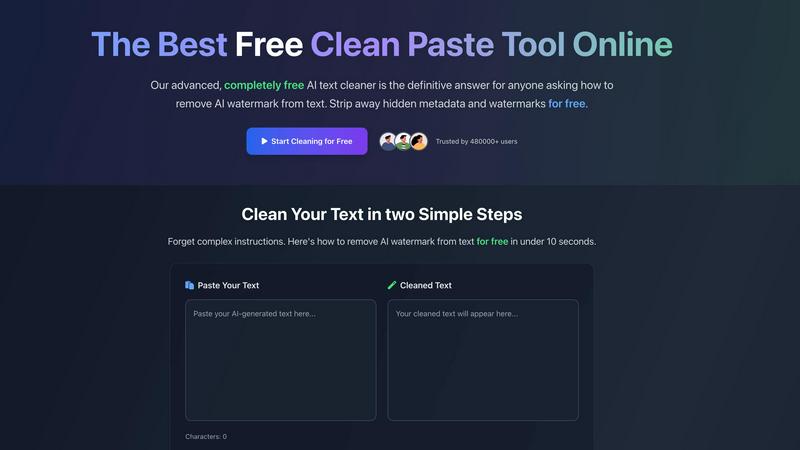
Hush Touch | Voice-to-Text for MacOS

Feature Comparison
CleanPaste.org
Invisible Character Removal
CleanPaste.org's primary feature is its ability to strip invisible characters and hidden metadata from your text. This ensures that any remnants of AI-generated content are eradicated, allowing for a seamless and natural reading experience.
Watermark Removal Mode
The watermark removal mode provides real-time cleaning of AI watermarks while preserving the original content. Users can quickly paste their text and watch as the tool instantly cleanses any unwanted markers, ensuring the text appears authentically human.
Instant Processing
With CleanPaste.org, users can expect rapid results. The tool processes content instantly, allowing users to paste their text and click clean without any delays, making it an efficient solution for urgent writing needs.
User-Friendly Interface
The platform boasts a simple and intuitive interface that makes the cleaning process accessible to everyone. Users can easily navigate through options without any technical expertise, ensuring a smooth experience for all.
Hush Touch | Voice-to-Text for MacOS
Dual Engine Recognition
Hush Touch utilizes a dual-engine recognition system combining DictationTranscriber and SFSpeechRecognizer. This integration allows for natural flow and punctuation, as well as enhanced vocabulary recognition tailored to your specific needs. The result is a more accurate transcription that captures the nuances of your speech.
Custom Vocabulary
With the ability to learn and remember up to 500 custom terms, Hush Touch adapts to your unique vocabulary over time. Whether you use technical jargon, brand names, or specific medical terminology, this feature ensures that Hush Touch accurately recognizes and transcribes what you say, improving your dictation efficiency.
Smart Text Processing
The app employs smart text processing techniques, which include the removal of filler words and auto-correction of frequently mispronounced terms. It also formats voice snippets for repeated phrases and organizes content into numbered lists, all processed locally in real time for a smooth user experience.
Context Modes & Hands-Free Options
Hush Touch offers multiple context modes, such as General, Email, Code, and Notes, allowing you to switch seamlessly based on your dictation needs. Additionally, with hands-free capabilities, you can start dictation using Siri, and the app will automatically insert text after a brief pause, making it easier to compose messages without manual intervention.
Use Cases
CleanPaste.org
For Students
CleanPaste.org is invaluable for students looking to refine their essays. By removing hidden characters and metadata, students can submit work that appears genuine and polished, enhancing their academic integrity.
For Content Creators & Bloggers
Content creators can utilize CleanPaste.org to maintain their brand's authenticity. By cleansing AI-generated drafts of invisible watermarks, they ensure their content resonates with audiences while appearing organic and trustworthy.
For Professionals
Professionals drafting reports or proposals can benefit from CleanPaste.org by ensuring their documents are free from any AI traces. This enhances the credibility of their work, making it suitable for presentation in any formal setting.
For Non-Native Speakers
Non-native English speakers often rely on AI for drafting communications. CleanPaste.org helps them refine their texts, removing AI markers and enhancing the natural quality of their writing, making their messages clearer and more relatable.
Hush Touch | Voice-to-Text for MacOS
Drafting Emails
Hush Touch is an excellent tool for busy professionals looking to draft emails quickly and efficiently. You can dictate your thoughts naturally, and the app will handle the punctuation and formatting, saving you time and effort.
Taking Notes
Students and educators alike can benefit from Hush Touch when taking class notes or summarizing lectures. The app's ability to transcribe spoken words accurately allows users to capture critical information hands-free, making note-taking more efficient.
Writing Content
Freelancers and content creators can leverage Hush Touch to enhance their writing productivity. By dictating articles, blogs, or creative pieces, users can focus on their ideas while the app captures their words, helping to eliminate writer's block.
Medical Documentation
Healthcare professionals can utilize Hush Touch to streamline the documentation process. With its custom vocabulary feature, it can accurately transcribe medical terms and notes, allowing physicians to focus on patient care rather than paperwork.
Overview
About CleanPaste.org
CleanPaste.org is a cutting-edge web-based utility that addresses the modern challenge of digital fingerprints in AI-assisted writing. As AI-generated text becomes more prevalent, it often carries invisible watermarks and hidden metadata that can compromise its authenticity. CleanPaste.org is specifically designed to remove these imperfections, transforming drafts into polished, human-like prose. Its core audience is diverse, including students refining essays, professionals drafting reports, and content creators striving to maintain their brand's integrity. By employing advanced algorithms, CleanPaste.org efficiently sanitizes text, ensuring it is free from any detectable AI markers. The tool stands out not only for its effectiveness but also for its commitment to accessibility; it is completely free to use, requiring no sign-ups, imposing no limits, and hiding no paywalls. Trusted by over 480,000 users, CleanPaste.org empowers individuals to present their work with confidence, ensuring it meets the highest standards of originality and quality.
About Hush Touch | Voice-to-Text for MacOS
Hush Touch is an innovative voice-to-text application designed specifically for macOS users who seek a seamless dictation experience without compromising their privacy. This lightweight app, only 5.5 MB in size, operates entirely on-device, allowing users to dictate text offline. By integrating two advanced Apple transcription engines along with an Apple Intelligence final pass, Hush Touch ensures high accuracy and cleaner output every time you use it. It is tailored for various user groups, from busy professionals drafting emails and reports to students taking notes and writers creating content. The app’s main value proposition lies in its ability to provide a fast, natural dictation process that learns and adapts to individual vocabulary, removes filler words, and maintains a clear tone, all while keeping your data secure and private.
Frequently Asked Questions
CleanPaste.org FAQ
How does CleanPaste remove invisible characters?
CleanPaste.org employs advanced algorithms that detect and eliminate invisible characters, zero-width spaces, hidden metadata, and AI watermarks. Users simply paste their content and click clean for instant processing.
Is CleanPaste truly free? What's the catch?
Yes, CleanPaste.org is entirely free. There are no hidden fees, usage limits, or sign-up requirements. The tool is designed to provide accessible text sanitization for everyone.
What types of hidden characters does CleanPaste remove?
The tool effectively removes all types of invisible characters, including zero-width spaces, hidden metadata, and formatting artifacts. Each feature is available to all users at no cost.
Can CleanPaste handle large texts?
Yes, CleanPaste.org can process large texts efficiently without compromising performance. Users can paste extensive documents and expect the same level of quick and thorough cleaning as with smaller texts.
Hush Touch | Voice-to-Text for MacOS FAQ
How does Hush Touch ensure privacy?
Hush Touch ensures privacy by processing all voice data entirely on your device, eliminating any reliance on cloud services. This means no data collection or external storage, keeping your dictation secure.
Can I try Hush Touch before purchasing?
Yes, Hush Touch offers a 7-day free trial with no credit card required. This allows users to experience the app’s features and capabilities before committing to a purchase.
Is Hush Touch compatible with all macOS versions?
Hush Touch is designed to work with the latest macOS versions. It is recommended to check the app's compatibility with your specific version of macOS for the best performance.
What is the cost of Hush Touch?
Hush Touch is available for a one-time purchase of $20, providing users with a lifetime license. There are no subscription fees, making it a cost-effective solution for voice-to-text dictation.
Alternatives
CleanPaste.org Alternatives
CleanPaste.org is a cutting-edge web-based utility that specializes in removing AI watermarks and invisible characters from text, ensuring the content appears genuine and human-like. As an essential tool in the realm of AI-assisted writing, it caters to a diverse audience including students, professionals, and content creators who seek to maintain the authenticity of their work. Users often seek alternatives to CleanPaste.org for various reasons such as exploring different pricing structures, evaluating feature sets, or finding tools that align better with specific platform requirements. When choosing an alternative, it's crucial to consider aspects such as ease of use, the range of features offered, security measures, and any potential costs involved to ensure the selected tool meets your needs effectively.
Hush Touch | Voice-to-Text for MacOS Alternatives
Hush Touch | Voice-to-Text for MacOS is a cutting-edge dictation application designed specifically for macOS users. It falls under the category of AI Assistants, offering an offline voice-to-text solution that prioritizes user privacy and efficiency. With its dual Apple transcription engines and on-device processing, Hush Touch enables users to convert speech into text seamlessly, catering to a variety of writing tasks such as emails, notes, and documents. Users often seek alternatives to Hush Touch for various reasons, including budget considerations, specific feature sets, or compatibility with other platforms. When looking for an alternative, it’s essential to consider factors such as ease of use, accuracy, offline capabilities, and the overall value for money. A good alternative should meet your dictation needs while aligning with your workflow requirements and ensuring data privacy.