

CleanPaste.org
CleanPaste.org quickly removes AI watermarks and invisible characters from your text for free, ensuring authentic.
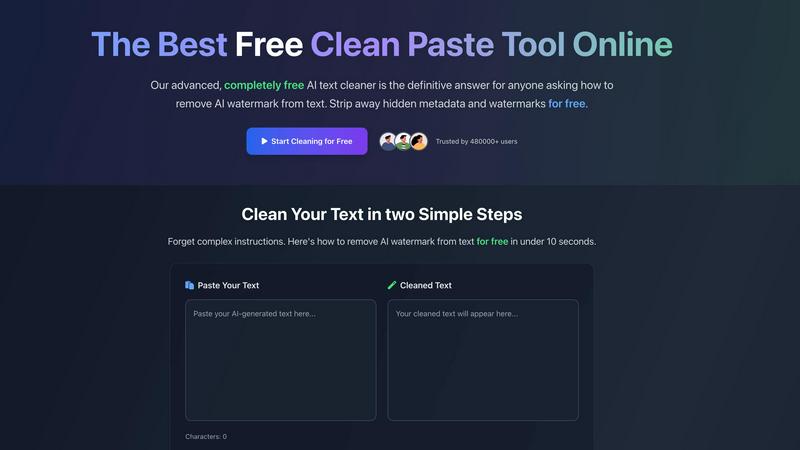
About CleanPaste.org
CleanPaste.org is a cutting-edge web-based utility that addresses the modern challenge of digital fingerprints in AI-assisted writing. As AI-generated text becomes more prevalent, it often carries invisible watermarks and hidden metadata that can compromise its authenticity. CleanPaste.org is specifically designed to remove these imperfections, transforming drafts into polished, human-like prose. Its core audience is diverse, including students refining essays, professionals drafting reports, and content creators striving to maintain their brand's integrity. By employing advanced algorithms, CleanPaste.org efficiently sanitizes text, ensuring it is free from any detectable AI markers. The tool stands out not only for its effectiveness but also for its commitment to accessibility; it is completely free to use, requiring no sign-ups, imposing no limits, and hiding no paywalls. Trusted by over 480,000 users, CleanPaste.org empowers individuals to present their work with confidence, ensuring it meets the highest standards of originality and quality.
Features of CleanPaste.org
Invisible Character Removal
CleanPaste.org's primary feature is its ability to strip invisible characters and hidden metadata from your text. This ensures that any remnants of AI-generated content are eradicated, allowing for a seamless and natural reading experience.
Watermark Removal Mode
The watermark removal mode provides real-time cleaning of AI watermarks while preserving the original content. Users can quickly paste their text and watch as the tool instantly cleanses any unwanted markers, ensuring the text appears authentically human.
Instant Processing
With CleanPaste.org, users can expect rapid results. The tool processes content instantly, allowing users to paste their text and click clean without any delays, making it an efficient solution for urgent writing needs.
User-Friendly Interface
The platform boasts a simple and intuitive interface that makes the cleaning process accessible to everyone. Users can easily navigate through options without any technical expertise, ensuring a smooth experience for all.
Use Cases of CleanPaste.org
For Students
CleanPaste.org is invaluable for students looking to refine their essays. By removing hidden characters and metadata, students can submit work that appears genuine and polished, enhancing their academic integrity.
For Content Creators & Bloggers
Content creators can utilize CleanPaste.org to maintain their brand's authenticity. By cleansing AI-generated drafts of invisible watermarks, they ensure their content resonates with audiences while appearing organic and trustworthy.
For Professionals
Professionals drafting reports or proposals can benefit from CleanPaste.org by ensuring their documents are free from any AI traces. This enhances the credibility of their work, making it suitable for presentation in any formal setting.
For Non-Native Speakers
Non-native English speakers often rely on AI for drafting communications. CleanPaste.org helps them refine their texts, removing AI markers and enhancing the natural quality of their writing, making their messages clearer and more relatable.
Frequently Asked Questions
How does CleanPaste remove invisible characters?
CleanPaste.org employs advanced algorithms that detect and eliminate invisible characters, zero-width spaces, hidden metadata, and AI watermarks. Users simply paste their content and click clean for instant processing.
Is CleanPaste truly free? What's the catch?
Yes, CleanPaste.org is entirely free. There are no hidden fees, usage limits, or sign-up requirements. The tool is designed to provide accessible text sanitization for everyone.
What types of hidden characters does CleanPaste remove?
The tool effectively removes all types of invisible characters, including zero-width spaces, hidden metadata, and formatting artifacts. Each feature is available to all users at no cost.
Can CleanPaste handle large texts?
Yes, CleanPaste.org can process large texts efficiently without compromising performance. Users can paste extensive documents and expect the same level of quick and thorough cleaning as with smaller texts.
Explore more in this category:
Similar to CleanPaste.org

Easemic
Open-source Android comic & manga reader with encrypted cloud streaming and AI ad-page stripping.

AIVideoAgent
Turn text ideas or reference images into videos through conversation, with agent-assisted prompts and a choice of video models.

LaunchIntel
Your AI agent picks relevant directories, submits your product in your browser and tracks every step. One-time purchase.


GenX
All-in-one AI workspace to generate images, videos, and audio with multiple leading AI models.

Bloom
An adaptive AI tutor that turns topics or your materials into courses, lessons, and answers tailored to how you learn.

TypeFire
Free text expander, Markdown notes app and clipboard manager for Mac and Chrome

CADCraft
Open-source 2D CAD in Rust with precise drafting and AI-assisted automation.