

EditTextImage
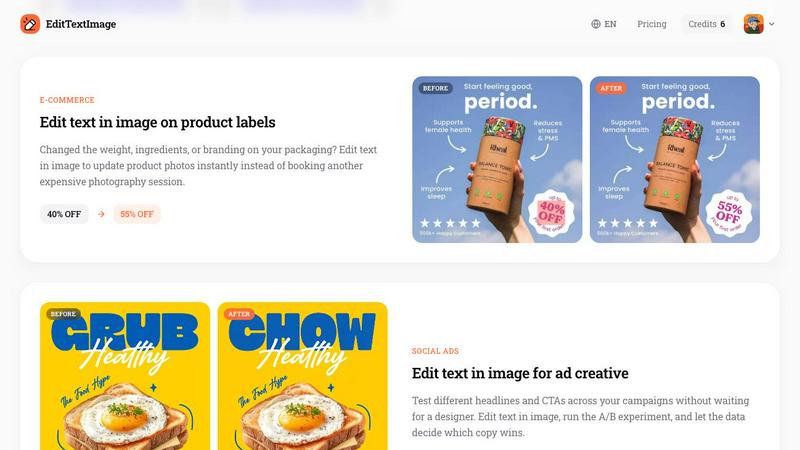
EditTextImage lets you replace any text in an image online while perfectly preserving the original font, color, lighting, and perspective in under 30.
About EditTextImage
EditTextImage is a specialized online AI tool designed to solve one of the most common frustrations in visual content creation: the need to change text in an image when the original source design file is lost or inaccessible. Whether you are a marketer, designer, small business owner, localization specialist, or social media manager, this tool eliminates the dependency on complex software like Photoshop or expensive subscriptions from Canva. The core value proposition is simple yet powerful: upload any image containing text, specify the original text and the replacement, and the AI will sample the typography, color, lighting, drop shadow, and perspective directly from the pixels. The result is a pixel-perfect edit that preserves the exact font, even if it is a paid font you do not own or a unique hand-lettered style. The entire process takes approximately 10 seconds, and the output is delivered at a crisp 2K resolution. This tool is not just for quick fixes; it is a production-grade solution for updating posters, screenshots, product labels, documents, and social media ads without needing to recreate the entire design. With a free first edit and a simple one-time credit system, EditTextImage offers an accessible, no-subscription approach to image text replacement that respects both your time and your budget.
Features of EditTextImage
Pixel-Perfect Font and Style Preservation
The most critical and impressive feature of EditTextImage is its ability to analyze the existing text in an image and replicate the exact typeface, color, size, perspective, and background seamlessly. Unlike generic image editors that often apply a default font or leave a messy background after text removal, this AI tool samples the typography directly from the pixels. This means that whether the original text uses a rare paid font, a custom hand-drawn style, or a specific drop shadow effect, the replacement text will match it perfectly. This preservation extends to lighting and perspective, ensuring that the new text looks naturally embedded in the original image, as if it were always there.
Rapid 10-Second Processing with 2K Output
Speed and quality are not mutually exclusive with EditTextImage. The tool processes each edit in approximately 10 to 12 seconds, making it one of the fastest solutions for text replacement in images. Despite this speed, the output resolution is maintained at a high 2K quality, which is essential for professional use in marketing materials, high-resolution screenshots, and printed posters. This combination of rapid turnaround and high fidelity allows users to iterate quickly on A/B testing headlines or make last-minute corrections without compromising on the final visual standard.
Simple Three-Step Workflow
EditTextImage is designed for users with zero design skills. The workflow is broken down into three intuitive steps: upload your image in PNG, JPEG, or WebP format (up to 10 MB), type the original text and the replacement text, and click generate. There are no complex layers, masks, or font files to manage. This streamlined interface reduces the learning curve to almost nothing, enabling anyone from a busy social media manager to a small business owner to edit text in images confidently and efficiently in under 30 seconds.
Free First Edit and No Subscription Model
The tool offers a generous and risk-free entry point with one free credit that requires no credit card to use. After that, users can purchase a one-time pack of 30 credits for a flat fee of $9.90. This pricing model is a direct contrast to the recurring monthly subscriptions of other design platforms. Credits never expire, and commercial use is included, making it a highly flexible and cost-effective solution for both occasional users and those with ongoing, project-based needs.
Use Cases of EditTextImage
Document and Contract Corrections
When you have a scanned contract, a screenshot of a spreadsheet, or a PDF that needs a quick text fix, EditTextImage is invaluable. Users can correct typos in official documents, update invoice numbers, or change dates on forms without needing the original editable file. This is particularly useful for administrative professionals, legal assistants, or anyone who needs to make a minor but critical correction to a document image without leaving a trace of editing. The tool ensures the new text matches the original font and formatting, maintaining the document's authenticity for internal use.
Marketing and Advertising A/B Testing
Marketers and ad creative teams can use EditTextImage to rapidly test different headlines, calls-to-action, and promotional text on finished ad creatives. Instead of waiting for a designer to open the source file and make changes, a marketer can upload a final ad image, swap the text, and generate a new version in seconds. This enables faster A/B testing cycles for social media ads, banner ads, and landing page graphics. The ability to keep the font, color, and layout identical means the only variable in the test is the copy itself, leading to cleaner data and more reliable results.
Localization of App Screenshots and UI Mockups
For app developers and product managers, localizing screenshots for different app store regions is a repetitive and time-consuming task. EditTextImage allows you to take a single screenshot of your app's user interface and quickly swap the text into multiple languages. The AI preserves the exact UI font and button styling, ensuring the localized screenshots look native and professional. This eliminates the need to rebuild each mockup from scratch for every language, saving significant time and resources during the app release cycle.
Event and Promotional Material Updates
Event organizers and marketing teams often reuse high-quality flyers and posters from previous campaigns. When a date changes, a venue moves, or a speaker drops out, EditTextImage provides a quick fix. You can take last year's gala flyer, update the date and location, and have a new, professional-looking graphic ready in minutes. This use case is particularly valuable for small businesses and non-profits that may not have a dedicated designer on staff, allowing them to extend the life of their visual assets and save hundreds of dollars per season on redesign costs.
Frequently Asked Questions
What file formats and sizes does EditTextImage support?
EditTextImage supports the most common image formats for web and print: PNG, JPEG, and WebP. The maximum file size allowed for upload is 10 MB. This covers the vast majority of use cases, from high-resolution screenshots to product photos and marketing posters. If your image is larger than 10 MB, you may need to compress it slightly before uploading.
How does the AI preserve the original font if I don't have it installed?
The AI does not require you to have the font file installed on your computer. Instead, it uses a process called typography sampling. It analyzes the pixels around the original text to understand the unique characteristics of the typeface, including its shape, weight, spacing, and any effects like drop shadows or gradients. It then generates the replacement text with the same visual properties, effectively recreating the font style from the image data itself.
Is my first edit really free, and do I need a credit card?
Yes, your first edit is completely free. You do not need to provide a credit card or any payment information to use your first credit. Simply sign in with your Google account, upload your image, and generate the edit. This allows you to test the tool's accuracy and speed with your own images before deciding to purchase additional credits.
What are the acceptable use policies I need to be aware of?
EditTextImage has strict guidelines to prevent misuse. You must own or be licensed to edit the image you upload. The tool is not to be used for deceptive purposes, such as altering visa or immigration documents, creating fake refund or transaction proofs, or falsifying email or chat screenshots. The platform explicitly does not process IDs, passports, bank statements, or tampered receipts. Violations of these policies can result in immediate account termination without refund, and request logs may be shared with law enforcement.
Pricing of EditTextImage
EditTextImage operates on a simple, credit-based pricing model with no recurring subscriptions. New users receive one free credit upon signing in with Google, which requires no credit card. After using the free credit, you can purchase a pack of 30 credits for a one-time payment of $9.90. These credits never expire, meaning you can use them at your own pace, whether that is over a month or a year. Commercial use of the generated images is included in the price, making it a straightforward and affordable solution for both personal and professional projects.
Similar to EditTextImage


Vismuse
Create polished AI images and videos from prompts or references for social posts, ads, flyers, album covers, and campaigns.

Imagine2
Private browser-based AI image generation and editing with text-to-image, targeted edits, and multi-image references.

Kogashitsuka AI
An online AI image tool that enhances photos and illustrations at their original size or upscales them by 2x or 4x.

UGCad AI
AI UGC video ad Generator which Turn a URL, prompt, or template into a ready video ads

IsThisAIImage
Free AI image checker: upload a photo for AI-generated and deepfake scores, a clear verdict, and optional generator hints.

StopScroll
StopScroll is an AI thumbnail maker that generates YouTube thumbnail concepts from a URL, title, or prompt.

HubVanta AI
HubVanta AI helps creators generate images and videos with advanced AI tools for visual content workflows.