

ComicsMaker
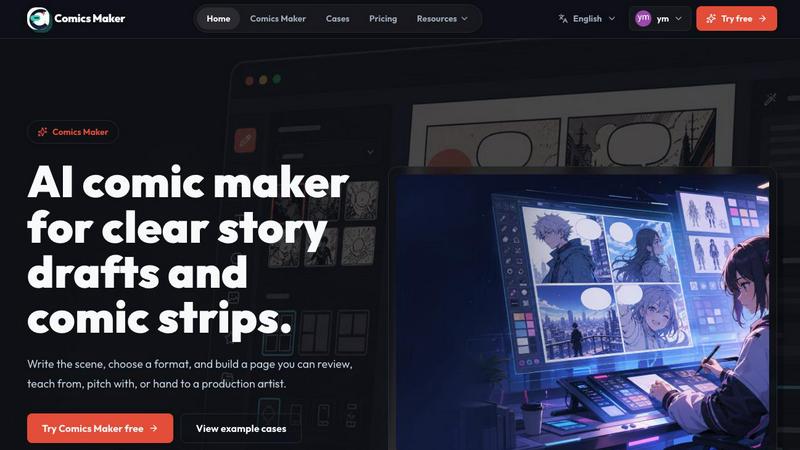
ComicsMaker turns your plain text scene into a structured comic draft, letting you plan beats, generate panels, and add dialogue right in your.
About ComicsMaker
ComicsMaker is an AI-powered comic creation platform that redefines how visual stories are conceived, structured, and produced. At its core, it is an AI comic maker and comic strip generator that transforms plain language prompts into fully realized comic panels, manga-style drafts, storyboards, and social-ready comic pages. The product is engineered for a diverse audience including creators, educators, marketers, and teams who require visual narratives with speed and precision. Unlike generic image generators, ComicsMaker provides granular control over layout, tone, reading flow, and artistic style direction, ensuring that every panel serves a narrative purpose. The platform operates on a unique premise: start with one scene, plan the beats, generate the panels, then add dialogue and arrange the page directly in your browser. This workflow eliminates the intimidating blank canvas problem, allowing users to move from a raw idea to a structured comic draft in minutes. The workspace is designed around three core phases: planning the narrative structure, generating consistent visual panels, and refining the final page layout. By keeping panel count, pacing, shot type, and reading order visible before users invest time in polish, ComicsMaker bridges the gap between conceptual storytelling and production-ready assets. Whether you are drafting an explainer comic for a classroom, a product storyboard for a marketing campaign, or a character-driven manga sequence, ComicsMaker provides the scaffolding to turn fleeting ideas into reviewable, editable comic pages.
Features of ComicsMaker
Scene to Panel Planning Engine
The platform begins with a dedicated scene planning module that forces narrative clarity before any image generation occurs. Users input a single scene description including character name, setting, visible action, and emotional change. This structured input, limited to 1600 characters, ensures every panel has a clear job. The system then suggests beat breakdowns for common formats like single panel, 3-panel strip, 2x2 page, or vertical flow. This feature acts as a narrative editor, helping users check story clarity, panel order, and dialogue space before committing to visual generation, effectively reducing wasted iterations and ensuring every generated image serves a defined narrative function.
Style Consistency and Direction Lock
Maintaining visual coherence across multiple panels is a critical challenge in comic creation. ComicsMaker solves this through a style locking mechanism that allows users to define visual direction using style notes, character details, and reference language. Before generating any images, creators can lock the artistic tone, character appearance, and environmental aesthetics. This means every panel belongs to the same visual world, whether the user is aiming for a dramatic shonen manga look, a clean explainer comic style, or a moody detective noir atmosphere. The system remembers these parameters across sessions, enabling reuse of character and environment notes for serialized content.
Flexible Layout and Pacing Controls
The studio interface provides a clean middle panel for making layout decisions that directly impact narrative pacing. Users can choose from predefined grid formats including single panel for impactful moments, 3-panel strips for quick sequences, 2x2 pages for traditional comic book pacing, and vertical flow optimized for mobile reading. Each format automatically adjusts panel count, shot type suggestions, and reading order. The system keeps these structural elements visible throughout the editing process, allowing creators to experiment with pacing and composition without losing sight of the overall narrative architecture. Simple controls for size, tone, and production notes are available at every step.
Prompt to Panel Generation with Dialogue Integration
The core generation engine takes structured scene briefs and produces consistent comic panels with integrated dialogue and caption spaces. Users write scenes in plain language, and the AI interprets the narrative beats to generate corresponding visual panels. Unlike text-to-image tools that produce standalone images, ComicsMaker generates panels that are aware of their position in a sequence, ensuring visual continuity between adjacent panels. The dialogue and caption system is kept close to the panel plan, allowing creators to add speech bubbles, narrative captions, and sound effects directly within the browser-based editor. This integrated approach means the final output is not just a collection of images but a structured, editable comic page ready for export.
Use Cases of ComicsMaker
Marketing Campaign Storyboarding
Marketing teams can rapidly prototype product reveal sequences and campaign concepts using ComicsMaker. By inputting a product moment or a campaign narrative, marketers generate a structured comic sequence that visualizes customer journeys, feature benefits, or brand stories. The 2x2 layout is particularly effective for before-and-after comparisons or step-by-step product explanations. The ability to lock visual style ensures brand consistency across all panels, while the export function provides prompts, notes, and panel data that can be handed off to graphic designers for final polish. This accelerates the concept approval process from days to hours.
Educational and Classroom Visuals
Educators and instructional designers use ComicsMaker to create explainer comics that simplify complex topics. By describing a scientific process, historical event, or mathematical concept as a scene, teachers can generate a multi-panel comic that breaks down information into digestible visual steps. The single panel format works well for concept introductions, while the 3-panel strip is ideal for cause-and-effect sequences. The platform's ability to keep captions and dialogue close to the panel plan ensures that text remains tightly integrated with visuals, making the final product suitable for handouts, digital lessons, or classroom presentations without requiring artistic skills.
Character-Driven Narrative Development
Writers and manga artists leverage ComicsMaker for prototyping character moments and emotional beats. The scene planning engine forces creators to articulate the visible action and emotional change for each panel, which is invaluable for character development. Users can generate multiple versions of the same scene with different moods (dramatic, lighthearted, mysterious) to explore tonal variations. The style locking feature allows character designs to remain consistent across different scenes, enabling creators to build a visual library for their characters. This makes the platform a powerful pre-visualization tool before committing to full production art.
Social Media Content Production
Content creators and social media managers use ComicsMaker to produce engaging comic strips optimized for platforms like Instagram, Twitter, and Facebook. The vertical flow layout is specifically designed for mobile-first consumption, while the 2x2 format works well for carousel posts. By generating a complete comic page with dialogue already integrated, creators can produce shareable content in minutes rather than hours. The ability to reuse character and environment notes allows for serialized content series, such as weekly comic strips or episodic storytelling campaigns, without starting from scratch each time.
Frequently Asked Questions
What is the difference between ComicsMaker and other AI image generators?
ComicsMaker is specifically designed for sequential visual storytelling, not standalone image generation. While generic AI image tools produce single images, ComicsMaker provides a complete workflow from scene planning to panel generation to page layout. The platform maintains visual consistency across multiple panels, controls reading order, integrates dialogue and captions, and exports structured project data. It is a narrative tool first, with image generation as one component of a larger storytelling system. Users can plan beats, generate panels, add text, and arrange the page all within the same browser-based workspace.
Can I use ComicsMaker for commercial projects?
Yes, ComicsMaker is built for creators, marketers, and teams producing commercial content including brand comics, marketing campaigns, educational materials, and social media assets. The paid plans (Creator and Studio) are designed for regular commercial use with increased monthly credits. The free plan includes 10 starter credits for testing the workflow. All plans follow the same editor and JSON project export workflow, meaning the transition from free to paid is seamless. The platform supports exporting drafts that artists or teammates can understand, making it suitable for professional production pipelines.
How does the scene planning process work?
The scene planning process begins with a single scene description. Users name the character, setting, visible action, and emotional change in a structured input field limited to 1600 characters. Based on this input, the system suggests a beat breakdown for the chosen layout format (single panel, 3-panel, 2x2, or vertical flow). Each beat represents a panel with a specific narrative job. Users can then plan the beats, review the suggested panel structure, and refine the scene before generating images. This ensures every generated panel has a clear purpose and contributes to the overall story arc.
What export options are available for my comic projects?
ComicsMaker exports drafts as structured project data that includes prompts, notes, panel descriptions, dialogue, and layout information. This JSON project export format is designed for handoff to artists, teammates, or other production tools. The platform also supports exporting reviewable comic pages that can be shared for feedback. While the current editor and export workflow are consistent across all plans, paid plans offer increased monthly credits for generating more images. The export focuses on providing usable project data rather than just final images, supporting iterative revision and collaboration.
Pricing of ComicsMaker
ComicsMaker offers three pricing tiers designed to scale with user needs. The Free plan provides 10 starter credits for testing image generation and exploring the workflow, making it ideal for initial evaluation. The Creator plan costs $15 per month and is designed for individuals making comic strips, lessons, and social campaigns on a weekly basis, offering increased monthly credits for regular use. The Studio plan costs $39 per month and targets teams producing brand comics, campaigns, and classroom content, providing the highest monthly credit allocation for intensive production workflows. All plans share the same editor interface and JSON project export functionality, ensuring a consistent experience regardless of tier. The primary differentiator between plans is the number of monthly credits available for image generation, allowing users to start small and upgrade as their workflow becomes more demanding.
Explore more in this category:
Similar to ComicsMaker

Video Text Remover
Video Text Remover — Erase Subtitles & Watermark from Video

AIPetGen
AIPetGen turns a photo of your dog, cat, or other pet, or a written description, into a new picture or a short animation.

Image to Layers AI
Turn any image into editable transparent PNG/PSD layers with AI

AI Object Remover
Remove unwanted objects, people, text and watermarks from photos with AI

Genjutsu AI
Genjutsu AI turns your ideas into cinematic videos, product ads, social shorts, and high-quality images in minutes. Built for TikTok & Reels.

AI Album Cover Maker
Create release-ready album covers from a prompt or photo. Generate, refine, and export art for singles, EPs, mixtapes, and playlists.

Sprite Sheet Maker
A free browser-based toolkit for creating, cutting, converting, and previewing sprite sheet animations.
