
FindExams vs YouTube to Transcript
Side-by-side comparison to help you choose the right AI tool.

FindExams
FindExams offers realistic exam simulations for PMP, PMI-ACP, and ITIL 4, helping you build confidence and ensure exam success.
Last updated: March 18, 2026

YouTube to Transcript
Instantly extract and translate any YouTube video's transcript for free with no login required.
Last updated: March 3, 2026
Visual Comparison
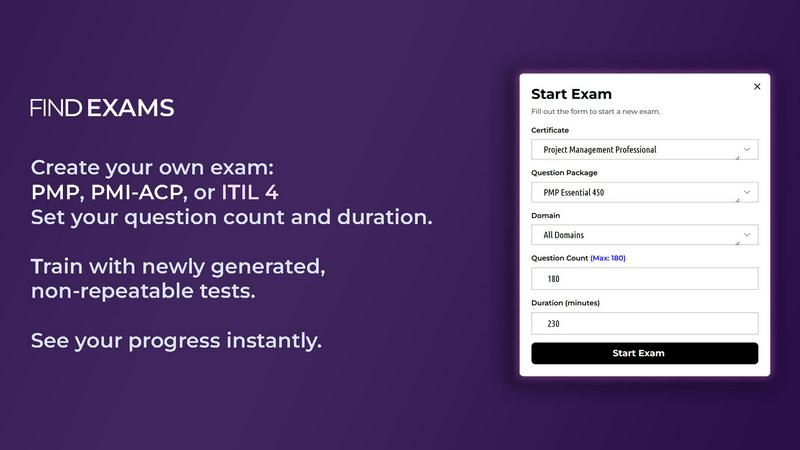
FindExams
YouTube to Transcript

Feature Comparison
FindExams
Realistic Exam Simulations
FindExams provides users with realistic, timed exam simulations that closely replicate real certification tests. This feature is crucial for building confidence and reducing anxiety, as candidates can familiarize themselves with the exam format and pressure.
Domain-Aligned Question Packages
The platform offers customizable question packages aligned with specific certification domains. Users can select questions based on their study needs, ensuring they focus on areas that require the most attention and improvement.
Progress Tracking and Analytics
With advanced performance analytics, FindExams allows users to track their progress over time. This feature offers insights into accuracy by domain, average time per question, and overall success trends, enabling targeted study efforts.
Randomized Practice Tests
To enhance the learning experience, FindExams includes randomized practice tests. Each attempt presents questions in a different order and from various domains, preventing memorization and encouraging comprehensive understanding of the material.
YouTube to Transcript
100% Free, No Registration
This is the cornerstone feature that sets YouTube to Transcript apart in a market of freemium models and sign-up walls. The service operates on a truly free-forever model with no hidden costs, premium tiers, or mandatory account creation. Users can access the full power of the tool immediately upon visiting the website, ensuring instant utility without the typical data entry or email verification hurdles. This commitment removes barriers for one-time users and empowers high-volume professionals alike.
Multi-Language Support & Translation
The tool excels in global accessibility by supporting transcription for videos in any language that YouTube itself supports. Beyond mere extraction, it features a powerful one-click translation capability into over 125 languages. This transforms a monolingual video into a multilingual resource, enabling users to understand foreign-language content, localize research materials, or reach a broader audience with translated subtitles and scripts, all within the same streamlined interface.
Unlimited Usage & No Video Length Restrictions
YouTube to Transcript imposes no artificial constraints on user activity. There are no caps on the number of transcripts generated per day or month, and critically, no restrictions on the duration of the source video. Whether transcribing a 60-second short or a multi-hour lecture, documentary, or livestream, the tool processes the request with the same efficiency. This "no limits" policy is essential for researchers dealing with long-form content and creators who need consistent, reliable access.
Clean Export for Content Repurposing
The tool doesn't just provide a raw text dump; it delivers a cleanly formatted transcript ready for immediate application. The output is structured for clarity, making it easy to copy for SEO-friendly blog articles, detailed study notes, closed captioning files, or script outlines for new video content. This focus on production-ready formatting saves users significant time in post-processing, directly enabling efficient content repurposing and workflow integration.
Use Cases
FindExams
Preparing for Certification Exams
Professionals preparing for certification exams can utilize FindExams to simulate real exam conditions. This practice helps users not only in content knowledge but also in time management and test-taking strategies.
Identifying Weak Areas
FindExams is ideal for users looking to identify and improve upon their weak areas. The detailed analytics provided after each practice exam allow users to focus their study efforts where it matters most, increasing their chances of success.
Enhancing Exam Confidence
Candidates can build their confidence by repeatedly practicing with the platform's realistic exam simulations. Achieving high scores in simulated tests can significantly reduce anxiety during the actual exam.
Flexible Study Plans
FindExams caters to various learning styles and schedules. Users can customize their study sessions by setting question counts, timers, and selecting specific domains, making it suitable for busy professionals or those seeking a more structured study approach.
YouTube to Transcript
Academic Research and Study
Students and academics can leverage the tool to transcribe lectures, documentary footage, or expert interviews. This creates accurate, searchable notes for revision, enables precise quoting in papers and theses, and aids in the analysis of complex spoken material. It transforms passive listening into an active, text-based research process, enhancing comprehension and citation accuracy while saving countless hours of manual note-taking.
Content Creation and SEO
Bloggers, marketers, and video creators can repurpose video content into various text-based formats. A single YouTube video can be transformed into a detailed blog post, a series of social media snippets, newsletter content, or optimized website copy. The transcript provides the exact wording for accurate closed captions, improving accessibility and SEO, as search engines can index the textual content derived from the video.
Language Learning and Accessibility
Language learners can use transcripts alongside videos to improve reading and listening comprehension, look up unfamiliar vocabulary, and practice pronunciation. Furthermore, the translation feature opens up foreign content for understanding. Crucially, the tool serves as an accessibility aid for individuals who are deaf or hard of hearing, providing a textual alternative to audio content, and for those who prefer reading to listening.
Professional Analysis and Journalism
Professionals, analysts, and journalists can use the service to transcribe earnings calls, conference presentations, political speeches, or competitor product reviews. Having a precise text record allows for detailed analysis, easy extraction of key quotes, fact-checking, and efficient summarization of lengthy discussions. It enables thorough preparation and creates a verifiable record of spoken statements.
Overview
About FindExams
FindExams is an innovative online platform designed to facilitate certification exam preparation for professionals across various fields. Primarily targeting individuals preparing for prestigious certifications such as PMP, PMI-ACP, ITIL 4 Foundation, PMI-PBA, and IIBA-AAC, FindExams offers a comprehensive exam simulator that mirrors the structure and rigor of actual certification tests. The platform provides users with realistic practice exams that feature domain-balanced questions, meticulously crafted explanations, and in-depth performance analytics. This empowers users to identify their weakest areas and develop targeted strategies for improvement. Unlike traditional study methods that emphasize rote memorization, FindExams promotes practical learning through an exam-like experience, enabling users to track their progress, analyze their performance by domain, and enhance their overall exam readiness. Additionally, FindExams offers multiple question packages and free demo exams, allowing prospective users to experience the platform's capabilities before committing to a full preparation package, thereby ensuring they make an informed decision on their learning path.
About YouTube to Transcript
In the digital age, video content is a primary source of information, education, and entertainment. However, its fleeting, audio-visual nature often creates barriers for deep analysis, accessibility, and content repurposing. YouTube to Transcript emerges as a critical bridge between the dynamic world of video and the tangible, versatile world of text. This powerful, web-based utility is engineered to democratize access to video content by instantly converting any YouTube video into a high-quality, accurate transcript with a simple URL paste. It serves a diverse audience: content creators seeking to repurpose videos into blog posts or captions, students and researchers needing accurate notes and citations, professionals analyzing market trends or interviews, and language learners or individuals with hearing impairments requiring textual access. Its core value proposition is unparalleled simplicity and freedom—offering a robust, feature-rich service that is completely free, requires no registration, and imposes no usage limits, thereby removing all traditional friction points associated with transcription services.
Frequently Asked Questions
FindExams FAQ
How does FindExams simulate real exam conditions?
FindExams simulates real exam conditions by providing timed exams that mirror the structure and difficulty of actual certification tests. This includes randomized questions and a focus on domain balance.
Can I track my progress over time?
Yes, FindExams features robust analytics that allow you to track your progress, review accuracy by domain, and monitor your improvement over time, helping you stay focused on your study goals.
Are there free demo exams available?
Absolutely! FindExams offers free demo exams that allow users to experience the platform's features and functionalities before committing to a full package.
What certifications does FindExams cover?
FindExams currently supports preparation for several key certifications, including PMP, PMI-ACP, ITIL 4 Foundation, PMI-PBA, and IIBA-AAC, catering to a wide range of professional needs.
YouTube to Transcript FAQ
Is YouTube to Transcript completely free to use?
Yes, YouTube to Transcript is 100% free to use with no hidden fees or premium tiers. The service operates on a free-forever model, meaning there are no plans to charge for core transcription features. You can generate unlimited transcripts without any payment or subscription required.
How do I get a transcript from a YouTube video?
The process is straightforward. First, copy the URL of the YouTube video you want to transcribe. Then, navigate to the YouTube to Transcript website and paste the URL into the provided input field. Finally, click the "Generate Transcript" button. The system will process the video and display the text transcript for you to copy or download, usually within seconds.
Can I download the transcript text?
Absolutely. Once the transcript is generated, you have two primary options. You can directly copy the entire text to your computer's clipboard with one click for immediate pasting into another document. Alternatively, you can download the transcript as a plain text (.TXT) file, which can be opened and edited in any text editor or word processor.
What if the YouTube video has no subtitles?
YouTube to Transcript is designed to extract text from the subtitle tracks that are either manually added by the uploader or automatically generated by YouTube's speech recognition. If a video has absolutely no subtitles available (neither manual nor auto-generated), the tool will not be able to produce a transcript, as it relies on this existing textual data from YouTube's system.
Alternatives
FindExams Alternatives
FindExams is a comprehensive online exam simulator tailored for professionals preparing for certification exams such as PMP, PMI-ACP, and ITIL 4. It offers a user-friendly platform that emphasizes realistic practice through detailed analytics and performance tracking, ensuring that users can effectively identify and strengthen their knowledge gaps. As users seek alternatives to FindExams, they often consider various factors including pricing, specific features, and the overall user experience. Different platforms may cater to unique learning styles or provide varying levels of support and resources. When selecting an alternative, it’s essential to assess the quality of practice questions, the depth of analytics offered, and the flexibility of the learning environment to ensure it aligns with personal study goals and preferences.
YouTube to Transcript Alternatives
YouTube to Transcript is a specialized online tool in the productivity and content creation space. It provides a straightforward, no-cost method for extracting text from YouTube videos, which is invaluable for creating notes, generating content, or overcoming language barriers through translation. Users often seek alternatives for various reasons. Some may require advanced features like bulk processing or direct integration with other software. Others might prioritize a different user interface or have specific concerns about data privacy and how their queries are handled. The needs of a professional subtitler differ greatly from those of a casual student. When evaluating different tools, key considerations include the core functionality's reliability, the range of supported languages, and the flexibility of export formats. It's also wise to assess any usage limits, cost structures, and the overall ease of use to find a solution that aligns perfectly with your individual workflow and project demands.