
Linkfinder AI vs TemplateFox
Side-by-side comparison to help you choose the right AI tool.

Linkfinder AI
Linkfinder AI instantly enriches your leads with complete company details and contact information.
Last updated: February 27, 2026

TemplateFox
Design dynamic PDF templates once and generate thousands automatically via API or Zapier.
Last updated: February 28, 2026
Visual Comparison
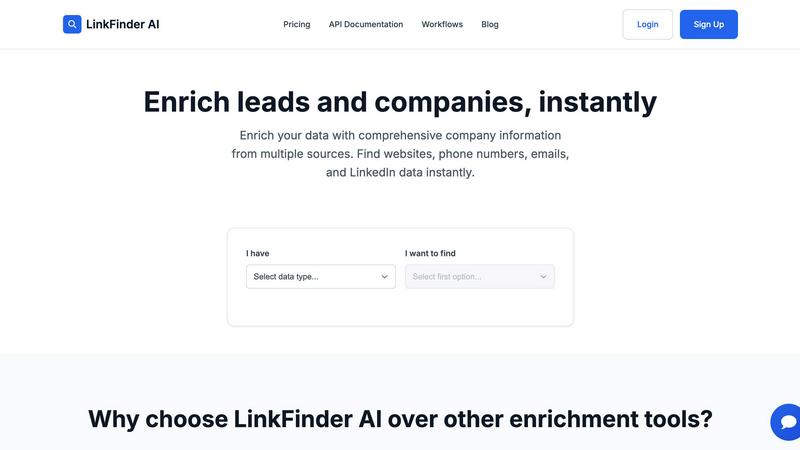
Linkfinder AI
TemplateFox

Feature Comparison
Linkfinder AI
Multi-Source Data Enrichment Engine
Linkfinder AI distinguishes itself by not relying on a single data silo. Its powerful engine simultaneously queries and cross-references information from LinkedIn, extensive company databases, and various public records. This multi-pronged approach ensures users receive the most complete and verified picture possible, pulling in data points like corporate websites, direct phone numbers, email addresses, and key LinkedIn profile details, thereby significantly increasing data reliability and completeness.
High-Volume Batch Processing with CSV
Designed for scale, this feature allows users to upload thousands of records at once via a simple CSV file. Sales teams and marketing agencies can process entire lead lists in a single operation, receiving enriched data back in a matter of minutes. This batch capability eliminates tedious manual lookups, enabling teams to focus on engagement rather than data preparation and dramatically accelerating the time-to-insight for large datasets.
Real-Time API Integration
For dynamic, automated workflows, Linkfinder AI provides a robust API. This allows businesses to integrate instant data enrichment directly into their existing tech stack, such as CRM systems, marketing automation platforms, or custom applications. Leads captured through forms or other channels can be enriched in real-time, ensuring that sales reps always have the most current information at their fingertips the moment a lead enters the system.
Intuitive User Interface & No-Code Workflows
Prioritizing accessibility, Linkfinder AI offers an exceptionally user-friendly interface that requires minimal to no training. Users can navigate the platform and execute complex enrichments through straightforward dropdown selections (e.g., "I have a Company Name, I want to find an Email"). This design philosophy, complemented by integrations with tools like Zapier and Make, empowers non-technical team members to leverage powerful data enrichment without depending on developer resources.
TemplateFox
Visual Drag-and-Drop Editor
TemplateFox features a fully-featured, WYSIWYG (What You See Is What You Get) editor that requires zero HTML or CSS knowledge. Users can design professional PDF templates through an intuitive drag-and-drop interface, customizing every component with fine-tuned control over content, borders, colors, sizes, and positions via a dedicated properties panel. This empowers non-technical business users to create complex, dynamic document layouts visually, removing the traditional barrier to entry for high-quality PDF design.
High-Speed Generation API
For developers and automated workflows, TemplateFox provides a robust, high-speed REST API for programmatic PDF generation. This allows for seamless integration into existing applications, CRMs, or backend systems. The API is designed for performance, delivering generated PDFs in 1-3 seconds, and offers flexible delivery options including signed URLs or direct binary downloads, enabling scalable, on-demand document creation at any volume.
Dynamic Data Binding & Logic
The platform goes beyond simple text placeholders. It allows for deep dynamic data binding, where any data point—names, addresses, prices, lists—can be injected into templates. Furthermore, it supports expressions and over 100 built-in functions to format dates, calculate totals, round numbers, and apply conditional logic. This ensures documents intelligently adapt to the input data, creating personalized and accurate outputs every time.
Smart Layout Components
TemplateFox includes specialized components built for real-world business documents. This includes headers and footers that automatically repeat on every page, dynamic tables where rows grow automatically with your data (spanning multiple pages if needed), and built-in, scanner-ready QR codes and barcodes (like Code128, EAN-13) generated on the fly from your data. These features guarantee professional formatting and functionality without manual adjustment.
Use Cases
Linkfinder AI
Supercharging Sales Prospecting and Outreach
Sales teams can upload lists of target company names or LinkedIn profile URLs to instantly append missing contact information such as verified email addresses and direct phone numbers. This enriched data allows for highly personalized and effective outreach campaigns, improving connection rates and shortening sales cycles by ensuring communications reach the right person with the right context.
Building and Cleansing CRM Databases
Marketing and operations teams can use batch processing to cleanse and augment existing records in their CRM. By enriching stale or incomplete entries with current company details, employee counts, and professional contact information, organizations maintain a high-quality, actionable database, improving segmentation, campaign targeting, and overall data health.
Conducting Competitive and Market Intelligence
Business analysts and strategists can systematically gather intelligence on competitors or a target market. By enriching lists of companies, they can efficiently compile data on company size, technologies used (via website), key personnel, and online presence, providing a solid foundation for strategic analysis, benchmarking, and opportunity identification without manual research.
Automating Lead Qualification Processes
Through real-time API integration, businesses can automate the initial qualification of inbound leads. As a form is submitted, Linkfinder AI can instantly enrich the lead's details with company information, funding status, and professional profile data. This allows for immediate scoring and routing, ensuring hot leads are prioritized and sales reps are better prepared for their first contact.
TemplateFox
Ecommerce Order Fulfillment
Ecommerce businesses can automate the entire post-purchase documentation process. TemplateFox can generate packing slips, shipping labels with tracking barcodes, and invoices automatically by pulling data from their store platform or database. This streamlines operations, reduces manual errors, and ensures customers receive professional, accurate documents with every order, significantly improving operational efficiency.
Automated Client Invoicing
Freelancers, agencies, and SaaS companies can automate their billing cycles. By connecting TemplateFox to their time-tracking or billing software via API or no-code tools like Zapier, they can set up workflows where a new invoice PDF is automatically generated and sent when a project is completed or a subscription cycle renews. This saves countless hours on manual creation and follow-up.
Certificate & Document Generation
Educational institutions, training providers, and event organizers can use TemplateFox to mass-produce personalized certificates, diplomas, or participation letters. By feeding a spreadsheet of recipient data into the API, they can generate hundreds of unique, professional-grade certificates in minutes, each with dynamically populated names, dates, and course details, complete with official seals or QR codes for verification.
Business Reporting & Compliance
Enterprises and startups can automate the creation of complex business reports, compliance documents, or audit trails. TemplateFox can pull data from various sources to populate detailed, multi-page reports with dynamic tables, charts (as images), headers, footers, and page numbers. This ensures consistent, accurate, and timely reporting for internal stakeholders or regulatory bodies.
Overview
About Linkfinder AI
Linkfinder AI is a sophisticated data enrichment platform engineered to transform sparse lead and company information into actionable, comprehensive intelligence. At its core, it solves the critical business problem of data fragmentation by aggregating and validating information from a diverse array of sources, including LinkedIn profiles, company databases, and public records. This tool is specifically designed for sales professionals, marketing teams, and business analysts who require accurate and up-to-date contact and firmographic data to fuel their pipelines and strategies. Its primary value proposition lies in its remarkable speed and high accuracy, promising enrichment processes that take minutes instead of hours with a 95% accuracy guarantee. By offering both intuitive self-service tools like CSV upload and powerful API integration for real-time workflows, Linkfinder AI serves as a versatile engine for organizations of all sizes aiming to enhance lead generation, personalize outreach, and conduct efficient market research without the traditional bottlenecks of manual data gathering.
About TemplateFox
TemplateFox redefines the landscape of automated document generation by bridging the gap between powerful code-based APIs and intuitive visual design. It is a sophisticated SaaS platform that empowers users to create professional, data-driven PDFs at scale. The platform's core value proposition is its dual approach: a fully-featured, drag-and-drop WYSIWYG editor that requires zero HTML or CSS knowledge, coupled with a robust, high-speed API for programmatic generation. This unique versatility caters to both non-technical business users who can design templates visually and developers who need to integrate PDF generation seamlessly into their applications. From indie hackers automating client invoices to development teams building reporting modules and large enterprises streamlining packing slips and certificates, TemplateFox provides the essential infrastructure. It eliminates tedious, error-prone manual document creation by offering a system where you design once and generate thousands of times, with results delivered in 1-3 seconds via signed URLs or direct binary downloads. Starting with a generous free tier, TemplateFox effectively democratizes access to enterprise-grade document automation, making it a pivotal tool for anyone looking to operationalize their document workflows.
Frequently Asked Questions
Linkfinder AI FAQ
How accurate is the data enrichment provided by Linkfinder AI?
Linkfinder AI maintains a 95% accuracy guarantee for its enriched data. This high confidence level is achieved through its multi-source enrichment methodology, which cross-validates information pulled from LinkedIn, proprietary databases, and public records. Continuous data validation processes are in place to ensure the information remains current and reliable.
What types of data can I enrich with Linkfinder AI?
The platform can enrich various data points depending on your starting information. Core enrichable data includes company websites, phone numbers, email addresses, and LinkedIn profile data. You can start with inputs like a Company Name, LinkedIn Company URL, LinkedIn Profile URL, Lead Full Name, or even a LinkedIn Post URL to find the associated information you need.
Do you provide API access for integration?
Yes, Linkfinder AI offers comprehensive real-time API access, which is included in its Professional plan. This allows developers and operations teams to seamlessly integrate instant data enrichment capabilities into their own applications, CRM systems, and automated workflows, enabling data enrichment at the point of capture.
Can I process multiple data entries at once?
Absolutely. Linkfinder AI is built for scale with its batch processing feature. Users can upload a CSV file containing thousands of records for simultaneous enrichment. This bulk processing capability returns results in minutes, making it ideal for handling large datasets commonly used by sales teams and marketing agencies.
TemplateFox FAQ
Do I need coding skills to use TemplateFox?
No, you do not need any coding skills to start creating templates. TemplateFox's primary interface is a visual, drag-and-drop WYSIWYG editor that allows you to design professional PDFs just like using a design tool. Coding is only required if you wish to use the advanced API for programmatic integration, but even then, no-code platforms like Zapier and Make offer integration paths.
How does the dynamic data binding work?
Dynamic data binding works by using placeholders (like {{customer_name}}) and expressions within your template design. When you generate a PDF via the API or an integration, you send a JSON data payload. TemplateFox's engine seamlessly injects this data into the corresponding placeholders, executes any functions (like date formatting or calculations), and renders the final PDF with all your real data in place.
Can I generate a PDF with multiple pages?
Absolutely. TemplateFox is built for real-world documents, which often span multiple pages. Components like dynamic tables will automatically flow onto a new page if the data is too long for one page. You can also manually manage page breaks. Headers and footers, once defined, will consistently appear on every page of the generated document, maintaining professional formatting throughout.
What integrations does TemplateFox support?
TemplateFox offers versatile integration options. For developers, a comprehensive REST API with full documentation is available. For no-code users, direct integrations with popular platforms like Zapier, Make (Integromat), Airtable, Bubble, and FlutterFlow allow you to connect TemplateFox to hundreds of other apps to automate PDF generation within your existing workflows without writing code.
Alternatives
Linkfinder AI Alternatives
Linkfinder AI is a data enrichment tool in the marketing and sales technology category. It specializes in rapidly appending detailed company and contact information, such as emails, websites, and LinkedIn profiles, to existing datasets. This process is crucial for teams aiming to enhance lead quality and streamline outreach. Users often explore alternatives for various practical reasons. These can include budget constraints, the need for specific niche features not offered, integration requirements with other software platforms, or simply a desire to compare market options to ensure they select the best-fit tool for their operational scale and goals. When evaluating other data enrichment solutions, key considerations should be the accuracy and sources of the data, the flexibility of pricing and plans, the strength of API and platform integrations, and the overall ease of use. The right tool should not only fill data gaps but also fit seamlessly into your existing workflow to maximize efficiency.
TemplateFox Alternatives
TemplateFox is a sophisticated SaaS platform in the productivity and management category, specializing in automated, data-driven PDF generation. It uniquely combines a visual, drag-and-drop template editor with a powerful API, allowing both non-technical users and developers to create and produce thousands of professional documents at high speed. Users often explore alternatives for various reasons, such as budget constraints, specific feature requirements not covered, or the need for a different integration path. Some may seek a solution embedded within their existing software suite, while others prioritize different pricing models or more granular control over the underlying code and infrastructure. When evaluating other options, key considerations include the balance between ease of use and technical capability, the performance and reliability of the generation engine, and the flexibility of data handling and formatting. Security standards, scalability for high-volume needs, and the overall cost versus value for your specific use case are also critical factors to weigh.