
RocketShare vs SupaSidebar
Side-by-side comparison to help you choose the right AI tool.

RocketShare
RocketShare encrypts your files on your device for truly private sharing.
Last updated: March 4, 2026

SupaSidebar
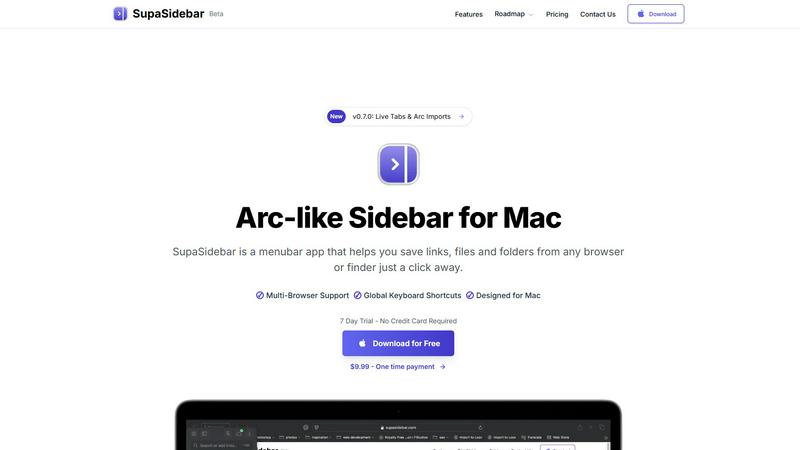
SupaSidebar is your universal Mac sidebar for instantly saving and opening links, files, and folders.
Last updated: February 28, 2026
Visual Comparison
RocketShare

SupaSidebar
Feature Comparison
RocketShare
Zero-Knowledge End-to-End Encryption
This is the foundational pillar of RocketShare's security. Every file is encrypted on your local device using a unique key before it is transmitted. The encryption key never leaves your control; RocketShare's servers only receive and store the encrypted, unreadable data. This "zero-knowledge" model ensures that not even RocketShare's engineers can access your files, providing true privacy by design and eliminating the risk of server-side data breaches or unauthorized internal access.
Dual Sharing Modes: Cloud and Local (P2P)
RocketShare offers flexible transfer methods to suit different needs and preferences. The Cloud Share option uploads your encrypted files to secure EU-based servers for convenient, asynchronous sharing with anyone, anywhere. The Local Share (peer-to-peer) mode creates a direct, encrypted connection between devices for transferring files without them ever touching an external server, ideal for the utmost speed and privacy when both parties are online simultaneously.
EU-Based Data Storage & Sovereignty
All files shared via the cloud method are stored on servers located within the European Union. This provides users with strong legal data protection under regulations like the GDPR. Choosing EU storage ensures a high standard of privacy rights, strict data handling requirements, and protection from foreign data access laws, giving businesses and individuals greater control and confidence over their data's geographical and legal jurisdiction.
No-Account Required Simplicity
Reflecting its commitment to accessibility and privacy, RocketShare allows users to send and receive files immediately without mandatory account creation or providing a credit card. This frictionless approach lowers the barrier to entry for secure sharing, protects user anonymity, and demonstrates a product philosophy that prioritizes the core utility—private file transfer—over data collection.
SupaSidebar
Universal Menubar Sidebar
SupaSidebar transforms your macOS menubar into a powerful, Arc-inspired command center. This elegantly designed panel provides instant, one-click access to your saved links, files, folders, and open browser tabs from any application. It consolidates disparate elements of your workflow into a single, distraction-free interface, eliminating the need to hunt through Finder windows or browser bookmarks. The sidebar is always accessible but never intrusive, living discreetly in your menubar until summoned.
Global Keyboard Shortcuts
The app is built for speed, powered by a suite of intuitive global keyboard shortcuts that work from anywhere on your Mac. Save the current website link with CMD+CTRL+S or copy it with CMD+CTRL+C directly to the sidebar. Instantly open the search panel with CMD+CTRL+K to find any file, folder, website, or app. These shortcuts are designed to minimize mouse travel and context switching, allowing you to execute commands and retrieve information without breaking your concentration or leaving your current application.
Privacy-First, On-Device Storage
SupaSidebar is engineered with a fundamental commitment to user privacy. All your data—every saved link, file path, and organizational structure—resides securely on your Mac. Nothing is sent to external servers or cloud storage unless you explicitly choose to sync via iCloud. This approach ensures your sensitive work materials, research, and personal references remain completely under your control, offering peace of mind alongside powerful functionality.
Intelligent Organization with Spaces & Recents
Organize your digital assets into customizable "Spaces" for different projects, contexts, or workflows. The free plan includes 3 spaces, perfect for daily use, while Pro unlocks unlimited organization. Furthermore, the "Recents" feature automatically tracks every website you've used in the last 48 hours, creating a dynamic, searchable history that helps you instantly find work you were just viewing, preventing valuable links from getting lost in a tab avalanche.
Use Cases
RocketShare
Legal Document Exchange
Law firms and independent attorneys regularly handle highly confidential case files, client communications, and legal briefs. RocketShare provides a secure channel for exchanging these sensitive documents with clients, co-counsel, and experts. The zero-knowledge encryption ensures attorney-client privilege is technically enforced, mitigating the risk of data leaks and maintaining compliance with stringent professional confidentiality obligations.
Secure Client Deliverables for Creatives
Photographers and videographers can deliver high-resolution galleries, raw footage, and final edits to clients with the assurance that their intellectual property remains protected. RocketShare prevents unauthorized access, sharing, or piracy of creative work. Clients appreciate the professional, secure delivery method, while creatives safeguard their valuable assets throughout the transfer process.
Confidential Healthcare Data Transfer
Healthcare administrators, researchers, or therapists needing to share anonymized patient data, reports, or medical imaging can leverage RocketShare's robust encryption. While compliant with high security standards, it facilitates necessary collaboration and data exchange between departments or institutions without exposing sensitive Personal Health Information (PHI) to unnecessary risk.
Internal Business & Project Collaboration
Teams working on confidential projects, such as financial forecasts, merger details, proprietary code, or unreleased marketing campaigns, require a secure collaboration tool. RocketShare enables team members to share large, sensitive files internally or with trusted external partners. The platform ensures that intellectual property and strategic documents are shared only with intended recipients, securing the business's competitive edge.
SupaSidebar
The Multitasking Professional
For professionals juggling multiple projects, clients, and communication platforms, SupaSidebar acts as a central nervous system. Quickly switch between project-specific spaces containing relevant documents, dashboards, and communication links. Use global search to pull up a contract, a Slack channel, and a project management board in seconds, all without leaving your email client. This drastically reduces costly context-switching and keeps all project assets organized and immediately accessible.
The Researcher and Creator
Researchers, writers, and content creators who constantly gather sources, references, and assets will find SupaSidebar indispensable. Save article links, PDFs, image folders, and inspiration websites directly from the browser with a single shortcut. Organize them into spaces for different articles or projects. The "Recents" feature is a lifesaver for retracing your digital steps through hours of research, ensuring no critical source is ever lost in a sea of tabs.
The Tab-Hoarder and Bookmark Collector
For users who habitually have dozens of browser tabs open or maintain a sprawling, unmanageable bookmark bar, SupaSidebar offers liberation. It provides a structured way to save important links without the performance hit of keeping tabs open. Pin favorite items to the top for daily use and let less urgent links reside in an organized, searchable list. This clears mental and digital clutter, leading to a calmer, more focused computing experience.
The Efficiency Enthusiast
Anyone looking to streamline their Mac workflow and reduce repetitive actions will benefit. SupaSidebar eliminates the tedious process of manually navigating to frequently used files or typing out often-visited URLs. By making these resources accessible via consistent keyboard shortcuts from any app, it turns complex navigation tasks into simple, muscle-memory commands, saving countless clicks and minutes throughout the day.
Overview
About RocketShare
RocketShare is a paradigm shift in digital file transfer, redefining security as a default state rather than an optional feature. At its core, it is a secure file-sharing platform built on an uncompromising principle: absolute privacy. It empowers individuals, professionals, and businesses to send files of any size with the ironclad guarantee that no third party—including RocketShare's own servers—can ever access the unencrypted content. This is achieved through a sophisticated zero-knowledge encryption architecture, where files are encrypted directly on the user's device before upload. The decryption key remains solely with the sender and intended recipient, often embedded within the share link itself. This means the platform only ever handles cryptographically scrambled data, rendering it useless to anyone without the key. By merging this enterprise-grade security model with an intuitive, self-serve interface, RocketShare democratizes top-tier data protection. It caters to a wide audience, from legal and healthcare professionals handling sensitive documents to creative agencies sharing intellectual property, all while ensuring data sovereignty with storage located within the European Union. It offers versatile sharing methods, including cloud-based transfers and direct local peer-to-peer connections, making it the quintessential tool for anyone who refuses to choose between simplicity and formidable security.
About SupaSidebar
SupaSidebar is a transformative productivity application designed exclusively for macOS, reimagining how users interact with their digital workspace. At its core, it is a beautifully crafted, Arc-inspired sidebar that lives in your menubar, serving as a universal command center for your links, files, folders, and open tabs. It addresses the common pain points of digital clutter, context switching, and inefficient workflows by consolidating access to everything you need into one instantly accessible, distraction-free panel. The product is engineered for a diverse range of Mac users, from researchers and creators juggling multiple sources, to professionals multitasking across projects and browsers, to anyone who feels overwhelmed by scattered bookmarks and a sea of open tabs. Its main value proposition is profound simplicity: keeping everything you need right where you need it, accessible through intuitive global keyboard shortcuts, without ever leaving your current flow state. By operating as a lightweight, native Mac app that respects your privacy—ensuring all data stays on your device—SupaSidebar offers a seamless, powerful, and elegant solution to modern computer navigation. It is a tool built for focus, designed to declutter your digital life and put your most important resources just a keystroke away.
Frequently Asked Questions
RocketShare FAQ
How does zero-knowledge encryption work on RocketShare?
Zero-knowledge encryption means your files are encrypted on your own computer or device before they are uploaded to RocketShare's servers. The encryption key is generated and stays with you—often as part of the shareable link you send to the recipient. Since RocketShare never has the key, it cannot decrypt or view your files at any point. The servers only store the encrypted data, which appears as random, meaningless information without the key.
Where are my files stored?
When you use the Cloud Share feature, your encrypted files are stored on secure servers located within the European Union. This choice aligns with strong data protection regulations like the GDPR. If you use the Local Share (peer-to-peer) option, your files are transferred directly between devices and are never stored on any RocketShare server at all.
Is there a file size limit?
Based on the provided context, RocketShare is designed to allow users to send "files of any size." This indicates a core value proposition of removing traditional file size barriers, making it suitable for transferring very large datasets, high-definition videos, or extensive project archives without compression or splitting.
Do recipients need a RocketShare account to download files?
No, one of the key aspects of RocketShare's simplicity is that recipients do not need to create an account. The sender generates a secure link containing the access key. The recipient simply clicks the link to download the encrypted file, which is then decrypted on their device using the key within the link, ensuring a seamless and secure experience for both parties.
SupaSidebar FAQ
Is SupaSidebar a browser extension?
No, SupaSidebar is not a browser extension. It is a standalone, native macOS application that installs directly on your Mac. It integrates with your system to capture links and information from all major browsers (like Safari, Chrome, Firefox, and Arc) but operates independently from the menubar. This architecture makes it more stable, universally compatible, and powerful than a simple extension.
Which browsers does SupaSidebar work with?
SupaSidebar is designed to work seamlessly with all major browsers on macOS, including Safari, Google Chrome, Mozilla Firefox, Arc, and others. Its system-level integration allows it to capture the current tab's URL and title regardless of which browser you are using, making it a truly universal tool for managing web-based resources across your entire workflow.
Where is my data stored?
Your data is stored locally and privately on your Mac. SupaSidebar operates on a privacy-first principle; all your saved links, files, folders, and organizational spaces are kept on your device. The app does not send your personal data to external servers. Optional iCloud syncing is available if you wish to sync your data across multiple Macs, but this is under your complete control.
Is there a free trial?
Yes, SupaSidebar offers a fully-featured Free Forever plan that includes support for all major browsers, 3 organizational Spaces, and the core functionality like global shortcuts and Recents. The Pro features, such as unlimited Spaces, come with a 7-day free trial that requires no credit card. You can start with the free plan and upgrade to Pro at any time.
Alternatives
RocketShare Alternatives
RocketShare is a secure file-sharing platform in the productivity and management category, distinguished by its zero-knowledge encryption model. This ensures that files are encrypted on the user's device before upload, making the content inaccessible to anyone except the intended recipient, including RocketShare itself. Users may seek alternatives for various practical reasons. Common motivations include finding a solution with different pricing tiers, specific collaboration features like real-time editing or team workspaces, or a need for integration with other business software. Others might prioritize platforms with different storage locations, longer file retention periods, or a more familiar user interface. When evaluating alternatives, the key is to identify which of RocketShare's core principles are most important to you. The primary consideration should be the security model: do you require true end-to-end, zero-knowledge encryption, or is standard transport encryption sufficient for your needs? Beyond that, assess factors like file size limits, transfer speed, ease of use for recipients, and the platform's data jurisdiction and privacy policies.
SupaSidebar Alternatives
SupaSidebar is a macOS productivity application that reimagines digital navigation. It functions as a universal, menubar-based sidebar, acting as a central command center for links, files, folders, and open tabs. Its core mission is to reduce digital clutter and context switching by consolidating access to everything you need into one instantly accessible panel. Users often explore alternatives for various reasons. Some may seek different pricing models, require specific features not present in one tool, or need cross-platform compatibility beyond macOS. Others might prefer a different user interface philosophy or have unique workflow integrations that demand a tailored solution. When evaluating alternatives, consider your primary needs. Key factors include the core functionality for managing links and files, the depth of browser and app integration, the availability of global shortcuts, and the overall design's impact on your focus. Privacy policies and data handling are also crucial, as is ensuring the tool aligns with your specific operating system and workflow ecosystem.