
Perkoon vs SupaSidebar
Side-by-side comparison to help you choose the right AI tool.

Perkoon offers free, unlimited peer-to-peer file transfers with no signup required.
Last updated: March 4, 2026

SupaSidebar
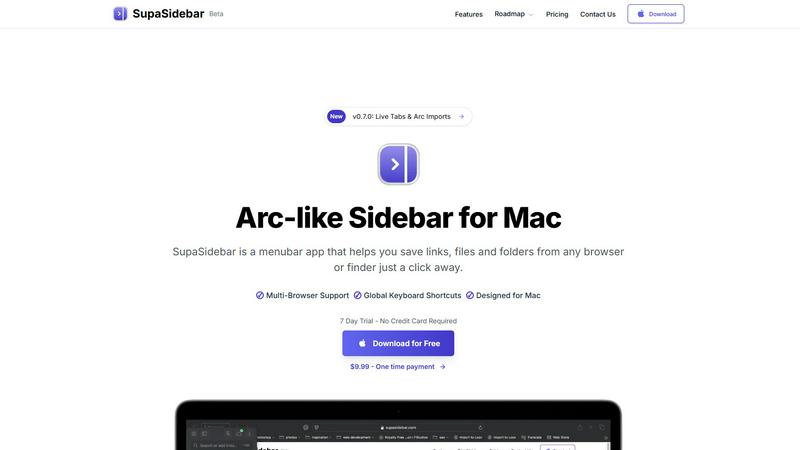
SupaSidebar is your universal Mac sidebar for instantly saving and opening links, files, and folders.
Last updated: February 28, 2026
Visual Comparison
Perkoon

SupaSidebar
Feature Comparison
Perkoon
Truly Free Peer-to-Peer (P2P) Transfers
This is Perkoon's cornerstone feature. It enables direct, browser-to-browser file transfers with no intermediary server. This architecture means there are absolutely no file size limits, no mandatory account creation, and complete privacy as Perkoon cannot access the data stream. The service is free in perpetuity because this direct transfer model incurs negligible infrastructure costs for the company, a cost-saving passed directly to the user.
Honest Encrypted Cloud Storage
For when the recipient is offline, Perkoon provides a paid cloud storage solution. The service is upfront about this being a paid feature, as it honestly covers the cost of running and maintaining secure servers. Files stored in the cloud are encrypted, providing a secure holding zone. This transparent "pay for what costs us" model contrasts sharply with services that offer "free" tiers subsidized by data mining.
Native AI & Automation Integration
Perkoon is built for the future of work. It features window.__perkoon, a dedicated JavaScript object that allows AI agents and automation scripts to interact with the service programmatically without resorting to unreliable screen-scraping techniques. This native design makes it a robust tool for developers and users who incorporate AI assistants into their workflows for seamless file transfer automation.
Simple CLI and Referral Ecosystem
Beyond the web interface, Perkoon offers a Command Line Interface tool for power users who prefer terminal-based operations. Additionally, it features a community-driven referral program. Users can share a unique link; when new users sign up and perform transfers, both the referrer and referee earn bonus cloud storage, creating a sustainable growth model that rewards the community.
SupaSidebar
Universal Menubar Sidebar
SupaSidebar transforms your macOS menubar into a powerful, Arc-inspired command center. This elegantly designed panel provides instant, one-click access to your saved links, files, folders, and open browser tabs from any application. It consolidates disparate elements of your workflow into a single, distraction-free interface, eliminating the need to hunt through Finder windows or browser bookmarks. The sidebar is always accessible but never intrusive, living discreetly in your menubar until summoned.
Global Keyboard Shortcuts
The app is built for speed, powered by a suite of intuitive global keyboard shortcuts that work from anywhere on your Mac. Save the current website link with CMD+CTRL+S or copy it with CMD+CTRL+C directly to the sidebar. Instantly open the search panel with CMD+CTRL+K to find any file, folder, website, or app. These shortcuts are designed to minimize mouse travel and context switching, allowing you to execute commands and retrieve information without breaking your concentration or leaving your current application.
Privacy-First, On-Device Storage
SupaSidebar is engineered with a fundamental commitment to user privacy. All your data—every saved link, file path, and organizational structure—resides securely on your Mac. Nothing is sent to external servers or cloud storage unless you explicitly choose to sync via iCloud. This approach ensures your sensitive work materials, research, and personal references remain completely under your control, offering peace of mind alongside powerful functionality.
Intelligent Organization with Spaces & Recents
Organize your digital assets into customizable "Spaces" for different projects, contexts, or workflows. The free plan includes 3 spaces, perfect for daily use, while Pro unlocks unlimited organization. Furthermore, the "Recents" feature automatically tracks every website you've used in the last 48 hours, creating a dynamic, searchable history that helps you instantly find work you were just viewing, preventing valuable links from getting lost in a tab avalanche.
Use Cases
Perkoon
Sending Large Media Files Freely
Videographers, photographers, and designers can send massive project files, raw footage, or high-resolution image sets without worrying about arbitrary caps, compression, or expensive subscription tiers. The unlimited P2P transfer is ideal for collaborative creative work where large data packets are the norm and budgets may be tight.
Secure and Private Document Sharing
Legal professionals, journalists, or anyone handling sensitive information can utilize the direct P2P transfer for confidential documents. Since the data never passes through a central server and Perkoon cannot see the content, it offers a higher degree of privacy for one-time secure document exchange compared to traditional cloud services.
Automated Workflow and AI Agent Tasks
Developers and tech-savvy users can integrate Perkoon into automated pipelines. An AI agent could be programmed to automatically back up generated reports via the CLI or use the native API to fetch and process files uploaded by a client, all without manual intervention, streamlining complex digital workflows.
Offline File Delivery via Cloud Link
When you need to send a file to a colleague or client who isn't currently available online, you can use Perkoon's encrypted cloud storage. You upload the file, and Perkoon holds it securely, generating a link you can send. The recipient can then download it at their convenience, solving the common problem of asynchronous file sharing.
SupaSidebar
The Multitasking Professional
For professionals juggling multiple projects, clients, and communication platforms, SupaSidebar acts as a central nervous system. Quickly switch between project-specific spaces containing relevant documents, dashboards, and communication links. Use global search to pull up a contract, a Slack channel, and a project management board in seconds, all without leaving your email client. This drastically reduces costly context-switching and keeps all project assets organized and immediately accessible.
The Researcher and Creator
Researchers, writers, and content creators who constantly gather sources, references, and assets will find SupaSidebar indispensable. Save article links, PDFs, image folders, and inspiration websites directly from the browser with a single shortcut. Organize them into spaces for different articles or projects. The "Recents" feature is a lifesaver for retracing your digital steps through hours of research, ensuring no critical source is ever lost in a sea of tabs.
The Tab-Hoarder and Bookmark Collector
For users who habitually have dozens of browser tabs open or maintain a sprawling, unmanageable bookmark bar, SupaSidebar offers liberation. It provides a structured way to save important links without the performance hit of keeping tabs open. Pin favorite items to the top for daily use and let less urgent links reside in an organized, searchable list. This clears mental and digital clutter, leading to a calmer, more focused computing experience.
The Efficiency Enthusiast
Anyone looking to streamline their Mac workflow and reduce repetitive actions will benefit. SupaSidebar eliminates the tedious process of manually navigating to frequently used files or typing out often-visited URLs. By making these resources accessible via consistent keyboard shortcuts from any app, it turns complex navigation tasks into simple, muscle-memory commands, saving countless clicks and minutes throughout the day.
Overview
About Perkoon
Perkoon is a paradigm shift in file transfer, rejecting the modern playbook of surveillance, artificial restrictions, and data monetization. It is a service built on a radical principle of honesty: moving files from one point to another should be simple, private, and fair. It serves a diverse audience, from individuals tired of mandatory accounts and hidden fees to developers and power users seeking automation-friendly tools. Its core value proposition is a two-tiered, transparent model. The flagship offering is a truly unlimited and free peer-to-peer (P2P) transfer service that operates directly between browsers when both parties are online, imposing no size limits and requiring no sign-up. This is free forever because the data never touches Perkoon's servers, costing them nothing. For asynchronous transfers, Perkoon offers encrypted, paid cloud storage, openly acknowledging this covers their server costs. Uniquely, Perkoon is natively designed for the age of automation, featuring built-in APIs for AI agents and a CLI tool, positioning itself as the straightforward, powerful, and privacy-respecting file transfer solution for both people and the machines that assist them.
About SupaSidebar
SupaSidebar is a transformative productivity application designed exclusively for macOS, reimagining how users interact with their digital workspace. At its core, it is a beautifully crafted, Arc-inspired sidebar that lives in your menubar, serving as a universal command center for your links, files, folders, and open tabs. It addresses the common pain points of digital clutter, context switching, and inefficient workflows by consolidating access to everything you need into one instantly accessible, distraction-free panel. The product is engineered for a diverse range of Mac users, from researchers and creators juggling multiple sources, to professionals multitasking across projects and browsers, to anyone who feels overwhelmed by scattered bookmarks and a sea of open tabs. Its main value proposition is profound simplicity: keeping everything you need right where you need it, accessible through intuitive global keyboard shortcuts, without ever leaving your current flow state. By operating as a lightweight, native Mac app that respects your privacy—ensuring all data stays on your device—SupaSidebar offers a seamless, powerful, and elegant solution to modern computer navigation. It is a tool built for focus, designed to declutter your digital life and put your most important resources just a keystroke away.
Frequently Asked Questions
Perkoon FAQ
How can P2P transfers be completely free?
P2P transfers are free because of the underlying technology. The files are streamed directly from the sender's browser to the recipient's browser without ever being stored on or routed through Perkoon's servers. This direct connection means Perkoon incurs virtually no bandwidth or storage costs for these transfers, allowing them to offer the service for free indefinitely.
What happens if the recipient is offline?
If the recipient is not online to receive a direct P2P transfer, Perkoon offers encrypted cloud storage as a solution. This is a paid feature. The sender can upload the file to Perkoon's secure servers, where it is held encrypted. A link is then provided that can be sent to the recipient for download at their convenience.
Can Perkoon see the files I send via P2P?
No, absolutely not. During a peer-to-peer transfer, the file data is encrypted and transmitted directly between the two users' web browsers using WebRTC data channels. Perkoon's servers only facilitate the initial connection ("signaling") but never have access to the actual file content, ensuring true privacy.
Is Perkoon compatible with AI agents and automation?
Yes, uniquely so. Perkoon is built with a native API for automation, exposed via window.__perkoon in the browser. This allows AI agents and scripts to interact with the service directly to initiate transfers or check statuses programmatically, eliminating the need for fragile and inefficient web scraping techniques.
SupaSidebar FAQ
Is SupaSidebar a browser extension?
No, SupaSidebar is not a browser extension. It is a standalone, native macOS application that installs directly on your Mac. It integrates with your system to capture links and information from all major browsers (like Safari, Chrome, Firefox, and Arc) but operates independently from the menubar. This architecture makes it more stable, universally compatible, and powerful than a simple extension.
Which browsers does SupaSidebar work with?
SupaSidebar is designed to work seamlessly with all major browsers on macOS, including Safari, Google Chrome, Mozilla Firefox, Arc, and others. Its system-level integration allows it to capture the current tab's URL and title regardless of which browser you are using, making it a truly universal tool for managing web-based resources across your entire workflow.
Where is my data stored?
Your data is stored locally and privately on your Mac. SupaSidebar operates on a privacy-first principle; all your saved links, files, folders, and organizational spaces are kept on your device. The app does not send your personal data to external servers. Optional iCloud syncing is available if you wish to sync your data across multiple Macs, but this is under your complete control.
Is there a free trial?
Yes, SupaSidebar offers a fully-featured Free Forever plan that includes support for all major browsers, 3 organizational Spaces, and the core functionality like global shortcuts and Recents. The Pro features, such as unlimited Spaces, come with a 7-day free trial that requires no credit card. You can start with the free plan and upgrade to Pro at any time.
Alternatives
Perkoon Alternatives
Perkoon is a file transfer service in the productivity and management category, distinguished by its commitment to privacy and a no-nonsense approach. It leverages peer-to-peer technology for direct browser-to-browser transfers, eliminating the need for user accounts or subscriptions for its core service. Users often seek alternatives for various reasons. Some may require different pricing models or specific advanced features not offered. Others might need guaranteed compatibility with certain platforms or workflows, or simply prefer a service with a different balance between simplicity and control. The search for the right tool is highly personal. When evaluating alternatives, key considerations include your primary use case—whether for instant transfers or asynchronous sharing—and your budget. Also crucial are the security and privacy policies of the service, its ease of use, and any platform restrictions. The ideal choice aligns with your specific technical requirements and personal values regarding data handling.
SupaSidebar Alternatives
SupaSidebar is a macOS productivity application that reimagines digital navigation. It functions as a universal, menubar-based sidebar, acting as a central command center for links, files, folders, and open tabs. Its core mission is to reduce digital clutter and context switching by consolidating access to everything you need into one instantly accessible panel. Users often explore alternatives for various reasons. Some may seek different pricing models, require specific features not present in one tool, or need cross-platform compatibility beyond macOS. Others might prefer a different user interface philosophy or have unique workflow integrations that demand a tailored solution. When evaluating alternatives, consider your primary needs. Key factors include the core functionality for managing links and files, the depth of browser and app integration, the availability of global shortcuts, and the overall design's impact on your focus. Privacy policies and data handling are also crucial, as is ensuring the tool aligns with your specific operating system and workflow ecosystem.