
Never Drop vs SupaSidebar
Side-by-side comparison to help you choose the right AI tool.

Never Drop
NeverDrop instantly captures event leads and drafts personalized follow-ups to close deals faster.
Last updated: February 28, 2026

SupaSidebar
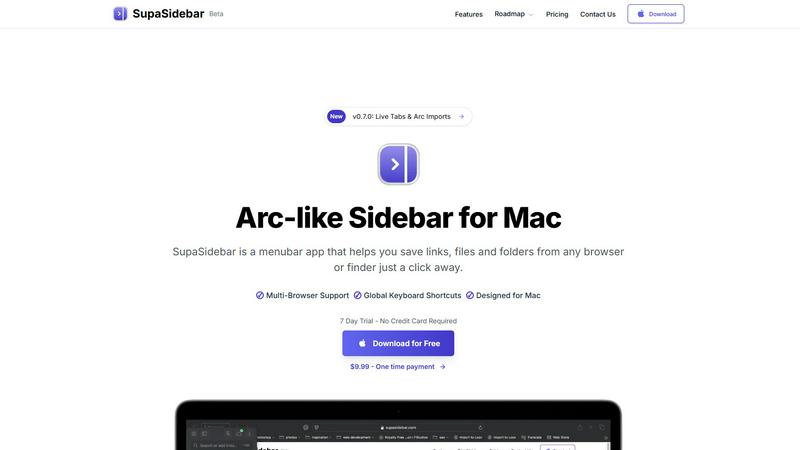
SupaSidebar is your universal Mac sidebar for instantly saving and opening links, files, and folders.
Last updated: February 28, 2026
Visual Comparison
Never Drop

SupaSidebar
Feature Comparison
Never Drop
AI-Powered Business Card Scanning
Gone are the days of manually typing details from a stack of cards. Never Drop's advanced Optical Character Recognition (OCR) technology allows users to simply snap a photo of any business card. The AI instantly and accurately extracts key details—name, company, title, phone number, and email—eliminating errors and saving invaluable time on the event floor. This foundational feature ensures contact data is digitized and ready for action within seconds of a meeting ending.
Intelligent Contact Enrichment & Email Finding
Business cards often lack direct contact information. Never Drop solves this by automatically searching for and appending verified work emails to a contact's profile using just the name and company. This eliminates tedious manual LinkedIn searches or guesswork, ensuring your sales team has a complete, actionable profile ready for immediate follow-up and seamless integration into your CRM, keeping your database clean and powerful.
Context-Aware AI Follow-Up Drafting
This is where Never Drop transitions from a capture tool to a sales acceleration engine. Based on the voice notes or text context you record about your conversation, its AI generates a uniquely personalized follow-up email draft. It moves beyond generic templates by incorporating the specific tone and topics discussed, crafting a message that feels genuinely personal and relevant, all within two minutes of the interaction.
Team Workspace & Event Organization
Never Drop is built for collaborative sales efforts. Leads can be organized by specific events, reassigned between team members, and all activity can be tracked from a centralized dashboard. This feature ensures alignment across the team, prevents leads from falling through the cracks due to miscommunication, and provides managers with clear visibility into event ROI and team performance.
SupaSidebar
Universal Menubar Sidebar
SupaSidebar transforms your macOS menubar into a powerful, Arc-inspired command center. This elegantly designed panel provides instant, one-click access to your saved links, files, folders, and open browser tabs from any application. It consolidates disparate elements of your workflow into a single, distraction-free interface, eliminating the need to hunt through Finder windows or browser bookmarks. The sidebar is always accessible but never intrusive, living discreetly in your menubar until summoned.
Global Keyboard Shortcuts
The app is built for speed, powered by a suite of intuitive global keyboard shortcuts that work from anywhere on your Mac. Save the current website link with CMD+CTRL+S or copy it with CMD+CTRL+C directly to the sidebar. Instantly open the search panel with CMD+CTRL+K to find any file, folder, website, or app. These shortcuts are designed to minimize mouse travel and context switching, allowing you to execute commands and retrieve information without breaking your concentration or leaving your current application.
Privacy-First, On-Device Storage
SupaSidebar is engineered with a fundamental commitment to user privacy. All your data—every saved link, file path, and organizational structure—resides securely on your Mac. Nothing is sent to external servers or cloud storage unless you explicitly choose to sync via iCloud. This approach ensures your sensitive work materials, research, and personal references remain completely under your control, offering peace of mind alongside powerful functionality.
Intelligent Organization with Spaces & Recents
Organize your digital assets into customizable "Spaces" for different projects, contexts, or workflows. The free plan includes 3 spaces, perfect for daily use, while Pro unlocks unlimited organization. Furthermore, the "Recents" feature automatically tracks every website you've used in the last 48 hours, creating a dynamic, searchable history that helps you instantly find work you were just viewing, preventing valuable links from getting lost in a tab avalanche.
Use Cases
Never Drop
Maximizing ROI at Trade Shows
For sales reps navigating crowded expo halls, Never Drop is indispensable. It allows them to quickly scan a card, dictate key conversation points while walking to the next booth, and have a tailored follow-up ready to send before the day ends. This rapid response capitalizes on the "warm" lead, dramatically increasing the chance of conversion compared to post-event batch emails.
Streamlining Conference Networking
Attendees at multi-day conferences meet dozens of potential contacts. Never Drop helps organize these interactions by event, allowing users to add rich context about each discussion. Later, they can efficiently send personalized follow-ups that reference specific sessions or conversations, making their outreach stand out in a crowded inbox.
Empowering Field Sales Representatives
For reps who meet prospects at client sites, business dinners, or local meetups, Never Drop ensures no detail is forgotten. The ability to capture a card and immediately record voice notes about needs, objections, or next steps means the intelligence from the field is perfectly preserved and instantly actionable for timely, informed follow-up.
Accelerating Sales Team Onboarding
New sales hires can immediately contribute at events without the fear of losing leads due to inexperience. Never Drop provides a structured, foolproof process for capture and follow-up. Managers can also review drafts and activity from the dashboard, using it as a coaching tool to ensure consistency and quality in team communications.
SupaSidebar
The Multitasking Professional
For professionals juggling multiple projects, clients, and communication platforms, SupaSidebar acts as a central nervous system. Quickly switch between project-specific spaces containing relevant documents, dashboards, and communication links. Use global search to pull up a contract, a Slack channel, and a project management board in seconds, all without leaving your email client. This drastically reduces costly context-switching and keeps all project assets organized and immediately accessible.
The Researcher and Creator
Researchers, writers, and content creators who constantly gather sources, references, and assets will find SupaSidebar indispensable. Save article links, PDFs, image folders, and inspiration websites directly from the browser with a single shortcut. Organize them into spaces for different articles or projects. The "Recents" feature is a lifesaver for retracing your digital steps through hours of research, ensuring no critical source is ever lost in a sea of tabs.
The Tab-Hoarder and Bookmark Collector
For users who habitually have dozens of browser tabs open or maintain a sprawling, unmanageable bookmark bar, SupaSidebar offers liberation. It provides a structured way to save important links without the performance hit of keeping tabs open. Pin favorite items to the top for daily use and let less urgent links reside in an organized, searchable list. This clears mental and digital clutter, leading to a calmer, more focused computing experience.
The Efficiency Enthusiast
Anyone looking to streamline their Mac workflow and reduce repetitive actions will benefit. SupaSidebar eliminates the tedious process of manually navigating to frequently used files or typing out often-visited URLs. By making these resources accessible via consistent keyboard shortcuts from any app, it turns complex navigation tasks into simple, muscle-memory commands, saving countless clicks and minutes throughout the day.
Overview
About Never Drop
In the high-stakes arena of sales, the moments following a handshake are critical. Yet, this is precisely where many opportunities dissolve into the chaos of trade show floors and networking events. Never Drop emerges as a definitive solution to this age-old problem, engineered specifically for sales professionals who operate at this frenetic pace. At its core, Never Drop is an intelligent lead-capture application that transforms the ephemeral nature of event networking into a structured, actionable sales pipeline. It addresses the full lifecycle of a lead encounter: from the initial capture via business card scanning, through contextual enrichment with voice notes, to the ultimate crescendo—an AI-drafted, personalized follow-up email generated in under two minutes. This product is not merely a digital Rolodex; it is a strategic partner that ensures no conversational nuance or promising contact is ever lost. By seamlessly integrating with tools like HubSpot and Gmail, it bridges the gap between field intelligence and CRM management, empowering teams to act with unprecedented speed and personalization. The value proposition is clear and compelling: convert more leads by being the first, most relevant responder, turning every event from a cost center into a proven revenue generator.
About SupaSidebar
SupaSidebar is a transformative productivity application designed exclusively for macOS, reimagining how users interact with their digital workspace. At its core, it is a beautifully crafted, Arc-inspired sidebar that lives in your menubar, serving as a universal command center for your links, files, folders, and open tabs. It addresses the common pain points of digital clutter, context switching, and inefficient workflows by consolidating access to everything you need into one instantly accessible, distraction-free panel. The product is engineered for a diverse range of Mac users, from researchers and creators juggling multiple sources, to professionals multitasking across projects and browsers, to anyone who feels overwhelmed by scattered bookmarks and a sea of open tabs. Its main value proposition is profound simplicity: keeping everything you need right where you need it, accessible through intuitive global keyboard shortcuts, without ever leaving your current flow state. By operating as a lightweight, native Mac app that respects your privacy—ensuring all data stays on your device—SupaSidebar offers a seamless, powerful, and elegant solution to modern computer navigation. It is a tool built for focus, designed to declutter your digital life and put your most important resources just a keystroke away.
Frequently Asked Questions
Never Drop FAQ
How does Never Drop's AI ensure follow-up emails sound personal?
The AI does not rely on static templates. It analyzes the specific context you provide—be it voice notes or typed text about your conversation—including discussed topics, pain points, and next steps. It uses this unique data to generate a draft that references your actual interaction. You can further review and tweak the tone, ensuring the final email is authentic and personalized.
What happens to the image of the business card after scanning?
Data security is a priority. The business card image is used solely by Never Drop's AI for the purpose of extracting contact information. According to their policy, these images are not shared with any third parties. The data is processed in compliance with GDPR, as Never Drop is built by a French company, with information hosted on secure EU-based servers.
Can I use Never Drop without a mobile app?
The mobile app is essential for the core functionality of scanning business cards and recording voice context on the go. However, a complementary web dashboard is available for managing team settings, reviewing captured leads, configuring integrations, and handling billing, providing a full management suite for administrators.
Which CRM systems does Never Drop currently integrate with?
Currently, Never Drop offers direct integration with HubSpot for pushing enriched contact profiles and lead data directly into your sales pipeline. It also integrates with Gmail, allowing you to send the AI-drafted follow-up emails directly from your own email address. The company has indicated that additional CRM integrations are planned for future updates.
SupaSidebar FAQ
Is SupaSidebar a browser extension?
No, SupaSidebar is not a browser extension. It is a standalone, native macOS application that installs directly on your Mac. It integrates with your system to capture links and information from all major browsers (like Safari, Chrome, Firefox, and Arc) but operates independently from the menubar. This architecture makes it more stable, universally compatible, and powerful than a simple extension.
Which browsers does SupaSidebar work with?
SupaSidebar is designed to work seamlessly with all major browsers on macOS, including Safari, Google Chrome, Mozilla Firefox, Arc, and others. Its system-level integration allows it to capture the current tab's URL and title regardless of which browser you are using, making it a truly universal tool for managing web-based resources across your entire workflow.
Where is my data stored?
Your data is stored locally and privately on your Mac. SupaSidebar operates on a privacy-first principle; all your saved links, files, folders, and organizational spaces are kept on your device. The app does not send your personal data to external servers. Optional iCloud syncing is available if you wish to sync your data across multiple Macs, but this is under your complete control.
Is there a free trial?
Yes, SupaSidebar offers a fully-featured Free Forever plan that includes support for all major browsers, 3 organizational Spaces, and the core functionality like global shortcuts and Recents. The Pro features, such as unlimited Spaces, come with a 7-day free trial that requires no credit card. You can start with the free plan and upgrade to Pro at any time.
Alternatives
Never Drop Alternatives
Never Drop is a productivity and management tool designed to streamline lead capture and follow-up for sales professionals. It automates the process of collecting contact details from business cards and using AI to draft personalized emails, ensuring no potential deal is forgotten after a networking event. Users often explore alternatives for various reasons. Budget constraints can lead to a search for more cost-effective solutions, while specific feature needs—like deeper integration with a niche CRM or more advanced data enrichment—might not be fully met. Others may simply prefer a different user interface or require a platform that works across specific operating systems not supported by their current tool. When evaluating other options, key considerations include the core functionality of business card scanning and data capture, the quality and customizability of automated follow-up generation, and seamless connectivity with your existing sales tech stack, particularly your CRM. Security of sensitive contact data and overall ease of use in high-pressure environments are also critical factors to weigh.
SupaSidebar Alternatives
SupaSidebar is a macOS productivity application that reimagines digital navigation. It functions as a universal, menubar-based sidebar, acting as a central command center for links, files, folders, and open tabs. Its core mission is to reduce digital clutter and context switching by consolidating access to everything you need into one instantly accessible panel. Users often explore alternatives for various reasons. Some may seek different pricing models, require specific features not present in one tool, or need cross-platform compatibility beyond macOS. Others might prefer a different user interface philosophy or have unique workflow integrations that demand a tailored solution. When evaluating alternatives, consider your primary needs. Key factors include the core functionality for managing links and files, the depth of browser and app integration, the availability of global shortcuts, and the overall design's impact on your focus. Privacy policies and data handling are also crucial, as is ensuring the tool aligns with your specific operating system and workflow ecosystem.