
Changeflow vs SupaSidebar
Side-by-side comparison to help you choose the right AI tool.

Changeflow
Changeflow uses AI to track and summarize critical website changes for your business.
Last updated: March 4, 2026

SupaSidebar
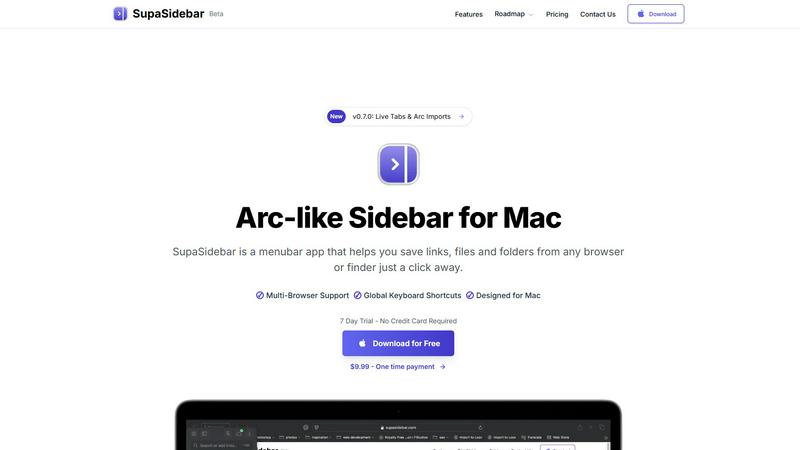
SupaSidebar is your universal Mac sidebar for instantly saving and opening links, files, and folders.
Last updated: February 28, 2026
Visual Comparison
Changeflow

SupaSidebar
Feature Comparison
Changeflow
AI-Powered Contextual Intelligence
Changeflow's core differentiator is its AI engine, which doesn't just detect changes but understands them. It reads the page content, grasps the context of your specific monitoring goals, and filters out irrelevant modifications. This means you are notified only about substantive changes—like a price adjustment, a new regulatory clause, or a key news mention—while ignoring minor tweaks like font changes or ad rotations. The AI then generates a clear summary explaining what changed and why it matters to your business.
Natural Language Setup & Smart Link Following
Setting up a monitor requires no technical knowledge of RSS feeds or complex configuration. You simply provide a URL and describe what you care about in plain English. Furthermore, Changeflow can intelligently follow links from a designated page. It reads the target pages, determines their relevance based on your description, and turns an entire directory or news site into a curated, intelligent feed of updates, automatically expanding your monitoring scope.
Enterprise-Grade Page Unblocking & Reliability
Built on over a decade of experience tracking billions of pages, Changeflow employs advanced anti-blocking technology to reliably access content that stumps other tools. It successfully navigates JavaScript-rendered pages, login walls, and other challenging site structures with a 99.9% success rate. This ensures continuous, uninterrupted monitoring for mission-critical sources, providing the reliability demanded by Fortune 500 and Am Law 200 firms.
Collaborative Workspaces & Forensic Change Viewer
Changeflow is built for team use. Shared workspaces keep everyone aligned on the latest intelligence. For deep analysis, the Site Version Control feature acts as a forensic change viewer, providing timestamped archives of every page version. You can navigate through time to see exactly what changed, with highlights pinpointing the specific, relevant alterations, allowing for thorough verification and audit trails.
SupaSidebar
Universal Menubar Sidebar
SupaSidebar transforms your macOS menubar into a powerful, Arc-inspired command center. This elegantly designed panel provides instant, one-click access to your saved links, files, folders, and open browser tabs from any application. It consolidates disparate elements of your workflow into a single, distraction-free interface, eliminating the need to hunt through Finder windows or browser bookmarks. The sidebar is always accessible but never intrusive, living discreetly in your menubar until summoned.
Global Keyboard Shortcuts
The app is built for speed, powered by a suite of intuitive global keyboard shortcuts that work from anywhere on your Mac. Save the current website link with CMD+CTRL+S or copy it with CMD+CTRL+C directly to the sidebar. Instantly open the search panel with CMD+CTRL+K to find any file, folder, website, or app. These shortcuts are designed to minimize mouse travel and context switching, allowing you to execute commands and retrieve information without breaking your concentration or leaving your current application.
Privacy-First, On-Device Storage
SupaSidebar is engineered with a fundamental commitment to user privacy. All your data—every saved link, file path, and organizational structure—resides securely on your Mac. Nothing is sent to external servers or cloud storage unless you explicitly choose to sync via iCloud. This approach ensures your sensitive work materials, research, and personal references remain completely under your control, offering peace of mind alongside powerful functionality.
Intelligent Organization with Spaces & Recents
Organize your digital assets into customizable "Spaces" for different projects, contexts, or workflows. The free plan includes 3 spaces, perfect for daily use, while Pro unlocks unlimited organization. Furthermore, the "Recents" feature automatically tracks every website you've used in the last 48 hours, creating a dynamic, searchable history that helps you instantly find work you were just viewing, preventing valuable links from getting lost in a tab avalanche.
Use Cases
Changeflow
Competitive Intelligence & Pricing Monitoring
Business and marketing teams use Changeflow to automatically track competitor websites for pricing changes, product launches, promotional campaigns, and feature updates. Instead of manual daily checks, they receive AI-summarized alerts that explain the competitive move, enabling swift and informed strategic responses to maintain market advantage.
Legal & Regulatory Compliance Tracking
Legal librarians and compliance officers at top-tier firms rely on Changeflow to monitor court dockets, legal journals, and government portals like the SEC or FDA. The platform alerts them to new filings, updated guidance documents, or changes in regulatory text, ensuring they never miss a critical update that could impact cases, compliance status, or corporate strategy.
News & Brand Mention Monitoring
Communications and PR teams utilize Changeflow to follow news sites, industry blogs, and forums for brand mentions, executive coverage, or relevant industry news. The AI filters out unrelated stories, delivering a clean feed of significant mentions, allowing teams to manage reputation, engage with media, and stay atop trending topics efficiently.
Market Research & Due Diligence
Investment analysts, consultants, and business development professionals employ Changeflow to track industry reports, company "news" pages, and market data sources. By monitoring for new executive appointments, financial updates, or strategic announcements, they gather timely intelligence for investment decisions, partnership opportunities, and comprehensive due diligence processes.
SupaSidebar
The Multitasking Professional
For professionals juggling multiple projects, clients, and communication platforms, SupaSidebar acts as a central nervous system. Quickly switch between project-specific spaces containing relevant documents, dashboards, and communication links. Use global search to pull up a contract, a Slack channel, and a project management board in seconds, all without leaving your email client. This drastically reduces costly context-switching and keeps all project assets organized and immediately accessible.
The Researcher and Creator
Researchers, writers, and content creators who constantly gather sources, references, and assets will find SupaSidebar indispensable. Save article links, PDFs, image folders, and inspiration websites directly from the browser with a single shortcut. Organize them into spaces for different articles or projects. The "Recents" feature is a lifesaver for retracing your digital steps through hours of research, ensuring no critical source is ever lost in a sea of tabs.
The Tab-Hoarder and Bookmark Collector
For users who habitually have dozens of browser tabs open or maintain a sprawling, unmanageable bookmark bar, SupaSidebar offers liberation. It provides a structured way to save important links without the performance hit of keeping tabs open. Pin favorite items to the top for daily use and let less urgent links reside in an organized, searchable list. This clears mental and digital clutter, leading to a calmer, more focused computing experience.
The Efficiency Enthusiast
Anyone looking to streamline their Mac workflow and reduce repetitive actions will benefit. SupaSidebar eliminates the tedious process of manually navigating to frequently used files or typing out often-visited URLs. By making these resources accessible via consistent keyboard shortcuts from any app, it turns complex navigation tasks into simple, muscle-memory commands, saving countless clicks and minutes throughout the day.
Pricing Comparison
Changeflow
Changeflow offers tiered pricing designed to scale with business needs. All plans include core features like AI-powered change detection, natural language setup, and enterprise-grade reliability.
Plus Plan ($19/month): Ideal for getting started, this plan allows monitoring of 20 pages. It includes email & chat support, onboarding assistance, and basic notification features. It saves 10 historical versions of each page.
Business Plan ($149/month): Designed for teams, this plan supports monitoring for 500 pages. It includes all Plus features, plus enhanced expert support, 20 saved versions per page, more notification addresses, and advanced capabilities like data import from CSV/Excel and the premium page unblocker for maximum reliability on difficult sites. Annual billing options are available for both plans, offering savings compared to monthly billing.
SupaSidebar
SupaSidebar offers transparent, honest pricing with a free tier and two paid upgrade options. A 30% discount is available during the beta period using the code BETA30.
Free Forever ($0): Includes all major browser support, 3 Spaces for organization, and a 7-day trial of Pro features. Designed so most users can benefit without paying.
Pro ($13.99/year or $19.99/month): Includes unlimited Spaces for ultimate organization, early access to new features, and priority support. The yearly plan offers significant savings.
Lifetime ($34.99 one-time, beta pricing): Includes all Pro features forever, usable on up to 5 active devices. This is a one-time purchase option that provides long-term value.
All plans are covered by a 14-day money-back guarantee. The company also offers a 50% educational discount for students who verify with a university email address.
Overview
About Changeflow
Changeflow is an advanced web monitoring and change detection platform engineered to transform how businesses gather intelligence from the internet. It moves far beyond simple page-watching tools that merely alert you "something changed." Instead, Changeflow employs sophisticated AI to read, comprehend, and contextualize web page content, delivering concise summaries of only the meaningful updates. Its core value proposition is eliminating noise and manual effort, providing actionable insights instead of raw data. The platform is designed for professionals who rely on timely, accurate information from the web. This includes business teams tracking competitor pricing and market movements, legal professionals monitoring court dockets and regulatory updates, and compliance officers following FDA or SEC filings. With a decade of experience, Changeflow boasts enterprise-grade reliability, capable of navigating complex login walls and JavaScript-heavy sites with a 99.9% success rate, where other tools fail. It combines powerful AI with a remarkably simple natural language setup, making sophisticated web intelligence accessible to both technical and non-technical users.
About SupaSidebar
SupaSidebar is a transformative productivity application designed exclusively for macOS, reimagining how users interact with their digital workspace. At its core, it is a beautifully crafted, Arc-inspired sidebar that lives in your menubar, serving as a universal command center for your links, files, folders, and open tabs. It addresses the common pain points of digital clutter, context switching, and inefficient workflows by consolidating access to everything you need into one instantly accessible, distraction-free panel. The product is engineered for a diverse range of Mac users, from researchers and creators juggling multiple sources, to professionals multitasking across projects and browsers, to anyone who feels overwhelmed by scattered bookmarks and a sea of open tabs. Its main value proposition is profound simplicity: keeping everything you need right where you need it, accessible through intuitive global keyboard shortcuts, without ever leaving your current flow state. By operating as a lightweight, native Mac app that respects your privacy—ensuring all data stays on your device—SupaSidebar offers a seamless, powerful, and elegant solution to modern computer navigation. It is a tool built for focus, designed to declutter your digital life and put your most important resources just a keystroke away.
Frequently Asked Questions
Changeflow FAQ
How is Changeflow different from other website change detectors?
Unlike basic tools that simply alert you to any HTML change (resulting in false alarms from ads or design tweaks), Changeflow uses AI to understand page content and your specific intent. It provides a summary of what changed and why it's relevant, filtering out noise. It also uniquely handles complex, blocked pages with superior reliability and allows natural language setup without technical configuration.
Can Changeflow monitor pages behind a login or with heavy JavaScript?
Yes, this is a key strength. Changeflow's advanced anti-blocking technology is built to navigate JavaScript-rendered content, login walls, and other sophisticated site structures. The platform claims a 99.9% success rate on pages that commonly block other monitoring tools, making it suitable for monitoring intranets, subscription services, and modern web applications.
How does the "Smart Link Following" feature work?
When you point Changeflow at a page containing a list of links (like a blog homepage, directory, or search results page), it can be configured to follow those links. The AI then reads the content of each linked page, assesses its relevance based on your monitoring description, and includes meaningful updates from those pages in your feed. This automatically creates a dynamic, intelligent monitoring network from a single source.
What kind of support and collaboration features are available?
Changeflow is built for business teams. It offers shared workspaces to centralize intelligence, role-based user management, and consolidated billing. Support includes email and chat, with onboarding calls and fast troubleshooting. API access is also available for integrating alerts directly into internal dashboards, Slack, or other workflow tools like Zapier.
SupaSidebar FAQ
Is SupaSidebar a browser extension?
No, SupaSidebar is not a browser extension. It is a standalone, native macOS application that installs directly on your Mac. It integrates with your system to capture links and information from all major browsers (like Safari, Chrome, Firefox, and Arc) but operates independently from the menubar. This architecture makes it more stable, universally compatible, and powerful than a simple extension.
Which browsers does SupaSidebar work with?
SupaSidebar is designed to work seamlessly with all major browsers on macOS, including Safari, Google Chrome, Mozilla Firefox, Arc, and others. Its system-level integration allows it to capture the current tab's URL and title regardless of which browser you are using, making it a truly universal tool for managing web-based resources across your entire workflow.
Where is my data stored?
Your data is stored locally and privately on your Mac. SupaSidebar operates on a privacy-first principle; all your saved links, files, folders, and organizational spaces are kept on your device. The app does not send your personal data to external servers. Optional iCloud syncing is available if you wish to sync your data across multiple Macs, but this is under your complete control.
Is there a free trial?
Yes, SupaSidebar offers a fully-featured Free Forever plan that includes support for all major browsers, 3 organizational Spaces, and the core functionality like global shortcuts and Recents. The Pro features, such as unlimited Spaces, come with a 7-day free trial that requires no credit card. You can start with the free plan and upgrade to Pro at any time.
Alternatives
Changeflow Alternatives
Changeflow is an AI-driven market and competitor insights platform, specializing in monitoring web pages for meaningful changes. It belongs to the broader category of web monitoring and competitive intelligence tools, designed to automate the tracking of critical online information. Users often explore alternatives for various reasons, such as budget constraints, specific feature requirements like different integration capabilities, or the need for a platform tailored to a particular industry niche. The search can also stem from scaling needs or a desire for a different user experience. When evaluating other options, consider the tool's ability to accurately parse complex, modern web pages, the intelligence behind its change detection, and the flexibility of its output. The right solution should reliably deliver contextual insights, not just alerts, and fit seamlessly into your team's existing workflows.
SupaSidebar Alternatives
SupaSidebar is a macOS productivity application that reimagines digital navigation. It functions as a universal, menubar-based sidebar, acting as a central command center for links, files, folders, and open tabs. Its core mission is to reduce digital clutter and context switching by consolidating access to everything you need into one instantly accessible panel. Users often explore alternatives for various reasons. Some may seek different pricing models, require specific features not present in one tool, or need cross-platform compatibility beyond macOS. Others might prefer a different user interface philosophy or have unique workflow integrations that demand a tailored solution. When evaluating alternatives, consider your primary needs. Key factors include the core functionality for managing links and files, the depth of browser and app integration, the availability of global shortcuts, and the overall design's impact on your focus. Privacy policies and data handling are also crucial, as is ensuring the tool aligns with your specific operating system and workflow ecosystem.