
Facejam vs Shrinkpad
Side-by-side comparison to help you choose the right AI tool.

Facejam
Create professional AI headshots from your selfies in minutes, no photographer needed.
Last updated: February 28, 2026

Shrinkpad
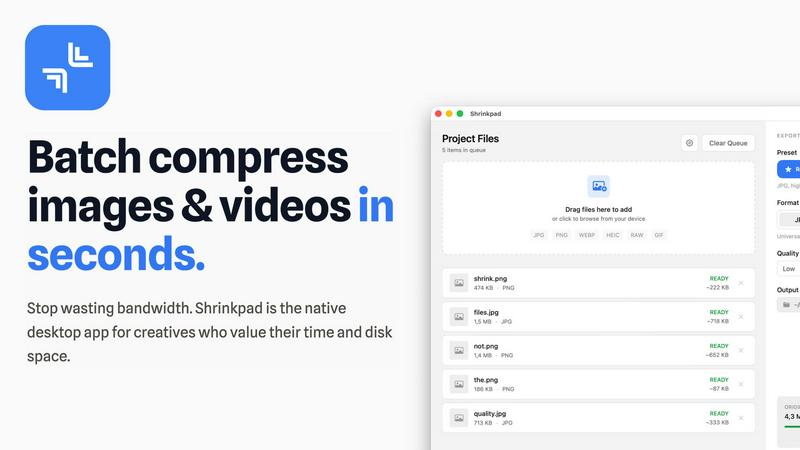
Shrinkpad compresses images and videos on your Mac in seconds, saving space and streamlining your creative workflow.
Last updated: February 28, 2026
Visual Comparison
Facejam

Shrinkpad
Feature Comparison
Facejam
Extensive Style Library
Facejam offers a curated collection of over 100 professional templates, with new styles added regularly. This library is intelligently categorized, featuring industry-specific looks for fields like law, real estate, and tech, alongside versatile corporate, business casual, and creative portraits. This depth ensures every user can find a style that aligns perfectly with their personal brand and professional environment, moving beyond generic filters to context-appropriate imagery.
Hyper-Realistic AI Generation
The platform's advanced AI is engineered to produce results that look authentically photographic, not artificially generated. It meticulously learns facial features, skin tones, and expressions from uploaded selfies to create headshots with natural lighting, believable textures, and professional posing. This focus on realism is crucial for maintaining credibility on platforms like LinkedIn, where overtly AI-generated images can undermine professional trust.
Rapid, On-Demand Creation
Facejam compresses a process that typically takes weeks—scheduling, shooting, and retouching—into mere minutes. There is no waiting for appointments, commuting to a studio, or delayed edits. Users have full control, generating a portfolio of headshots whenever and wherever they need them, providing unparalleled convenience for last-minute profile updates or rapid team onboarding.
Full Commercial Ownership & Privacy
Users retain complete ownership and commercial rights to all generated headshots. Facejam emphasizes a strict privacy policy where uploaded photos are used solely to create that individual's images and are never used to train general AI models or contribute to other users' results. This commitment to security and user ownership is a foundational feature for professional use.
Shrinkpad
One-Drop Import
With Shrinkpad's intuitive one-drop import feature, users can simply drag and drop entire folders onto the application. This functionality automatically detects and adds all supported images and videos to the batch processing list, eliminating the need to manually select individual files.
Smart Detection
Shrinkpad's smart detection technology identifies over 30 different image formats, including popular RAW formats, alongside major video formats. This ensures that all media files are processed optimally while non-media files are ignored for a streamlined experience, allowing users to focus on their creative outputs.
Unlimited Batching
Designed for efficiency, Shrinkpad allows users to process thousands of assets simultaneously without crashing. Unlike web-based tools that may falter under heavy loads, Shrinkpad handles massive queues effortlessly, ensuring that users can maximize their productivity without interruptions.
Privacy First
Shrinkpad is built with privacy at its core. All processing occurs locally on the user's machine, meaning that no files are ever uploaded to the cloud. This not only protects sensitive data but also ensures that users are not dependent on internet speeds, providing a secure and fast compression experience.
Use Cases
Facejam
LinkedIn & Job Search Profiles
For active job seekers or professionals optimizing their network, a standout LinkedIn photo is non-negotiable. Facejam enables users to create a confident, approachable, and industry-appropriate headshot that makes a strong first impression on recruiters and connections, directly impacting perceived credibility and employability without a costly photoshoot.
Corporate Team Page Curation
Companies can ensure brand consistency and a polished public image by using Facejam to generate uniform headshots for entire teams. This is ideal for remote teams, new hires, or company rebrands, providing cohesive imagery for the "About Us" page, internal directories, and investor pitch decks quickly and cost-effectively.
Personal Branding for Entrepreneurs & Coaches
Solo entrepreneurs, consultants, and coaches require consistent, high-quality imagery across their website, social media, and marketing materials to build trust and authority. Facejam allows them to create a suite of on-brand photos for different contexts (e.g., a formal bio shot, a more casual social media pose) that reinforce their professional identity.
Industry-Specific Professional Portraits
Professions like real estate, law, and creative services have distinct visual expectations. A realtor needs a trustworthy, approachable photo, while a lawyer may require a more authoritative look. Facejam’s tailored styles allow professionals to meet these niche expectations directly, ensuring their headshot communicates the right message to their specific clientele.
Shrinkpad
Photographers Optimizing Portfolio
Professional photographers can use Shrinkpad to quickly compress high-resolution images for their portfolios, ensuring that they retain visual quality while reducing file sizes for faster loading times on websites and easier sharing with clients.
Designers Streamlining Assets
Graphic designers often work with multiple image formats in projects. Shrinkpad allows them to batch compress assets directly from design tools like Figma or Photoshop, saving hours of manual work and enabling smooth collaboration with clients and team members.
Developers Enhancing Website Performance
Web developers can leverage Shrinkpad to optimize images and videos before deployment. By significantly reducing file sizes, they improve website load times and user experience, which can lead to better performance metrics and higher search engine rankings.
Content Creators Managing Media Libraries
Content creators with extensive media libraries can benefit from Shrinkpad's ability to handle mixed media batches. Whether they are compressing photos for social media or videos for YouTube, the tool ensures that all assets are optimized in a single workflow, enhancing productivity.
Overview
About Facejam
Facejam is an AI-powered headshot generator that transforms ordinary selfies into professional, studio-quality portraits. It fundamentally reimagines the process of obtaining a business headshot, eliminating the traditional barriers of cost, scheduling, and logistical hassle. The platform is designed for professionals, entrepreneurs, job seekers, and creatives who need a polished, credible visual identity without the time and expense of a photoshoot. Users simply upload a selection of their own photos, choose from a vast and ever-growing library of over 100 curated styles, and generate a suite of realistic headshots in minutes. Its core value proposition is democratizing professional imagery: offering photographer-quality results that are private, secure, and owned entirely by the user, all for a fraction of the traditional cost and effort. From corporate team pages to personal branding across social media, Facejam provides a fast, reliable, and surprisingly sophisticated solution for anyone needing to put their best face forward in the digital world.
About Shrinkpad
Shrinkpad is a cutting-edge, privacy-first desktop application specifically designed for macOS, aiming to revolutionize batch media compression. It addresses a significant challenge faced by modern creatives: the struggle with oversized image and video files that not only occupy precious disk space but also hinder workflow efficiency. Unlike traditional cloud-based solutions, Shrinkpad operates solely on your local machine, utilizing native macOS frameworks. This guarantees the utmost privacy, ensures that your sensitive data remains secure, and eliminates reliance on internet bandwidth. The application is engineered to process hundreds or even thousands of files in mere seconds, optimizing performance especially for Apple Silicon. Shrinkpad allows photographers, designers, developers, and content creators to compress files by up to 90% while intelligently maintaining visual quality. Supporting over 50 formats, from JPGs and RAW files to 4K MP4 videos, Shrinkpad transforms a typically cumbersome task into a simple one-click batch operation. This makes it an essential productivity tool for anyone looking to optimize their digital assets and reclaim valuable storage space.
Frequently Asked Questions
Facejam FAQ
How does the Facejam AI headshot generator work?
The process is intentionally simple and two-fold. First, you upload a series of clear selfies from different angles, which teaches the AI your unique facial features. Second, you browse and select from the extensive library of professional style templates. The AI then synthesizes this information, generating new, original headshots of you in the chosen styles, complete with realistic lighting, backgrounds, and professional attire.
What happens to the photos I upload?
Your uploaded photos are used exclusively to train the AI model for your specific session—to understand what "you" look like. They are not used to improve the general AI model for other users, nor are they stored for other purposes. Facejam's policy prioritizes user privacy, ensuring your personal images remain secure and are not contributed to another person's generated content.
How many usable headshots can I expect to get?
While results can vary, Facejam guarantees at least one high-quality image per generation pack. The final yield is highly dependent on the quality and variety of the input selfies provided. Users who closely follow the upload guidelines (clear, well-lit photos from multiple angles) often report receiving 5 to 10 or more exceptional, portfolio-ready headshots from a single session.
Can I use these headshots on LinkedIn and my resume?
Absolutely. FaceJam is specifically designed for professional applications. The generated headshots are perfectly suited for LinkedIn profiles, resumes, company biographies, email signatures, and business websites. They are crafted to meet the standards of professional portrait photography, providing a flattering and credible representation for any business or career context.
Shrinkpad FAQ
Can I use Shrinkpad for free?
Yes, Shrinkpad offers a Free Starter plan that includes essential tools for casual users, allowing compression of up to 10 files per batch.
What file formats does Shrinkpad support?
Shrinkpad supports a wide range of formats, including popular ones like JPG, PNG, WEBP, AVIF, MP4, MOV, and many RAW formats, making it versatile for various media types.
Does Shrinkpad support video compression?
Absolutely! Shrinkpad is capable of compressing various video formats, including 4K MP4 and MOV, ensuring that both images and videos can be optimized efficiently.
How many files can I process at once?
With Shrinkpad, users can process thousands of files simultaneously, thanks to its unlimited batching feature, which is designed to handle massive queues without any crashes.
Alternatives
Facejam Alternatives
Facejam is an AI-powered photo generation tool that transforms personal selfies into professional, studio-quality headshots. It operates within the rapidly growing category of AI headshot generators and portrait enhancers, designed for professionals and individuals seeking a polished online presence without the traditional photoshoot. Users often explore alternatives for various reasons, including budget constraints, the need for different artistic styles or editing controls, compatibility with specific platforms, or a desire for more specialized features like team management or advanced retouching. The market offers a wide spectrum of tools, each with its own strengths. When evaluating alternatives, key considerations include the realism and quality of the AI output, the diversity and relevance of available styles, pricing transparency and subscription models, data privacy policies, and the overall speed and simplicity of the user experience. Identifying which of these factors is most critical for your specific use case is the essential first step.
Shrinkpad Alternatives
Shrinkpad is a powerful desktop application designed for macOS that specializes in compressing images and videos to optimize storage and improve workflow efficiency. As a privacy-first tool, it allows users to process files locally without uploading data to the cloud. This makes it particularly appealing to creative professionals who often handle large media files and prioritize data security. Users frequently seek alternatives to Shrinkpad for various reasons, including budget constraints, feature sets that may better align with specific needs, or compatibility with different operating systems. When selecting an alternative, it’s crucial to consider factors such as processing speed, the range of supported file formats, ease of use, and the degree of privacy offered by the software.