
Refbox vs Zovo
Side-by-side comparison to help you choose the right AI tool.

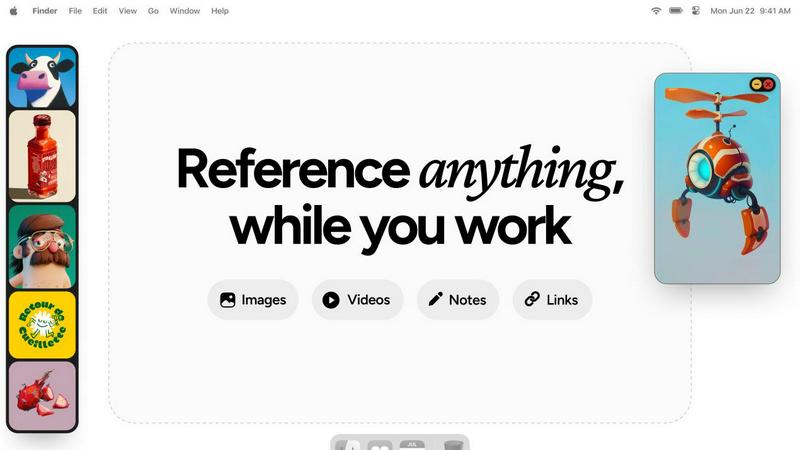
Refbox provides instant access to your images, videos, and notes for a streamlined and efficient workflow.
Last updated: February 28, 2026

Zovo offers 20 privacy-focused Chrome extensions for developers and writers, all under one subscription, ensuring your.
Last updated: February 28, 2026
Visual Comparison
Refbox
Zovo

Feature Comparison
Refbox
Floating Reference Frames
Refbox allows users to create floating reference frames that can be resized and positioned anywhere on their screen. This feature ensures that your references are always visible, regardless of the application you are using, enhancing your productivity.
Masonry Mode
The Masonry Mode organizes your pinned content into visually appealing layouts, making it easier to view multiple references at once. This feature is perfect for moodboarding and ensures that your creative inspirations are presented in an aesthetically pleasing manner.
Markdown-Enabled Notes
With markdown-enabled notes, users can jot down ideas, create checklists, and include styled text without needing to switch between apps. This integration keeps your thoughts organized and accessible right alongside your visual references.
GIF Playback and Pixel Rendering
Refbox supports GIF playback, allowing users to step through each frame for detailed analysis. Additionally, the pixel rendering feature ensures that pixel art is displayed correctly, providing artists with the precision they need for their projects.
Zovo
Privacy-First Design
Zovo's extensions prioritize user privacy above all else. All tools run locally on your device, ensuring that your data is never sent to external servers. This means no tracking, no data collection, and no risk of breaches, giving users peace of mind while they work.
One-Click Language Rewrites
BeLikeNative offers a revolutionary feature that allows users to write like native speakers across 80 languages with a single keystroke. This tool is essential for non-native speakers looking to improve their written communication quickly and efficiently.
Feature Voting System
Zovo empowers its users by allowing them to submit feature requests and vote on upcoming developments. This unique approach ensures that the most requested features are prioritized, making the suite more responsive to user needs.
Open Source Transparency
Many of Zovo's extensions are open source, allowing users to review the code for themselves. This transparency builds trust and confidence in the software, as users can verify how their data is handled and ensure that it aligns with Zovo's privacy policies.
Use Cases
Refbox
Graphic Design
Graphic designers can use Refbox to keep essential reference images and color palettes readily accessible while working on projects. This continuous access helps streamline the design process and boosts creativity.
Animation
Animators can pin videos, GIFs, and notes related to their projects, allowing them to reference movements and styles without disrupting their workflow. Refbox facilitates quicker iterations and enhances the overall animation quality.
UI/UX Development
UI/UX developers can benefit from having design inspirations, color schemes, and user feedback at their fingertips. With Refbox, they can easily compare design elements and make informed decisions during the development process.
Concept Art Creation
Concept artists can utilize Refbox to gather diverse references, such as images and notes, into one accessible space. This support fosters an environment where creativity can flourish, allowing artists to explore new ideas without losing focus.
Zovo
Freelancers and Remote Workers
Freelancers can benefit from Zovo's suite by utilizing tools like Clipboard History Pro and Form Filler Pro to manage their workflow. These extensions streamline tasks, saving time and enhancing productivity.
Language Learners
Language learners can leverage BeLikeNative to practice writing in their target languages. The one-click rewrite feature aids in understanding nuances and improving language skills, making it an essential tool for learners.
Developers and Programmers
Developers can make use of JSON Formatter Pro and Regex Tester Pro to streamline their coding tasks. These tools help to format and test code snippets efficiently, improving coding accuracy and speed.
Privacy-Conscious Users
Individuals who prioritize their online privacy will find Zovo's local processing and zero data collection policies appealing. Users can browse, communicate, and work without the fear of their data being harvested or misused.
Overview
About Refbox
Refbox is a groundbreaking floating reference application tailored for creatives who require continuous access to their sources of inspiration while working. This versatile app allows users to pin a variety of media, including images, GIFs, videos, and notes, in always-on-top frames that remain visible above all other applications. This eliminates the hassle of window switching, allowing artists, designers, animators, and 3D modelers to maintain an uninterrupted workflow. Refbox supports the integration of media from multiple sources such as the web, local storage, and clipboard, all organized into a customizable sidebar. Users can enjoy features like Masonry Mode for aesthetically pleasing layouts, frame resizing, and full-screen galleries for dual monitor setups. Furthermore, Refbox enables markdown-enabled notes for quick idea capture and instructions, streamlining the creative process. This app is essential for any creative professional seeking to enhance productivity and focus without distractions.
About Zovo
Zovo is an innovative suite of 20 Chrome extensions designed to enhance productivity and streamline workflow for users who prioritize privacy and efficiency. Created by a solo developer with over 10 years of experience and a proven track record of $400K earned on Upwork, Zovo stands out in a crowded market. Its flagship extension, BeLikeNative, empowers over 3,300 users to communicate like native speakers in 80 languages with just a keystroke. The suite includes essential tools such as Tab Suspender Pro, JSON Formatter Pro, Clipboard History Pro, and more, catering to a wide range of needs from web scraping to session management. Zovo is unique in its commitment to user privacy; all extensions operate locally, meaning no data is sent to external servers, eliminating risks associated with data harvesting. Users have a direct say in the development process, voting on features and shaping the roadmap, ensuring that the tools evolve according to their needs. With new extensions released monthly and many tools available for free, Zovo is an invaluable resource for anyone looking to enhance their browsing experience without compromising privacy.
Frequently Asked Questions
Refbox FAQ
How does Refbox improve my creative workflow?
Refbox enhances your creative workflow by providing constant access to your references without the need to switch between multiple applications. This saves time and helps maintain focus.
Can I customize the layout of my references?
Yes, Refbox offers customizable frames that can be resized and organized in various layouts, including Masonry Mode, allowing you to create a visual workspace that best suits your needs.
Is there support for different media types in Refbox?
Absolutely! Refbox supports various media types, including images, videos, GIFs, and markdown-enabled notes, making it a versatile tool for all types of creative professionals.
Can I use Refbox on multiple monitors?
Yes, Refbox is designed to work seamlessly with multiple monitors. You can utilize full-screen galleries and arrange your frames across different screens for an optimized creative experience.
Zovo FAQ
How does Zovo ensure my privacy?
Zovo's extensions run entirely on your device, meaning no data is sent to external servers. There is zero tracking, no analytics, and no data collection, ensuring complete privacy.
What happens if I encounter a problem?
If you face any issues, you can reach out directly via email or Discord. Zovo's developer, Michael Lip, personally responds to inquiries, ensuring a human touch in support.
Are the extensions free?
Zovo offers many extensions for free, with core features available at no cost. Users can choose to upgrade to the Pro version for advanced features when they are ready.
How can I request new features?
Users can submit feature requests directly through Zovo's platform. The developer reads every request, and the most popular suggestions are prioritized for development, allowing users to shape the roadmap.
Alternatives
Refbox Alternatives
Refbox is a cutting-edge floating reference app tailored for creatives, designed to keep essential media like images, videos, and notes readily accessible above other applications. It enables users to maintain a seamless workflow by allowing them to pin references in always-on-top frames, significantly reducing the need for constant window switching. As users explore their creative options, they often seek alternatives to Refbox due to factors such as pricing, specific feature sets, or different platform compatibility that may better suit their unique needs. When searching for alternatives, it is crucial to consider aspects such as user interface design, customization options, and the ability to integrate with existing tools. Additionally, factors like performance, customer support, and community feedback can greatly influence the decision-making process. Ultimately, the right alternative should enhance productivity and streamline the creative workflow, catering to the individual preferences of each user.
Zovo Alternatives
Zovo is a comprehensive suite of 20 privacy-first Chrome extensions designed specifically for developers and writers. With tools like JSON Formatter, Tab Suspender, and Clipboard History, Zovo aims to enhance productivity while prioritizing user privacy. As a project developed by a solo developer with extensive experience, Zovo stands out for its commitment to data security, ensuring no information leaves the user's device. Users commonly seek alternatives to Zovo for various reasons, including pricing structures, specific feature sets, and compatibility with different platforms. When exploring alternatives, it’s essential to consider factors such as user experience, privacy policies, and the flexibility of the extensions offered. A well-rounded alternative should meet specific needs while maintaining a strong emphasis on user data protection.