
Receipt Generator vs Refbox
Side-by-side comparison to help you choose the right AI tool.

Receipt Generator
Create and customize realistic receipts in seconds with over 400 templates for business, creative, and personal use, all for free.
Last updated: April 4, 2026

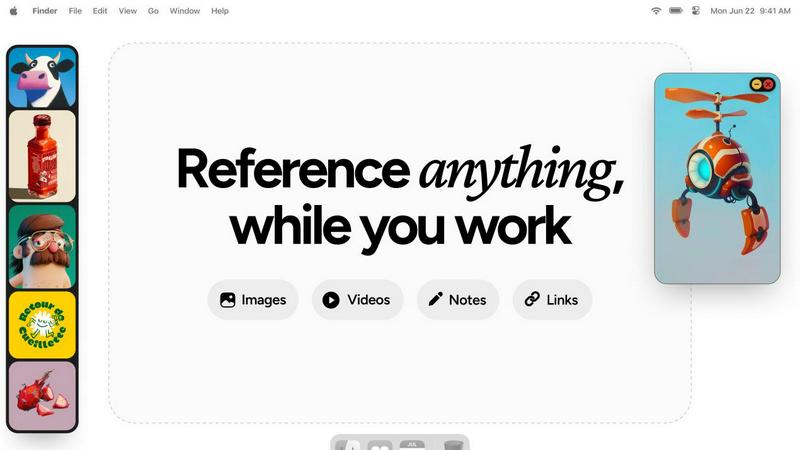
Refbox provides instant access to your images, videos, and notes for a streamlined and efficient workflow.
Last updated: February 28, 2026
Visual Comparison
Receipt Generator

Refbox
Feature Comparison
Receipt Generator
Extensive Template Library
Receipt Generator offers an impressive library of over 400 professionally designed templates tailored for various industries, including retail, restaurants, and pharmacies. This extensive selection allows users to find the perfect template to suit their specific needs, ensuring that every receipt looks authentic and professional.
Full Customization Options
Users can customize every aspect of their receipts, including store information, line items, prices, taxes, payment methods, and more. This level of detail ensures that each receipt can be tailored to reflect the exact transaction, enhancing its authenticity for business or personal use.
AI "Place in Scene" Feature
The innovative "Place in Scene" feature enables users to generate photorealistic images of their receipts placed on various surfaces, such as desks, countertops, or even wallets. This function is perfect for content creators and marketers looking to produce visually appealing material without the hassle of printing.
Instant Download and User-Friendly Interface
Receipt Generator boasts lightning-fast performance with instant download capabilities. Users can export their finished receipts in high-resolution PNG or PDF formats without any waiting or lag. The intuitive drag-and-drop editor simplifies the customization process, making it accessible even for those with minimal tech skills.
Refbox
Floating Reference Frames
Refbox allows users to create floating reference frames that can be resized and positioned anywhere on their screen. This feature ensures that your references are always visible, regardless of the application you are using, enhancing your productivity.
Masonry Mode
The Masonry Mode organizes your pinned content into visually appealing layouts, making it easier to view multiple references at once. This feature is perfect for moodboarding and ensures that your creative inspirations are presented in an aesthetically pleasing manner.
Markdown-Enabled Notes
With markdown-enabled notes, users can jot down ideas, create checklists, and include styled text without needing to switch between apps. This integration keeps your thoughts organized and accessible right alongside your visual references.
GIF Playback and Pixel Rendering
Refbox supports GIF playback, allowing users to step through each frame for detailed analysis. Additionally, the pixel rendering feature ensures that pixel art is displayed correctly, providing artists with the precision they need for their projects.
Use Cases
Receipt Generator
Small Business Expenses
Small business owners can use Receipt Generator to create professional-looking receipts for clients or for their own record-keeping. This enhances credibility and provides a clear documentation trail for tax and accounting purposes.
Freelance Billing
Freelancers can customize receipts to bill clients for services rendered, ensuring they reflect the specifics of the transaction. This not only provides clarity but also helps in maintaining a professional image.
Content Creation
Content creators can leverage the "Place in Scene" feature to generate realistic images of receipts for blog posts, social media, or marketing materials. This adds a layer of authenticity to their content and engages their audience effectively.
Inventory Documentation
Resellers and e-commerce businesses can utilize Receipt Generator to document their inventory purchases. The tool allows for easy customization to reflect precise details, which is beneficial for tracking expenses and managing stock.
Refbox
Graphic Design
Graphic designers can use Refbox to keep essential reference images and color palettes readily accessible while working on projects. This continuous access helps streamline the design process and boosts creativity.
Animation
Animators can pin videos, GIFs, and notes related to their projects, allowing them to reference movements and styles without disrupting their workflow. Refbox facilitates quicker iterations and enhances the overall animation quality.
UI/UX Development
UI/UX developers can benefit from having design inspirations, color schemes, and user feedback at their fingertips. With Refbox, they can easily compare design elements and make informed decisions during the development process.
Concept Art Creation
Concept artists can utilize Refbox to gather diverse references, such as images and notes, into one accessible space. This support fosters an environment where creativity can flourish, allowing artists to explore new ideas without losing focus.
Overview
About Receipt Generator
Receipt Generator is the ultimate online tool designed for creating realistic receipts with unparalleled ease and convenience. With over 400 store-specific templates, users can generate receipts for popular retailers like Walmart, Target, Starbucks, CVS, Best Buy, and many more. This tool is tailored for a diverse audience including small business owners, freelancers, content creators, and resellers around the globe. The main value proposition lies in its ability to allow complete customization of every detail on the receipt—from items, prices, and payment methods to dates—followed by instant download of high-resolution PNG files. Notably, Receipt Generator requires no account setup to begin, making it accessible and user-friendly. The standout feature is the AI "Place in Scene" capability, which lets users create photorealistic images of their receipts in various settings without the need for printing. This feature is ideal for enhancing content, documenting inventory, and creating expense mockups, making Receipt Generator a versatile asset for both personal and business needs.
About Refbox
Refbox is a groundbreaking floating reference application tailored for creatives who require continuous access to their sources of inspiration while working. This versatile app allows users to pin a variety of media, including images, GIFs, videos, and notes, in always-on-top frames that remain visible above all other applications. This eliminates the hassle of window switching, allowing artists, designers, animators, and 3D modelers to maintain an uninterrupted workflow. Refbox supports the integration of media from multiple sources such as the web, local storage, and clipboard, all organized into a customizable sidebar. Users can enjoy features like Masonry Mode for aesthetically pleasing layouts, frame resizing, and full-screen galleries for dual monitor setups. Furthermore, Refbox enables markdown-enabled notes for quick idea capture and instructions, streamlining the creative process. This app is essential for any creative professional seeking to enhance productivity and focus without distractions.
Frequently Asked Questions
Receipt Generator FAQ
Is Receipt Generator free to use?
Yes, Receipt Generator offers a free tier that includes watermarking on the receipts. Users can create and download receipts without creating an account, though a subscription is available for unlimited downloads and watermark-free options.
Can I upload my own logo to the receipts?
Absolutely! Receipt Generator allows users to upload their own logos, enabling them to personalize receipts and make them more aligned with their brand identity.
What file formats can I download my receipts in?
Users can download their receipts in high-resolution PNG or PDF formats. This flexibility ensures that the receipts can be used across various platforms and for different purposes.
Is there a limit to the number of receipts I can create?
With the free tier, there may be restrictions, but subscribing to the Pro plans unlocks unlimited downloads and additional features, allowing users to create as many receipts as they need without constraints.
Refbox FAQ
How does Refbox improve my creative workflow?
Refbox enhances your creative workflow by providing constant access to your references without the need to switch between multiple applications. This saves time and helps maintain focus.
Can I customize the layout of my references?
Yes, Refbox offers customizable frames that can be resized and organized in various layouts, including Masonry Mode, allowing you to create a visual workspace that best suits your needs.
Is there support for different media types in Refbox?
Absolutely! Refbox supports various media types, including images, videos, GIFs, and markdown-enabled notes, making it a versatile tool for all types of creative professionals.
Can I use Refbox on multiple monitors?
Yes, Refbox is designed to work seamlessly with multiple monitors. You can utilize full-screen galleries and arrange your frames across different screens for an optimized creative experience.
Alternatives
Receipt Generator Alternatives
Receipt Generator is a cutting-edge online tool designed for generating custom receipts quickly and efficiently. As a product within the productivity and management category, it caters to a diverse audience, including small business owners, freelancers, and content creators. Users often seek alternatives to Receipt Generator due to various factors such as pricing structures, feature sets, platform compatibility, or specific customization needs that may not be fully met by the original product. When searching for alternatives, it's essential to consider several critical aspects. Look for user-friendly interfaces that allow for easy customization, a variety of templates that suit your specific needs, and fast performance with instant download capabilities. Additionally, evaluate the pricing tiers and features offered, ensuring they align with your requirements for receipt generation, whether for personal use or business purposes.
Refbox Alternatives
Refbox is a cutting-edge floating reference app tailored for creatives, designed to keep essential media like images, videos, and notes readily accessible above other applications. It enables users to maintain a seamless workflow by allowing them to pin references in always-on-top frames, significantly reducing the need for constant window switching. As users explore their creative options, they often seek alternatives to Refbox due to factors such as pricing, specific feature sets, or different platform compatibility that may better suit their unique needs. When searching for alternatives, it is crucial to consider aspects such as user interface design, customization options, and the ability to integrate with existing tools. Additionally, factors like performance, customer support, and community feedback can greatly influence the decision-making process. Ultimately, the right alternative should enhance productivity and streamline the creative workflow, catering to the individual preferences of each user.