
Perkoon vs Refbox
Side-by-side comparison to help you choose the right AI tool.

Perkoon offers free, unlimited peer-to-peer file transfers with no signup required.
Last updated: March 4, 2026

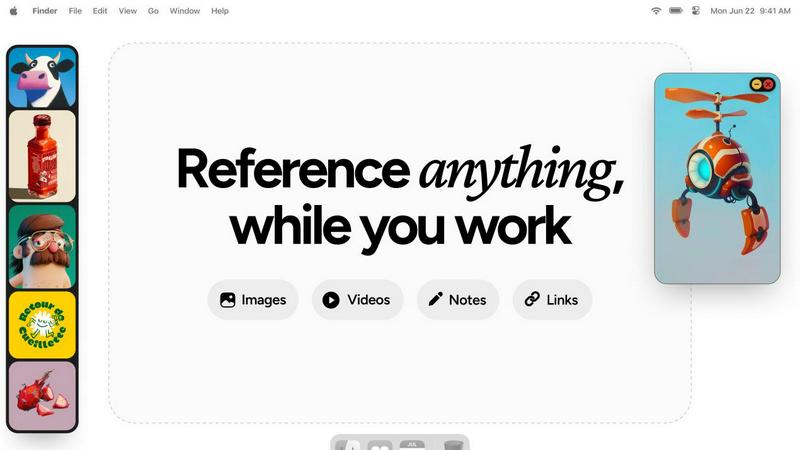
Refbox provides instant access to your images, videos, and notes for a streamlined and efficient workflow.
Last updated: February 28, 2026
Visual Comparison
Perkoon

Refbox
Feature Comparison
Perkoon
Truly Free Peer-to-Peer (P2P) Transfers
This is Perkoon's cornerstone feature. It enables direct, browser-to-browser file transfers with no intermediary server. This architecture means there are absolutely no file size limits, no mandatory account creation, and complete privacy as Perkoon cannot access the data stream. The service is free in perpetuity because this direct transfer model incurs negligible infrastructure costs for the company, a cost-saving passed directly to the user.
Honest Encrypted Cloud Storage
For when the recipient is offline, Perkoon provides a paid cloud storage solution. The service is upfront about this being a paid feature, as it honestly covers the cost of running and maintaining secure servers. Files stored in the cloud are encrypted, providing a secure holding zone. This transparent "pay for what costs us" model contrasts sharply with services that offer "free" tiers subsidized by data mining.
Native AI & Automation Integration
Perkoon is built for the future of work. It features window.__perkoon, a dedicated JavaScript object that allows AI agents and automation scripts to interact with the service programmatically without resorting to unreliable screen-scraping techniques. This native design makes it a robust tool for developers and users who incorporate AI assistants into their workflows for seamless file transfer automation.
Simple CLI and Referral Ecosystem
Beyond the web interface, Perkoon offers a Command Line Interface tool for power users who prefer terminal-based operations. Additionally, it features a community-driven referral program. Users can share a unique link; when new users sign up and perform transfers, both the referrer and referee earn bonus cloud storage, creating a sustainable growth model that rewards the community.
Refbox
Floating Reference Frames
Refbox allows users to create floating reference frames that can be resized and positioned anywhere on their screen. This feature ensures that your references are always visible, regardless of the application you are using, enhancing your productivity.
Masonry Mode
The Masonry Mode organizes your pinned content into visually appealing layouts, making it easier to view multiple references at once. This feature is perfect for moodboarding and ensures that your creative inspirations are presented in an aesthetically pleasing manner.
Markdown-Enabled Notes
With markdown-enabled notes, users can jot down ideas, create checklists, and include styled text without needing to switch between apps. This integration keeps your thoughts organized and accessible right alongside your visual references.
GIF Playback and Pixel Rendering
Refbox supports GIF playback, allowing users to step through each frame for detailed analysis. Additionally, the pixel rendering feature ensures that pixel art is displayed correctly, providing artists with the precision they need for their projects.
Use Cases
Perkoon
Sending Large Media Files Freely
Videographers, photographers, and designers can send massive project files, raw footage, or high-resolution image sets without worrying about arbitrary caps, compression, or expensive subscription tiers. The unlimited P2P transfer is ideal for collaborative creative work where large data packets are the norm and budgets may be tight.
Secure and Private Document Sharing
Legal professionals, journalists, or anyone handling sensitive information can utilize the direct P2P transfer for confidential documents. Since the data never passes through a central server and Perkoon cannot see the content, it offers a higher degree of privacy for one-time secure document exchange compared to traditional cloud services.
Automated Workflow and AI Agent Tasks
Developers and tech-savvy users can integrate Perkoon into automated pipelines. An AI agent could be programmed to automatically back up generated reports via the CLI or use the native API to fetch and process files uploaded by a client, all without manual intervention, streamlining complex digital workflows.
Offline File Delivery via Cloud Link
When you need to send a file to a colleague or client who isn't currently available online, you can use Perkoon's encrypted cloud storage. You upload the file, and Perkoon holds it securely, generating a link you can send. The recipient can then download it at their convenience, solving the common problem of asynchronous file sharing.
Refbox
Graphic Design
Graphic designers can use Refbox to keep essential reference images and color palettes readily accessible while working on projects. This continuous access helps streamline the design process and boosts creativity.
Animation
Animators can pin videos, GIFs, and notes related to their projects, allowing them to reference movements and styles without disrupting their workflow. Refbox facilitates quicker iterations and enhances the overall animation quality.
UI/UX Development
UI/UX developers can benefit from having design inspirations, color schemes, and user feedback at their fingertips. With Refbox, they can easily compare design elements and make informed decisions during the development process.
Concept Art Creation
Concept artists can utilize Refbox to gather diverse references, such as images and notes, into one accessible space. This support fosters an environment where creativity can flourish, allowing artists to explore new ideas without losing focus.
Overview
About Perkoon
Perkoon is a paradigm shift in file transfer, rejecting the modern playbook of surveillance, artificial restrictions, and data monetization. It is a service built on a radical principle of honesty: moving files from one point to another should be simple, private, and fair. It serves a diverse audience, from individuals tired of mandatory accounts and hidden fees to developers and power users seeking automation-friendly tools. Its core value proposition is a two-tiered, transparent model. The flagship offering is a truly unlimited and free peer-to-peer (P2P) transfer service that operates directly between browsers when both parties are online, imposing no size limits and requiring no sign-up. This is free forever because the data never touches Perkoon's servers, costing them nothing. For asynchronous transfers, Perkoon offers encrypted, paid cloud storage, openly acknowledging this covers their server costs. Uniquely, Perkoon is natively designed for the age of automation, featuring built-in APIs for AI agents and a CLI tool, positioning itself as the straightforward, powerful, and privacy-respecting file transfer solution for both people and the machines that assist them.
About Refbox
Refbox is a groundbreaking floating reference application tailored for creatives who require continuous access to their sources of inspiration while working. This versatile app allows users to pin a variety of media, including images, GIFs, videos, and notes, in always-on-top frames that remain visible above all other applications. This eliminates the hassle of window switching, allowing artists, designers, animators, and 3D modelers to maintain an uninterrupted workflow. Refbox supports the integration of media from multiple sources such as the web, local storage, and clipboard, all organized into a customizable sidebar. Users can enjoy features like Masonry Mode for aesthetically pleasing layouts, frame resizing, and full-screen galleries for dual monitor setups. Furthermore, Refbox enables markdown-enabled notes for quick idea capture and instructions, streamlining the creative process. This app is essential for any creative professional seeking to enhance productivity and focus without distractions.
Frequently Asked Questions
Perkoon FAQ
How can P2P transfers be completely free?
P2P transfers are free because of the underlying technology. The files are streamed directly from the sender's browser to the recipient's browser without ever being stored on or routed through Perkoon's servers. This direct connection means Perkoon incurs virtually no bandwidth or storage costs for these transfers, allowing them to offer the service for free indefinitely.
What happens if the recipient is offline?
If the recipient is not online to receive a direct P2P transfer, Perkoon offers encrypted cloud storage as a solution. This is a paid feature. The sender can upload the file to Perkoon's secure servers, where it is held encrypted. A link is then provided that can be sent to the recipient for download at their convenience.
Can Perkoon see the files I send via P2P?
No, absolutely not. During a peer-to-peer transfer, the file data is encrypted and transmitted directly between the two users' web browsers using WebRTC data channels. Perkoon's servers only facilitate the initial connection ("signaling") but never have access to the actual file content, ensuring true privacy.
Is Perkoon compatible with AI agents and automation?
Yes, uniquely so. Perkoon is built with a native API for automation, exposed via window.__perkoon in the browser. This allows AI agents and scripts to interact with the service directly to initiate transfers or check statuses programmatically, eliminating the need for fragile and inefficient web scraping techniques.
Refbox FAQ
How does Refbox improve my creative workflow?
Refbox enhances your creative workflow by providing constant access to your references without the need to switch between multiple applications. This saves time and helps maintain focus.
Can I customize the layout of my references?
Yes, Refbox offers customizable frames that can be resized and organized in various layouts, including Masonry Mode, allowing you to create a visual workspace that best suits your needs.
Is there support for different media types in Refbox?
Absolutely! Refbox supports various media types, including images, videos, GIFs, and markdown-enabled notes, making it a versatile tool for all types of creative professionals.
Can I use Refbox on multiple monitors?
Yes, Refbox is designed to work seamlessly with multiple monitors. You can utilize full-screen galleries and arrange your frames across different screens for an optimized creative experience.
Alternatives
Perkoon Alternatives
Perkoon is a file transfer service in the productivity and management category, distinguished by its commitment to privacy and a no-nonsense approach. It leverages peer-to-peer technology for direct browser-to-browser transfers, eliminating the need for user accounts or subscriptions for its core service. Users often seek alternatives for various reasons. Some may require different pricing models or specific advanced features not offered. Others might need guaranteed compatibility with certain platforms or workflows, or simply prefer a service with a different balance between simplicity and control. The search for the right tool is highly personal. When evaluating alternatives, key considerations include your primary use case—whether for instant transfers or asynchronous sharing—and your budget. Also crucial are the security and privacy policies of the service, its ease of use, and any platform restrictions. The ideal choice aligns with your specific technical requirements and personal values regarding data handling.
Refbox Alternatives
Refbox is a cutting-edge floating reference app tailored for creatives, designed to keep essential media like images, videos, and notes readily accessible above other applications. It enables users to maintain a seamless workflow by allowing them to pin references in always-on-top frames, significantly reducing the need for constant window switching. As users explore their creative options, they often seek alternatives to Refbox due to factors such as pricing, specific feature sets, or different platform compatibility that may better suit their unique needs. When searching for alternatives, it is crucial to consider aspects such as user interface design, customization options, and the ability to integrate with existing tools. Additionally, factors like performance, customer support, and community feedback can greatly influence the decision-making process. Ultimately, the right alternative should enhance productivity and streamline the creative workflow, catering to the individual preferences of each user.