
Genstory vs Refbox
Side-by-side comparison to help you choose the right AI tool.

Genstory
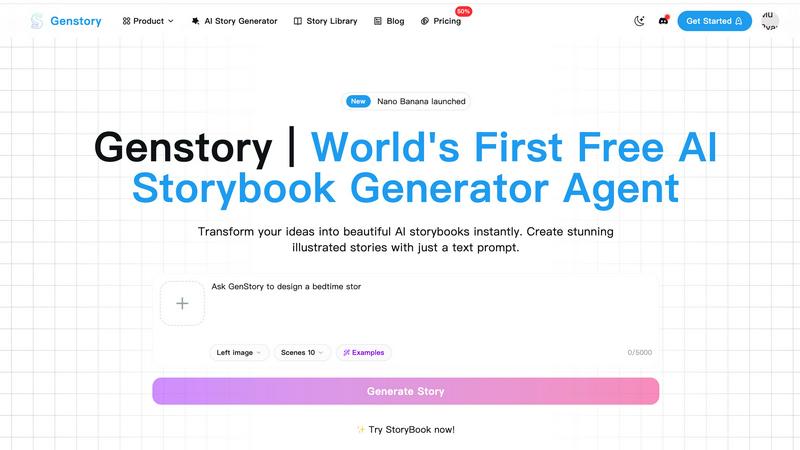
Unlock your creativity with Genstory, the AI tool that transforms your ideas into stunning novels, comics, and videos.
Last updated: February 27, 2026

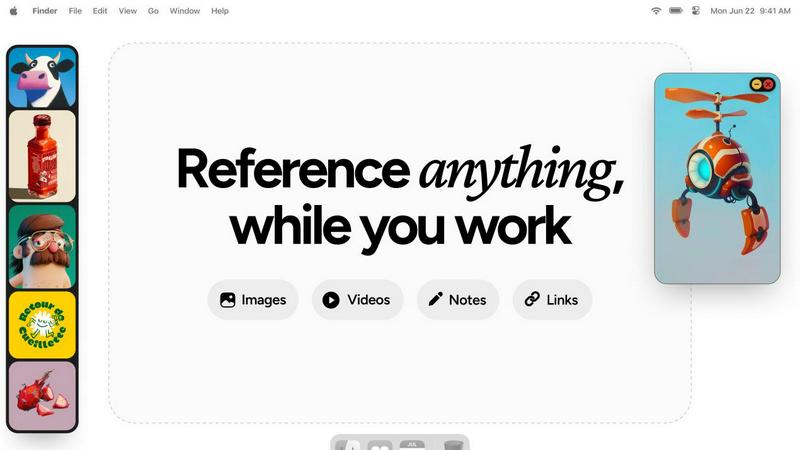
Refbox provides instant access to your images, videos, and notes for a streamlined and efficient workflow.
Last updated: February 28, 2026
Visual Comparison
Genstory
Refbox
Feature Comparison
Genstory
Lightning-Fast Generation
Genstory’s AI story generator can create a complete storybook in mere seconds. From initial text prompts to finalized illustrations, the entire process is streamlined, allowing users to experience rapid story creation without sacrificing quality.
Simple and Intuitive Interface
With Genstory, there is no need to learn complicated commands or technical jargon. The user-friendly interface allows for natural conversations with the AI, making it easy for anyone, regardless of tech-savviness, to generate captivating stories effortlessly.
Multi-Dimensional Output
Genstory provides flexibility in how stories can be enjoyed. Users can choose to generate their stories as PDFs for easy printing or create interactive web stories, making sharing with friends and family a breeze.
Beautiful Illustrations
Every story generated by Genstory is paired with stunning AI-created illustrations that enhance the narrative. These visuals are crafted to complement the text, ensuring that readers are not only engaged by the story but also captivated by the artwork.
Refbox
Floating Reference Frames
Refbox allows users to create floating reference frames that can be resized and positioned anywhere on their screen. This feature ensures that your references are always visible, regardless of the application you are using, enhancing your productivity.
Masonry Mode
The Masonry Mode organizes your pinned content into visually appealing layouts, making it easier to view multiple references at once. This feature is perfect for moodboarding and ensures that your creative inspirations are presented in an aesthetically pleasing manner.
Markdown-Enabled Notes
With markdown-enabled notes, users can jot down ideas, create checklists, and include styled text without needing to switch between apps. This integration keeps your thoughts organized and accessible right alongside your visual references.
GIF Playback and Pixel Rendering
Refbox supports GIF playback, allowing users to step through each frame for detailed analysis. Additionally, the pixel rendering feature ensures that pixel art is displayed correctly, providing artists with the precision they need for their projects.
Use Cases
Genstory
For Parents
Parents can utilize Genstory to create personalized bedtime stories that feature their children as main characters. This not only fosters a love for reading but also strengthens the parent-child bond through shared storytelling experiences.
For Educators
Educators can employ Genstory to generate visual narratives that help explain complex concepts or stimulate creative writing prompts in classrooms. This is particularly beneficial in ESL and special education settings, where engaging content can enhance learning outcomes.
For Creative Writers
Aspiring writers can use Genstory to overcome writer's block or explore new narrative ideas. By simply entering a prompt, they can receive a full story that they can build upon, edit, or modify to suit their unique voice.
For Story Enthusiasts
Story enthusiasts looking to explore diverse genres can utilize Genstory to delve into different storytelling styles. Whether it's fantasy, adventure, or educational content, users can experiment with unlimited story possibilities guided by their creativity.
Refbox
Graphic Design
Graphic designers can use Refbox to keep essential reference images and color palettes readily accessible while working on projects. This continuous access helps streamline the design process and boosts creativity.
Animation
Animators can pin videos, GIFs, and notes related to their projects, allowing them to reference movements and styles without disrupting their workflow. Refbox facilitates quicker iterations and enhances the overall animation quality.
UI/UX Development
UI/UX developers can benefit from having design inspirations, color schemes, and user feedback at their fingertips. With Refbox, they can easily compare design elements and make informed decisions during the development process.
Concept Art Creation
Concept artists can utilize Refbox to gather diverse references, such as images and notes, into one accessible space. This support fosters an environment where creativity can flourish, allowing artists to explore new ideas without losing focus.
Overview
About Genstory
Genstory is an innovative AI story generator that leverages advanced technology to transform your creative ideas into beautifully illustrated digital storybooks. Designed for parents, educators, and storytellers alike, Genstory allows users to generate complete storybooks with just a simple natural language prompt. Whether you want to craft a unique bedtime story for your child, create engaging educational material for a classroom, or simply explore your creativity, Genstory makes it accessible and uncomplicated. The platform not only provides compelling narratives but also enriches them with vivid illustrations, making the storytelling experience immersive and visually appealing. With Genstory, the possibilities for storytelling are endless, empowering users to bring their wildest imaginations to life in a matter of seconds.
About Refbox
Refbox is a groundbreaking floating reference application tailored for creatives who require continuous access to their sources of inspiration while working. This versatile app allows users to pin a variety of media, including images, GIFs, videos, and notes, in always-on-top frames that remain visible above all other applications. This eliminates the hassle of window switching, allowing artists, designers, animators, and 3D modelers to maintain an uninterrupted workflow. Refbox supports the integration of media from multiple sources such as the web, local storage, and clipboard, all organized into a customizable sidebar. Users can enjoy features like Masonry Mode for aesthetically pleasing layouts, frame resizing, and full-screen galleries for dual monitor setups. Furthermore, Refbox enables markdown-enabled notes for quick idea capture and instructions, streamlining the creative process. This app is essential for any creative professional seeking to enhance productivity and focus without distractions.
Frequently Asked Questions
Genstory FAQ
How does Genstory work?
Genstory operates by allowing users to input a simple text prompt describing their story idea. The advanced AI then generates a complete storybook, complete with engaging text and illustrations, in a matter of seconds.
Can I customize the stories generated by Genstory?
Yes, after the initial story is generated, users can review and customize the content. You can adjust the text, illustrations, and overall style to better fit your vision or preferences.
What formats can I save my stories in?
Genstory supports multiple output formats. You can save your stories as PDFs for printing or as interactive web stories for sharing online with friends and family.
Is there a limit to the number of stories I can generate?
There is no specified limit to the number of stories you can create with Genstory. Users are encouraged to experiment and explore various story ideas, allowing for endless creative possibilities.
Refbox FAQ
How does Refbox improve my creative workflow?
Refbox enhances your creative workflow by providing constant access to your references without the need to switch between multiple applications. This saves time and helps maintain focus.
Can I customize the layout of my references?
Yes, Refbox offers customizable frames that can be resized and organized in various layouts, including Masonry Mode, allowing you to create a visual workspace that best suits your needs.
Is there support for different media types in Refbox?
Absolutely! Refbox supports various media types, including images, videos, GIFs, and markdown-enabled notes, making it a versatile tool for all types of creative professionals.
Can I use Refbox on multiple monitors?
Yes, Refbox is designed to work seamlessly with multiple monitors. You can utilize full-screen galleries and arrange your frames across different screens for an optimized creative experience.
Alternatives
Genstory Alternatives
Genstory is an innovative AI-driven platform that allows users to instantly create novels, comics, and cinematic videos. It falls within the category of design tools, where creativity meets technology, enabling users to generate illustrated digital picture books through simple, natural language prompts. Users often seek alternatives to Genstory for various reasons, including pricing concerns, desired features, or particular platform compatibility that better aligns with their needs. When choosing an alternative, it’s crucial to consider factors such as ease of use, the quality of generated content, platform accessibility, and any additional capabilities that enhance the storytelling experience.
Refbox Alternatives
Refbox is a cutting-edge floating reference app tailored for creatives, designed to keep essential media like images, videos, and notes readily accessible above other applications. It enables users to maintain a seamless workflow by allowing them to pin references in always-on-top frames, significantly reducing the need for constant window switching. As users explore their creative options, they often seek alternatives to Refbox due to factors such as pricing, specific feature sets, or different platform compatibility that may better suit their unique needs. When searching for alternatives, it is crucial to consider aspects such as user interface design, customization options, and the ability to integrate with existing tools. Additionally, factors like performance, customer support, and community feedback can greatly influence the decision-making process. Ultimately, the right alternative should enhance productivity and streamline the creative workflow, catering to the individual preferences of each user.