
Quickfix AI vs QuoteCraft AI
Side-by-side comparison to help you choose the right AI tool.

Quickfix AI
Quickfix AI instantly diagnoses your computer's performance and explains it in plain English.
Last updated: March 1, 2026

QuoteCraft AI
QuoteCraft AI instantly generates clear, competitive proposals for freelancers, helping them win more deals.
Last updated: March 4, 2026
Visual Comparison
Quickfix AI
QuoteCraft AI

Feature Comparison
Quickfix AI
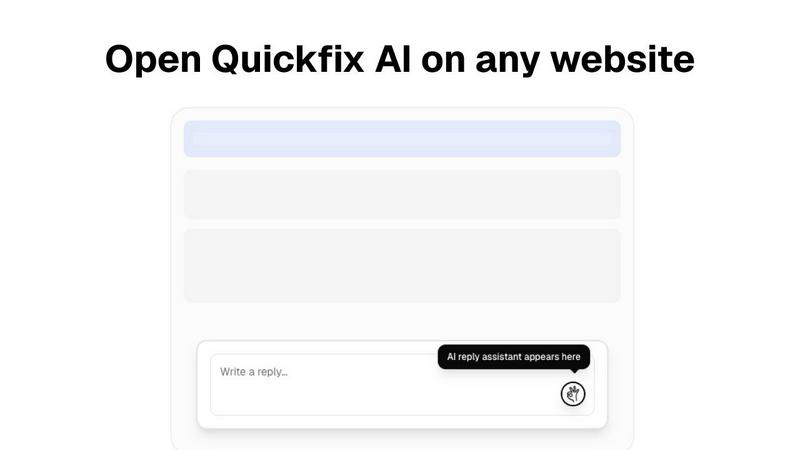
One-Click AI Communication Assistant
This intelligent browser extension integrates seamlessly into your existing workflow on any website. By analyzing the context of emails, social media comments, or support tickets, it generates relevant, tone-appropriate draft replies instantly. This feature eliminates manual drafting and copy-pasting, allowing you to maintain engagement and productivity without ever leaving the tab you're working in, saving significant time across professional and personal communications.
Comprehensive System Health Scan
Quickfix AI performs a rapid, full-system diagnostic scan in under 60 seconds. It meticulously analyzes all critical components of your computer's health, including real-time CPU and memory usage, GPU load, storage drive health and capacity, battery wear cycles, security settings (firewall, encryption), and network connection speed and stability. This provides a complete, at-a-glance overview of your machine's performance and potential issues.
AI-Powered Technical Translator
The cornerstone of the diagnostics tool is its built-in AI assistant. This feature takes the raw, complex data from the system scan and interprets it into clear, plain English summaries. You can ask specific questions like "Why is my computer slow?" and receive answers that pinpoint exact processes or hardware limitations, accompanied by straightforward, actionable steps to resolve the identified problems, making advanced diagnostics accessible to all.
Secure Remote Diagnostics via Sharing Code
Designed for collaborative troubleshooting, this feature allows IT support teams or helpful individuals to diagnose a remote computer effortlessly. The person needing help simply runs the scan and receives a unique, secure sharing code. This code can be sent to a technician, who can then view the full diagnostic report remotely, enabling instant insight and guidance without requiring physical access or complicated screen-sharing sessions.
QuoteCraft AI
Voice-to-Proposal
The voice-to-proposal feature allows users to describe their project out loud, with the platform transcribing the audio into a professional proposal in seconds. This innovative capability is especially useful for freelancers who want to quickly capture their thoughts right after client meetings, making the proposal process more efficient and less daunting.
Interactive Proposals
QuoteCraft AI offers interactive proposals that allow clients to customize their desired services directly within the proposal. Clients can toggle line items on or off, with real-time updates on the total pricing. This flexibility reduces the likelihood of proposal rejections and fosters a more collaborative approach to finalizing project details.
Smart Follow-Ups
The smart follow-up feature automates reminders for clients who have not yet viewed the proposals sent to them. Users can set up gentle nudges at intervals they choose, such as 3, 5, or 7 days after sending. This proactive feature helps freelancers maintain engagement with potential clients without appearing overly aggressive.
Context Engine
The Context Engine is an advanced AI component that learns from users' previous proposals, adapting to their unique writing style and preferences over time. This means that each new proposal generated by QuoteCraft AI feels personal and aligned with the freelancer's established voice, making it easier to maintain consistency and professionalism.
Use Cases
Quickfix AI
The Everyday Troubleshooter
For individuals who sense their computer is underperforming but lack the technical vocabulary to diagnose the issue. Quickfix AI acts as a personal tech consultant, scanning the system and using its AI to explain problems like high memory usage or a failing drive in simple terms, providing clear steps to resolve slowdowns or warnings without needing to consult dense forums or pay for expert help.
The IT Support Professional
IT teams and managed service providers can use Quickfix AI to streamline remote support. Instead of guiding users through lengthy manual checks, they can send a download link, have the user run a scan and share the code, and instantly access a comprehensive diagnostic report. This drastically reduces resolution time, improves first-call fix rates, and provides a clear audit trail for system health.
The Performance-Optimizing Enthusiast
Gamers, video editors, developers, and power users who want to squeeze maximum performance from their hardware use Quickfix AI for deep insights. They can monitor GPU and CPU temperatures under load, analyze memory pressure during intensive tasks, check disk speeds, and use the AI to get recommendations for optimal settings or potential upgrade paths based on their specific usage data.
The Proactive Security Auditor
Individuals and small business owners concerned about their digital security posture can use Quickfix AI for a quick audit. The tool checks the status of essential security features like firewall settings, disk encryption (FileVault for Mac), and system integrity protections. The AI can then explain the importance of each setting and recommend enabling any that are turned off, providing peace of mind.
QuoteCraft AI
Web Design Proposals
Freelance web designers can utilize QuoteCraft AI to quickly generate tailored proposals for new projects. By inputting project specifics and utilizing the voice-to-proposal feature, designers can create and send professional documents that clearly outline scope, pricing, and timelines, all while saving valuable time.
Marketing Project Pitches
Marketing agencies can benefit from the interactive proposals offered by QuoteCraft AI, allowing clients to customize their desired services and view real-time pricing adjustments. This capability enhances client engagement and fosters better communication, leading to more successful pitches.
Creative Studio Contracts
Creative studios can leverage QuoteCraft AI to draft comprehensive proposals for various projects, from video production to graphic design. The platform's AI-generated content ensures that all necessary elements are included, such as deliverables and timelines, making it easier to secure client agreements.
Consulting Firm Proposals
Consulting firms can streamline their proposal process by using QuoteCraft AI to quickly generate documents that clearly define project scope and pricing strategies. The smart follow-up feature helps keep potential clients engaged, increasing the chances of proposal acceptance and project initiation.
Overview
About Quickfix AI
Quickfix AI is a revolutionary dual-platform tool designed to tackle two of the most pervasive productivity drains in the modern digital experience: inefficient communication and opaque system performance. It operates as a cohesive ecosystem of efficiency. On one front, it serves as an intelligent browser extension that integrates directly into your workflow. This AI assistant generates context-aware, high-quality replies with a single click across any website, from Gmail and LinkedIn to social media and customer support portals. It eliminates the tedious cycle of drafting, editing, and switching windows, reclaiming hours per week for professionals, support agents, and anyone who communicates online.
Simultaneously, Quickfix AI is a powerful, desktop-based system diagnostics powerhouse. This tool demystifies computer health for users of all technical levels. It performs a comprehensive, sub-one-minute scan of your CPU, memory, storage, battery, security, and network. The true innovation lies in its integrated AI assistant, which translates complex technical data into plain English explanations and actionable recommendations. This dual nature makes Quickfix AI uniquely valuable: it empowers the everyday user to fix communication bottlenecks and diagnose machine bottlenecks, while providing IT professionals with a powerful, shareable tool for remote support and system audits. It is a commitment to clarity and efficiency, packaged for everyone.
About QuoteCraft AI
QuoteCraft AI is a cutting-edge tool tailored specifically for freelancers who aspire to streamline the proposal-writing process. This innovative platform leverages advanced artificial intelligence to alleviate common pain points such as unclear project scope and ineffective pricing strategies. By allowing users to describe their project verbally or select from seven predefined templates, QuoteCraft AI generates comprehensive proposals in mere seconds. The platform is designed to cater to a variety of freelancers, including web designers, marketing agencies, creative studios, and consulting firms. Its main value proposition lies in simplifying the proposal creation journey, ensuring that users can present professional, customized documents that resonate with their clients. With features like voice-to-proposal capabilities and a Context Engine that adapts based on user feedback, QuoteCraft AI empowers freelancers to enhance their proposal game and secure more deals. Notably, it is free during the beta phase, providing an excellent opportunity for early adopters to access powerful proposal tools without any financial commitment.
Frequently Asked Questions
Quickfix AI FAQ
Is Quickfix AI free?
Yes, the core system diagnostics functionality of Quickfix AI is available as a free download. This allows users to run comprehensive system scans, view their full diagnostic report, and chat with the AI assistant for explanations and recommendations at no cost. Premium features or the communication assistant extension may be part of separate tiered plans.
Is my data secure?
Absolutely. Quickfix AI is designed with privacy and security as a priority. The diagnostic scan runs locally on your machine, and the report data is processed securely. When using the sharing code feature, the data is transmitted over encrypted connections. The company states they do not sell your personal data, and you can review their detailed Privacy Policy and Data Processing Agreement (DPA) for comprehensive information.
Do I need technical knowledge?
Not at all. This is a core value proposition of Quickfix AI. The tool is specifically designed for users with no technical background. The AI assistant exists to translate all complex system information into plain, easy-to-understand English. You simply need to ask questions about your report in natural language, and the AI will provide clear explanations and actionable advice.
What platforms are supported?
Quickfix AI is a cross-platform tool. The system diagnostics application is available for both Windows and macOS operating systems, covering the vast majority of personal computers. The AI communication assistant is a browser extension, which typically supports browsers like Chrome, Edge, Firefox, and Safari, allowing it to work across websites regardless of your underlying operating system.
QuoteCraft AI FAQ
How does the AI generate proposals?
QuoteCraft AI utilizes advanced algorithms to analyze project details provided by users. By processing this information, it automatically creates a comprehensive proposal that includes essential elements like scope, pricing, timelines, and deliverables within seconds.
Will my proposals look generic?
No, QuoteCraft AI is designed to learn from your input and past proposals. The Context Engine ensures that each generated proposal reflects your unique writing style and preferences, making them feel personal and tailored to your clients.
Can I edit proposals after generation?
Absolutely! After the AI generates your proposal, you have the opportunity to review, edit, and customize it before sending it out. This flexibility allows you to make any necessary adjustments to align with your client's needs.
Is my data secure?
Yes, QuoteCraft AI prioritizes data security. The platform employs industry-standard encryption and privacy practices to ensure that your project details and client information are protected at all times during the proposal process.
Alternatives
Quickfix AI Alternatives
Quickfix AI is a versatile productivity tool that combines an AI-powered writing assistant with a comprehensive system diagnostics platform. It belongs to the productivity and management software category, aiming to streamline both digital communication and computer health monitoring from a single ecosystem. Users often explore alternatives for various reasons. These can include budget constraints, a need for more specialized or different features, compatibility requirements with specific operating systems or browsers, or a preference for a tool that focuses solely on one of its two core functions—either AI writing or system analysis. The search for the right fit is a natural part of the software selection process. When evaluating alternatives, consider your primary pain points. Determine if you need a holistic solution or a best-in-class tool for a single task. Key factors to weigh include the depth of AI writing capabilities, the accuracy and detail of system diagnostics, pricing models (subscription vs. one-time purchase), platform availability, and overall ease of use. The goal is to find software that aligns perfectly with your workflow and technical needs.
QuoteCraft AI Alternatives
QuoteCraft AI is an innovative tool designed for freelancers, falling under the Business & Finance and Productivity & Management categories. It specializes in creating professional proposals quickly, addressing common challenges freelancers face, such as defining project scopes and establishing competitive pricing. As users explore alternatives, they often seek options that offer better pricing, additional features, or compatibility with their preferred platforms. When looking for an alternative to QuoteCraft AI, it is essential to consider several factors. Evaluate the user interface for ease of use, the range of features offered, and how well the platform integrates with your existing workflow. Additionally, assess the level of customization available and whether the pricing structure aligns with your budget, ensuring that the alternative meets your specific proposal needs.