
Mailopoly vs Quickfix AI
Side-by-side comparison to help you choose the right AI tool.

Mailopoly
Mailopoly is your AI email assistant that instantly organizes your inbox and drafts replies in your voice.
Last updated: February 28, 2026

Quickfix AI
Quickfix AI instantly diagnoses your computer's performance and explains it in plain English.
Last updated: March 1, 2026
Visual Comparison
Mailopoly

Quickfix AI
Feature Comparison
Mailopoly
Cleanbox AI Inbox Management
Mailopoly's Cleanbox feature acts as an intelligent gatekeeper for your attention. From day one, with zero manual setup or complex rules, its AI accurately identifies and surfaces only the emails that truly matter—like urgent messages from your boss or time-sensitive delivery updates—while quietly filtering out promotional noise and low-priority correspondence. It learns your preferences with a single tap, ensuring your notifications are reserved for genuine priorities, dramatically reducing daily distractions and creating a consistently organized, manageable inbox that promotes focus instead of overwhelm.
Poly - Your Integrated AI Life Assistant
Poly is more than a chatbot; it's a personal executive assistant built directly into your inbox with full context of your account. You can ask Poly natural questions like "What do I need to pay this week?" or "Summarize emails from my accountant," and it will provide instant, accurate answers. It manages your life admin by tracking shipments with full timelines, monitoring upcoming events, and helping you manage personal finances. This deep integration means you get actionable insights and summaries without ever needing to open multiple emails or apps.
AI-Powered Reply Drafting
This feature eliminates the friction of composing responses. Mailopoly's AI doesn't just generate generic replies; it analyzes your writing style and history to draft emails that sound authentically like you. Whether for personal notes, work correspondence, or side-hustle communications, it provides multiple tone-appropriate suggestions instantly. You simply review, make minor edits if desired, and send—turning the tedious task of email writing into a quick decision-making process, saving significant time and mental energy.
Intelligent Unsubscriber & Email Tracker
Mailopoly tackles inbox clutter at its source with an instant unsubscriber that actively and reliably removes you from unwanted mailing lists, not just moving them to spam. Complementing this is a powerful email tracker that provides full transparency on your sent messages, showing you exactly who opened them, how many times, and their geographic location. This suite of tools gives you unprecedented control over both incoming noise and outgoing communication effectiveness.
Quickfix AI
One-Click AI Communication Assistant
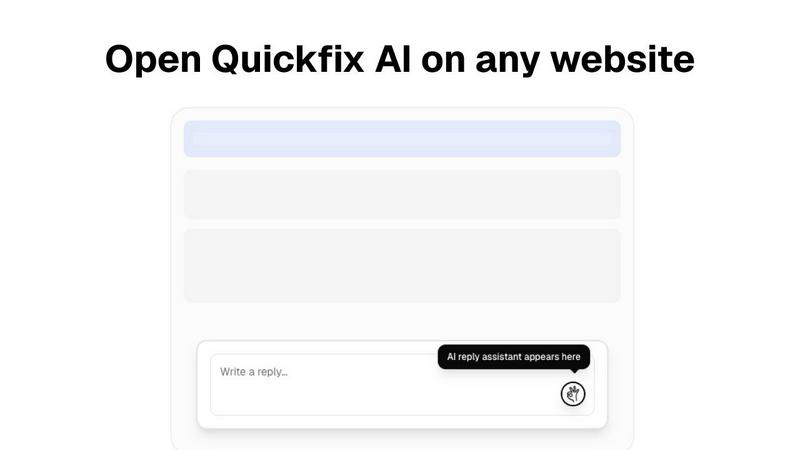
This intelligent browser extension integrates seamlessly into your existing workflow on any website. By analyzing the context of emails, social media comments, or support tickets, it generates relevant, tone-appropriate draft replies instantly. This feature eliminates manual drafting and copy-pasting, allowing you to maintain engagement and productivity without ever leaving the tab you're working in, saving significant time across professional and personal communications.
Comprehensive System Health Scan
Quickfix AI performs a rapid, full-system diagnostic scan in under 60 seconds. It meticulously analyzes all critical components of your computer's health, including real-time CPU and memory usage, GPU load, storage drive health and capacity, battery wear cycles, security settings (firewall, encryption), and network connection speed and stability. This provides a complete, at-a-glance overview of your machine's performance and potential issues.
AI-Powered Technical Translator
The cornerstone of the diagnostics tool is its built-in AI assistant. This feature takes the raw, complex data from the system scan and interprets it into clear, plain English summaries. You can ask specific questions like "Why is my computer slow?" and receive answers that pinpoint exact processes or hardware limitations, accompanied by straightforward, actionable steps to resolve the identified problems, making advanced diagnostics accessible to all.
Secure Remote Diagnostics via Sharing Code
Designed for collaborative troubleshooting, this feature allows IT support teams or helpful individuals to diagnose a remote computer effortlessly. The person needing help simply runs the scan and receives a unique, secure sharing code. This code can be sent to a technician, who can then view the full diagnostic report remotely, enabling instant insight and guidance without requiring physical access or complicated screen-sharing sessions.
Use Cases
Mailopoly
The Overwhelmed Professional & Parent
For individuals balancing a demanding career with family life, Mailopoly is a lifeline. It automatically filters out internal company newsletters and promotional blasts, ensuring notifications only come through for critical emails from a child's school, a partner, or an urgent work client. Poly can instantly find that buried flight confirmation or invoice, while the automated reply drafting handles quick confirmations during a busy day. This use case is about reclaiming mental space and ensuring nothing important slips through the cracks amidst the chaos.
The Entrepreneur & Side-Hustler
Managing multiple income streams means managing multiple email accounts and communication channels. Mailopoly consolidates everything—Gmail for the main business, Outlook for a freelance gig, a custom domain for a side project—into one clear dashboard. The AI extracts key tasks and deadlines from client emails, tracks shipments for product-based hustles, and helps draft professional replies in the appropriate voice for each venture. It turns a scattered operation into a centralized, manageable command center.
The Frequent Traveler & Event Planner
For those constantly on the move or organizing events, details are everything. Mailopoly automatically extracts booking confirmations, check-in times, gate information, and hotel details from emails, presenting them in an easy-to-scan format. The integrated event manager allows for sending custom invitations and tracking RSVPs seamlessly. Poly can answer "What are my upcoming trips?" or "When does my package arrive?" instantly, making travel and event coordination remarkably smooth.
The Privacy-Conscious User Seeking Efficiency
This user is tired of fragmented tools and values security alongside smart features. Mailopoly appeals by offering a SOC 2 certified, privacy-first platform that works with existing email providers without requiring data migration. The intelligent unsubscriber reduces exposure to marketing trackers, while the all-in-one functionality of Poly—handling tasks, summaries, and Q&A—means less data is spread across disparate, less secure apps. It's a single, secure solution for comprehensive life management.
Quickfix AI
The Everyday Troubleshooter
For individuals who sense their computer is underperforming but lack the technical vocabulary to diagnose the issue. Quickfix AI acts as a personal tech consultant, scanning the system and using its AI to explain problems like high memory usage or a failing drive in simple terms, providing clear steps to resolve slowdowns or warnings without needing to consult dense forums or pay for expert help.
The IT Support Professional
IT teams and managed service providers can use Quickfix AI to streamline remote support. Instead of guiding users through lengthy manual checks, they can send a download link, have the user run a scan and share the code, and instantly access a comprehensive diagnostic report. This drastically reduces resolution time, improves first-call fix rates, and provides a clear audit trail for system health.
The Performance-Optimizing Enthusiast
Gamers, video editors, developers, and power users who want to squeeze maximum performance from their hardware use Quickfix AI for deep insights. They can monitor GPU and CPU temperatures under load, analyze memory pressure during intensive tasks, check disk speeds, and use the AI to get recommendations for optimal settings or potential upgrade paths based on their specific usage data.
The Proactive Security Auditor
Individuals and small business owners concerned about their digital security posture can use Quickfix AI for a quick audit. The tool checks the status of essential security features like firewall settings, disk encryption (FileVault for Mac), and system integrity protections. The AI can then explain the importance of each setting and recommend enabling any that are turned off, providing peace of mind.
Overview
About Mailopoly
Mailopoly is not just another email client; it's a fundamental reimagining of how we interact with our digital lives through the inbox. Designed for individuals who are juggling multiple responsibilities—be it a demanding career, family life, side hustles, or complex personal projects—Mailopoly transforms the chaotic epicenter of modern communication into a calm, intelligent command center. Its core value proposition is profound simplicity through advanced intelligence. Instead of forcing you to manually sift through a flood of messages, Mailopoly's AI works from the moment you connect, automatically extracting critical information like dates, amounts, and tasks, slashing notification noise and inbox volume by over half. It goes far beyond email management by integrating a deeply knowledgeable AI assistant, Poly, that can answer questions about your schedule, finances, and correspondence. By unifying email, task management, event planning, and financial tracking into a single, seamless interface that works across all major email providers, Mailopoly empowers you to be proactive, organized, and in control, turning a traditional source of stress into your greatest productivity asset.
About Quickfix AI
Quickfix AI is a revolutionary dual-platform tool designed to tackle two of the most pervasive productivity drains in the modern digital experience: inefficient communication and opaque system performance. It operates as a cohesive ecosystem of efficiency. On one front, it serves as an intelligent browser extension that integrates directly into your workflow. This AI assistant generates context-aware, high-quality replies with a single click across any website, from Gmail and LinkedIn to social media and customer support portals. It eliminates the tedious cycle of drafting, editing, and switching windows, reclaiming hours per week for professionals, support agents, and anyone who communicates online.
Simultaneously, Quickfix AI is a powerful, desktop-based system diagnostics powerhouse. This tool demystifies computer health for users of all technical levels. It performs a comprehensive, sub-one-minute scan of your CPU, memory, storage, battery, security, and network. The true innovation lies in its integrated AI assistant, which translates complex technical data into plain English explanations and actionable recommendations. This dual nature makes Quickfix AI uniquely valuable: it empowers the everyday user to fix communication bottlenecks and diagnose machine bottlenecks, while providing IT professionals with a powerful, shareable tool for remote support and system audits. It is a commitment to clarity and efficiency, packaged for everyone.
Frequently Asked Questions
Mailopoly FAQ
How does Mailopoly work with my existing email accounts?
Mailopoly connects securely to your existing email accounts—including Gmail, Outlook, Yahoo, Hotmail, and any IMAP provider—using standard, secure authentication protocols. It acts as a client, meaning your emails remain on your provider's servers. Mailopoly simply reads, organizes, and presents them intelligently in its interface. You can also get a private @mly.life address. There is zero migration needed; you keep all your accounts and can manage them from one unified dashboard.
Does the AI really sound like me when drafting replies?
Yes. Mailopoly's AI is designed to analyze your unique writing style, including your common phrasing, tone (formal or casual), and vocabulary, from your historical sent emails. When drafting a reply, it uses this learned model to generate suggestions that mirror your authentic voice. You are always in control, with the ability to edit any draft before sending, ensuring every communication feels personal and appropriate.
Is my data private and secure with Mailopoly?
Absolutely. Security and privacy are foundational to Mailopoly's design. The company is SOC 2 certified, which is a rigorous auditing standard for data security. It employs a privacy-first approach, ensuring your email data is handled with strong encryption and robust security practices. You can review their detailed privacy policy for specific information on data handling and retention.
What happens to the emails Mailopoly filters out?
Emails deemed low-priority or "noise" by Mailopoly's Cleanbox AI are not deleted. They are intelligently filtered into a separate "Other" section within the app. You can review this section at any time, ensuring you never miss anything. The system is designed to hide distractions, not remove information, and you can easily "teach" it your preferences with one tap to refine its filtering accuracy over time.
Quickfix AI FAQ
Is Quickfix AI free?
Yes, the core system diagnostics functionality of Quickfix AI is available as a free download. This allows users to run comprehensive system scans, view their full diagnostic report, and chat with the AI assistant for explanations and recommendations at no cost. Premium features or the communication assistant extension may be part of separate tiered plans.
Is my data secure?
Absolutely. Quickfix AI is designed with privacy and security as a priority. The diagnostic scan runs locally on your machine, and the report data is processed securely. When using the sharing code feature, the data is transmitted over encrypted connections. The company states they do not sell your personal data, and you can review their detailed Privacy Policy and Data Processing Agreement (DPA) for comprehensive information.
Do I need technical knowledge?
Not at all. This is a core value proposition of Quickfix AI. The tool is specifically designed for users with no technical background. The AI assistant exists to translate all complex system information into plain, easy-to-understand English. You simply need to ask questions about your report in natural language, and the AI will provide clear explanations and actionable advice.
What platforms are supported?
Quickfix AI is a cross-platform tool. The system diagnostics application is available for both Windows and macOS operating systems, covering the vast majority of personal computers. The AI communication assistant is a browser extension, which typically supports browsers like Chrome, Edge, Firefox, and Safari, allowing it to work across websites regardless of your underlying operating system.
Alternatives
Mailopoly Alternatives
Mailopoly is a next-generation email client that redefines productivity and management by using AI to transform your inbox into a personal command center. It goes beyond simple email organization to actively manage tasks, finances, and communications. Users often explore alternatives for various reasons, such as budget constraints, specific feature requirements not covered by a single platform, or the need for compatibility with certain operating systems or workplace ecosystems. The search for the right tool is highly personal. When evaluating options, consider the core value you need: is it pure email triage, deep AI integration, automated task management, or robust privacy controls? Identifying your primary pain point will guide you toward a solution that effectively addresses your unique workflow challenges.
Quickfix AI Alternatives
Quickfix AI is a versatile productivity tool that combines an AI-powered writing assistant with a comprehensive system diagnostics platform. It belongs to the productivity and management software category, aiming to streamline both digital communication and computer health monitoring from a single ecosystem. Users often explore alternatives for various reasons. These can include budget constraints, a need for more specialized or different features, compatibility requirements with specific operating systems or browsers, or a preference for a tool that focuses solely on one of its two core functions—either AI writing or system analysis. The search for the right fit is a natural part of the software selection process. When evaluating alternatives, consider your primary pain points. Determine if you need a holistic solution or a best-in-class tool for a single task. Key factors to weigh include the depth of AI writing capabilities, the accuracy and detail of system diagnostics, pricing models (subscription vs. one-time purchase), platform availability, and overall ease of use. The goal is to find software that aligns perfectly with your workflow and technical needs.