
Decode This Text vs Phishly
Side-by-side comparison to help you choose the right AI tool.

Decode This Text
Decode This Text gives you a wise, anonymous reality check on any confusing conversation in just 30 seconds.
Last updated: February 28, 2026

Phishly
Phishly uses AI to instantly detect phishing emails in your Gmail inbox.
Visual Comparison
Decode This Text

Phishly
Feature Comparison
Decode This Text
Screenshot Analysis
Gone are the days of manually transcribing lengthy chat histories. With this featured functionality, users can simply upload a photo of their text conversation. The tool seamlessly reads and analyzes the entire visual context, extracting every word, timestamp, and emoji. This streamlines the process immensely, allowing for a quick and effortless entry point to understanding complex or emotionally charged exchanges without the barrier of retyping.
Tone & Intent Deciphering
This feature acts as an emotional barometer for digital communication. It goes beyond dictionary definitions to measure the true emotional temperature of a message—assessing whether the sender is being cold, sarcastic, genuinely friendly, or passively aggressive. By quantifying elements like tone, effort, and intent, it provides an objective lens, helping users avoid the common pitfall of projecting their own anxieties or hopes onto ambiguous words.
Behavioral Pattern Detection
Human communication is rife with subtle, recurring cues that are easy to miss in the moment. This intelligent feature scans conversations for these critical behavioral patterns. It can highlight if someone only messages late at night, consistently avoids direct questions, or is gradually shortening their replies over time. Identifying these trends offers a strategic, big-picture view of the dynamics at play, revealing intentions that single messages might conceal.
AI-Generated Response Crafting
Paralysis over what to say next is a common experience. Decode This Text directly addresses this by generating contextually appropriate response options. After its analysis, it provides users with multiple tailored replies—often categorized as calm, direct, or firm. This empowers individuals to choose a response that aligns with their desired outcome, turning uncertainty into confident action and closing the communication loop effectively.
Phishly
AI-Powered Phishing Detection Engine
At the heart of Phishly is a sophisticated artificial intelligence system trained to identify a wide spectrum of phishing indicators. This goes beyond simple link checking. The AI scrutinizes the email's content for urgent or threatening language designed to provoke panic, analyzes the sender's address for subtle spoofing attempts (like replacing an 'm' with 'rn'), and evaluates the overall structure for social engineering tactics. This multi-layered analysis ensures a comprehensive threat assessment that adapts to evolving phishing strategies, providing a depth of scrutiny that manual inspection would likely miss.
Seamless Gmail Integration via Chrome Extension
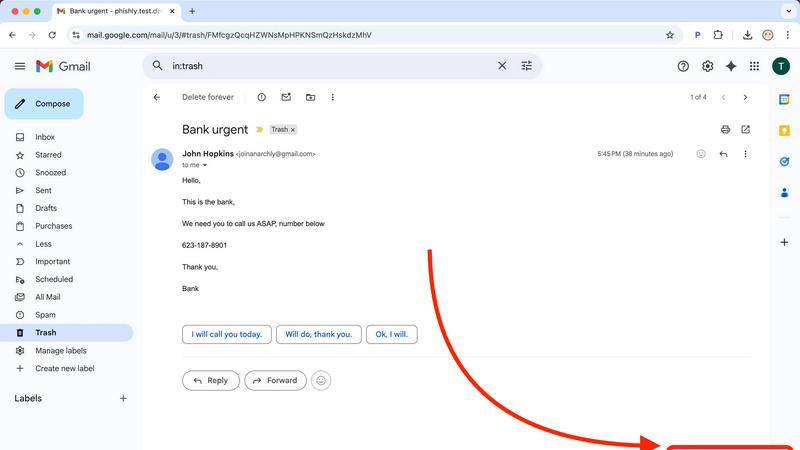
Phishly eliminates friction by embedding its protective capabilities directly into your most-used workflow. The Chrome extension for Gmail adds a discreet "Scan with Phishly" button to your email interface. With a single click on any open email, the analysis begins instantly. This seamless integration means you don't have to copy, paste, or navigate away from your inbox, allowing for rapid decision-making precisely when you encounter a dubious message, thereby maintaining your productivity and security posture simultaneously.
Clear, Actionable Risk Assessment & Explanations
Phishly understands that a simple "danger" alert can be as paralyzing as the phishing attempt itself. Instead, it provides a clear, tri-color risk rating: Safe, Medium Risk, or High Risk. Each rating is accompanied by a detailed, plain-language explanation of the findings. For instance, it might specify, "The sender's domain 'paypa1.com' is a common misspelling of 'paypal.com'," or "This email uses urgent language demanding immediate payment." This transparency educates the user, building their own phishing awareness over time while providing the immediate context needed to decide whether to delete, report, or proceed with caution.
Privacy-First Web Tool for Versatile Analysis
For emails outside of Gmail or for users who prefer not to use an extension, Phishly offers a versatile web-based tool. You can paste the headers and content of any suspicious email—whether from Outlook, a work server, or a forwarded message—into the website for an instant scan. This feature underscores Phishly's commitment to privacy; analysis is performed only on the content you explicitly provide, with no continuous monitoring or data harvesting. It's a powerful, on-demand tool that respects user autonomy and data boundaries.
Use Cases
Decode This Text
Decoding Dating & Romantic Signals
Navigating the early stages of dating is fraught with mixed signals. Is "I'll let you know" a polite brush-off or a genuine statement from a busy person? When someone ghosts after a great date, what does it mean? This tool analyzes text exchanges to clarify interest levels, interpret silence, and explain confusing behaviors like breadcrumbing. It helps users understand the real subtext, saving them from overthinking and guiding them toward responses that protect their emotional well-being.
Interpreting Professional & Workplace Communication
Workplace communication often carries high stakes and hidden meanings. A terse one-word email from a boss, a vague "we'll keep your resume on file," or the challenge of saying "no" to a colleague without causing offense—all are ripe for misinterpretation. Decode This Text analyzes the tone and structure of professional messages, providing clarity on the sender's likely state of mind and suggesting diplomatically worded responses to navigate office politics with grace.
Understanding Friends & Family Dynamics
Group chats that go silent after your message, a friend's suddenly distant tone, or confusing family interactions can create social anxiety. This use case involves using the tool to parse conversations within personal circles. It helps determine if a comment was taken the wrong way, if someone is subtly upset, or if the silence is benign. The analysis fosters healthier relationships by providing an outside perspective on familiar dynamics, often more reliably than asking the same friends for advice repeatedly.
Analyzing Client & Business Correspondence
For freelancers, entrepreneurs, and sales professionals, clear client communication is crucial. Vague feedback, delayed responses, or ambiguous contract language can stall projects. Decode This Text can be used to analyze client emails or messages to discern their true level of satisfaction, urgency, or hesitation. Understanding the client's underlying tone and intent allows for more precise and effective follow-ups, ensuring projects stay on track and relationships remain positive.
Phishly
The Cautious Individual and Family User
For everyday internet users managing personal emails, online shopping accounts, and social media notifications, Phishly acts as a first line of defense. When a user receives an unexpected "bank alert" or a too-good-to-be-true offer, they can instantly scan it. This empowers individuals and families to protect their personal finances and identities from sophisticated scams that often bypass traditional spam filters, fostering safer digital habits for all ages without requiring technical expertise.
The Small Business Owner or Freelancer
Small businesses and freelancers are prime targets for phishing due to often-limited IT resources. A successful attack can mean financial loss or data breach. Phishly provides these professionals with an enterprise-grade security check at zero cost. Before clicking a link in an invoice from a new "vendor" or opening an attachment from a "client," they can verify its legitimacy in seconds, safeguarding their business operations, sensitive client data, and hard-earned revenue.
The Remote and Hybrid Workforce Employee
Employees working outside the traditional office firewall are particularly vulnerable. Phishly equips remote workers with a personal security assistant directly in their inbox. Whether assessing a link in a supposed HR update or a file shared via a collaborative platform, they can independently verify emails without always needing to escalate to an IT helpdesk. This reduces organizational risk and increases employee confidence and productivity in distributed work environments.
The IT Trainer and Security Awareness Advocate
For professionals responsible for security awareness training, Phishly serves as an excellent educational tool. Instead of theoretical examples, trainers can use real (or simulated) emails with the class, scanning them live to demonstrate the AI's findings. This hands-on approach makes the lessons on spoofed domains, psychological manipulation, and other tactics tangible and memorable, significantly improving the effectiveness of cybersecurity education programs.
Overview
About Decode This Text
In the intricate dance of modern communication, where subtext often outweighs the words on the screen, Decode This Text emerges as a vital digital confidant. This innovative tool is designed to demystify the ambiguous messages that populate our inboxes and chat threads, transforming confusion into clarity. At its core, it is an AI-powered analysis engine that interprets the true meaning behind cryptic emails, vague texts, and confusing professional correspondence. By simply pasting a conversation, uploading a screenshot, or describing a scenario, users receive a comprehensive, human-feeling breakdown in about 30 seconds. This analysis delves into the underlying intentions, emotional tone, and even the unspoken patterns within the dialogue, providing actionable advice on how to respond. It serves a diverse audience—from anyone navigating the uncertainties of modern dating and friendships to professionals aiming to decode workplace nuance. Its primary value proposition is profound: to eliminate the anxiety of misinterpretation, enhance communication skills, and empower users to interact with confidence, all within a framework that is 100% anonymous and private.
About Phishly
In the digital age, where our inboxes serve as gateways to both opportunity and peril, discerning friend from foe in an email has become a critical daily skill. Phishly emerges as a vigilant, AI-powered sentinel designed to demystify this threat landscape. At its core, Phishly is an intuitive phishing detection platform that operates directly where you need it most: within your Gmail via a Chrome extension and on the web for broader analysis. Its primary mission is to provide instant, clear-eyed analysis of suspicious emails, transforming uncertainty into actionable insight. By simply opening an email in Gmail and clicking "Scan with Phishly" or pasting email content on their website, users receive an immediate risk assessment categorized as Safe, Medium Risk, or High Risk. This tool is meticulously crafted for individuals, remote workers, and small to medium-sized businesses who seek robust phishing protection without the overhead, complexity, or cost of enterprise-grade security suites. Its profound value proposition lies in its simplicity, speed, and unwavering commitment to privacy—it only analyzes emails you explicitly submit, ensuring your digital correspondence remains confidential. By translating complex threat indicators like domain spoofing, social engineering tactics, and malicious links into plain language, Phishly empowers everyone to navigate their inbox with confidence.
Frequently Asked Questions
Decode This Text FAQ
How does Decode This Text protect my privacy?
Privacy is a foundational principle. The service is designed to be 100% anonymous. No human ever reads the texts, conversations, or screenshots you submit. All analysis is performed by secure AI algorithms. Furthermore, the company states that your data is not used to train their models, ensuring your personal conversations remain confidential and are not stored or reviewed by any person.
What kind of input does the tool accept?
The tool offers flexible input methods to suit your needs. You can directly paste the text of a conversation, write a descriptive summary of what happened, or use the featured Screenshot Analysis function to upload a photo of your chat. This allows you to analyze any digital interaction, whether it's a fresh text thread or a saved conversation from your camera roll.
Is the analysis really accurate if it's done by AI?
While not a substitute for human emotional intelligence, the AI is trained on vast datasets of communication patterns, linguistic cues, and social dynamics to provide highly insightful analysis. It excels at identifying consistent patterns, measuring tonal shifts, and offering probabilistic interpretations of intent based on common scenarios. Users report it feels like getting advice from a wise, objective third party, providing clarity that often cuts through personal bias.
Can it help me write a response?
Absolutely. One of the core features is the AI-generated response crafting. After analyzing the message, the tool provides you with several potential reply options tailored to the situation. These are typically framed with different strategic approaches (e.g., calm, direct, playful), giving you a starting point to communicate back with greater confidence and alignment with your goals.
Phishly FAQ
How does Phishly protect my privacy?
Phishly is built on a principle of explicit user consent and minimal data handling. The Chrome extension and web tool only analyze the specific email content you choose to submit for a scan. It does not continuously monitor your inbox, read your other emails, store your personal data, or track your browsing activity. Your scans are processed to provide the risk assessment and then discarded, ensuring your private communications remain just that—private.
Is Phishly really free to use?
Yes, based on the provided information, Phishly is currently free to use. This makes its advanced AI-powered phishing detection accessible to individuals, small businesses, and organizations of any size without a financial barrier. The company may offer the service for free to build a user base, gather anonymized threat data to improve its AI, or as part of a freemium model where advanced features could be introduced later, but the core scanning functionality is available at no cost.
What makes Phishly different from my email provider's spam filter?
Traditional spam filters operate automatically in the background, primarily filtering based on volume, known bad senders, and basic content rules. Phishly is a targeted, on-demand analysis tool. It uses advanced AI to deconstruct the specific content, context, and subtle deception techniques of an individual email that has already passed through the spam filter. It's designed for the sophisticated, targeted attacks (spear phishing) that often appear legitimate and require human-like scrutiny to detect.
Do I need technical knowledge to use Phishly?
Absolutely not. Phishly is designed for ease of use by anyone. The interface is straightforward: a single click in Gmail or a paste into the website. The results are presented in simple, clear language with a color-coded risk level (Safe, Medium, High) and bullet-point explanations of what triggered the alert. There is no configuration, complex settings, or cybersecurity jargon required, making powerful protection instantly accessible.