
Octopods vs Playwriter
Side-by-side comparison to help you choose the right AI tool.

Octopods
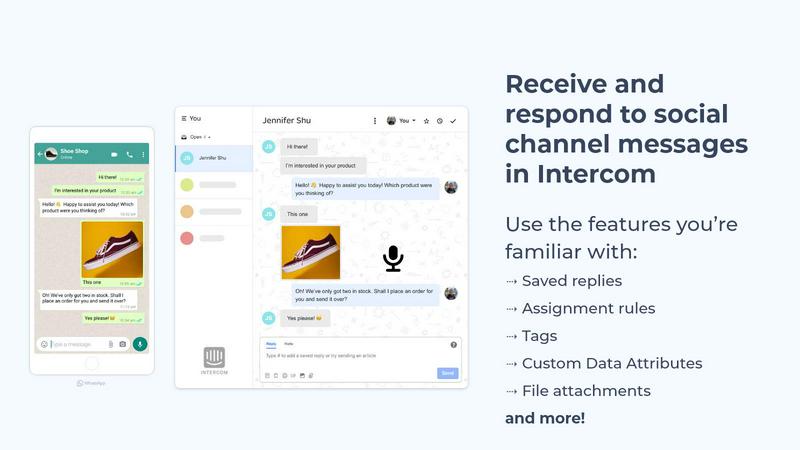
Octopods seamlessly integrates 15+ messaging channels into your Intercom or HubSpot inbox for effortless customer.
Last updated: February 28, 2026

Playwriter
Playwriter lets AI agents control your actual Chrome browser with all your logins and extensions intact.
Last updated: March 18, 2026
Visual Comparison
Octopods
Playwriter

Feature Comparison
Octopods
Native Conversations
Octopods creates native conversations within Intercom and HubSpot, enabling teams to manage all communications without having to switch between different platforms. This functionality ensures that agents can utilize the same tools and workflows they are familiar with, improving efficiency and response times.
Rich Media Support
With robust support for various media types, Octopods allows teams to send images, videos, audio files, documents, and GIFs directly through messaging channels. This rich media capability enhances communication, making interactions more engaging and informative for customers.
Proactive Outbound Messaging
Octopods features proactive outbound messaging capabilities, allowing teams to utilize templates for effective communication. This functionality ensures that businesses can reach out to customers with timely and relevant messages, improving engagement and customer satisfaction.
Automatic Contact Matching
To enhance organizational efficiency, Octopods includes automatic contact matching to prevent duplicate entries. This feature ensures that customer data remains clean and organized, reducing confusion and improving the accuracy of interactions.
Playwriter
Your Authenticated Browser Session
Playwriter's core feature is its ability to let AI agents operate within your existing Chrome window. This is not a simulated or fresh instance; it's the browser you use daily, complete with all logged-in accounts (like Google, GitHub, or social media), installed extensions (password managers, ad blockers), and accumulated cookies. This eliminates the constant friction of re-authentication, bypasses many anti-bot measures that flag "new" browsers, and allows agents to perform tasks in environments that are otherwise inaccessible to automated tools.
Comprehensive Playwright API Access
Unlike other solutions that expose a limited, curated set of browser actions, Playwriter provides agents with the full, unadulterated power of the Playwright automation library through a single execute command. This means an agent can write and run any Playwright code—from complex interactions and network interception to performance profiling and taking accessibility snapshots. This flexibility is far superior to rigid tool schemas, enabling sophisticated automation scripts that can adapt to virtually any website or task.
Advanced Debugging and Inspection Suite
Playwriter equips developers and agents with deep inspection capabilities. It includes a built-in debugger with breakpoints, live code editing, and network request interception. Crucially, it generates lightweight "accessibility snapshots" (5-20KB) that provide a semantic, structured view of the page for the AI, which is far more efficient and context-rich than sending full 100KB+ screenshots. This suite allows for precise troubleshooting and understanding of page state.
Seamless Human-AI Collaboration
The tool is designed for a shared control model. You can watch the AI interact with websites in real-time on your screen. When the agent encounters a CAPTCHA, a consent popup, or an unexpected UI flow, you can simply pause, intervene manually to resolve the issue, and then let the agent continue. This collaborative loop combines AI efficiency for repetitive tasks with human intuition for edge cases, creating a powerful hybrid workflow.
Use Cases
Octopods
Customer Support Efficiency
Support teams can utilize Octopods to manage inquiries from multiple messaging platforms within a single interface. By consolidating conversations, agents can respond faster and more effectively, leading to improved customer satisfaction.
Sales Engagement
Sales teams can leverage Octopods to communicate with prospects across various messaging channels. By using rich media and proactive messaging, they can enhance their outreach efforts and establish stronger connections with potential clients.
Operational Coordination
Operations teams can benefit from the centralized communication provided by Octopods. By managing messages from all channels in one place, teams can streamline their processes, ensuring that all stakeholders are informed and aligned.
Marketing Campaigns
Marketers can use Octopods to execute targeted campaigns across different messaging platforms. With proactive outbound messaging and the ability to send rich media content, they can create engaging campaigns that resonate with their audience.
Playwriter
Automated Testing and QA with Real User Data
QA engineers and developers can use Playwriter to create and run automated tests in a browser that mirrors a real user's state. This allows for testing complex, multi-step user journeys that depend on being logged into specific accounts (e.g., testing a purchase flow from cart to checkout while logged into a payment profile), providing far more accurate and reliable test results than isolated, stateless browser instances.
AI-Powered Research and Data Extraction
Researchers, analysts, and content creators can task AI agents with gathering information from websites that require login or have complex, interactive interfaces. An agent can navigate a personal LinkedIn feed, extract data from a web-based SaaS dashboard, or monitor a private forum, all using the user's established identity and session, automating tedious data collection tasks.
Automated Social Media and Content Management
Marketing professionals and social media managers can leverage Playwriter to automate posting schedules, engagement, or analytics gathering across platforms like Twitter, Facebook, or Instagram. Since the agent operates within the authenticated browser, it can interact with these platforms' often-fragile and login-protected interfaces without triggering security locks.
Development and Debugging Assistance
Software developers can use Playwriter as a powerful co-pilot for front-end development. An AI agent can be instructed to reproduce a bug, intercept network calls to inspect API payloads, edit CSS live to test styling changes, or generate snapshots of a component's accessibility tree, significantly speeding up the debugging and development process.
Overview
About Octopods
Octopods is an innovative messaging integration tool designed to unify communication channels for businesses. By connecting over 18 messaging platforms, including WhatsApp, Telegram, Instagram, LINE, Viber, SMS, and WeChat, Octopods allows teams to manage customer interactions seamlessly through their existing Intercom or HubSpot inbox. This eliminates the need for context switching, enhancing productivity and efficiency. The main value proposition of Octopods lies in its ability to create native conversations within these platforms, enabling teams to leverage tags, saved replies, assignment rules, workflows, and advanced AI features as if they were handling traditional conversations. This integration is particularly beneficial for support, sales, and operations teams looking to engage with customers in their preferred communication channels. With quick setup and no retention of conversation data, Octopods is a secure and efficient solution for businesses aiming to enhance customer engagement.
About Playwriter
Playwriter is a paradigm-shifting tool that redefines how AI agents interact with the web. It solves the fundamental flaw in most browser automation for AI: isolation. Traditional methods force agents to operate in sterile, headless browser instances devoid of personal context—no saved logins, no trusted extensions, and no cookies, which often triggers bot detection systems. Playwriter takes the opposite approach. It is a Chrome extension and CLI that grants AI agents direct, programmatic control over your actual browser session. This means the agent works within a browser that already has your authenticated sessions, custom extensions, and user profile intact. By leveraging the powerful Playwright API through a simple MCP (Model Context Protocol) server, it provides a single, flexible execution tool instead of a limited set of predefined actions. This results in more robust, human-like browsing that avoids detection, reduces memory overhead, and enables a true collaborative workflow between human and AI.
Frequently Asked Questions
Octopods FAQ
How does Octopods integrate with Intercom and HubSpot?
Octopods integrates seamlessly with Intercom and HubSpot by creating native conversations within these platforms. This allows teams to manage all communications without needing to switch between different applications.
What messaging channels does Octopods support?
Octopods connects over 18 messaging channels, including popular platforms like WhatsApp, Telegram, Instagram, LINE, Viber, SMS, and WeChat. This extensive support ensures businesses can reach customers where they are.
Is my conversation data retained by Octopods?
No, Octopods does not retain any conversation data. This commitment to privacy ensures that your customer interactions remain confidential and secure.
How long does it take to set up Octopods?
Setting up Octopods is quick and straightforward, typically taking just a few minutes. This ease of setup allows teams to start benefiting from the integration almost immediately.
Playwriter FAQ
How does Playwriter differ from a traditional headless browser?
Traditional headless browsers are launched as separate, isolated processes with no user data. Playwriter attaches directly to your existing, running Chrome session. The key differences are profound: you keep all logins and extensions, you avoid bot detection that targets "fresh" browser fingerprints, you use less system memory by not duplicating Chrome, and you can collaborate in real-time with the AI.
Is my browsing data sent to a remote server?
No. Playwriter is designed with privacy and security as a priority. All communication happens locally on your machine. The Chrome extension connects to a local WebSocket relay server (on localhost:19988), and your CLI or MCP client connects to the same local server. No browsing data, credentials, or session cookies are transmitted to any remote service.
What happens if the AI gets stuck or encounters a CAPTCHA?
This is where Playwriter's collaborative design shines. You can see the browser acting in real-time. If a CAPTCHA or a complex modal appears, you can simply click the extension icon to detach control for that tab, solve the challenge yourself manually, and then re-attach the extension. The agent will then continue its task from the new state, creating a seamless human-in-the-loop workflow.
Can I use Playwriter with any AI assistant or IDE?
Yes, due to its implementation of the Model Context Protocol (MCP), Playwriter is client-agnostic. It works seamlessly with any MCP-compatible client, including popular AI-powered IDEs like Cursor, Windsurf, and Claude Desktop, as well as code editors like VS Code through appropriate extensions. The open-source MIT license also allows for extensive customization and integration.
Alternatives
Octopods Alternatives
Octopods is a powerful tool that consolidates over 18 messaging channels, including WhatsApp, Telegram, Instagram, and SMS, directly into your Intercom or HubSpot inbox. This integration allows customer support, sales, and operations teams to manage conversations seamlessly, without the need to switch between different platforms. By creating native conversations within Intercom and HubSpot, Octopods enhances operational efficiency and communication quality. Users often seek alternatives to Octopods for various reasons, such as pricing considerations, specific feature requirements, or compatibility with existing platforms. When looking for a substitute, it's essential to evaluate factors like ease of integration, support for multiple messaging channels, and the ability to leverage powerful features like tagging, automated responses, and AI functionalities. Ensuring that an alternative meets your team's unique needs is crucial for maintaining effective customer engagement.
Playwriter Alternatives
Playwriter is an open-source automation tool that provides AI agents with direct, authenticated access to a user's actual Chrome browser session. It belongs to the growing category of browser automation and AI agent tooling, designed to bridge the gap between AI capabilities and real-world web interaction. By leveraging the user's existing browser, it enables complex workflows that require logins, extensions, and bypassing common bot detection mechanisms. Users often seek alternatives for various practical reasons. These can include budget constraints, specific feature requirements not covered by a single tool, or compatibility needs with different operating systems or development environments. Some may prioritize a different licensing model, require a managed cloud service over a local tool, or need integration with a particular stack outside of the MCP (Model Context Protocol) ecosystem. When evaluating options in this space, key considerations should include the depth of browser control offered, the method of session handling (fresh vs. authenticated), and the quality of debugging and observability features. Security is paramount, especially concerning how the tool accesses and manages sensitive browser data. Additionally, assess the flexibility of the automation API, the supported client applications, and the overall philosophy of the project, whether it's open-source or commercially focused.