
Never Drop vs Phishly
Side-by-side comparison to help you choose the right AI tool.

Never Drop
NeverDrop instantly captures event leads and drafts personalized follow-ups to close deals faster.
Last updated: February 28, 2026

Phishly
Phishly uses AI to instantly detect phishing emails in your Gmail inbox.
Visual Comparison
Never Drop

Phishly
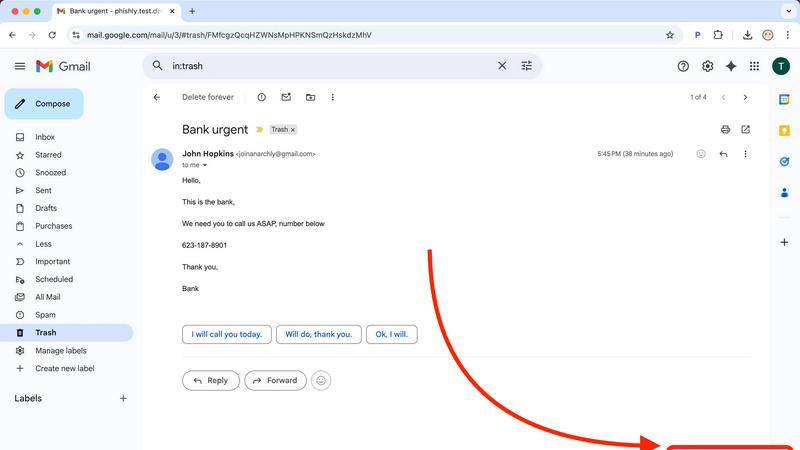
Feature Comparison
Never Drop
AI-Powered Business Card Scanning
Gone are the days of manually typing details from a stack of cards. Never Drop's advanced Optical Character Recognition (OCR) technology allows users to simply snap a photo of any business card. The AI instantly and accurately extracts key details—name, company, title, phone number, and email—eliminating errors and saving invaluable time on the event floor. This foundational feature ensures contact data is digitized and ready for action within seconds of a meeting ending.
Intelligent Contact Enrichment & Email Finding
Business cards often lack direct contact information. Never Drop solves this by automatically searching for and appending verified work emails to a contact's profile using just the name and company. This eliminates tedious manual LinkedIn searches or guesswork, ensuring your sales team has a complete, actionable profile ready for immediate follow-up and seamless integration into your CRM, keeping your database clean and powerful.
Context-Aware AI Follow-Up Drafting
This is where Never Drop transitions from a capture tool to a sales acceleration engine. Based on the voice notes or text context you record about your conversation, its AI generates a uniquely personalized follow-up email draft. It moves beyond generic templates by incorporating the specific tone and topics discussed, crafting a message that feels genuinely personal and relevant, all within two minutes of the interaction.
Team Workspace & Event Organization
Never Drop is built for collaborative sales efforts. Leads can be organized by specific events, reassigned between team members, and all activity can be tracked from a centralized dashboard. This feature ensures alignment across the team, prevents leads from falling through the cracks due to miscommunication, and provides managers with clear visibility into event ROI and team performance.
Phishly
AI-Powered Phishing Detection Engine
At the heart of Phishly is a sophisticated artificial intelligence system trained to identify a wide spectrum of phishing indicators. This goes beyond simple link checking. The AI scrutinizes the email's content for urgent or threatening language designed to provoke panic, analyzes the sender's address for subtle spoofing attempts (like replacing an 'm' with 'rn'), and evaluates the overall structure for social engineering tactics. This multi-layered analysis ensures a comprehensive threat assessment that adapts to evolving phishing strategies, providing a depth of scrutiny that manual inspection would likely miss.
Seamless Gmail Integration via Chrome Extension
Phishly eliminates friction by embedding its protective capabilities directly into your most-used workflow. The Chrome extension for Gmail adds a discreet "Scan with Phishly" button to your email interface. With a single click on any open email, the analysis begins instantly. This seamless integration means you don't have to copy, paste, or navigate away from your inbox, allowing for rapid decision-making precisely when you encounter a dubious message, thereby maintaining your productivity and security posture simultaneously.
Clear, Actionable Risk Assessment & Explanations
Phishly understands that a simple "danger" alert can be as paralyzing as the phishing attempt itself. Instead, it provides a clear, tri-color risk rating: Safe, Medium Risk, or High Risk. Each rating is accompanied by a detailed, plain-language explanation of the findings. For instance, it might specify, "The sender's domain 'paypa1.com' is a common misspelling of 'paypal.com'," or "This email uses urgent language demanding immediate payment." This transparency educates the user, building their own phishing awareness over time while providing the immediate context needed to decide whether to delete, report, or proceed with caution.
Privacy-First Web Tool for Versatile Analysis
For emails outside of Gmail or for users who prefer not to use an extension, Phishly offers a versatile web-based tool. You can paste the headers and content of any suspicious email—whether from Outlook, a work server, or a forwarded message—into the website for an instant scan. This feature underscores Phishly's commitment to privacy; analysis is performed only on the content you explicitly provide, with no continuous monitoring or data harvesting. It's a powerful, on-demand tool that respects user autonomy and data boundaries.
Use Cases
Never Drop
Maximizing ROI at Trade Shows
For sales reps navigating crowded expo halls, Never Drop is indispensable. It allows them to quickly scan a card, dictate key conversation points while walking to the next booth, and have a tailored follow-up ready to send before the day ends. This rapid response capitalizes on the "warm" lead, dramatically increasing the chance of conversion compared to post-event batch emails.
Streamlining Conference Networking
Attendees at multi-day conferences meet dozens of potential contacts. Never Drop helps organize these interactions by event, allowing users to add rich context about each discussion. Later, they can efficiently send personalized follow-ups that reference specific sessions or conversations, making their outreach stand out in a crowded inbox.
Empowering Field Sales Representatives
For reps who meet prospects at client sites, business dinners, or local meetups, Never Drop ensures no detail is forgotten. The ability to capture a card and immediately record voice notes about needs, objections, or next steps means the intelligence from the field is perfectly preserved and instantly actionable for timely, informed follow-up.
Accelerating Sales Team Onboarding
New sales hires can immediately contribute at events without the fear of losing leads due to inexperience. Never Drop provides a structured, foolproof process for capture and follow-up. Managers can also review drafts and activity from the dashboard, using it as a coaching tool to ensure consistency and quality in team communications.
Phishly
The Cautious Individual and Family User
For everyday internet users managing personal emails, online shopping accounts, and social media notifications, Phishly acts as a first line of defense. When a user receives an unexpected "bank alert" or a too-good-to-be-true offer, they can instantly scan it. This empowers individuals and families to protect their personal finances and identities from sophisticated scams that often bypass traditional spam filters, fostering safer digital habits for all ages without requiring technical expertise.
The Small Business Owner or Freelancer
Small businesses and freelancers are prime targets for phishing due to often-limited IT resources. A successful attack can mean financial loss or data breach. Phishly provides these professionals with an enterprise-grade security check at zero cost. Before clicking a link in an invoice from a new "vendor" or opening an attachment from a "client," they can verify its legitimacy in seconds, safeguarding their business operations, sensitive client data, and hard-earned revenue.
The Remote and Hybrid Workforce Employee
Employees working outside the traditional office firewall are particularly vulnerable. Phishly equips remote workers with a personal security assistant directly in their inbox. Whether assessing a link in a supposed HR update or a file shared via a collaborative platform, they can independently verify emails without always needing to escalate to an IT helpdesk. This reduces organizational risk and increases employee confidence and productivity in distributed work environments.
The IT Trainer and Security Awareness Advocate
For professionals responsible for security awareness training, Phishly serves as an excellent educational tool. Instead of theoretical examples, trainers can use real (or simulated) emails with the class, scanning them live to demonstrate the AI's findings. This hands-on approach makes the lessons on spoofed domains, psychological manipulation, and other tactics tangible and memorable, significantly improving the effectiveness of cybersecurity education programs.
Overview
About Never Drop
In the high-stakes arena of sales, the moments following a handshake are critical. Yet, this is precisely where many opportunities dissolve into the chaos of trade show floors and networking events. Never Drop emerges as a definitive solution to this age-old problem, engineered specifically for sales professionals who operate at this frenetic pace. At its core, Never Drop is an intelligent lead-capture application that transforms the ephemeral nature of event networking into a structured, actionable sales pipeline. It addresses the full lifecycle of a lead encounter: from the initial capture via business card scanning, through contextual enrichment with voice notes, to the ultimate crescendo—an AI-drafted, personalized follow-up email generated in under two minutes. This product is not merely a digital Rolodex; it is a strategic partner that ensures no conversational nuance or promising contact is ever lost. By seamlessly integrating with tools like HubSpot and Gmail, it bridges the gap between field intelligence and CRM management, empowering teams to act with unprecedented speed and personalization. The value proposition is clear and compelling: convert more leads by being the first, most relevant responder, turning every event from a cost center into a proven revenue generator.
About Phishly
In the digital age, where our inboxes serve as gateways to both opportunity and peril, discerning friend from foe in an email has become a critical daily skill. Phishly emerges as a vigilant, AI-powered sentinel designed to demystify this threat landscape. At its core, Phishly is an intuitive phishing detection platform that operates directly where you need it most: within your Gmail via a Chrome extension and on the web for broader analysis. Its primary mission is to provide instant, clear-eyed analysis of suspicious emails, transforming uncertainty into actionable insight. By simply opening an email in Gmail and clicking "Scan with Phishly" or pasting email content on their website, users receive an immediate risk assessment categorized as Safe, Medium Risk, or High Risk. This tool is meticulously crafted for individuals, remote workers, and small to medium-sized businesses who seek robust phishing protection without the overhead, complexity, or cost of enterprise-grade security suites. Its profound value proposition lies in its simplicity, speed, and unwavering commitment to privacy—it only analyzes emails you explicitly submit, ensuring your digital correspondence remains confidential. By translating complex threat indicators like domain spoofing, social engineering tactics, and malicious links into plain language, Phishly empowers everyone to navigate their inbox with confidence.
Frequently Asked Questions
Never Drop FAQ
How does Never Drop's AI ensure follow-up emails sound personal?
The AI does not rely on static templates. It analyzes the specific context you provide—be it voice notes or typed text about your conversation—including discussed topics, pain points, and next steps. It uses this unique data to generate a draft that references your actual interaction. You can further review and tweak the tone, ensuring the final email is authentic and personalized.
What happens to the image of the business card after scanning?
Data security is a priority. The business card image is used solely by Never Drop's AI for the purpose of extracting contact information. According to their policy, these images are not shared with any third parties. The data is processed in compliance with GDPR, as Never Drop is built by a French company, with information hosted on secure EU-based servers.
Can I use Never Drop without a mobile app?
The mobile app is essential for the core functionality of scanning business cards and recording voice context on the go. However, a complementary web dashboard is available for managing team settings, reviewing captured leads, configuring integrations, and handling billing, providing a full management suite for administrators.
Which CRM systems does Never Drop currently integrate with?
Currently, Never Drop offers direct integration with HubSpot for pushing enriched contact profiles and lead data directly into your sales pipeline. It also integrates with Gmail, allowing you to send the AI-drafted follow-up emails directly from your own email address. The company has indicated that additional CRM integrations are planned for future updates.
Phishly FAQ
How does Phishly protect my privacy?
Phishly is built on a principle of explicit user consent and minimal data handling. The Chrome extension and web tool only analyze the specific email content you choose to submit for a scan. It does not continuously monitor your inbox, read your other emails, store your personal data, or track your browsing activity. Your scans are processed to provide the risk assessment and then discarded, ensuring your private communications remain just that—private.
Is Phishly really free to use?
Yes, based on the provided information, Phishly is currently free to use. This makes its advanced AI-powered phishing detection accessible to individuals, small businesses, and organizations of any size without a financial barrier. The company may offer the service for free to build a user base, gather anonymized threat data to improve its AI, or as part of a freemium model where advanced features could be introduced later, but the core scanning functionality is available at no cost.
What makes Phishly different from my email provider's spam filter?
Traditional spam filters operate automatically in the background, primarily filtering based on volume, known bad senders, and basic content rules. Phishly is a targeted, on-demand analysis tool. It uses advanced AI to deconstruct the specific content, context, and subtle deception techniques of an individual email that has already passed through the spam filter. It's designed for the sophisticated, targeted attacks (spear phishing) that often appear legitimate and require human-like scrutiny to detect.
Do I need technical knowledge to use Phishly?
Absolutely not. Phishly is designed for ease of use by anyone. The interface is straightforward: a single click in Gmail or a paste into the website. The results are presented in simple, clear language with a color-coded risk level (Safe, Medium, High) and bullet-point explanations of what triggered the alert. There is no configuration, complex settings, or cybersecurity jargon required, making powerful protection instantly accessible.