
Nabbed vs Refbox
Side-by-side comparison to help you choose the right AI tool.

Nabbed is your career CRM that helps sales professionals manage their job search like a revenue pipeline with AI tools.
Last updated: April 13, 2026

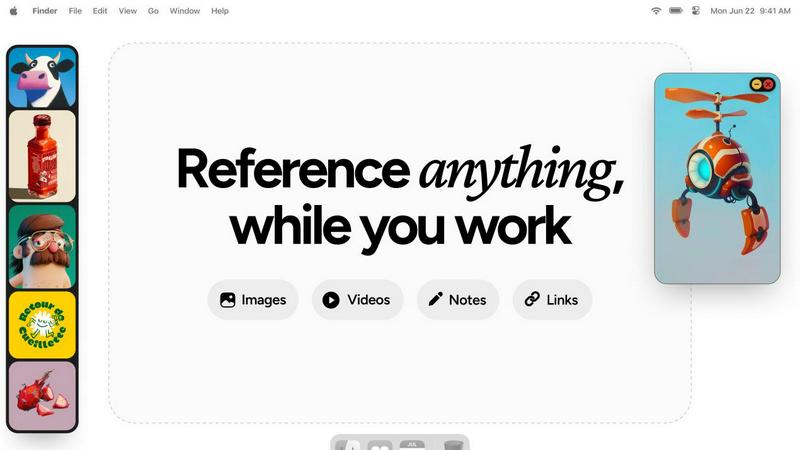
Refbox provides instant access to your images, videos, and notes for a streamlined and efficient workflow.
Last updated: February 28, 2026
Visual Comparison
Nabbed

Refbox
Feature Comparison
Nabbed
Dual Sales Pipelines
Nabbed features two distinct, interconnected Kanban-style pipelines mirroring tools like HubSpot: one for job applications and one for networking contacts. This allows you to drag-and-drop opportunities through stages like "Tracking," "Outreach," "Discovery," and "Closed Won." You can track momentum, velocity, and pipeline health with analytics, providing a clear, visual overview of your entire search's progress and where you need to focus your efforts to move deals forward.
AI Career Suite
This integrated suite provides four powerful AI tools that generate personalized, high-quality content in seconds. It includes an AI cover letter writer, a resume tailor that matches your experience to specific job descriptions, an interview preparation coach that generates likely questions and talking points, and a smart email composer for outreach. The AI is designed to write in your tone, saving hours of manual work while maintaining a professional and personalized touch.
Chrome Extension with ATS Autofill
The free browser extension is the workhorse of the Nabbed ecosystem. It allows you to one-click save jobs from any platform (LinkedIn, Indeed, etc.) directly into your pipeline. Its standout feature is stealth autofill, which automatically populates application fields on over 60 Applicant Tracking Systems (ATS) like Greenhouse, Lever, and Workday using your saved profile, drastically reducing application time and friction.
Company Intelligence & Hiring Signals
Nabbed automatically enriches every saved job with deep company intelligence, pulling in real-time data on funding stages, headcount growth, tech stack, Glassdoor ratings, and open positions. Crucially, it monitors these target accounts for "hiring signals" or trigger events—like new funding rounds or growth spikes—and alerts you, enabling proactive outreach when companies are most likely to be hiring.
Refbox
Floating Reference Frames
Refbox allows users to create floating reference frames that can be resized and positioned anywhere on their screen. This feature ensures that your references are always visible, regardless of the application you are using, enhancing your productivity.
Masonry Mode
The Masonry Mode organizes your pinned content into visually appealing layouts, making it easier to view multiple references at once. This feature is perfect for moodboarding and ensures that your creative inspirations are presented in an aesthetically pleasing manner.
Markdown-Enabled Notes
With markdown-enabled notes, users can jot down ideas, create checklists, and include styled text without needing to switch between apps. This integration keeps your thoughts organized and accessible right alongside your visual references.
GIF Playback and Pixel Rendering
Refbox supports GIF playback, allowing users to step through each frame for detailed analysis. Additionally, the pixel rendering feature ensures that pixel art is displayed correctly, providing artists with the precision they need for their projects.
Use Cases
Nabbed
The Strategic Job Hunter in Active Search
For a sales leader actively seeking a new CRO or VP of Sales role, Nabbed provides structure and leverage. They can name their 50 target accounts, track every relevant opening, use AI to tailor each application, and automate follow-ups. The pipeline view gives them a deal-by-deal forecast of their search, while hiring signal alerts tell them precisely when to strike at growing companies, turning a reactive search into a targeted business development campaign.
The Passive Candidate Building a Network
A professional not actively applying but open to opportunities uses Nabbed as a long-term career CRM. They can systematically build and maintain a network of contacts, logging conversations and scheduling follow-ups within the platform. When a hiring signal pops for a dream company, they have a mapped network of warm introductions ready to leverage, ensuring they are the first to know and best positioned to act on elite opportunities.
The High-Volume Applicant in Competitive Fields
For roles in highly competitive spaces like tech sales, where hundreds may apply, speed and volume are key. The user relies on Nabbed's Chrome extension to capture dozens of listings quickly and autofill applications in seconds, allowing them to apply to more quality roles in less time. The Gmail sync and email tracking then tell them which applications are being reviewed, so they can double down on outreach for promising leads.
The Career Transitioner Seeking Relevance
An individual moving into a new industry or role type uses Nabbed to de-risk their pivot. The AI tools help reframe their resume and experience to match new job descriptions effectively. The Company Intelligence feature helps them rapidly research and understand potential employers, while the Job Fit Score provides data-driven feedback on how well their profile aligns with specific listings, guiding a more targeted and successful transition.
Refbox
Graphic Design
Graphic designers can use Refbox to keep essential reference images and color palettes readily accessible while working on projects. This continuous access helps streamline the design process and boosts creativity.
Animation
Animators can pin videos, GIFs, and notes related to their projects, allowing them to reference movements and styles without disrupting their workflow. Refbox facilitates quicker iterations and enhances the overall animation quality.
UI/UX Development
UI/UX developers can benefit from having design inspirations, color schemes, and user feedback at their fingertips. With Refbox, they can easily compare design elements and make informed decisions during the development process.
Concept Art Creation
Concept artists can utilize Refbox to gather diverse references, such as images and notes, into one accessible space. This support fosters an environment where creativity can flourish, allowing artists to explore new ideas without losing focus.
Overview
About Nabbed
Nabbed is a paradigm-shifting platform that redefines the modern job search by applying the rigorous, data-driven methodologies of sales and revenue operations to career management. It is the first CRM built explicitly for sales, business development, and revenue professionals who understand that finding a new role is the most important deal they will ever close. The core premise is simple yet powerful: you wouldn't manage a million-dollar pipeline in a spreadsheet, so why manage your career in one? Nabbed provides a centralized command center to "run your job search like a sales pipeline." It enables users to visually track job applications through customizable Kanban stages, build a robust contact CRM to manage warm introductions and networking efforts, and gain AI-powered intelligence on target companies. With a powerful Chrome extension, it automates the tedious parts of applying, including autofilling applications across 60+ ATS platforms. From detecting interview invites in your Gmail to alerting you when a dream company starts hiring, Nabbed transforms a chaotic, hope-based process into a strategic, measurable campaign designed for closing.
About Refbox
Refbox is a groundbreaking floating reference application tailored for creatives who require continuous access to their sources of inspiration while working. This versatile app allows users to pin a variety of media, including images, GIFs, videos, and notes, in always-on-top frames that remain visible above all other applications. This eliminates the hassle of window switching, allowing artists, designers, animators, and 3D modelers to maintain an uninterrupted workflow. Refbox supports the integration of media from multiple sources such as the web, local storage, and clipboard, all organized into a customizable sidebar. Users can enjoy features like Masonry Mode for aesthetically pleasing layouts, frame resizing, and full-screen galleries for dual monitor setups. Furthermore, Refbox enables markdown-enabled notes for quick idea capture and instructions, streamlining the creative process. This app is essential for any creative professional seeking to enhance productivity and focus without distractions.
Frequently Asked Questions
Nabbed FAQ
How does Nabbed's email tracking work?
Nabbed's email tracking uses a secure, invisible pixel embedded in the emails you send through its integrated Gmail system or using its templates. When the recipient opens the email, the pixel is loaded, and Nabbed records this activity in your dashboard in real-time. This provides concrete data on engagement, showing you which recruiters or contacts are viewing your messages before they even reply, a feature highlighted as unique compared to competitors.
Is my data and job search activity private?
Yes, Nabbed takes privacy seriously. The platform uses cookies and similar technologies primarily for essential functionality, analytics, and to improve user experience. You can manage your consent preferences for non-essential cookies. All data is handled according to their detailed Privacy Policy, which outlines how your personal information, application data, and contact details are collected, used, and protected.
What is the difference between the Free and Core plan?
The Free plan includes access to the Chrome extension for basic job capture and autofill functionality. The Core plan, at $19/month, unlocks the full platform: advanced ATS autofill strategies, the complete AI Career Suite (cover letters, resume tailoring, etc.), Gmail and LinkedIn contact syncing with full email tracking and analytics, outreach sequences, and access to all company intelligence data and hiring signal alerts.
Can I use Nabbed for industries outside of sales?
While Nabbed is specifically designed with the workflows and terminology of revenue professionals in mind, its core functionalities are highly effective for any professional conducting a strategic job search. The pipeline management, contact CRM, AI-powered tools, and application automation provide universal value for anyone in competitive job markets, from marketing and engineering to finance and operations.
Refbox FAQ
How does Refbox improve my creative workflow?
Refbox enhances your creative workflow by providing constant access to your references without the need to switch between multiple applications. This saves time and helps maintain focus.
Can I customize the layout of my references?
Yes, Refbox offers customizable frames that can be resized and organized in various layouts, including Masonry Mode, allowing you to create a visual workspace that best suits your needs.
Is there support for different media types in Refbox?
Absolutely! Refbox supports various media types, including images, videos, GIFs, and markdown-enabled notes, making it a versatile tool for all types of creative professionals.
Can I use Refbox on multiple monitors?
Yes, Refbox is designed to work seamlessly with multiple monitors. You can utilize full-screen galleries and arrange your frames across different screens for an optimized creative experience.
Alternatives
Nabbed Alternatives
Nabbed is a specialized productivity and management tool designed for sales and revenue professionals navigating a job search. It functions as a career-focused CRM, helping users track applications, manage contacts, and leverage AI for company intelligence and application autofill. It consolidates job searching into a single, powerful platform. Users often explore alternatives for various reasons. Some may seek a different pricing structure or a free tool with more generous limits. Others might need a platform with a broader or narrower feature set, perhaps one that integrates with different software or focuses solely on application tracking without the CRM or AI components. Platform compatibility, like needing a mobile-first experience, can also drive the search. When evaluating alternatives, consider your primary need. Is it meticulous pipeline tracking, deep contact management, or automated application filling? Assess the importance of AI features, salary data, and real-time alerts. Finally, examine the tool's integration capabilities with your email, calendars, and the job boards you use most frequently to ensure a seamless workflow.
Refbox Alternatives
Refbox is a cutting-edge floating reference app tailored for creatives, designed to keep essential media like images, videos, and notes readily accessible above other applications. It enables users to maintain a seamless workflow by allowing them to pin references in always-on-top frames, significantly reducing the need for constant window switching. As users explore their creative options, they often seek alternatives to Refbox due to factors such as pricing, specific feature sets, or different platform compatibility that may better suit their unique needs. When searching for alternatives, it is crucial to consider aspects such as user interface design, customization options, and the ability to integrate with existing tools. Additionally, factors like performance, customer support, and community feedback can greatly influence the decision-making process. Ultimately, the right alternative should enhance productivity and streamline the creative workflow, catering to the individual preferences of each user.