
Blueberry vs Mod
Side-by-side comparison to help you choose the right AI tool.

Blueberry
Blueberry unifies your editor, terminal, and browser into a single AI-powered workspace for seamless web app.
Last updated: February 28, 2026

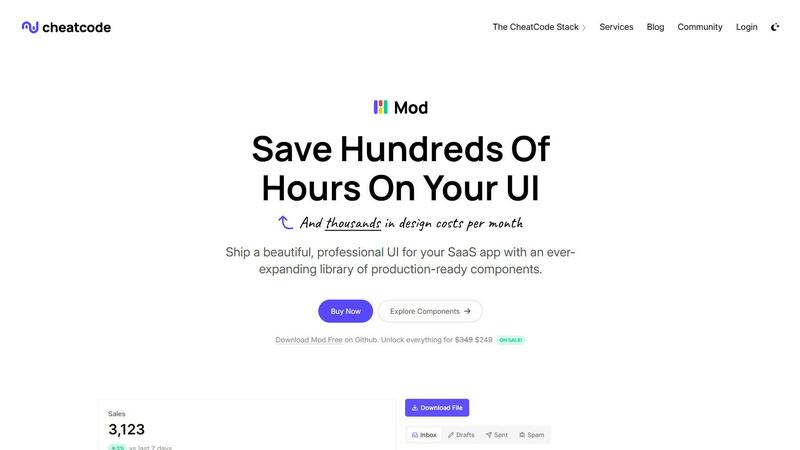
Mod is a CSS framework that helps developers build SaaS interfaces quickly with its library of components.
Visual Comparison
Blueberry

Mod
Feature Comparison
Blueberry
Integrated Workspace
Blueberry provides a unique integrated workspace that combines a code editor, terminal, and live preview browser. This feature allows developers to access all necessary tools in one place, significantly enhancing workflow efficiency while minimizing distractions from switching between different applications.
Multi-Channel Processing (MCP)
The built-in MCP server enables Blueberry to provide AI models with complete context of your project. By allowing AI to see open files, terminal outputs, and browser previews, developers can interact with AI in a meaningful way, leading to better coding assistance and real-time feedback.
Visual Context Tools
With features like screenshot capture and element selection, developers can provide their AI with visual context directly from the preview browser. This not only enriches the interaction with AI but also allows for better assistance in design and development tasks, making it easier to implement user interface changes.
Pinned Apps Integration
Blueberry allows users to dock essential applications like GitHub, Linear, Figma, and PostHog directly within the workspace. These pinned apps load automatically with your project, ensuring that your AI has access to the tools and resources needed to enhance your development process.
Mod
Extensive Pre-Built Component Library
Mod's foundation is its robust library of over 88 ready-to-use components, meticulously designed for SaaS applications. This includes everything from complex data tables, dashboards, and form elements to navigation bars, modals, and feedback widgets like alerts and toasts. Each component is built with accessibility and semantic HTML in mind, ensuring a solid baseline for user interaction. This depth eliminates the need to build common UI patterns from scratch, saving countless hours of development and testing while guaranteeing a consistent, professional look and feel across the entire application interface.
Framework-Agnostic Flexibility
A defining technical feature of Mod is its complete independence from any specific JavaScript framework or meta-framework. It delivers pure, well-structured CSS and component logic that can be seamlessly adopted by projects using React (via Next.js, Vite), Vue (via Nuxt), Svelte, or even traditional server-rendered applications in Ruby on Rails or Django. This architecture future-proofs your investment, as teams can migrate their underlying technology stack without abandoning their UI system. It empowers developers to choose the best tools for their job without being constrained by their design library's dependencies.
Comprehensive Theming and Style System
Beyond individual components, Mod provides a powerful, systematic approach to styling with 168 predefined styles and two core themes (light and dark). The theming engine allows for easy customization of color palettes, typography, spacing, and border radii to align with any brand identity. The built-in dark mode support is not an afterthought but a first-class feature, with all components designed to adapt gracefully. This system ensures visual consistency is maintainable at scale, enabling quick global changes from a single source of truth rather than hunting through thousands of lines of CSS.
Icon Suite and Responsive Foundations
Mod includes an extensive library of over 1,500 icons, covering a vast range of use cases from common actions (edit, delete, user) to more niche SaaS-related concepts. This integrated suite ensures visual consistency and saves developers from managing multiple third-party icon dependencies. Furthermore, every component and layout is built with a mobile-first, responsive design philosophy. This means interfaces automatically adapt and remain usable and aesthetically pleasing across all device sizes, from desktop monitors to smartphones, which is a non-negotiable requirement for modern web applications.
Use Cases
Blueberry
Rapid Prototyping
Developers can use Blueberry to rapidly prototype web applications by leveraging its integrated workspace and real-time AI feedback. This capability allows for quick iterations and adjustments based on user testing and feedback, significantly accelerating the development cycle.
Collaborative Development
Teams can utilize Blueberry to collaborate effectively by using pinned apps and the shared context feature. This ensures that all team members are on the same page, enabling better communication and coordination throughout the development process.
Design Implementation
Designers can work seamlessly with developers in Blueberry by leveraging the visual context tools. By capturing screenshots and selecting elements within the preview browser, they can provide precise feedback and implement design changes more efficiently.
Debugging and Testing
Blueberry's integrated terminal and live preview browser make it easier for developers to debug and test their applications in real-time. With the AI's context awareness, developers can quickly identify issues and implement fixes without losing focus on the overall project.
Mod
Rapid Prototyping and MVP Development
For entrepreneurs and solo developers validating a business idea, speed is critical. Mod is an ideal tool for rapidly building a high-fidelity, functional prototype or Minimum Viable Product (MVP). Instead of spending weeks designing and coding basic UI elements, developers can leverage Mod's component library to assemble a professional-looking interface in days. This allows them to test core functionality with real users faster, gather feedback, and iterate on the product's unique value proposition without getting bogged down in frontend intricacies.
Scaling Design Consistency in Growing Teams
As a startup expands its engineering team, maintaining a consistent UI without a dedicated design system often leads to visual fragmentation and increased technical debt. Adopting Mod provides an instant, shared source of truth for all frontend developers. New team members can immediately contribute features with components that automatically adhere to the established design language. This scales design consistency effortlessly, improves collaboration between developers and designers, and reduces the time spent on code reviews for visual regressions.
Modernizing Legacy Application UIs
Many established businesses operate on older web applications with outdated, non-responsive user interfaces that harm user experience. A full rewrite may be cost-prohibitive. Mod offers a strategic path for incremental UI modernization. Its framework-agnostic CSS can be progressively integrated into legacy stacks (like a Rails monolith or a Django app) to refresh specific sections—like the admin dashboard or customer portal—with a modern, responsive design without a complete platform overhaul, delivering immediate UX improvements.
Building Internal Tools and Admin Panels
The development of internal tools, dashboards, and admin panels is often deprioritized, leading to clunky, poorly designed interfaces that hinder productivity. Mod is perfectly suited for this use case. Its comprehensive component set includes many elements crucial for admin interfaces: data grids, charts, complex forms, and filter controls. Developers can quickly assemble powerful, intuitive internal tools that employees enjoy using, thereby improving operational efficiency, all while maintaining a cohesive look with the customer-facing product if desired.
Overview
About Blueberry
Blueberry is an innovative macOS application designed to revolutionize the way modern product builders create and manage web applications. It brings together an editor, terminal, and browser into one seamless workspace, eliminating the need for constant window juggling and allowing developers to focus on what truly matters: building great products. By integrating powerful AI models like Claude, Gemini, and Codex through its built-in Multi-Channel Processing (MCP) server, Blueberry provides contextual awareness of your entire project. This means your AI can access files, terminal outputs, and live previews simultaneously, streamlining the development process and enhancing productivity. With its user-friendly interface and comprehensive features, Blueberry caters to developers, designers, and product managers, making it the ideal choice for anyone looking to ship web applications that delight users.
About Mod
In the high-stakes arena of SaaS development, where user experience can make or break a product, Mod emerges as a specialized design system engineered for velocity and polish. It is not merely another CSS library; it is a comprehensive, production-ready toolkit for crafting sophisticated, business-grade user interfaces. At its core, Mod provides developers with a vast, pre-assembled collection of 88+ components, 168 distinct styles, and over 1,500 icons, all built with a mobile-first, responsive philosophy. Its framework-agnostic nature is a key strategic advantage, allowing seamless integration with modern stacks like Next.js, Nuxt, SvelteKit, and even backend-heavy frameworks such as Rails and Django. This eliminates the common friction of vendor lock-in, granting teams architectural freedom. Designed for solo developers, startups, and engineering teams, Mod's primary value proposition is the radical reduction of design debt and frontend development time. By offering meticulously styled, accessible, and themeable components out of the box—including built-in dark mode support—it enables builders to shift their focus from reinventing UI widgets to solving unique business logic and user experience challenges, ultimately accelerating the path from concept to a shipped, professional-grade application.
Frequently Asked Questions
Blueberry FAQ
What operating system does Blueberry support?
Blueberry is specifically designed for macOS, ensuring that users on this platform can take full advantage of its features and capabilities.
Is Blueberry free to use?
Yes, Blueberry is currently available for free during its beta phase, allowing users to experience its powerful features without any cost.
How does the Multi-Channel Processing (MCP) feature work?
MCP allows your AI models to access live context from your entire workspace, including open files, terminal output, and browser previews. This enhances AI responsiveness and accuracy in providing coding assistance.
Can I integrate other applications with Blueberry?
Yes, Blueberry supports integrating essential applications like GitHub, Linear, Figma, and PostHog directly within its workspace, facilitating a more cohesive development environment.
Mod FAQ
What makes Mod different from other CSS frameworks like Tailwind or Bootstrap?
While frameworks like Tailwind provide utility classes and Bootstrap offers generic components, Mod is specifically engineered for SaaS and business application interfaces. It provides a higher level of abstraction with complex, pre-composed components (e.g., data tables with sorting, detailed dashboard cards) that are not available in generic frameworks. Mod delivers opinionated, production-ready designs out of the box, whereas Tailwind requires you to design the aesthetics yourself. It's a complete design system, not just a set of low-level building blocks.
How does the framework-agnostic approach work in practice?
Mod is distributed as plain, well-structured CSS alongside component templates written in standard HTML/JavaScript (or JSX/Vue/Svelte snippets). There are no framework-specific dependencies or React/Vue component binaries. Developers copy the HTML structure and apply the provided CSS classes. This pure approach means the components render consistently regardless of your tech stack. Documentation provides examples for popular frameworks, but the underlying implementation remains standard web technologies, ensuring maximum compatibility and longevity.
Is Mod suitable for completely custom designs, or is it locked into its default look?
Mod is highly customizable. While it offers beautiful default themes, it is built with a systematic design token approach. Core variables for colors, fonts, spacing, and borders are centralized, allowing you to override them to match any brand guideline. You can create a completely custom theme that transforms the entire component library's appearance while retaining all the functional behavior, responsiveness, and accessibility features. It provides a structured foundation for customization, not a rigid template.
What is included in the "yearly updates" mentioned?
The yearly updates refer to ongoing maintenance and expansion of the Mod library. This typically includes adding new components based on emerging SaaS UI patterns, updating existing components for improved accessibility or browser compatibility, expanding the icon set, and refining the core themes. For subscribers, this ensures the design system stays modern and secure without requiring manual upgrades or patches from the development team, providing long-term value and reducing maintenance overhead.