
Imgezy vs SparkPix
Side-by-side comparison to help you choose the right AI tool.

Imgezy
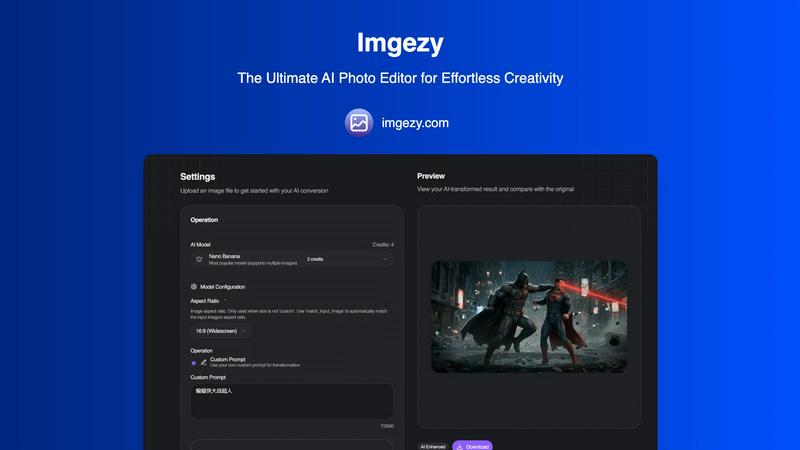
Imgezy is an AI photo editor that effortlessly removes objects and changes backgrounds for anyone.
Last updated: February 28, 2026

SparkPix
SparkPix is an AI photo editor that transforms any image by simply typing your creative vision.
Last updated: March 11, 2026
Visual Comparison
Imgezy
SparkPix

Feature Comparison
Imgezy
Intelligent Object Removal
This feature leverages advanced AI to identify and seamlessly erase unwanted elements from any photograph. Whether it's a photobomber, a distracting street sign, power lines, or blemishes, the tool doesn't just delete; it intelligently reconstructs the background with pixel-perfect accuracy. The AI analyzes the surrounding textures, colors, and patterns to fill the void naturally, leaving absolutely no trace that an object was ever present, thus salvaging otherwise perfect shots.
Instant Background Replacement
Transform the context and mood of any image in an instant. Users can replace dull or unsuitable backgrounds with anything from a solid color to a breathtaking landscape or a professional studio setting. The AI precisely isolates the main subject, even handling complex edges like hair or fur, and seamlessly composites it onto the new background. This is invaluable for creating consistent branding visuals, enhancing product photos, or simply unleashing creative fantasies without a green screen.
AI-Powered Photo Enhancement
Beyond structural edits, Imgezy includes smart enhancement capabilities that automatically improve an image's fundamental qualities. The AI can analyze and optimize lighting conditions, boost color vibrancy, enhance sharpness, and restore clarity to blurry or damaged areas. This feature acts as an automatic professional touch-up, ensuring every photo looks its absolute best by making intelligent adjustments that would typically require manual fine-tuning with various sliders and filters.
Batch Processing & High-Quality Output
Designed for efficiency, Imgezy allows users to upload and edit multiple photos simultaneously, saving immense time on large projects like e-commerce catalogs or event galleries. Despite the speed and AI-driven process, the tool guarantees no loss in quality. All edited images are available for download in full, high resolution, making them suitable for both digital use and professional print. This combination of scalability and quality assurance is critical for professional workflows.
SparkPix
AI Photo Editor (Text-to-Edit)
This is the flagship feature that defines SparkPix's innovative approach. Instead of navigating layers and tools, users simply type a natural language instruction into a text box, such as "make the sky more dramatic" or "remove the trash can from the foreground." The AI interprets this command and applies the precise edits, delivering results typically in under 30 seconds. This feature encapsulates a wide range of adjustments, from basic corrections to complex compositional changes, all guided by the user's descriptive prompt.
Background Remover
SparkPix offers a highly efficient, one-click background removal tool powered by AI. It is engineered to handle a variety of subjects with precision, including portraits with fine hair details, product photos for e-commerce, and complex scenes with multiple elements. The tool instantly isolates the subject, creating a clean, transparent background (PNG) that can be replaced with a solid color, a new image, or left transparent for use in design projects, all without leaving any watermark on the free tier.
Photo Restoration & Enhancement
This dual-purpose feature addresses both historical preservation and modern quality improvement. The restoration AI specializes in repairing old, damaged photographs by automatically fixing scratches, tears, fading, and spots, effectively bringing cherished family archive photos back to life. Concurrently, the enhancer function improves modern digital photos by intelligently sharpening details, enhancing colors, reducing digital noise, and upscaling images to higher resolutions like HD, all in a single, automated step.
AI Image Generator & Style Transfer
SparkPix extends beyond editing into creation and artistic reinterpretation. The AI Image Generator allows users to create entirely new visuals from text prompts at high resolutions (1K, 2K, 4K). Complementing this, the Style Transfer feature can transform any uploaded photo into a wide array of artistic styles, such as anime, oil painting, watercolor, or pencil sketch. This allows users to reimagine their photos in over 15 different artistic genres with a single command.
Use Cases
Imgezy
Social Media Content Creation
For influencers, marketers, and casual users, crafting a visually cohesive and appealing social media feed is paramount. Imgezy allows for the rapid editing of photos to remove distractions, replace cluttered backgrounds with cleaner alternatives, and enhance overall aesthetic appeal. This enables the creation of professional-looking content that engages followers and strengthens personal or brand identity without requiring a background in graphic design or expensive software.
E-commerce Product Photography
Online sellers can drastically improve their conversion rates by presenting products in the best light. Imgezy is used to remove unwanted backgrounds, isolate products on pure white or branded backdrops, and erase minor imperfections or supporting props like mannequin stands. This results in a clean, consistent, and professional product gallery that builds customer trust and meets the visual standards of major marketplaces like Amazon or Etsy.
Travel and Lifestyle Blogging
Travel bloggers and photographers often capture amazing scenes that are marred by crowds of tourists or unfavorable weather. With Imgezy, they can magically remove those crowds to highlight architectural beauty, replace a gloomy sky with a sunny one, or erase obstructive signs. This allows them to present the idealized, yet convincingly real, version of their travels that resonates with their audience and captures the essence of a location.
Personal Photo Restoration and Improvement
Individuals can use Imgezy to breathe new life into personal memories. The tool can remove strangers from family vacation photos, erase scratches or tears from scanned old photographs through its smart repair function, and enhance faded colors. It empowers anyone to curate and perfect their personal photo archive, turning good snapshots into cherished, flawless keepsakes with minimal effort.
SparkPix
E-commerce & Product Photography
Online sellers and small business owners can use SparkPix to create professional product images without a studio. They can instantly remove backgrounds for clean white-backdrop shots, generate realistic product mockups (like a person holding a phone), and enhance image quality to make products look more appealing on platforms like Shopify, Amazon, or Etsy, directly competing with premium mockup services.
Family History & Photo Archiving
Genealogists and individuals looking to preserve family memories can utilize the photo restoration and colorization tools. They can upload scanned, black-and-white, or damaged old photographs and instruct the AI to restore them, remove scratches, and even add realistic color. This provides an accessible alternative to specialized services for revitalizing historical portraits and wedding photos.
Social Media Content Creation
Content creators, influencers, and marketers can rapidly produce eye-catching visuals for platforms like Instagram, TikTok, and YouTube. They can change backgrounds to match a theme, remove unwanted photobombers or objects, apply trendy artistic filters (like anime style), and generate custom thumbnail images—all processes that are completed in seconds to keep up with fast-paced content schedules.
Professional & Personal Portrait Editing
Individuals can create professional headshots for LinkedIn, resumes, or passport photos by using AI to refine a selfie—enhancing sharpness, adjusting lighting, and ensuring a compliant background. Similarly, for personal photos, users can easily perform complex edits like removing an ex-partner from a group picture, clearing clutter from a room, or creatively transforming a portrait into a piece of digital art.
Pricing Comparison
Imgezy
Imgezy offers straightforward, tiered pricing to suit different user needs. All plans operate on a credit system for AI operations.
Basic Plan: Priced at $9.99 per month (with annual billing available for savings), this plan is perfect for personal use and casual creators. It includes 200 credits (approximately 100 images per month), access to standard generation models, saved image history, and standard quality downloads. Users own their creations.
Pro Plan: The most popular option at $19.99 per month, designed for power users and professionals. It includes 800 credits (approx. 400 images/month) and all Basic features, plus a commercial license for using images in business and client work, priority customer support, and access to priority processing queues for faster results. Both plans offer monthly or annual billing with the flexibility to cancel anytime.
SparkPix
SparkPix operates on a credit-based pricing model designed to be accessible. Users can start completely for free by signing up to receive 5 initial credits with no credit card required, often supplemented with 1 daily credit. For users with higher volume needs, paid plans are available, starting at $9.99 which provides a bundle of 350 credits. This flexible system allows casual users to edit for free periodically, while power users can purchase affordable credit packs to support frequent, extensive editing, AI generation, and restoration projects.
Overview
About Imgezy
Imgezy represents a paradigm shift in digital image manipulation, positioning itself not merely as another editing tool but as an intelligent creative partner. At its core, Imgezy is an AI-powered photo editor designed to democratize professional-grade image editing by removing the traditional barriers of technical skill and time investment. It serves a diverse audience, from social media enthusiasts and travel bloggers seeking to perfect their visual narratives to e-commerce sellers requiring pristine product photos and professional creators who value efficiency. The platform's primary value proposition lies in its powerful simplicity: users can articulate their desired edits through natural language prompts, and the underlying artificial intelligence executes complex tasks like object removal, background replacement, and quality enhancement in seconds. This fusion of robust, algorithmic precision with an intuitive, conversational interface empowers users to achieve results that once required hours in sophisticated software like Photoshop. With a growing community of over 200,000 users who have collectively removed more than a million objects, Imgezy validates the market's demand for accessible, powerful, and instantaneous creative technology.
About SparkPix
SparkPix is a revolutionary web-based AI photo editor that democratizes professional-grade image manipulation by replacing complex software interfaces with simple text commands. At its core, SparkPix is designed for anyone who wants to edit photos but lacks the time, budget, or technical expertise for traditional tools like Photoshop. Its main value proposition is profound simplicity: you describe the change you want to see, and its advanced artificial intelligence executes it within seconds. This paradigm shift makes sophisticated editing—from intricate object removal to artistic style transformation—accessible to entrepreneurs, social media managers, genealogists, hobbyists, and everyday users. By operating entirely online, it eliminates the need for powerful hardware or software downloads, offering a seamless experience across desktops, iPhones, and Android devices. SparkPix positions itself not just as an editor, but as an intelligent creative partner that understands intent, bridging the gap between creative vision and polished result with unprecedented ease and speed.
Frequently Asked Questions
Imgezy FAQ
How does Imgezy's AI editing work?
Imgezy utilizes sophisticated machine learning models trained on vast datasets of images. When you upload a photo and provide a text prompt (e.g., "remove the car"), the AI analyzes the image to understand its content, context, and geometry. It then identifies the target object or area, removes it, and generates new pixels that plausibly match the surrounding background. For background changes, it performs precise subject segmentation before compositing. The entire process is automated and happens on secure servers in seconds.
What image formats does Imgezy support?
The platform supports all major image file formats, including JPG, PNG, and WebP. You can confidently upload photos from your smartphone, digital camera, or scans. After editing, you can typically download your enhanced image in a high-quality format suitable for your needs, whether for web use or print.
Is there a limit to how many images I can edit?
Yes, editing is managed through a credit system. Each AI operation consumes a certain number of credits. For example, the Basic plan provides 200 credits per month, which is approximately equivalent to editing 100 images, depending on the complexity of the tasks. The Pro plan offers significantly more credits (800) for high-volume users. This system allows for flexible usage based on your editing needs.
Do I own the images I create with Imgezy?
Absolutely. You retain full ownership of both your original uploaded images and the AI-edited results. The Pro plan explicitly includes a commercial license, meaning you can use the edited images for commercial purposes, such as in advertising, on products, or for client work. The Basic plan is intended for personal use but still grants you ownership of your creations.
SparkPix FAQ
Is SparkPix really free to use?
Yes, SparkPix offers a genuinely free starting tier. New users receive 5 credits immediately upon signing up without needing to provide credit card details. Additionally, free users may receive 1 credit daily, allowing for ongoing access to basic edits. This model lets you test the core AI editing capabilities, including background removal and simple enhancements, at no cost and without watermarks on exported images.
What can I do with the AI Photo Editor's text command?
You can instruct the AI to perform a vast array of edits using plain English. Effective commands range from simple tasks like "remove the background" or "brighten the image" to complex requests such as "restore this photo and keep the vintage feel," "change the outfit color to blue," "replace the sky with a sunset," or "remove the two people on the left." The more specific and descriptive your prompt, the better and more accurate the AI-generated result will be.
How does SparkPix compare to Photoshop?
SparkPix is not a direct replacement for Photoshop's limitless, granular control for professional graphic designers. Instead, it serves as a powerful alternative for speed, simplicity, and AI-powered automation. Where Photoshop requires learned skills and manual work, SparkPix accomplishes complex edits like object removal, restoration, and style change through AI in seconds based on a text prompt, making advanced editing accessible to non-experts. It's best viewed as a complementary, web-based tool for quick, high-quality results.
What are credits and how many do I need?
Credits are the currency used to perform operations on SparkPix. Each AI generation or significant edit, such as processing a text command, generating a new image, or performing a restoration, consumes a set number of credits (e.g., 5 credits per generation as noted on the site). The free plan provides a limited number to start. If you need more, you can purchase plans that offer larger credit packs, starting from $9.99 for 350 credits, which allows for substantial editing work.
Alternatives
Imgezy Alternatives
Imgezy is a popular AI-powered photo editor that specializes in effortless object removal and background changes. It belongs to the growing category of intelligent image editing tools that use artificial intelligence to simplify complex tasks, making professional-grade edits accessible to users of all skill levels. Users often explore alternatives for a variety of reasons. Some may seek different pricing models or subscription tiers that better fit their budget. Others might require specific features not offered, such as batch processing or integration with other creative software. Platform compatibility is another key factor, as users may need a tool that works on desktop, mobile, or within a particular operating system. When evaluating other options, it's crucial to consider your primary use case. Look for a tool that excels at your most frequent tasks, whether that's cleaning up product photos, creating social media graphics, or enhancing personal travel shots. Also, assess the overall user experience, the quality and speed of the AI output, and the transparency of the company's data usage and privacy policies.
SparkPix Alternatives
SparkPix is an AI-powered online photo editor that allows users to edit images simply by typing text commands. It falls into the rapidly growing category of web-based, AI-first creative tools designed to make advanced photo manipulation accessible to everyone, regardless of technical skill. Users often seek alternatives for a variety of reasons. Some may require a different pricing structure or a more generous free tier for frequent use. Others might be looking for specific, niche features not offered, prefer a downloadable desktop application for offline work, or simply want to explore the competitive landscape to find the tool that best aligns with their unique workflow and creative goals. When evaluating alternatives, consider your primary needs. Key factors include the core AI editing capabilities, the cost-effectiveness of subscription plans or credit systems, the availability on your preferred platforms, and the overall user experience. The ideal choice balances powerful functionality with an intuitive interface that feels natural to your creative process.