
BlitzCut vs Image to Animation
Side-by-side comparison to help you choose the right AI tool.

BlitzCut
BlitzCut transforms raw videos into polished posts by automatically removing silence and adding stylish captions in.
Last updated: February 28, 2026

Image to Animation
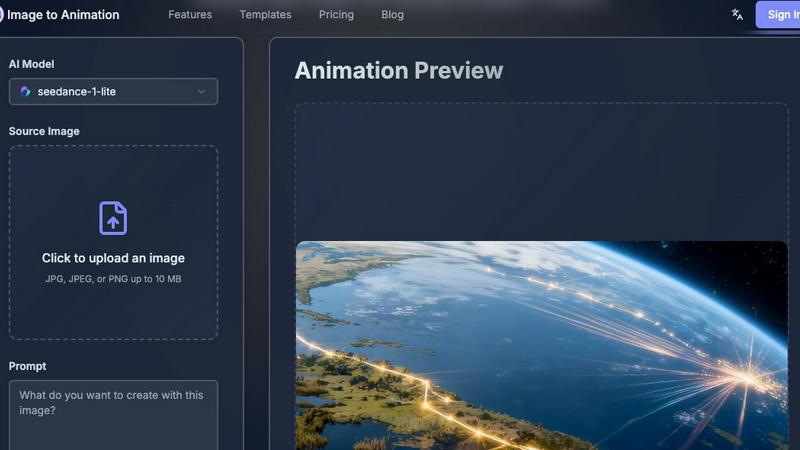
Unify top AI engines to instantly animate any static image into a professional video.
Last updated: March 1, 2026
Visual Comparison
BlitzCut

Image to Animation
Feature Comparison
BlitzCut
Automatic Silence Removal
BlitzCut's Automatic Silence Removal feature uses AI to detect and eliminate pauses in your videos instantly. This eliminates the tedious manual process that typically consumes 15-20 minutes, allowing you to focus on the creative aspects of your project. The result is a seamless viewing experience that keeps your audience engaged without unnecessary dead air.
AI Captions
Crafting captions can be a labor-intensive task, but BlitzCut simplifies this with its AI Captions feature. Achieving over 95% accuracy, the tool automatically generates styled captions that enhance the visual appeal of your videos. This feature is designed to save time while ensuring that your content remains accessible and engaging.
Text-Based Editing
With BlitzCut's Text-Based Editing, you can make quick adjustments to your videos by simply deleting sentences from the generated transcription. This innovative approach allows for an intuitive editing experience that caters to both novice and experienced editors. You can refine your content effortlessly without needing to scrub through timelines.
Mobile-First Experience
BlitzCut is built with a mobile-first mindset, ensuring that users can edit videos directly from their iPhone or iPad. The app is designed for speed and efficiency, allowing you to import, edit, and export videos in under two minutes. Whether you are on the go or at home, BlitzCut delivers a powerful editing experience right at your fingertips.
Image to Animation
Unified AI Model Hub
This feature eliminates the complexity of choosing between disparate AI tools. Image to Animation integrates multiple state-of-the-art animation models like Kling, Veo3, and Sora2 into one platform. Users benefit from a consolidated powerhouse, accessing varied stylistic and technical strengths without needing separate subscriptions or mastering different interfaces, ensuring the best possible motion output for any given image.
One-Click Animation Generation
Designed for ultimate simplicity, this feature allows users to transform static images into dynamic videos with a single click. After uploading a photo and optionally providing a text prompt, the platform's AI handles the intricate analysis and rendering processes automatically. This dramatically lowers the barrier to entry, enabling rapid content creation and iteration for users of all skill levels.
Context-Aware Motion Intelligence
Beyond simple looping effects, the platform's AI deeply analyzes the content of the uploaded image—recognizing elements like water, foliage, hair, or fabric—and interprets user prompts to apply fluid, natural, and contextually appropriate motion. This ensures that animations feel organic and believable, enhancing realism and emotional impact rather than appearing as generic, applied filters.
Watermark-Free, Studio-Quality Output
Professional creators require clean, branded content. Image to Animation delivers high-resolution, watermark-free video files suitable for commercial use. This commitment to quality ensures that the final animations meet professional standards for social media campaigns, digital advertisements, and presentations, providing immense value without the need for expensive post-production software or services.
Use Cases
BlitzCut
Content Creators
For vloggers and social media influencers, BlitzCut offers a streamlined editing process that allows for quick turnaround times on video content. Creators can easily remove silence and add captions, making their videos more engaging and ready for platforms like TikTok, Instagram, and YouTube.
Educational Videos
Teachers and educators can leverage BlitzCut to create dynamic learning materials. By using the AI tools to swiftly edit lecture recordings, they can focus on presenting valuable information while ensuring their videos are polished and professional.
Marketing Professionals
In the fast-paced world of marketing, timely content is crucial. BlitzCut provides marketing teams with the ability to produce high-quality promotional videos in minutes, enhancing their outreach efforts and ensuring that they remain agile in their campaigns.
Online Course Creators
For those developing online courses, BlitzCut simplifies the video editing process, allowing course creators to focus on content quality. By automating tedious tasks, they can dedicate more time to instructional design and less to technical editing challenges.
Image to Animation
Social Media Content Creation
In the fiercely competitive social media landscape, motion captures attention. Influencers, brands, and marketers can use Image to Animation to instantly transform product photos, travel snapshots, or portraits into eye-catching, shareable video clips. This boosts engagement rates, increases dwell time, and helps content stand out in crowded feeds like Instagram Reels, TikTok, and YouTube Shorts.
Enhanced Digital Marketing and Advertising
Marketing professionals can revitalize static ad banners, email campaign graphics, and website hero images. Animating key visuals for digital ads can significantly improve click-through and conversion rates. The ability to quickly prototype and produce animated concepts allows for more dynamic A/B testing and more memorable brand storytelling across all digital touchpoints.
Creative Storytelling for Educators and Presenters
Educators, trainers, and corporate presenters can bring educational materials, historical photos, data visualizations, and presentation slides to life. Animated elements can illustrate processes, highlight key information, and make complex subjects more understandable and engaging for students or stakeholders, transforming passive viewing into an immersive learning experience.
Personal Art and Portfolio Development
Digital artists, photographers, and hobbyists can explore new creative dimensions by animating their existing artwork or photographs. This tool allows for the creation of living portfolios, digital art displays, and personalized greeting cards or gifts. It opens a new avenue for artistic expression, enabling creators to add a layer of narrative and emotion to their still work.
Overview
About BlitzCut
BlitzCut is a revolutionary AI-powered video editing tool designed specifically for content creators who demand speed without sacrificing quality. Our mission is to make professional video editing accessible to everyone, from casual influencers to seasoned filmmakers. BlitzCut streamlines the editing process by utilizing advanced artificial intelligence to automate time-consuming tasks like silence removal and caption generation. This allows creators to focus on what they do best—making engaging content. With a mobile-first approach, BlitzCut is optimized for iPhone, iPad, and Mac users, ensuring that you can edit on the go. The platform’s unique features cater to the fast-paced creator economy, transforming raw footage into polished videos ready for social media in just two minutes. Join the growing community of creators who are embracing a faster, more efficient way to share their stories.
About Image to Animation
Image to Animation is not merely another digital effect tool; it is a comprehensive reimagining of creative agency in the visual domain. This platform represents a significant leap from static imagery, employing a sophisticated, AI-driven engine to breathe life into photographs, transforming them into dynamic, engaging video animations with remarkable ease. It effectively democratizes a process once gatekept by high-end studios, requiring extensive technical skill and resources. The tool is engineered for a vast spectrum of users: from individual content creators and social media influencers seeking viral-ready content, to marketing teams, educators, and businesses aiming to enhance their storytelling and audience engagement without a prohibitive learning curve. Its core value lies in its powerful aggregation. Instead of forcing users to navigate a fragmented landscape of specialized AI models, Image to Animation consolidates multiple cutting-edge technologies—including Kling, Veo3, Sora2, Wan, and Seedance—into a single, intuitive interface. This unified approach allows anyone to generate studio-quality, watermark-free animations in seconds by simply uploading an image and providing a creative prompt. By intelligently analyzing visual content and interpreting user intent, the platform infuses photos with fluid, natural motion, seamlessly bridging the gap between creative vision and polished, professional execution for social media, advertisements, presentations, and beyond.
Frequently Asked Questions
BlitzCut FAQ
How does BlitzCut automate the editing process?
BlitzCut utilizes advanced AI algorithms to automatically detect and remove silence from videos and generate accurate captions. This significantly reduces the time spent on manual editing tasks, allowing creators to focus on content creation.
Is BlitzCut available on all devices?
BlitzCut is primarily designed for iPhone, iPad, and Mac users. It offers a mobile-first experience that ensures you can edit videos efficiently regardless of your location.
What social media platforms does BlitzCut support for exporting?
BlitzCut allows you to export your edited videos directly to popular social media platforms, including TikTok, Instagram, and YouTube, ensuring a seamless posting experience.
Can I use BlitzCut without creating an account?
Yes, BlitzCut is free to download and does not require an account to start editing. This makes it accessible for all creators looking to streamline their video editing workflow.
Image to Animation FAQ
What kind of images work best with Image to Animation?
High-quality, well-lit images with clear subjects and distinct elements (like flowing water, clouds, or hair) typically yield the best results. The AI uses these details to generate natural motion. Complex, cluttered, or very low-resolution images may produce less defined animations. For optimal outcomes, use photos with good contrast and a focal point you wish to animate.
Do I need any animation or video editing experience to use this tool?
Absolutely not. Image to Animation is specifically designed to require zero prior expertise. The process is built around a simple upload-and-click workflow. While you can use text prompts to guide the animation style, the AI handles all the complex technical rendering, making professional animation accessible to complete beginners.
Can I use the animated videos for commercial purposes?
Yes, based on the platform's commitment to delivering watermark-free, studio-quality output, the animations you create are intended for personal and commercial use. This means you can legally incorporate them into social media ads, marketing campaigns, client projects, and other revenue-generating activities without concern for licensing issues typically associated with stock animation.
How does the platform's AI choose which motion model to use?
The platform intelligently routes your image and prompt through its aggregated model hub. It likely analyzes the content of your image and the nature of your request to select the most suitable AI model (e.g., Kling for certain motions, Veo3 for others) from its suite. This automated decision-making ensures users receive the highest quality animation without needing to understand the technical differences between each underlying model.
Alternatives
BlitzCut Alternatives
BlitzCut is an AI-powered video editor designed for content creators who need to produce engaging videos quickly. By automating tasks like silence removal and caption generation, it streamlines the editing process, making it easier for users to focus on creativity rather than technical details. However, users often seek alternatives due to various factors, including pricing, specific feature requirements, or compatibility with different platforms. When searching for an alternative to BlitzCut, it's essential to consider aspects such as ease of use, the range of automation features, and the speed of the editing process. Assessing whether the alternative meets mobile needs is also vital, as many creators prefer mobile-first solutions for editing on the go. Ultimately, the right choice should empower creators to enhance their workflow without compromising quality or creativity.
Image to Animation Alternatives
Image to Animation is a unified software platform in the generative art and video category. It aggregates multiple top AI engines to transform static images into professional, dynamic animations with a single click, democratizing a process that once required significant technical skill. Users often explore alternatives for various reasons. These can include budget constraints, a need for different feature sets like specific animation styles or control levels, or compatibility requirements with other software in their workflow. The desire for a free tier, different subscription models, or platform-specific applications also drives this search. When evaluating alternatives, key considerations should include the quality and realism of the generated motion, the range of available animation styles and controls, pricing transparency, and output format flexibility. It’s also crucial to assess the underlying AI technology's reliability and the tool's ease of use to ensure it aligns with your creative goals and technical comfort level.