
Hush Touch | Voice-to-Text for MacOS vs StudyPal
Side-by-side comparison to help you choose the right AI tool.

Hush Touch | Voice-to-Text for MacOS
Hush Touch transforms your voice into text offline on Mac, learning your vocabulary for accurate, seamless dictation.
Last updated: February 28, 2026

StudyPal
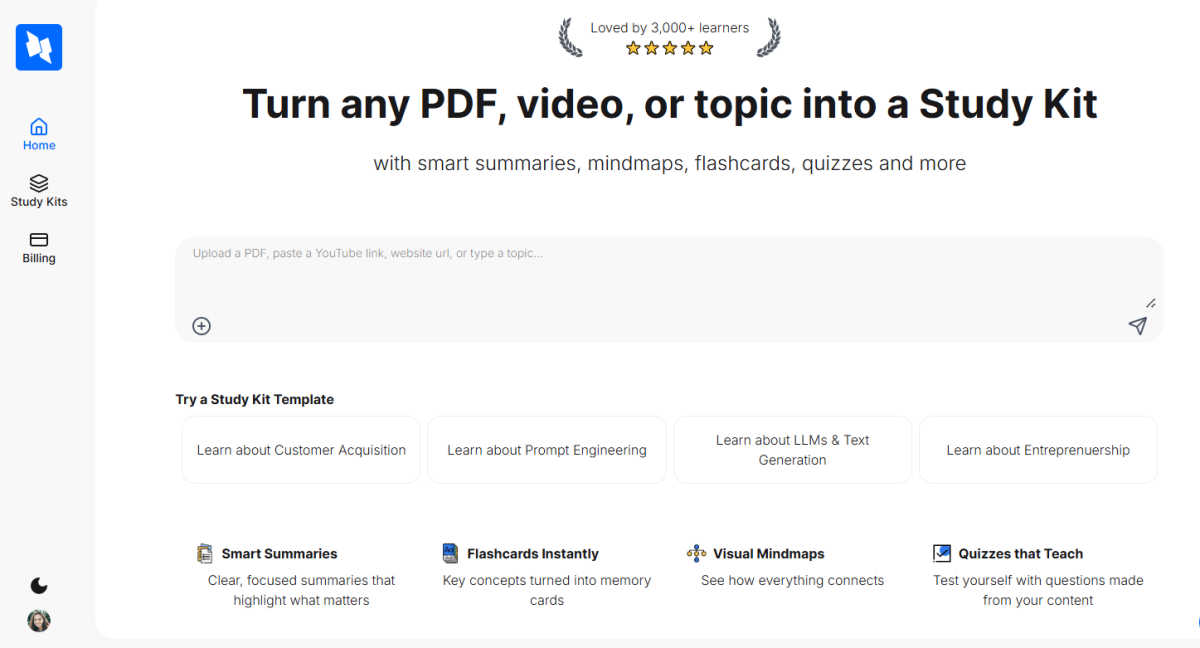
StudyPal converts PDFs and videos into engaging summaries, flashcards, mindmaps, and quizzes for smarter learning.
Last updated: March 1, 2026
Visual Comparison
Hush Touch | Voice-to-Text for MacOS

StudyPal
Feature Comparison
Hush Touch | Voice-to-Text for MacOS
Dual Engine Recognition
Hush Touch utilizes a dual-engine recognition system combining DictationTranscriber and SFSpeechRecognizer. This integration allows for natural flow and punctuation, as well as enhanced vocabulary recognition tailored to your specific needs. The result is a more accurate transcription that captures the nuances of your speech.
Custom Vocabulary
With the ability to learn and remember up to 500 custom terms, Hush Touch adapts to your unique vocabulary over time. Whether you use technical jargon, brand names, or specific medical terminology, this feature ensures that Hush Touch accurately recognizes and transcribes what you say, improving your dictation efficiency.
Smart Text Processing
The app employs smart text processing techniques, which include the removal of filler words and auto-correction of frequently mispronounced terms. It also formats voice snippets for repeated phrases and organizes content into numbered lists, all processed locally in real time for a smooth user experience.
Context Modes & Hands-Free Options
Hush Touch offers multiple context modes, such as General, Email, Code, and Notes, allowing you to switch seamlessly based on your dictation needs. Additionally, with hands-free capabilities, you can start dictation using Siri, and the app will automatically insert text after a brief pause, making it easier to compose messages without manual intervention.
StudyPal
Smart Summaries
StudyPal's smart summaries distill large volumes of information into clear, focused overviews that highlight the most important points. This ensures learners can quickly grasp key concepts without being overwhelmed by excessive details, making studying more efficient.
Engaging Flashcards
Transforming key concepts into engaging flashcards, StudyPal facilitates active recall and memorization. These flashcards are designed to be instant and user-friendly, allowing learners to review essential material on-the-go, reinforcing knowledge retention effectively.
Visual Mindmaps
The visual mindmaps created by StudyPal illustrate how different ideas and concepts connect, providing a holistic view of the subject matter. This visual representation aids learners in understanding relationships between topics, enhancing comprehension and recall.
Quizzes that Teach
With auto-generated quizzes tailored from the content, StudyPal allows users to test their understanding and reinforce their learning. These quizzes not only provide practice but also adapt to the learner’s progress, ensuring a personalized assessment experience.
Use Cases
Hush Touch | Voice-to-Text for MacOS
Drafting Emails
Hush Touch is an excellent tool for busy professionals looking to draft emails quickly and efficiently. You can dictate your thoughts naturally, and the app will handle the punctuation and formatting, saving you time and effort.
Taking Notes
Students and educators alike can benefit from Hush Touch when taking class notes or summarizing lectures. The app's ability to transcribe spoken words accurately allows users to capture critical information hands-free, making note-taking more efficient.
Writing Content
Freelancers and content creators can leverage Hush Touch to enhance their writing productivity. By dictating articles, blogs, or creative pieces, users can focus on their ideas while the app captures their words, helping to eliminate writer's block.
Medical Documentation
Healthcare professionals can utilize Hush Touch to streamline the documentation process. With its custom vocabulary feature, it can accurately transcribe medical terms and notes, allowing physicians to focus on patient care rather than paperwork.
StudyPal
Academic Learning
Students can use StudyPal to transform their lecture notes, textbooks, or online resources into interactive study kits. This adaptation allows for a comprehensive review of subjects, making exam preparation more structured and effective.
Professional Development
Professionals looking to upskill can utilize StudyPal to convert industry-related articles, videos, and research papers into informative study kits. This enables efficient learning and quick mastery of new competencies relevant to their careers.
Lifelong Learning
For lifelong learners, StudyPal is an invaluable tool that enables exploration of new topics or hobbies. Whether learning a new language or understanding a complex theory, users can create personalized study kits that cater to their interests and pace.
Group Study Sessions
StudyPal supports collaborative learning by allowing users to share their study kits with peers. This functionality encourages group study sessions, where multiple learners can engage with the same material and discuss concepts, enhancing collective understanding.
Overview
About Hush Touch | Voice-to-Text for MacOS
Hush Touch is an innovative voice-to-text application designed specifically for macOS users who seek a seamless dictation experience without compromising their privacy. This lightweight app, only 5.5 MB in size, operates entirely on-device, allowing users to dictate text offline. By integrating two advanced Apple transcription engines along with an Apple Intelligence final pass, Hush Touch ensures high accuracy and cleaner output every time you use it. It is tailored for various user groups, from busy professionals drafting emails and reports to students taking notes and writers creating content. The app’s main value proposition lies in its ability to provide a fast, natural dictation process that learns and adapts to individual vocabulary, removes filler words, and maintains a clear tone, all while keeping your data secure and private.
About StudyPal
StudyPal is an innovative AI-powered study companion that aims to redefine the learning experience for students, professionals, and lifelong learners. By converting various content formats—including PDFs, YouTube videos, and typed topics—into detailed, interactive study kits, StudyPal enhances the educational journey. Each kit is thoughtfully designed with components that cater to diverse learning styles, featuring concise summaries that distill essential information, visual mindmaps that illustrate intricate connections, and engaging flashcards that facilitate effective memorization. Additionally, auto-generated quizzes reinforce learning material, while curated video recommendations provide deeper insights into complex subjects. The standout feature, a built-in AI tutor, offers instant answers to questions, breaking down challenging concepts into manageable pieces. With personalized learning paths that are accessible anytime and anywhere, StudyPal saves countless hours of note-taking and significantly boosts information retention. Embrace the future of learning with StudyPal and embark on a tailored educational journey that adapts to your individual style and pace.
Frequently Asked Questions
Hush Touch | Voice-to-Text for MacOS FAQ
How does Hush Touch ensure privacy?
Hush Touch ensures privacy by processing all voice data entirely on your device, eliminating any reliance on cloud services. This means no data collection or external storage, keeping your dictation secure.
Can I try Hush Touch before purchasing?
Yes, Hush Touch offers a 7-day free trial with no credit card required. This allows users to experience the app’s features and capabilities before committing to a purchase.
Is Hush Touch compatible with all macOS versions?
Hush Touch is designed to work with the latest macOS versions. It is recommended to check the app's compatibility with your specific version of macOS for the best performance.
What is the cost of Hush Touch?
Hush Touch is available for a one-time purchase of $20, providing users with a lifetime license. There are no subscription fees, making it a cost-effective solution for voice-to-text dictation.
StudyPal FAQ
How does StudyPal convert content into study kits?
StudyPal uses advanced AI algorithms to analyze the content and identify key points, relationships, and concepts. It then organizes this information into structured study kits that include summaries, flashcards, mindmaps, and quizzes.
Can I access StudyPal on multiple devices?
Yes, StudyPal is designed to be accessible from various devices, including smartphones, tablets, and desktops. This flexibility allows users to study anytime and anywhere, enhancing their learning experience.
Is StudyPal suitable for all age groups?
Absolutely! StudyPal is tailored for students, professionals, and lifelong learners of all ages. Its customizable features cater to different learning styles, making it a versatile tool for anyone looking to enhance their educational journey.
What types of content can I upload to StudyPal?
Users can upload a variety of content formats to StudyPal, including PDFs, YouTube videos, and typed topics. This versatility allows for a comprehensive learning experience, drawing from multiple sources of information.
Alternatives
Hush Touch | Voice-to-Text for MacOS Alternatives
Hush Touch | Voice-to-Text for MacOS is a cutting-edge dictation application designed specifically for macOS users. It falls under the category of AI Assistants, offering an offline voice-to-text solution that prioritizes user privacy and efficiency. With its dual Apple transcription engines and on-device processing, Hush Touch enables users to convert speech into text seamlessly, catering to a variety of writing tasks such as emails, notes, and documents. Users often seek alternatives to Hush Touch for various reasons, including budget considerations, specific feature sets, or compatibility with other platforms. When looking for an alternative, it’s essential to consider factors such as ease of use, accuracy, offline capabilities, and the overall value for money. A good alternative should meet your dictation needs while aligning with your workflow requirements and ensuring data privacy.
StudyPal Alternatives
StudyPal is an innovative AI-powered study companion that transforms various content formats into interactive study kits, making it a valuable tool within the AI Assistants category. Its ability to convert PDFs and videos into smart summaries, engaging flashcards, and visual mindmaps enhances the learning experience for students, professionals, and lifelong learners alike. As users seek alternatives to StudyPal, they often do so due to factors such as pricing, specific feature sets, or platform compatibility that better align with their individual needs. When searching for an alternative, it's essential to consider the range of features offered, user-friendliness, integration capabilities with existing resources, and the overall cost. A solid alternative should not only replicate the core functionalities of StudyPal but also provide unique benefits that can enhance the learning experience further.