
HuntingPad vs Zovo
Side-by-side comparison to help you choose the right AI tool.

HuntingPad
HuntingPad organizes your job search, streamlining applications and boosting interview chances with AI insights.
Last updated: March 1, 2026

Zovo offers 20 privacy-focused Chrome extensions for developers and writers, all under one subscription, ensuring your.
Last updated: February 28, 2026
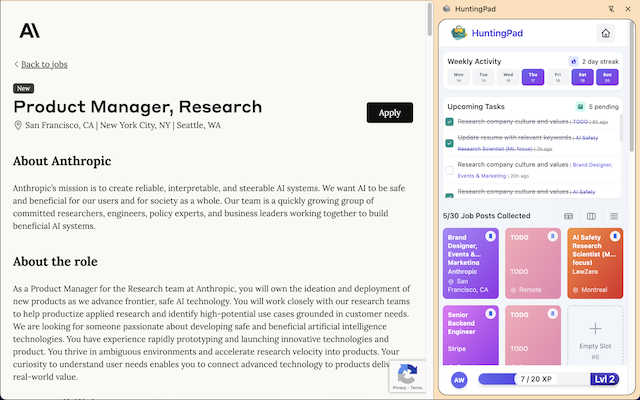
Visual Comparison
HuntingPad
Zovo

Feature Comparison
HuntingPad
One-Click Capture
HuntingPad allows users to save job postings from any site with a single click. This feature is designed to eliminate the time-consuming task of manually copying and pasting job details into a separate document or spreadsheet, ensuring that no opportunity is overlooked.
Smart Reminders
With integrated smart reminders, HuntingPad helps users never miss a deadline. This feature sends notifications for application due dates and follow-up reminders, allowing job seekers to stay organized and proactive in their job search.
AI-Powered Insights
HuntingPad leverages advanced AI technology to provide insights on when to follow up with recruiters and suggestions on how to tailor resumes and cover letters for specific roles. This feature empowers users to make informed decisions and stand out in competitive job markets.
Local Data Storage
Upholding a staunch privacy-first approach, HuntingPad ensures that all user data is stored locally on the device. This means that sensitive information remains secure and private, addressing common concerns about data breaches and privacy in online job searching.
Zovo
Privacy-First Design
Zovo's extensions prioritize user privacy above all else. All tools run locally on your device, ensuring that your data is never sent to external servers. This means no tracking, no data collection, and no risk of breaches, giving users peace of mind while they work.
One-Click Language Rewrites
BeLikeNative offers a revolutionary feature that allows users to write like native speakers across 80 languages with a single keystroke. This tool is essential for non-native speakers looking to improve their written communication quickly and efficiently.
Feature Voting System
Zovo empowers its users by allowing them to submit feature requests and vote on upcoming developments. This unique approach ensures that the most requested features are prioritized, making the suite more responsive to user needs.
Open Source Transparency
Many of Zovo's extensions are open source, allowing users to review the code for themselves. This transparency builds trust and confidence in the software, as users can verify how their data is handled and ensure that it aligns with Zovo's privacy policies.
Use Cases
HuntingPad
Efficient Job Tracking
Professionals can use HuntingPad to efficiently track job applications across multiple platforms. By capturing job postings directly through their browser, users can maintain organization without the need for external spreadsheets or tools.
Tailored Applications
Job seekers can leverage the AI-powered insights feature to customize their resumes and cover letters for specific roles. This ensures that their applications resonate with hiring managers and increases their chances of landing interviews.
Deadline Management
HuntingPad's smart reminders assist users in managing application deadlines, ensuring that they submit applications on time and follow up appropriately. This use case is particularly beneficial for those juggling multiple applications simultaneously.
Reducing Administrative Overhead
With HuntingPad, users can significantly reduce the amount of time spent on administrative tasks related to job searching. This allows them to allocate more time to networking, interview preparation, and skill enhancement, ultimately increasing their chances of success.
Zovo
Freelancers and Remote Workers
Freelancers can benefit from Zovo's suite by utilizing tools like Clipboard History Pro and Form Filler Pro to manage their workflow. These extensions streamline tasks, saving time and enhancing productivity.
Language Learners
Language learners can leverage BeLikeNative to practice writing in their target languages. The one-click rewrite feature aids in understanding nuances and improving language skills, making it an essential tool for learners.
Developers and Programmers
Developers can make use of JSON Formatter Pro and Regex Tester Pro to streamline their coding tasks. These tools help to format and test code snippets efficiently, improving coding accuracy and speed.
Privacy-Conscious Users
Individuals who prioritize their online privacy will find Zovo's local processing and zero data collection policies appealing. Users can browse, communicate, and work without the fear of their data being harvested or misused.
Overview
About HuntingPad
HuntingPad is an innovative Chrome extension that revolutionizes the often chaotic and time-consuming process of job searching into a streamlined and efficient operation. This tool is meticulously designed for ambitious professionals who are seasoned in their fields but find themselves bogged down by the administrative overhead associated with job applications. HuntingPad eliminates the need for cumbersome spreadsheets and endless browser tabs, allowing users to focus their energies on what truly matters—networking and interview preparation. By integrating directly into the user's browser, it captures job postings in one click, automatically tracks applications, and provides AI-powered insights tailored to individual needs. With a strong emphasis on privacy, all data is stored locally. The main value proposition of HuntingPad lies in its ability to empower job seekers to manage 50 to 150 applications without chaos, transforming the job hunt into a strategic advantage rather than an overwhelming burden.
About Zovo
Zovo is an innovative suite of 20 Chrome extensions designed to enhance productivity and streamline workflow for users who prioritize privacy and efficiency. Created by a solo developer with over 10 years of experience and a proven track record of $400K earned on Upwork, Zovo stands out in a crowded market. Its flagship extension, BeLikeNative, empowers over 3,300 users to communicate like native speakers in 80 languages with just a keystroke. The suite includes essential tools such as Tab Suspender Pro, JSON Formatter Pro, Clipboard History Pro, and more, catering to a wide range of needs from web scraping to session management. Zovo is unique in its commitment to user privacy; all extensions operate locally, meaning no data is sent to external servers, eliminating risks associated with data harvesting. Users have a direct say in the development process, voting on features and shaping the roadmap, ensuring that the tools evolve according to their needs. With new extensions released monthly and many tools available for free, Zovo is an invaluable resource for anyone looking to enhance their browsing experience without compromising privacy.
Frequently Asked Questions
HuntingPad FAQ
What is HuntingPad?
HuntingPad is a Chrome extension designed to streamline the job search process for professionals by capturing job postings, tracking applications, and providing AI insights directly within the browser.
How does HuntingPad protect my privacy?
HuntingPad prioritizes user privacy by ensuring that all data is stored locally on your device, meaning sensitive information is not shared or stored on external servers.
Can I use HuntingPad for jobs on any website?
Yes, HuntingPad allows you to save job postings from any site with its one-click capture feature, making it versatile for various job boards and company websites.
How quickly can I set up HuntingPad?
HuntingPad is designed for quick and easy setup, allowing users to install the extension in under 30 seconds and start organizing their job search right away.
Zovo FAQ
How does Zovo ensure my privacy?
Zovo's extensions run entirely on your device, meaning no data is sent to external servers. There is zero tracking, no analytics, and no data collection, ensuring complete privacy.
What happens if I encounter a problem?
If you face any issues, you can reach out directly via email or Discord. Zovo's developer, Michael Lip, personally responds to inquiries, ensuring a human touch in support.
Are the extensions free?
Zovo offers many extensions for free, with core features available at no cost. Users can choose to upgrade to the Pro version for advanced features when they are ready.
How can I request new features?
Users can submit feature requests directly through Zovo's platform. The developer reads every request, and the most popular suggestions are prioritized for development, allowing users to shape the roadmap.
Alternatives
HuntingPad Alternatives
HuntingPad is an AI job search assistant designed as a Chrome extension that streamlines the often chaotic and time-consuming process of job hunting. By integrating directly into the user's browser, it helps professionals manage their applications more efficiently while eliminating the administrative burdens typically associated with job searches. Users often seek alternatives for various reasons, including pricing concerns, feature sets that may better suit their needs, or compatibility with different platforms. When choosing an alternative to HuntingPad, it is essential to consider factors such as ease of use, integration capabilities with existing workflows, data security, and the range of features that align with personal job search strategies.
Zovo Alternatives
Zovo is a comprehensive suite of 20 privacy-first Chrome extensions designed specifically for developers and writers. With tools like JSON Formatter, Tab Suspender, and Clipboard History, Zovo aims to enhance productivity while prioritizing user privacy. As a project developed by a solo developer with extensive experience, Zovo stands out for its commitment to data security, ensuring no information leaves the user's device. Users commonly seek alternatives to Zovo for various reasons, including pricing structures, specific feature sets, and compatibility with different platforms. When exploring alternatives, it’s essential to consider factors such as user experience, privacy policies, and the flexibility of the extensions offered. A well-rounded alternative should meet specific needs while maintaining a strong emphasis on user data protection.