
HeyVid vs Vibrantsnap
Side-by-side comparison to help you choose the right AI tool.

HeyVid is your all-in-one AI platform for effortlessly creating high-quality videos and images, transforming ideas into professional content.
Last updated: April 4, 2026

Vibrantsnap
Vibrantsnap instantly transforms screen recordings into polished, high-converting product videos with AI.
Last updated: February 28, 2026
Visual Comparison
HeyVid

Vibrantsnap
Feature Comparison
HeyVid
Text to Video
HeyVid's Text to Video feature allows users to transform written content into visually engaging videos effortlessly. Simply input your text, and the AI will generate a professional video that captures the essence of your message, complete with visuals and animations that enhance the storytelling experience.
Image to Video
With the Image to Video function, users can animate static images by converting them into dynamic video content. This feature is perfect for creating promotional videos or social media content that brings visuals to life, allowing for a more engaging viewer experience.
AI Image Refiner & Stylizer
The AI Image Refiner & Stylizer enables users to enhance their images by applying various artistic styles and refinements. This feature is ideal for those looking to create unique visuals that stand out, whether for marketing materials, social media, or personal projects.
AI Voice and Music Generation
HeyVid also includes AI Voice and Music generation tools that allow users to add professional-grade audio to their videos. Choose from a variety of voice styles and music tracks to complement your visuals, ensuring a polished and cohesive final product that resonates with your audience.
Vibrantsnap
Magic Edit (Auto-Cut & Auto-Layout)
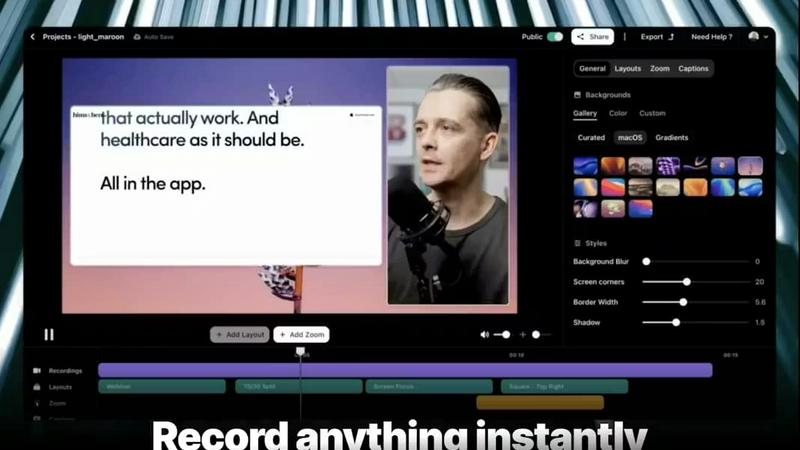
This flagship feature automates the tedious parts of video editing. With a single click, Vibrantsnap's AI analyzes your raw screen recording, intelligently removes silences and filler words, and applies clean, professional layouts automatically. This process transforms a rambling recording into a concise, polished video ready for sharing, requiring no manual timeline editing or design expertise from the user. It ensures your final product is engaging and maintains viewer attention from start to finish.
Built-in Video Analytics
Moving beyond simple view counts, Vibrantsnap provides deep, actionable insights directly within the platform. You can see exactly who watched your video, how many times they viewed it, and most crucially, identify where audience attention drops. This data empowers creators to understand what resonates, pinpoint confusing sections, and continuously refine their messaging for maximum impact and conversion, all without needing to integrate third-party analytics tools.
Interactive Call-to-Action (CTA) Buttons
To directly bridge viewing and action, Vibrantsnap allows you to embed interactive buttons like "Book a Call," "Buy Now," or "Visit Website" directly onto your video player. Viewers can click these without leaving the video, creating a seamless path to conversion. This feature turns passive viewing into an active engagement, enabling you to track clicks and measure the direct ROI of your video content in real-time.
Professional AI Voiceover & Captions
To ensure your video has a polished auditory presentation, Vibrantsnap offers AI-generated voiceovers that provide clear, professional narration. Additionally, automatic captioning is included, which enhances accessibility, improves comprehension for viewers in sound-off environments, and boosts overall engagement. These features ensure your message is delivered effectively, regardless of how or where your audience is watching.
Use Cases
HeyVid
Marketing Campaigns
Marketers can leverage HeyVid to create captivating promotional videos and social media content that effectively communicate their brand message. The platform's diverse features make it easy to produce videos that capture attention and drive engagement across multiple channels.
Educational Content
Educators can utilize HeyVid to develop engaging tutorials, presentations, and training materials. The ability to convert text and images into videos allows for dynamic learning experiences that can enhance student comprehension and retention.
Product Launches
Businesses can create visually stunning product launch videos that captivate audiences and generate buzz. Whether announcing new products or showcasing features, HeyVid helps businesses present their offerings in a compelling and memorable way.
Social Media Content Creation
Content creators can use HeyVid to generate eye-catching videos and images for platforms like YouTube, Instagram, and TikTok. The one-click video maker and image generation tools enable creators to produce high-quality content quickly, keeping their audience engaged and entertained.
Vibrantsnap
Boosting SaaS Product Demo Conversions
Founders and sales teams can use Vibrantsnap to create quick, compelling product demo videos for their website or sales emails. By replacing lengthy feature lists with an auto-edited, engaging walkthrough that includes a clear "Start Free Trial" CTA button, they can significantly reduce friction, help prospects understand value faster, and directly increase sign-up rates, often cited as improving trial conversions by 5x.
Creating Onboarding and Tutorial Content
Customer success and product teams can rapidly produce professional tutorial and onboarding videos. Recording a feature walkthrough, applying Magic Edit for polish, and adding captions ensures new users receive clear, concise guidance. This improves the user experience, reduces support tickets, and helps customers achieve success with the product more quickly.
Enhancing Sales and Outreach Campaigns
Sales professionals can personalize their outreach by embedding short, tailored video demos in their emails or LinkedIn messages. The analytics feature then allows them to see which prospects engaged with the content, providing a powerful follow-up trigger. This humanizes digital communication and increases response rates compared to text-only messages.
Producing Marketing and Social Media Content
Marketing teams can repurpose longer recordings into snackable, social-media-ready clips. The auto-editing feature quickly creates highlight reels or tutorial snippets perfect for platforms like Twitter, LinkedIn, or Instagram. The ability to track views and engagement helps gauge content performance and inform future marketing strategy.
Pricing Comparison
HeyVid
Limited-time offers are currently available, including 50% off annual plans and half-price access to Sora 2 and Veo 3.1. Pricing details may vary, so users are encouraged to check the HeyVid website for the latest information and deals.
Vibrantsnap
Vibrantsnap offers tiered pricing plans to suit different user needs, with significant savings for annual commitments. The Starter plan is priced at $7 per user per month (billed annually) and is tailored for solo founders and casual creators. It includes core features like auto-editing, captions, instant sharing, professional AI voiceovers, and 2K resolution export. The Pro plan, noted as the most popular, is designed for growing creators and founders at $16 per user per month (billed annually). This plan includes "everything," implying access to all advanced features, though the specific feature list from the provided context is cut off. Both plans offer a "Start for free" option, typically indicating a free trial period for users to test the platform.
Overview
About HeyVid
HeyVid is an innovative all-in-one AI video and image generator designed to empower creators, marketers, educators, and businesses alike. The platform simplifies the content creation process by enabling users to generate high-quality videos and images quickly and professionally. With its intuitive interface and a variety of powerful AI models, HeyVid caters to both beginners and seasoned professionals. Users can create stunning visuals, engaging videos, and even audio content without needing advanced editing skills. From scriptwriting to post-production, HeyVid streamlines the entire workflow, making it an indispensable tool for anyone looking to produce compelling multimedia content that captivates audiences and drives engagement.
About Vibrantsnap
Vibrantsnap is an AI-powered video creation platform specifically engineered to solve a critical bottleneck for founders, creators, and SaaS teams: converting product curiosity into customer action. It transforms raw screen recordings into polished, professional, and high-converting video content in minutes, eliminating the need for complex editing software or specialized skills. At its core, Vibrantsnap addresses the friction of long-winded explanations and static screenshots by enabling users to create short, engaging demo videos and tutorials that clearly communicate value. The platform is built for a multi-faceted audience, including solo founders looking to boost credibility, growing startups aiming to increase trial conversions, and marketing teams needing to scale content production without expanding their video editing overhead. Its main value proposition is a powerful trifecta: extreme ease of use through automated editing, built-in conversion tools like clickable call-to-action buttons, and actionable analytics that provide insights into viewer behavior. This positions Vibrantsnap not just as an editing tool, but as a growth engine that turns viewers into signups, subscriptions, and customers by making product storytelling faster, more effective, and data-driven.
Frequently Asked Questions
HeyVid FAQ
What types of media can I create with HeyVid?
HeyVid allows users to create a wide range of media types, including videos from text or images, as well as images from text. It also provides tools for refining and stylizing images, making it a versatile platform for multimedia content creation.
Do I need advanced skills to use HeyVid?
No, HeyVid is designed to be user-friendly and accessible for creators of all skill levels. Its intuitive interface and streamlined process mean that even beginners can produce professional-quality content quickly and efficiently.
Is there a limit on the number of projects I can create?
While specific project limits may depend on the plan you choose, HeyVid is designed to accommodate a wide range of projects, making it suitable for both individual creators and larger teams.
What kind of support does HeyVid offer?
HeyVid provides comprehensive customer support, including tutorials, documentation, and direct assistance, ensuring that users can make the most of the platform's features and resolve any issues they may encounter.
Vibrantsnap FAQ
Who is Vibrantsnap designed for?
Vibrantsnap is primarily designed for founders, SaaS teams, creators, and marketers who need to create professional product videos quickly without video editing skills. It's ideal for solo entrepreneurs looking to boost credibility, growing startups aiming to improve product-led growth through demos, and sales teams wanting to enhance their outreach with trackable video content.
How does the "Magic Edit" feature work?
The Magic Edit feature uses artificial intelligence to analyze your raw screen recording. It automatically detects and removes silent pauses, ums, ahs, and other filler words to create a tighter narrative. Simultaneously, it applies polished visual layouts and zooms to highlight important areas of your screen. This all happens with just one or two clicks, transforming a lengthy recording into a concise, professional video in seconds.
Can I track how well my videos are performing?
Yes, absolutely. Vibrantsnap includes built-in video analytics that go beyond basic view counts. You can see individual viewer engagement, total play counts, and most importantly, an attention heatmap that shows exactly where viewers are dropping off or rewatching. This data is crucial for understanding what content works and optimizing future videos for better conversion rates.
Do I need any video editing experience to use Vibrantsnap?
No, you do not need any prior video editing experience. Vibrantsnap is built specifically for users with zero editing skills. The workflow is designed to be simple: record your screen, press the Magic Edit button for automatic polishing, add a call-to-action, and share. The platform handles the complex editing tasks, allowing you to focus on delivering your message.
Alternatives
HeyVid Alternatives
HeyVid is an all-in-one AI video and image generator that caters to users seeking to create high-quality visual content quickly and efficiently. It falls within the productivity and management category, making it a valuable tool for professionals and creatives alike who want to streamline their content creation process. However, many users find themselves exploring alternatives to HeyVid due to various reasons, including pricing structures, specific feature sets that may not align with their needs, or compatibility with different platforms. When searching for alternatives, it’s essential to consider what features are most important to you, such as the ease of use, the quality of output, and the range of customization options. Additionally, evaluating the pricing plans and whether they fit your budget can help guide your decision. Ultimately, the right alternative should meet your specific requirements while providing a seamless user experience.
Vibrantsnap Alternatives
Vibrantsnap is a screen recording and demo creation tool designed for founders and product teams. It falls into the productivity and management software category, focusing on quickly transforming screen captures into polished, conversion-focused videos with AI-powered editing, voiceovers, and captions. Users often explore alternatives for various practical reasons. These can include budget constraints, the need for more advanced editing features, specific platform compatibility beyond Mac and Windows, or a preference for different workflow integrations. The search for the right tool is highly personal to a team's unique production needs and goals. When evaluating other options, consider your core requirements. Key factors often include the balance of automation versus manual control, the quality of AI-generated elements like voiceovers, the depth of analytics provided, and the overall ease of use. The ideal alternative should not only record your screen but effectively streamline your entire video creation process to save time and enhance communication.