
Fusedash vs Master Metrics
Side-by-side comparison to help you choose the right AI tool.

Fusedash transforms raw data into intuitive dashboards and charts, enabling quick insights and informed team actions.
Last updated: March 4, 2026

Master Metrics
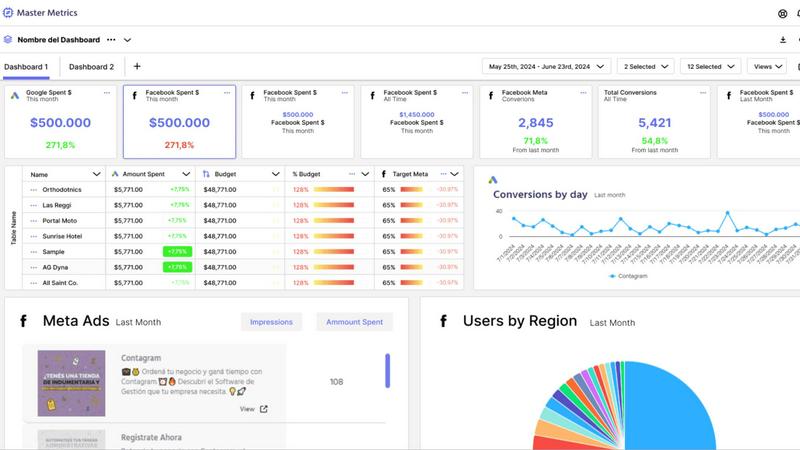
Master Metrics transforms your data into actionable insights, empowering smarter marketing and sales decisions.
Last updated: February 28, 2026
Visual Comparison
Fusedash

Master Metrics
Feature Comparison
Fusedash
Flexible Views
Fusedash offers the ability to build the right dashboard view tailored to different audiences. By allowing users to transform the same dataset into dashboards, charts, maps, or report-style views, stakeholders can easily access the information that matters most to them without unnecessary back-and-forth discussions.
AI Chart Generator
The AI Chart Generator enables users to create clear and informative visuals from CSVs or APIs in a matter of minutes. This feature simplifies the chart creation process by allowing users to select the appropriate chart type, apply comparisons, and refine labels, ensuring that each chart effectively communicates its intended story.
Dashboard Software
Fusedash combines dashboards with narrative reporting within one seamless workspace. This feature allows users to not only monitor KPIs but also provide context about performance changes through storytelling, keeping teams aligned and minimizing the chances of conflicting reports.
AI Chat
The AI Chat feature enhances the user experience by allowing team members to ask questions about their data in plain language. This innovative tool provides suggestions for metrics, charts, and breakdowns, facilitating a quicker understanding of the data and helping users turn insights into shareable dashboard views.
Master Metrics
Smart Dashboards
Smart dashboards provide an intuitive interface for users to visualize their marketing data at a glance. These customizable dashboards allow marketing teams to track key performance indicators (KPIs) in real-time, ensuring that critical metrics are always front and center. With the ability to tailor the displayed information, users can focus on what matters most to their specific goals and campaigns.
Custom Alerts
Master Metrics features customizable alerts that notify users when specific metrics exceed or fall below predefined thresholds. This proactive approach helps businesses manage their campaigns effectively by highlighting underperforming ads or declining sales without manual monitoring. Notifications can be sent via email or through integrations with popular messaging tools like WhatsApp and Slack.
Overview Control Panel
The Overview Control Panel offers a centralized view of all accounts and campaigns, enabling users to see what requires immediate attention. With customizable tables, users can merge data from various sources, include their own metrics, and prioritize tasks to improve efficiency. This feature is essential for agencies managing multiple clients or campaigns simultaneously.
AI-Powered Presentation Creation
With the AI-powered presentation feature, users can create professional Google Slides presentations in just a few clicks. By selecting data sources, metrics, and design preferences, Master Metrics automatically generates an editable presentation, saving valuable time and effort. This feature is particularly useful for marketers needing to present insights to clients or stakeholders.
Use Cases
Fusedash
Marketing Performance Tracking
Marketing teams can leverage Fusedash to create interactive dashboards that monitor campaign performance in real-time. By visualizing key metrics such as conversion rates and ROI, marketers can quickly adapt strategies based on data-driven insights.
Sales Analysis
Sales teams can utilize Fusedash to analyze sales data across different regions or time periods. By drilling down into specific segments and visualizing trends, sales professionals can identify opportunities for growth and adjust their tactics accordingly.
Operational Efficiency Monitoring
Operations teams can harness Fusedash to track key operational metrics, such as production efficiency and supply chain performance. By consolidating data from various sources into clear dashboards, they can quickly identify inefficiencies and implement improvements.
Financial Reporting
Finance departments can use Fusedash to create comprehensive financial reports that combine historical data with real-time insights. By standardizing KPIs and metrics across the organization, finance teams can ensure consistency in reporting and facilitate better decision-making at all levels.
Master Metrics
Freelancers Managing Multiple Clients
Freelancers often juggle multiple clients with varying needs. Master Metrics enables them to manage all accounts from a single platform, providing a clear overview of each client's performance. This centralized approach helps freelancers streamline their reporting and focus on delivering value to each client.
Marketing Teams Overseeing Large Campaigns
For marketing teams managing extensive campaigns across different platforms, Master Metrics simplifies data aggregation and analysis. By pulling in data from various sources, teams can collaborate more effectively and make data-driven decisions that enhance campaign performance.
E-commerce Businesses Tracking Sales Metrics
E-commerce businesses can leverage Master Metrics to monitor sales performance in real-time. With customizable alerts, they can quickly identify trends or issues affecting sales, allowing for timely interventions that can help maximize revenue.
Agencies Creating Client Reports
Agencies often need to provide clients with detailed reports on marketing performance. Master Metrics' AI-driven presentation feature allows agencies to rapidly produce professional-looking reports that effectively communicate insights and results to clients, enhancing client relationships and satisfaction.
Overview
About Fusedash
Fusedash is an innovative AI-powered data visualization platform designed to streamline the way teams interact with their data. By transforming connected data into clear and actionable insights, Fusedash serves as a unified workspace that allows users to create decision-ready dashboards, interactive charts, detailed maps, and narrative reports without the hassle of using multiple disconnected tools. This platform is ideal for organizations looking to enhance consistency and efficiency in their reporting processes. With Fusedash, users can define their key metrics and KPIs once and reuse these definitions across various views and reports, ensuring that everyone, from leadership to operational teams, is aligned and referencing the same trusted numbers. It caters to teams that are weary of manual reporting cycles and discrepancies in data storytelling, empowering them to monitor real-time events and delve into the reasons behind the data trends by segmenting information by region or time. Integrated AI features, such as natural language data chat and smart visualization assistance, make data exploration faster and more accessible, turning raw data into a shared source of truth that drives alignment and action across the organization.
About Master Metrics
Master Metrics is a comprehensive management solution designed specifically for agencies and marketing teams, offering a suite of tools to streamline the complexities of marketing analytics. Developed by experienced marketers who understand the unique challenges faced in digital marketing, this platform serves as a powerful ally for professionals looking to enhance their data management capabilities. Master Metrics simplifies the process of gathering, analyzing, and interpreting marketing data, enabling users to make informed, data-driven decisions with ease. Its robust features, including smart dashboards, customizable alerts, and seamless integrations with popular platforms, empower users to maximize their marketing and sales results effectively. Whether you are a freelancer managing a handful of clients or part of a larger team overseeing multiple accounts, Master Metrics provides the necessary tools to simplify workflows, enhance productivity, and achieve optimal results. The user-friendly interface allows you to extract and merge data from various sources, giving you a holistic view of your marketing performance that is crucial for strategic planning.
Frequently Asked Questions
Fusedash FAQ
What types of data sources can I connect to Fusedash?
Fusedash allows users to connect various data sources, including CSV files, APIs, and databases. This flexibility ensures that you can integrate all relevant data into one platform for comprehensive analysis.
How does Fusedash ensure data consistency across reports?
Fusedash enables users to define key metrics and KPIs once, which can then be reused across all dashboards and reports. This standardization helps maintain consistent data representation, reducing the risk of conflicting information.
Can I customize the visualizations in Fusedash?
Absolutely! Fusedash offers a range of customization options, allowing users to tailor dashboards, charts, and reports based on their specific needs. You can adjust layouts, filters, and time ranges to create the most relevant views for your audience.
Is there support for real-time data monitoring in Fusedash?
Yes, Fusedash provides real-time monitoring capabilities, allowing teams to stay updated with the latest data. This feature ensures that users can react swiftly to changes and make informed decisions based on live insights.
Master Metrics FAQ
What types of businesses can benefit from Master Metrics?
Master Metrics is designed for a wide range of businesses, including freelancers, marketing agencies, and e-commerce companies. Any organization that relies on data-driven marketing strategies can benefit from its robust analytics and reporting features.
How does Master Metrics integrate with other tools?
Master Metrics offers seamless integrations with popular marketing tools and platforms, allowing users to connect their existing data sources effortlessly. This capability ensures that users can gather and analyze data from multiple platforms without manual data entry.
Is there a free trial available?
Yes, Master Metrics offers a free trial for 7 days, allowing potential users to explore its features and functionalities before committing to a subscription plan. This trial is an excellent opportunity for businesses to assess how Master Metrics can fit into their marketing strategy.
What support options are available for users?
Master Metrics provides various support options, including a help center for self-service assistance and implementation support. Users can access resources to help them navigate the platform and maximize its capabilities.
Alternatives
Fusedash Alternatives
Fusedash is an innovative AI-powered data visualization platform that helps teams turn raw data into actionable insights through clear dashboards and charts. Positioned within the Analytics & Data and Business Intelligence categories, it serves as a unified workspace, allowing users to create decision-ready visualizations without the hassle of managing multiple disconnected tools. Users often seek alternatives to Fusedash for various reasons, including pricing considerations, feature requirements, or specific platform needs. When evaluating an alternative, it's important to consider factors such as ease of use, integration capabilities, scalability, and the level of data customization offered. An ideal alternative should align with your team's workflow and enhance your ability to make data-driven decisions.
Master Metrics Alternatives
Master Metrics is an AI-driven analytics tool designed to transform marketing and sales data into actionable insights. As a comprehensive management solution for agencies and marketing teams, it simplifies complex marketing analytics, enabling users to make informed, data-driven decisions. Users often seek alternatives to Master Metrics due to factors like pricing, specific feature requirements, or the need for integrations with different platforms. When choosing an alternative, it's essential to consider the tool's usability, feature set, integration capabilities, and how well it aligns with your team's specific marketing objectives and workflows.